Introduction
In our last lesson, we explored the fundamentals of binary file I/O, learning how fread() and fwrite() can directly transfer data between memory and disk. We established that this method is generally faster and produces more compact files than text-based persistence. You also learned a key pattern for saving arrays: writing the element count first, followed by the array's data.
Today, we will apply that knowledge to a more complex and practical task: converting your linked-list-based inventory persistence system from a text format to a binary one. This isn't as simple as saving an array. The pointers that link your list together are memory addresses, valid only for a single execution of your program. Simply writing them to a file is meaningless. We must develop a serialization strategy to save the data within the list in a structured way that allows us to perfectly reconstruct it later.
Part 1: The Challenge of Serializing a Linked List
Imagine you have a linked list of three inventory items. In memory, it might look something like this:
[Item A | ptr_to_B] --> [Item B | ptr_to_C] --> [Item C | NULL]
The ptr_to_B and ptr_to_C values are memory addresses. If you were to use fwrite() to dump these nodes directly to a file, you would save those specific addresses. When you run your program again and try to load the data, those addresses are highly unlikely to be valid or point to where the new data is located. It's like writing down a room number from one hotel and expecting it to lead to the correct room in a completely different hotel—it won't work.
The solution is to serialize the data. This means we traverse the data structure and write only the meaningful, persistent information to the file, ignoring the volatile, run-time-specific details like pointers.
Our strategy will be:
-
Saving:
- First, traverse the linked list to count the number of nodes.
- Open the binary file and write this count as a single integer to the beginning of the file.
- Traverse the list a second time. For each node, use
fwrite()to write theItemstruct (the data payload) to the file.
-
Loading:
- Open the binary file and use
fread()to read the first integer, which tells us how many items to expect. - Loop that many times. In each iteration:
- Use
fread()to read oneItemstruct's data from the file into a temporaryItemvariable. - Allocate a new
Nodeon the heap. - Copy the temporary
Itemdata into the new node. - Append this new node to the linked list you are rebuilding.
- Use
- Open the binary file and use
This process deconstructs the list into a linear sequence of data for saving and reconstructs it from that sequence for loading.
Part 2: Writing Structs with fwrite()
Let's quickly review the fwrite() function, which is central to our saving strategy.
size_t fwrite(const void *ptr, size_t size, size_t nmemb, FILE *stream);
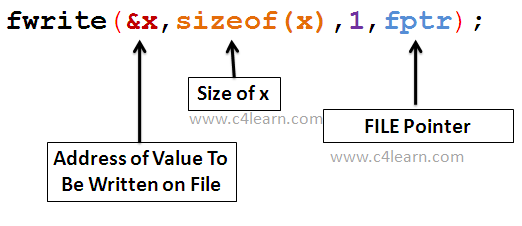
When we save our inventory, we will be inside a loop that iterates through the linked list. In each iteration, ptr will be the address of the item data inside the current node, size will be sizeof(Item), and nmemb will be 1.
For a concrete example of writing a single struct and inspecting the resulting binary file, you can watch this short video.
This video, "Writing to binary files in C" by CodeVault, gives a concise demonstration of writing a struct and viewing the raw bytes.
Watch the section from the fwrite explanation to see how a struct variable is written to a file. Then, observe how the resulting binary file is inspected in a hex editor from this segment. This helps demystify what "binary data" actually looks like.
Part 3: A Real-World Game Serialization Example
This problem of saving and loading game state is common in game development. The following resource is a forum post where a developer provides a complete, practical C code example for serializing game data. It's an excellent model for us to follow.
While the example uses dynamic arrays instead of a linked list, the core principles of serialization are identical: separating Plain Old Data (POD) from data that needs special handling (like pointers), and saving/loading data piece by piece.
Serialization libraries in C - Forums
This forum post from GameDev.net contains a fantastic, detailed code example for binary serialization in C for a game context.
Focus your attention on the long code block in the post from user 'Khatharr', which starts with the full code example. Please read through this code carefully. As you do, pay attention to these key points: saveParty() and loadParty(): These are the main functions. Notice how they first write the POD (Plain Old Data) part of the Party struct, then handle the dynamic arrays (inventory and members) separately. This is analogous to how we will handle our list. POD vs. Non-POD: The inventory array (containing Item structs, which are POD) is saved and loaded in a single fwrite/fread call. However, the members array (containing PartyMember structs, which are non-POD because they have a char* name) must be saved/loaded one element at a time using helper functions. saveString() and loadString(): This is a robust pattern for handling variable-length data like strings. It writes the length of the string, followed by the string's character data. This is a powerful technique for your capstone project. SaveHeader: Note the use of a header containing a fourcc ('SAVF') and a version number. This is excellent practice for ensuring file integrity and managing future updates to your save format.
Part 4: Your Turn: Refactoring Inventory Persistence
Now, let's apply this strategy to our inventory project. You will implement two new functions: save_inventory_binary and load_inventory_binary. These will replace the text-based functions from the previous module.
Assume you have the Item and Node structs from your linked list implementation, and a function insert_at_tail(Node **head, Item item) that correctly adds a new item to the end of the list.
save_inventory_binary()
This function will traverse the list and write its contents to a binary file.
// Helper function to count nodes in a linked list
int count_nodes(Node *head) {
    int count = 0;
    for (Node *current = head; current != NULL; current = current->next) {
        count++;
    }
    return count;
}

void save_inventory_binary(Node *head, const char *filename) {
    FILE *fp = fopen(filename, "wb");
    if (fp == NULL) {
        perror("Failed to open file for writing");
        return;
    }

    // 1. Get the number of items in the inventory.
    int itemCount = count_nodes(head);

    // 2. Write the count to the start of the file.
    if (fwrite(&itemCount, sizeof(int), 1, fp) != 1) {
        fprintf(stderr, "Error writing item count to file.\n");
        fclose(fp);
        return;
    }

    // 3. Loop through the list and write each item's data.
    for (Node *current = head; current != NULL; current = current->next) {
        if (fwrite(&(current->item), sizeof(Item), 1, fp) != 1) {
            fprintf(stderr, "Error writing item data to file.\n");
            // Note: In a real application, you might want to handle this more gracefully.
            break;
        }
    }

    printf("Inventory saved to %s (%d items).\n", filename, itemCount);
    fclose(fp);
}
load_inventory_binary()
This function will read the binary file and reconstruct the linked list in memory. It needs a double pointer **head so it can modify the caller's head pointer.
void load_inventory_binary(Node **head, const char *filename) {
    FILE *fp = fopen(filename, "rb");
    if (fp == NULL) {
        perror("Failed to open file for reading");
        // It's okay if the file doesn't exist on first run.
        return;
    }

    // Ensure the list is empty before loading.
    // (A function to free the existing list should be called before this if needed)
    *head = NULL;

    // 1. Read the item count from the file.
    int itemCount = 0;
    if (fread(&itemCount, sizeof(int), 1, fp) != 1) {
        if (!feof(fp)) { // Don't print an error for an empty file
            fprintf(stderr, "Error reading item count from file.\n");
        }
        fclose(fp);
        return;
    }

    // 2. Loop 'itemCount' times, reading one item and adding it to the list.
    Item tempItem;
    for (int i = 0; i < itemCount; i++) {
        if (fread(&tempItem, sizeof(Item), 1, fp) != 1) {
            fprintf(stderr, "Error: File seems to be corrupt. Read %d items instead of %d.\n", i, itemCount);
            break;
        }
        // Use your existing function to append the item to the list.
        insert_at_tail(head, tempItem);
    }

    printf("Inventory loaded from %s (%d items).\n", filename, itemCount);
    fclose(fp);
}
Integrate these functions into your main function. Call save_inventory_binary before your program exits and load_inventory_binary when it starts up. You will now have a much faster and more space-efficient persistence system.
Conclusion
You have now successfully transitioned your persistence system from a human-readable text format to a machine-efficient binary format. This is a critical skill in performance-sensitive applications like games, where loading times and file sizes matter.
Key Takeaways:
- Complex data structures like linked lists cannot be written directly to a file; they must be serialized.
- A robust serialization strategy for a linked list involves writing the node count, then iterating through the list to write the data payload of each node individually.
- The loading process reconstructs the data structure by reading the count, then looping to read each data payload, allocating new memory for each node, and linking them together.
- Adopting professional practices, such as including file headers with version numbers, makes your save format more robust and future-proof.
With this final piece of the puzzle in place, you have now mastered the core components needed to manage a game inventory: dynamic data structures, memory management, and now, efficient data persistence. You are fully equipped to tackle the capstone project. In our next lesson, we will begin designing the overall architecture for your text-based adventure game.