Introduction
In our last lesson, we built a complete persistence system for your game inventory using text files. You learned to serialize a linked list into a readable format and, crucially, deserialize it back into memory, correctly reconstructing the list. This is a significant milestone. However, text files, while human-readable, are not always the most efficient choice.
This lesson introduces a more powerful and performance-oriented alternative: binary files. We will explore why and when you would choose a binary format over text, a key consideration in performance-sensitive applications like games. Our goal is to master the C standard library functions fread() and fwrite(), which allow you to directly read and write raw bytes of data, exactly as they are represented in your program's memory. This will pave the way for creating a more compact and faster save/load system.
Part 1: Why Binary Files?
So far, we've worked with text files, which store information as a sequence of characters. For example, the integer 1,000,000,000 is stored as ten distinct characters: '1', '0', '0', ..., '0'. This requires parsing—converting the text representation back into a numeric type when you read the file.
Binary files work differently. They store the data directly in its native, in-memory format. An int is saved not as a string of digits, but as the four (or eight) raw bytes that constitute its value in memory. This has two major advantages:
- Space Efficiency: The binary representation of a number is almost always smaller than its text representation, especially for large numbers.
- Speed: Since the data in the file is an exact copy of the data in memory, no time is wasted on conversion or parsing. Reading and writing become direct memory-to-disk operations, which are significantly faster.
For a clear demonstration of these benefits, the following video compares the file size and read performance between text and binary formats for a large dataset. Given your background in finance and engineering, where large datasets are common, this practical comparison of efficiency will be particularly relevant.
Binary File Access Introduction | C Programming Example
Watch this video, "Binary File Access Introduction," from Portfolio Courses. It provides an excellent conceptual and practical comparison of text and binary files.
First, watch the introductory segment explaining the difference between text and binary storage. Then, to see the practical impact, skip ahead and watch the performance comparison where the presenter writes and reads one million integers, benchmarking both the file size and execution time.
Part 2: Writing and Reading Raw Data with fwrite() and fread()
To work with binary files, you use the same fopen() function but with different mode strings. You append a b to the mode: "wb" for "write binary" and "rb" for "read binary".
The core I/O functions for binary files are fwrite() and fread(). Their function signatures look a bit unusual at first but are designed for flexibility.
fwrite() Signature:size_t fwrite(const void *ptr, size_t size, size_t nmemb, FILE *stream);
ptr: A pointer to the block of memory containing the data you want to write.size: The size, in bytes, of each individual element in the block.nmemb: The number of elements you want to write.stream: TheFILEpointer.
The total number of bytes written is size * nmemb. This structure is perfect for writing an entire array in a single function call.
fread() Signature:size_t fread(void *ptr, size_t size, size_t nmemb, FILE *stream);
ptr: A pointer to a block of memory where the read data will be stored.size: The size, in bytes, of each element to be read.nmemb: The number of elements to read.stream: TheFILEpointer.
A crucial point for fread(): you must allocate sufficient memory for the data before calling the function. Passing an uninitialized pointer to fread() is a classic C error that results in a segmentation fault.
The following guide and video walk through a complete example of writing an array to a binary file and reading it back.
Beej's Guide offers a concise and well-explained text-based introduction to binary I/O.
Please read the section titled "Binary File I/O". Pay close attention to the two code examples: one for writing an array of bytes with fwrite and another for reading them back one by one with fread in a loop. Note how the arguments to the functions are used.
The guide's example reads bytes one at a time. To see how to read the entire array back at once, and to reinforce the concepts, watch the corresponding segments from the video we looked at earlier.
Binary File Access Introduction | C Programming Example
This video, "Binary File Access Introduction," also provides a clear, step-by-step coding demonstration.
First, watch the segment on writing an array to file.bin using fwrite. Then, watch the next part on reading that data back into an array using fread.
Part 3: A Common Pitfall: Memory Allocation for fread()
Let's reinforce the most common mistake made with fread(). When you declare a pointer like struct Person *people;, you only get a pointer variable, which initially holds a garbage value. It does not point to any valid, allocated memory. Attempting to fread() data into this pointer will write to an invalid memory address, causing a crash.
This Stack Overflow question perfectly illustrates the problem and the solution.
Writing an array of structs to a binary file in C
This Stack Overflow post shows a real-world example of someone making this exact mistake and the community correcting it.
First, look at the code in the question under read.c. Notice the line struct Person* people; followed by fread(people, ...) with no memory allocation in between. This is the error. Then, review the first two answers. The first answer explains the problem and shows the fix using malloc. The second answer shows an even simpler alternative if you only need to read a single struct: just declare it as a local variable on the stack and pass its address to fread.
Part 4: Writing and Reading Structs
Now, let's apply this to our game development context. Saving an array of structs, like our inventory, is a primary use case for binary I/O. The process is nearly identical to saving an array of integers.
A new problem arises, however: when you read the file back, how do you know how many structs are in it, and thus how much memory to malloc? A simple and effective pattern is to first write an integer representing the number of records, and then write the actual records. The reading process then becomes:
- Read the first integer to get the count.
mallocenough space forcountnumber of structs.- Read the
countstructs into the newly allocated memory.
The following video implements this exact pattern for an array of student structs. This is directly applicable to your capstone project's needs.
Read And Write An Array Of Structs To A Binary File | C Programming Example
This video, "Read And Write An Array Of Structs To A Binary File," provides a complete, robust example of managing struct persistence.
First, watch the implementation of the write_data function from the start of the function definition. Pay close attention to how it first calls fwrite to save the total number of records before writing the array itself. Next, watch the read_data function implementation from its definition. Notice the sequence: open file, fread the total count, malloc the required memory, and then fread the struct data into that memory. This is the pattern you will use.
A Note on Portability and structs
While writing an entire struct or an array of them with a single fwrite is convenient and efficient, you should be aware of a significant caveat: portability. This method is not guaranteed to work across different computer architectures or even different compilers.
There are two main reasons for this:
- Padding: C compilers are free to insert unnamed "padding" bytes between members of a
structto ensure that each member is properly aligned in memory for faster CPU access. Different compilers or settings can produce different padding, leading tostructlayouts that are incompatible.
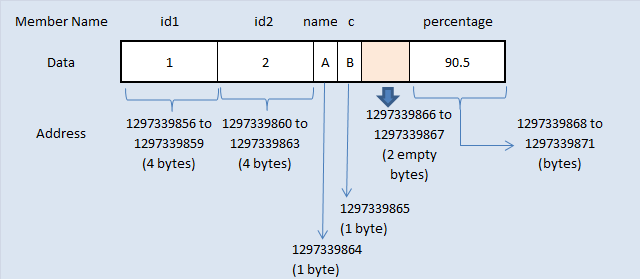
- Endianness: Different computer architectures may store the bytes of multi-byte numbers (like
intorfloat) in different orders—a concept called endianness. Writing the raw bytes of aninton a "little-endian" machine and reading it on a "big-endian" machine will result in a completely garbled value.
The formal solution to this is called serialization, where you define a specific, platform-independent byte-level format and write each struct member individually. We will explore this advanced topic later. For now, within the scope of your capstone project (which will be compiled and run on the same machine), directly writing structs with fwrite is a perfectly valid and highly efficient approach. This warning is for your long-term goal of C mastery.
Conclusion
In this lesson, we've unlocked a faster and more efficient method for data persistence. By moving from human-readable text to machine-native binary formats, we align our file I/O with how the computer actually works with data in memory.
Key Takeaways:
- Binary files store raw byte data, offering significant space and speed advantages over text files by eliminating the need for parsing.
- Files are opened in binary mode using
"wb"(write binary) and"rb"(read binary). fwrite()writes a specified number of data elements from memory to a file.fread()reads a specified number of data elements from a file into memory. You must ensure memory is allocated for the data before callingfread().- A common and robust pattern for saving an array is to first write its size to the file, allowing the reading program to know how much memory to allocate before reading the array data.
In our next lesson, we will put this knowledge into practice. We will refactor the inventory persistence system from our previous lessons, replacing the text-based save file with a compact and efficient binary format.