Introduction
Welcome to the first lesson of your capstone project! In our previous module, you mastered the critical skill of serializing a linked list to a binary file. This process of carefully saving and loading complex data structures, separating persistent data from transient memory addresses, is the perfect foundation for what comes next.
Today, we transition from isolated exercises to integrated design. We will lay the architectural groundwork for your text-based adventure game by designing its core data structures. This is the blueprinting phase where we decide how to represent the essential components of our game world—the player, the rooms they explore, and the items they find. By the end of this lesson, you will have designed the C struct definitions that will form the backbone of your entire capstone project.
From Brute Force to Data-Centric Design
When starting a project like a text adventure, a common initial impulse is to create a separate function for every location in the game. You might have a beach() function, a forest() function, and so on. This approach quickly leads to a maintenance nightmare, with huge amounts of duplicated code.
A far more elegant and scalable solution is to adopt a data-centric design. Instead of encoding the game world in the logic of our functions, we encode it in our data structures. We'll create a single, generic game loop that can operate on any location, simply by reading the data associated with that location.
To see a real-world example of a developer grappling with this exact problem, take a few minutes to read through the beginning of a forum thread on GameDev.net.
Text adventure design in C - For Beginners - Forums
This forum post is a classic example of a C learner moving from a naive implementation to a more robust, data-driven design.
First, read the Original Post to understand the "one function per room" problem the developer faced. Then, read the insightful replies from 'wintertime', 'RLS0812', and 'LennyLen' that introduce the correct approach: the core advice. This discussion perfectly frames the "why" behind what we are about to do.
Designing the Game's Core structs
With the principle of data-centric design in mind, let's define the primary entities of our game world.
1. The Player Struct
The player is the central entity of our game. We need a structure to hold all the information that defines the player's state. This includes their health, their stats, and, crucially, their inventory and current location.
Let's start with a basic Player struct. A great example of this can be found in a video tutorial on creating a roguelike game.
Coding a Rogue/Nethack RPG in C - Part 1
This clip from "Coding a Rogue/Nethack RPG in C" by badcodinghabits shows the initial setup of a Player struct.
Watch from this segment to see how a simple Player struct is defined and rationalized. Notice the use of typedef, which we'll also adopt for cleaner code.
Building on that idea, we can define our initial Player struct. We will deliberately leave the inventory and currentLocation as forward-looking comments for now; we'll define their types shortly.
// Forward declaration of the Room struct, which we will define next.
// This is necessary because Player and Room will refer to each other.
struct Room;

typedef struct {
    char name[50];
    int health;
    int maxHealth;

    // A pointer to the room the player is currently in.
    struct Room* currentLocation;

    // The player's inventory, likely a linked list of items.
    // struct ItemNode* inventory;
} Player;
2. The Room Struct and World Representation
Representing the game world is the most interesting design challenge. Each room needs a description, exits to other rooms, and a list of items it might contain. There are two primary ways to connect rooms:
- Static Array with Indices: You can have a global array of all
Roomstructs in the game. Each room's exits are then stored as indices into this array. This is simple, fast, and very easy to save/load. - Dynamic Linked Structure: Each
Roomstruct contains direct pointers to its neighbors (e.g.,struct Room* north;). This is more flexible, allowing for worlds that can be created and modified dynamically at runtime.
The forum post you read earlier provides an excellent, complete example of the first approach. Let's study its area struct definition, which is a fantastic model for our Room.
Text adventure design in C - For Beginners - Forums
The same forum post contains a full code example that implements a data-driven design.
Read through LennyLen's full code example, focusing on the area struct definition and the populate_areas function that initializes it. Note how neighbours is an array of integers (indices), not pointers. This design makes saving and loading the game state significantly simpler, as you don't have to deal with serializing pointers.
For our capstone, let's adopt a hybrid approach that favors the dynamic linking you've already worked with. This provides a better opportunity to practice dynamic memory management. Here is a possible definition for our Room and Item structs:
typedef struct Item {
    char name[50];
    char description[200];
    struct Item* next; // To form a linked list of items
} Item;

typedef struct Room {
    char name[50];
    char description[500];

    // A linked list of items present in the room.
    Item* items;

    // Pointers to adjacent rooms. NULL if there is no exit in that direction.
    struct Room* north;
    struct Room* south;
    struct Room* east;
    struct Room* west;
} Room;
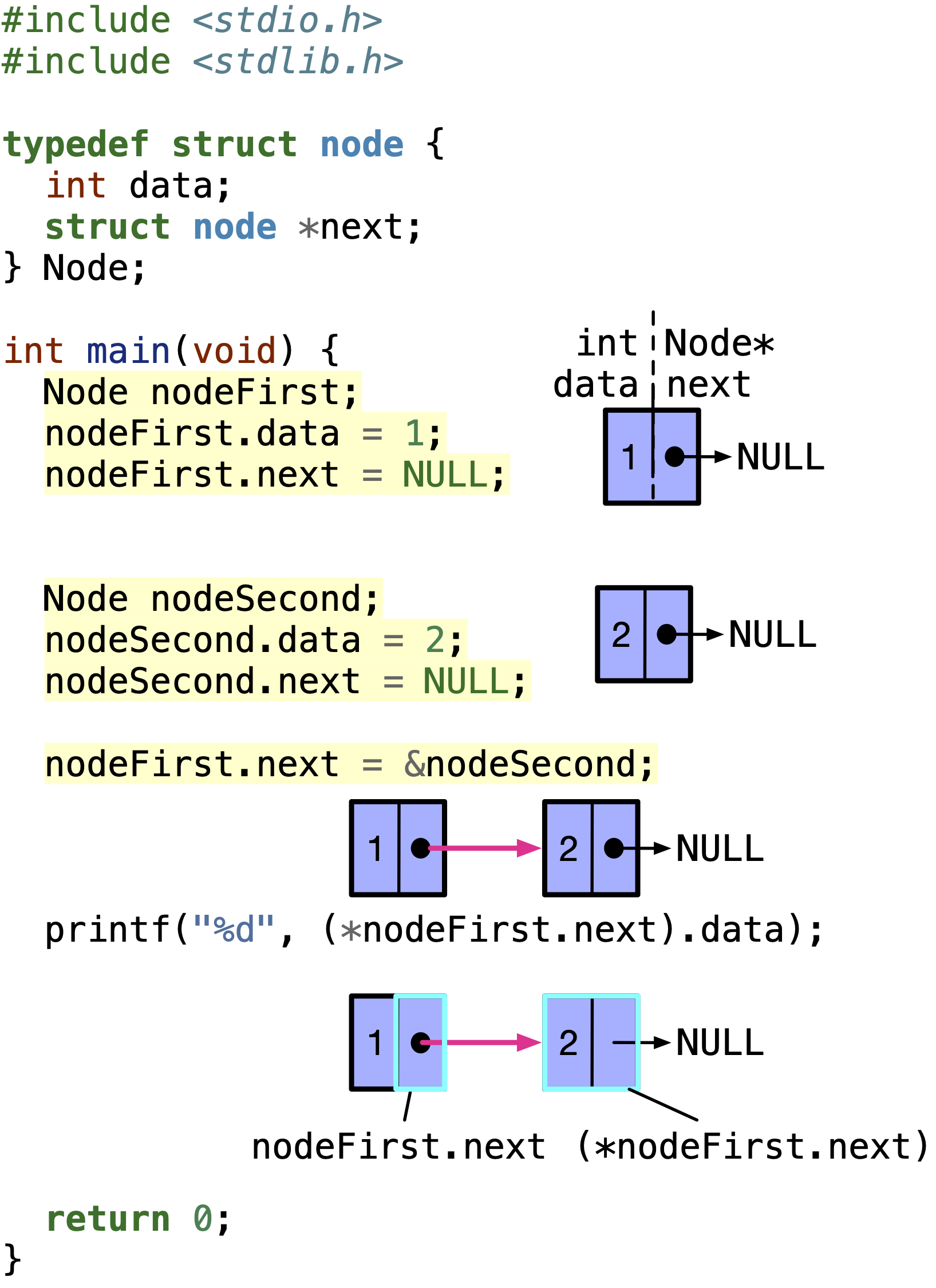
This design uses self-referential structs to build the world dynamically. An Item points to the next Item, forming a linked list. A Room has pointers to other Room structs, weaving together the map.
3. Accessing Struct Data Through Pointers
In our game, we will almost always be working with pointers to our structs (e.g., a pointer to the player object, a pointer to the currentRoom). To access the members of a struct via a pointer, C provides the convenient arrow operator ->.
It's crucial to understand the syntax here, as a common beginner mistake can lead to compiler errors.
(Almost) Everything You Need To Know About Pointers in C
This article provides a clear explanation of how to use pointers with structs.
Read the section titled Pointers and Structs. It explains why (*pa).p is the correct (but cumbersome) syntax and how the -> operator is simply clean shorthand for it.
To put it into practice, here's how you would use pointers and the arrow operator with our game structs:
// Assume 'player' is a pointer to a Player struct and it has been initialized.
Player* player;
// ... code to create and initialize the player ...

// To access the player's health:
player->health = 95;

// To get the description of the player's current location:
printf("%s\n", player->currentLocation->description);

// To check for an item in the room:
if (player->currentLocation->items != NULL) {
    printf("You see a %s.\n", player->currentLocation->items->name);
}
A Note on Memory Layout: Structure Padding
Your mechanical engineering background gives you an appreciation for precision and efficiency. In that spirit, it's worth knowing that the C compiler sometimes makes its own efficiency adjustments to your structs. To ensure fast access, the compiler may insert unused bytes, called padding, between members to align them on specific memory boundaries (e.g., ensuring a 4-byte int starts on an address divisible by 4).
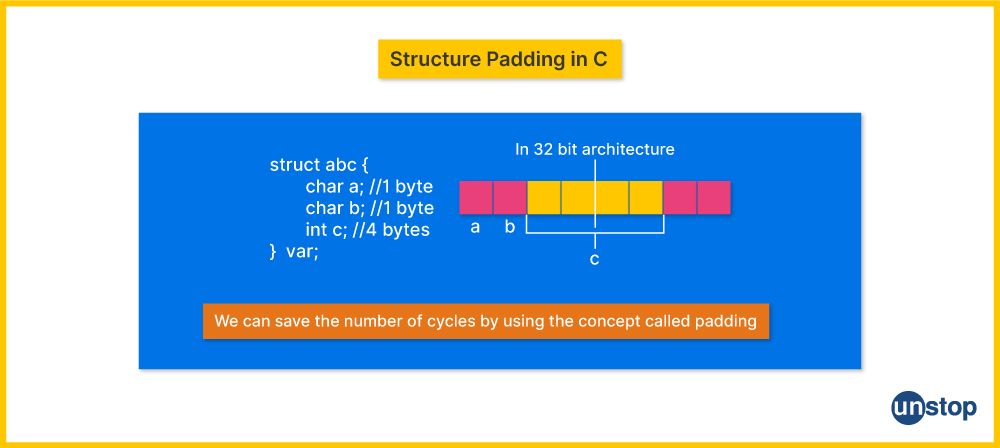
While this is handled automatically, it's a key low-level detail that explains why sizeof(YourStruct) might sometimes return a value larger than the sum of its members. This is the kind of hardware-conscious detail that makes C programming so distinct and powerful.
Conclusion
You've now created the conceptual blueprint for your game's world. This is a massive step forward in the capstone project.
Key Takeaways:
- A data-centric design, where game state is stored in
structs rather than hardcoded in functions, is scalable and maintainable. - We've designed three core data structures:
Player,Room, andItem. - We've chosen a design that uses pointers (
player->currentLocation,room->north, etc.) to link these structures together dynamically, creating a flexible game world. - You now understand how to use the arrow operator (
->) to access member data from a pointer to astruct.
In our next lesson, we will bring these designs to life. You will create the file structure for the capstone project—the various .c and .h files—and write a Makefile to automate the build process. We are officially moving from design to implementation.