Hello! Welcome back to our module on side effects in React.
In our last lesson, we established the "what" and "why" of side effects. We learned that while React components should ideally be pure, real-world applications need to interact with the outside world. We saw that placing these side effects directly in our component's rendering logic is dangerous, often leading to bugs and infinite loops. We concluded that side effects belong either in event handlers (for user-triggered actions) or, for effects that need to sync with what's on the screen, in a special hook.
Today, we dive into the "how." We will learn to use that special hook: useEffect. By the end of this lesson, you will be able to use the useEffect hook to run code after your component has finished rendering to the screen.
1. From "Side Effect" to useEffect
The name useEffect isn't arbitrary. It directly refers to the concept of "side effects" that we discussed. This hook is React's dedicated tool for managing these interactions with the "outside world" in a predictable and safe way.
To bridge the gap between the concept and the tool, let's start with a short article that explains this connection.
The React useEffect Hook for Absolute Beginners
This article from freeCodeCamp, 'The React useEffect Hook for Absolute Beginners', provides an excellent explanation for why the hook is named this way, linking it directly to the idea of pure functions and side effects.
Please read from the beginning down to the section 'What are side effects in React?'. This will solidify the connection between the concepts from our previous lesson and the hook we're about to learn.
In short, useEffect provides a "quarantined" space for our side effects, ensuring they run separately from the main rendering logic and don't disrupt the component's purity.
2. Basic useEffect Syntax and Behavior
The fundamental purpose of useEffect is to schedule a function to run after React has committed your component's changes to the DOM.
Here's the most basic syntax:
import { useEffect } from 'react';

useEffect(() => {
  // Your side effect code goes here...
  // This function is called the "effect" or "setup" function.
});
You call useEffect at the top level of your functional component and pass it a function. This function contains the side effect you want to perform.
By default, if you don't provide any other arguments, this effect function will run after the initial render and after every subsequent re-render.
Let's see this in action. The following video provides a clear, practical demonstration.
Full React Tutorial #14 - useEffect Hook (the basics)
The Net Ninja's video, 'Full React Tutorial #14 - useEffect Hook (the basics)', gives a great walkthrough of the fundamental use case for useEffect.
Watch from the beginning until 02:54. The video will show you how to import useEffect, use it with a console.log statement, and observe how it runs on both the initial render and after a state change causes a re-render.
Let's break down the key behavior shown in the video:
- Initial Render: When the component is first added to the page, React renders the JSX, updates the DOM, and then runs the
useEffectfunction. - Re-render: When a state (or prop) changes, React re-renders the component, updates the DOM if necessary, and then runs the
useEffectfunction again.
A classic example of a side effect that needs to sync with the UI is updating the document's title. Let's create a simple counter where the title reflects the current count.
import { useState, useEffect } from 'react';

function TitleCounter() {
  const [count, setCount] = useState(0);

  // This effect synchronizes the document title with the 'count' state.
  useEffect(() => {
    console.log('Effect is running! Updating title...');
    document.title = `You clicked ${count} times`;
  }); // No second argument is provided

  console.log('Component is rendering...');

  return (
    <div>
      <p>Check the browser tab title!</p>
      <button onClick={() => setCount(count + 1)}>
        Click me: {count}
      </button>
    </div>
  );
}

export default TitleCounter;
If you run this code and open your browser's console, you'll see a specific order of operations:
'Component is rendering...'is logged first.- The UI appears on the screen.
'Effect is running! Updating title...'is logged, and the tab title changes to "You clicked 0 times".
When you click the button:
- The
countstate updates. 'Component is rendering...'is logged again.- The UI updates to show the new count.
'Effect is running! Updating title...'is logged again, and the tab title changes to "You clicked 1 times".
This separation is crucial: the rendering is not blocked by the side effect.
3. Visualizing useEffect in the Component Lifecycle
To solidify your mental model, it helps to see where useEffect fits into React's overall process. A component goes through phases: mounting (being added to the DOM), updating (re-rendering), and unmounting (being removed).
React splits these phases into a Render Phase and a Commit Phase.
- Render Phase: React calls your component to figure out what should be on the screen. This phase must be pure.
- Commit Phase: React applies the changes to the DOM. This is where it's safe to run side effects.
The following diagram illustrates this lifecycle.
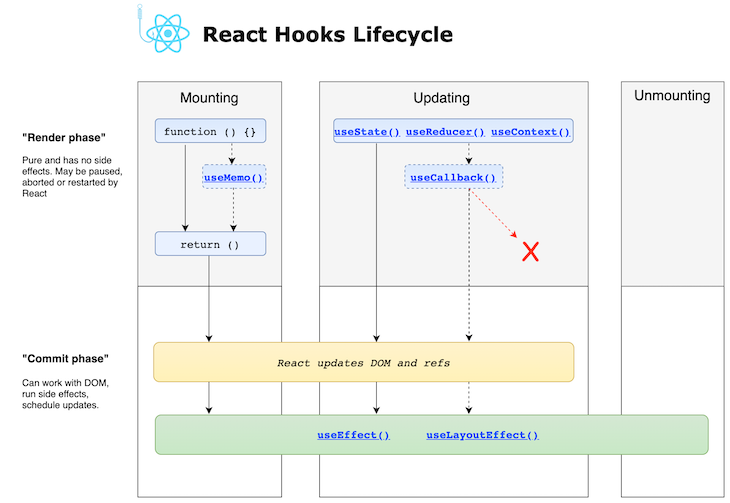
useEffect runs after the render phase and after the DOM has been updated in the commit phase. This timing prevents the effect from interfering with the rendering process, ensuring a smooth user experience.
4. The Need for More Control
Running an effect on every single render can be inefficient or even cause problems. In the video from Net Ninja, the narrator warned about the danger of updating state inside an effect without any conditions (from 02:54).
- Component renders.
useEffectruns and updates a piece of state.- The state update triggers a re-render.
useEffectruns again because of the re-render, and updates the state again.- This creates an infinite loop, and your application will crash.
This problem highlights that we need a way to tell React: "Don't run this effect on every render. Only run it when I tell you to."
React provides this control via a second argument to useEffect: the dependency array. This is the topic of our next lesson, but let's get a quick preview of how it works. This image provides a fantastic summary of the three main patterns.
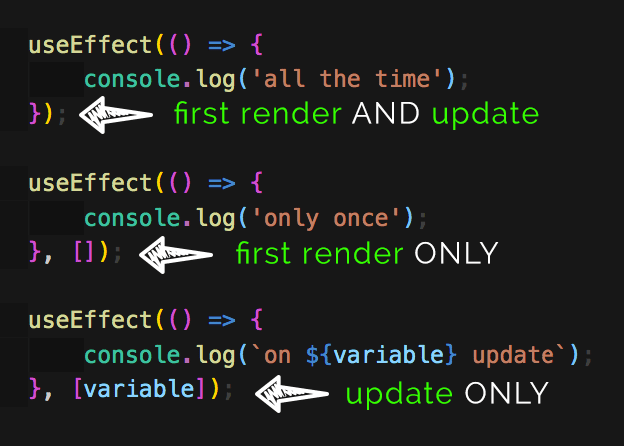
- No Dependency Array (what we learned today):
useEffect(() => { ... });runs after every render. - Empty Dependency Array:
useEffect(() => { ... }, []);runs only once, after the initial render. - Dependency Array with Values:
useEffect(() => { ... }, [val1, val2]);runs after the initial render and anytimeval1orval2changes.
Conclusion
In this lesson, we made the leap from theory to practice, learning the fundamental use of the useEffect hook. You now have the primary tool for managing side effects that need to synchronize with your component's render cycle.
Key Takeaways:
useEffectis React's hook for managing side effects like API calls, timers, or DOM manipulations.- It runs after the component has rendered, preventing side effects from blocking UI updates.
- The basic syntax is
useEffect(callbackFunction). - By default (without a second argument), the effect function runs after the initial render and every subsequent re-render.
- This default behavior can cause infinite loops if you update state within the effect, which demonstrates the need for more control.
Next Up:
We've seen the default behavior of useEffect and had a glimpse of how to control it. In the next lesson, we will fully explore the dependency array. You'll learn how to make your effects run only once when a component mounts or only when specific data changes, giving you precise control and unlocking the full power of useEffect.