Hello! Welcome to the next lesson in our journey with React's useEffect hook.
In the previous lesson, we learned that useEffect is the proper place for side effects that need to synchronize with your component's state and props. We saw that by default, an effect runs after the initial render and every re-render. We also saw how this default behavior can lead to infinite loops, which highlighted the need for more precise control.
Today, we'll master that control. This lesson is all about the second argument to useEffect: the dependency array. By the end of this lesson, you will be able to dictate exactly when your effects should run, making them more efficient and powerful.
1. The Three Patterns of Dependency
The dependency array is an array of values that you pass as the second argument to useEffect. React will "watch" these values, and it will only re-run the effect if one of them has changed since the last render. This gives us three fundamental patterns for controlling our effects.
Let's watch a video that demonstrates all three patterns with a clear, practical example. It uses a component with two separate state variables to make the distinction between the patterns very obvious.
useEffect Dependency Array Explained - React Tutorial 21
The video 'useEffect Dependency Array Explained' by Caleb Curry will walk us through the three core ways to use the dependency array. Pay close attention to how changes in different state variables trigger (or don't trigger) the effect in each case.
Please watch from 00:24 to 05:27. This covers the following demonstrations: No Dependency Array (00:24 - 02:44): A review of the default behavior where the effect runs on any state change. Empty Dependency Array [] (02:44 - 03:59): How this makes the effect run only once. Dependency Array with a Value [word] (03:59 - 05:27): How this makes the effect run only when a specific state variable changes.
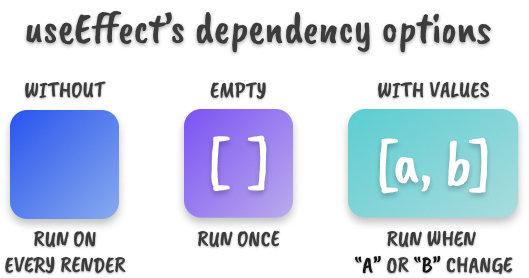
Let's summarize the three patterns from the video:
-
No Dependency Array:
useEffect(() => { ... });- When it runs: After the initial render and after every re-render.
- Use case: Rarely used. Primarily for effects that must react to any change in the component, but this is often inefficient.
-
Empty Dependency Array:
useEffect(() => { ... }, []);- When it runs: Only once, after the component's initial render (when it "mounts").
- Use case: Very common for "run-once" setup logic. Examples include fetching initial data from an API, setting up a timer or an event listener, or connecting to a service.
-
Dependency Array with Values:
useEffect(() => { ... }, [propA, stateB]);- When it runs: After the initial render, and after any subsequent re-render where the value of
propAorstateBhas changed. - Use case: The most flexible option. Used to synchronize the effect with specific props or state. For example, re-fetching data when a user ID changes, or reconnecting to a chat room when the room's name changes.
- When it runs: After the initial render, and after any subsequent re-render where the value of
This visual summary is a great way to remember these three options.
2. The Golden Rule: The Dependency Array Isn't Optional
Now that you know how to use the dependency array, we need to cover the most important rule about using it: You can't "choose" your dependencies.
The rule is: Every reactive value from your component's scope that is read inside your effect must be included in the dependency array.
What are reactive values?
- Props passed to your component.
- State variables declared with
useState. - Any other variables or functions declared directly inside your component body that are derived from props or state.
Let's read the official React documentation to understand why this rule is so important.
Lifecycle of Reactive Effects – React
The article 'Lifecycle of Reactive Effects' from the React team explains the mental model behind dependencies. It will help you think of effects as processes that synchronize with reactive values.
Please read the sections 'Effects “react” to reactive values' and 'React verifies that you specified every reactive value as a dependency'. These sections define reactive values and explain how React's linter helps you enforce the dependency rule.
As the documentation explains, this rule isn't an arbitrary restriction. It's a safety mechanism. If you use a reactive value inside an effect but omit it from the dependency array, your effect will not re-run when that value changes. This can lead to your effect using stale data from a previous render, which is a common source of bugs in React applications.
Your code editor's linter (if configured for React) will warn you if you break this rule:
function UserProfile({ userId }) { // userId is a reactive prop
  const [user, setUser] = useState(null);

  useEffect(() => {
    // This effect reads the 'userId' prop to fetch data
    fetchData(userId).then(data => setUser(data));
  }, []); // 🔴 Linter Error: React Hook useEffect has a missing dependency: 'userId'.

  // ...
}
In this case, the linter is telling you that if userId ever changes, the component won't re-fetch the new user's data, because the effect will only run once. The fix is to follow the rule and add userId to the array: [userId].
3. Separating Concerns with Multiple Effects
A single component can have multiple useEffect hooks. This is a powerful pattern for separating unrelated logic. Each effect represents an independent synchronization process with its own dependency array.
useEffect Dependency Array Explained - React Tutorial 21
Let's revisit Caleb Curry's video briefly. He demonstrates this exact pattern of using multiple effects for better code organization.
Watch from 05:27 to 07:14. He splits one effect into two, each with its own specific dependency, demonstrating the principle of 'separation of concerns'.
For example, imagine a component that does two things:
- It fetches user data when the
userIdprop changes. - It logs a "page view" analytics event whenever the page
pathchanges.
Instead of trying to combine these into one large effect, you should write two separate, focused effects:
function AnalyticsTracker({ userId, path }) {
  // Effect 1: Synchronizes user data with the userId
  useEffect(() => {
    console.log(`Fetching data for user: ${userId}`);
    // ... fetch logic ...
  }, [userId]); // Only re-runs when userId changes

  // Effect 2: Synchronizes analytics with the path
  useEffect(() => {
    console.log(`Logging page view for path: ${path}`);
    // ... analytics logic ...
  }, [path]); // Only re-runs when path changes

  // ...
}
This makes your code cleaner, easier to understand, and less prone to bugs.
4. Advanced Patterns & Common Pitfalls
Following the dependency rule is crucial, but it can sometimes lead to tricky situations. Let's look at two common pitfalls and their solutions. These are explained in the official documentation, and understanding them will save you a lot of debugging time.
The official useEffect reference page covers several important patterns for dealing with complex dependencies. We'll focus on two of the most common ones.
Please read the sections titled 'Updating state based on previous state from an Effect' and 'Removing unnecessary object dependencies'. These sections provide solutions to very common useEffect problems.
Let's break down those two scenarios:
Pitfall 1: Updating state based on the previous state
Imagine you have an effect that increments a counter every second. The naive approach creates an infinite loop or a bug:
function Counter() {
  const [count, setCount] = useState(0);

  useEffect(() => {
    const intervalId = setInterval(() => {
      setCount(count + 1); // This effect reads 'count'
    }, 1000);
    return () => clearInterval(intervalId);
  }, [count]); // So 'count' MUST be a dependency
}
Because count is a dependency, every time it changes (every second), the effect re-runs. This means the interval is cleared and reset every single second, which is not what we want.
Solution: Use the functional updater form of the state setter. Instead of telling React what the new state is, you tell it how to calculate the new state from the old one.
function Counter() {
  const [count, setCount] = useState(0);

  useEffect(() => {
    const intervalId = setInterval(() => {
      // Pass a function to setCount. React provides the latest state 'c'.
      setCount(c => c + 1); // This no longer reads 'count' from the component scope
    }, 1000);
    return () => clearInterval(intervalId);
  }, []); // ✅ Now 'count' is not a dependency, and the effect runs only once.
}
Pitfall 2: Depending on objects or functions
In JavaScript, objects and functions created inside a component are re-created on every render. This means their reference changes every time, even if their contents are the same.
function ChatRoom({ roomId }) {
  // 🚩 This 'options' object is a new object on every render
  const options = { serverUrl: 'https://...', roomId: roomId };

  useEffect(() => {
    const connection = createConnection(options);
    connection.connect();
    return () => connection.disconnect();
  }, [options]); // 🚩 This will run on EVERY render because 'options' is always new
}
Solution: If the object or function is only used inside the effect, define it inside the effect. This makes it non-reactive, so it doesn't need to be a dependency.
function ChatRoom({ roomId }) {
  useEffect(() => {
    // ✅ 'options' is created inside the effect
    const options = { serverUrl: 'https://...', roomId: roomId };
    const connection = createConnection(options);
    connection.connect();
    return () => connection.disconnect();
  }, [roomId]); // ✅ Now the effect only depends on the primitive value 'roomId'
}
Conclusion
You've now learned the most critical aspect of useEffect: how to precisely control when it runs. This skill is fundamental to writing correct and efficient React applications.
Key Takeaways:
- The dependency array is the second argument to
useEffectand controls when the effect re-runs. - An empty array
[]causes the effect to run only once after the initial render. - An array with values
[a, b]causes the effect to run on the initial render and wheneveraorbchanges. - The Rule: You must include every reactive value (props, state) that you read inside an effect in its dependency array. The linter will help you enforce this.
- You can use multiple
useEffecthooks in one component to separate unrelated logic. - To avoid unnecessary re-runs, use the functional updater
setState(c => c + 1)or move object/function definitions inside your effect.
Next Up:
Many side effects that we "set up" also need to be "cleaned up" to prevent memory leaks and bugs. For example, a timer needs to be cleared, or a subscription needs to be cancelled when the component is no longer on the screen. In the next lesson, we will explore the cleanup function that you can return from useEffect.