Hello! Welcome to the third lesson in our C++ fundamentals module.
In our last session, we learned how to create variables to store different types of data like numbers and characters. That was about creating the "boxes" to hold information. Today, we'll learn how to work with the information inside those boxes.
This lesson focuses on how to use arithmetic, relational, and logical operators to construct expressions. These operators are the fundamental tools you'll use to perform calculations, make comparisons, and build the logic that makes your programs smart and dynamic.
A Roadmap of C++ Operators
Before we dive in, let's get a high-level view of the operators we'll be covering. They generally fall into a few key categories.
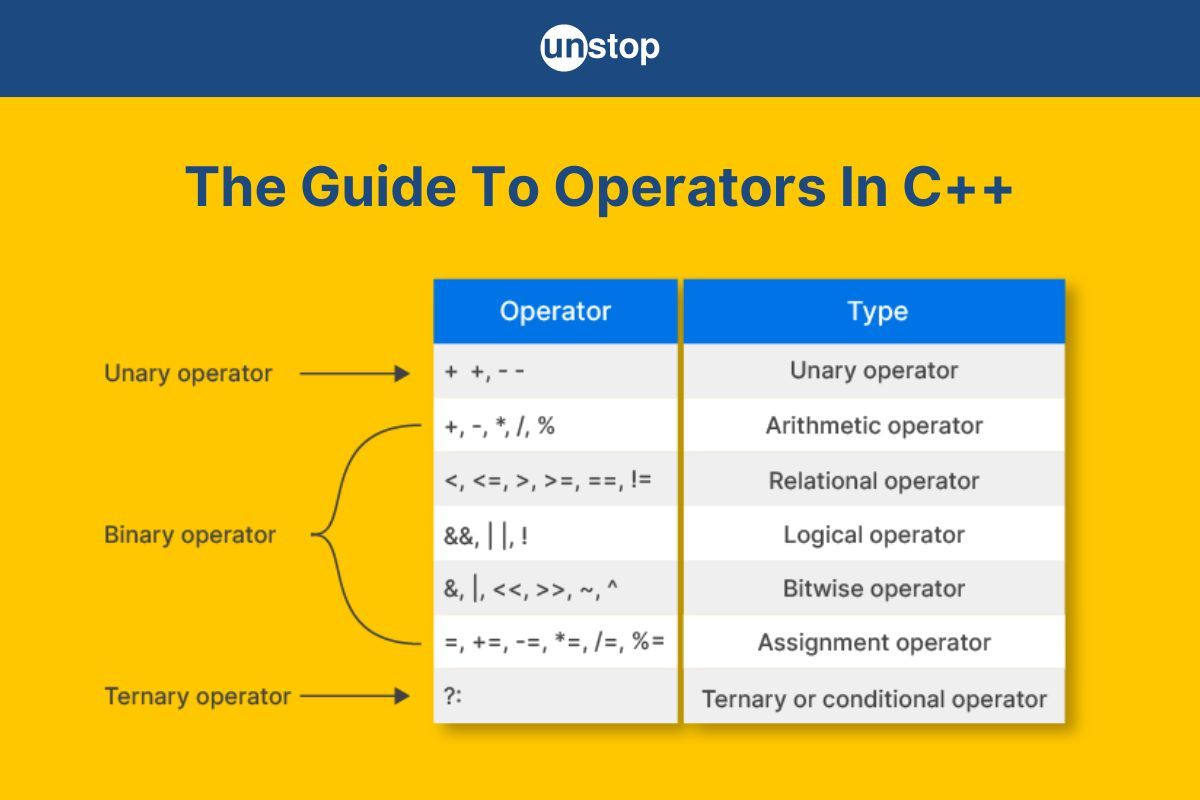
1. Arithmetic Operators: The Tools for Calculation
Arithmetic operators perform mathematical calculations, just like you've learned in math class. You already know most of these, but some have behaviors specific to programming that are important to master.
These operators include:
+(addition)-(subtraction)*(multiplication)/(division)%(modulo - the remainder of a division)
The division and modulo operators have some nuances, especially when working with integers. The following video explains this very clearly.
C++ FOR BEGINNERS (2025) - Operators in C++ PROGRAMMING TUTORIAL
Let's start with the basics of arithmetic operators. This video from the CodeBeauty channel provides a great introduction and highlights the crucial rule of integer division.
Watch from 00:36 to 05:25. Pay close attention to the explanation of integer division (e.g., 5 / 2 results in 2) and how the modulo operator (%) gives you the remainder.
Increment (++) and Decrement (--) Operators
C++ also has special operators to add or subtract 1 from a variable. These are extremely common in programming, especially within loops.
++increases the value by 1.--decreases the value by 1.
A critical detail is whether you put the operator before (prefix) or after (postfix) the variable. This changes when the value is updated in a larger expression.
- Prefix (
++counter): Increment the value first, then use the new value in the expression. - Postfix (
counter++): Use the current value in the expression first, then increment the value.
This distinction is a frequent source of bugs for newcomers, so it's worth focusing on. The next segment of the video explains this difference perfectly.
C++ FOR BEGINNERS (2025) - Operators in C++ PROGRAMMING TUTORIAL
Now let's look at the increment and decrement operators. The video explains the vital difference between the prefix and postfix versions.
Watch from 05:25 to 11:01. Focus on understanding why cout << counter++ and cout << ++counter produce different results.
Test your understanding!
What will the following code snippet print to the console?
#include <iostream>

int main() {
    int x = 5;
    int y = x++; // Postfix increment
    std::cout << "x is: " << x << std::endl;
    std::cout << "y is: " << y << std::endl;
    return 0;
}
Show answer
The code will print:
x is: 6
y is: 5
Why? In the line int y = x++;, the postfix ++ means the original value of x (which is 5) is assigned to y first. After that assignment, x is incremented to 6.
2. Relational Operators: The Tools for Comparison
Relational operators are used to compare two values. The result of a comparison is always a boolean value: true or false. In C++, when you print a boolean value, you'll see 1 for true and 0 for false.
The relational operators are:
==(Equal to)!=(Not equal to)>(Greater than)<(Less than)>=(Greater than or equal to)<=(Less than or equal to)
A very common mistake for beginners is to use a single equals sign (=) for comparison. Remember, = is for assignment (giving a variable a value), while == is for comparison (checking if two values are equal).
C++ FOR BEGINNERS (2025) - Operators in C++ PROGRAMMING TUTORIAL
This part of the video introduces the relational operators and shows how they produce boolean results.
Watch from 11:39 to 14:57. Notice how comparing two numbers results in an output of either 1 (true) or 0 (false).
3. Logical Operators: The Tools for Combining Conditions
Logical operators allow you to combine multiple boolean expressions into a single, more complex condition. This is the foundation of decision-making in your programs.
The logical operators are:
&&(AND):trueonly if both expressions aretrue.||(OR):trueif at least one expression istrue.!(NOT): Inverts the value of an expression (makestruebecomefalse, andfalsebecometrue).
C++ FOR BEGINNERS (2025) - Operators in C++ PROGRAMMING TUTORIAL
The next segment introduces logical operators and, crucially, explains the concept of operator precedence.
Watch from 15:44 to 21:04. Focus on how && and || work. Most importantly, pay attention to the section on operator precedence, which explains the order in which C++ evaluates different types of operators.
4. Operator Precedence and Expressions
As the video mentioned, operators have a predefined order of evaluation, known as operator precedence. This is similar to the order of operations (like PEMDAS/BODMAS) in mathematics.
A good rule of thumb in C++ is:
- Arithmetic operators are evaluated first.
- Relational operators are evaluated next.
- Logical operators are evaluated last.
Consider this expression: 5 + 3 > 2 * 3 && 10 <= 20
C++ evaluates it like this:
- Arithmetic:
8 > 6 && 10 <= 20 - Relational:
true && true - Logical:
true
When in doubt, or to make your code clearer, always use parentheses (). Parentheses force the expression inside them to be evaluated first, overriding the default precedence.
For example, (5 + 3) > (2 * 3) is much easier for a human to read and guarantees the order you intend.
5. Assignment Operators
You're already familiar with the main assignment operator, =. C++ also provides several compound assignment operators that offer a convenient shorthand for modifying a variable's value.
| Operator | Example | Equivalent to |
|---|---|---|
+= |
a += 5; |
a = a + 5; |
-= |
a -= 5; |
a = a - 5; |
*= |
a *= 2; |
a = a * 2; |
/= |
a /= 2; |
a = a / 2; |
%= |
a %= 3; |
a = a % 3; |
These are used everywhere in C++ to write more concise code.
C++ FOR BEGINNERS (2025) - Operators in C++ PROGRAMMING TUTORIAL
Finally, let's look at the assignment operators, which provide a shorthand for common operations.
Watch from 21:04 to 24:29. The key takeaway is that an expression like x += 7; is just a shorter way of writing x = x + 7;.
Let's Practice!
Theory is essential, but practice is where you build confidence. Your goal is to build a strong foundation in problem-solving, and applying these operators is a key part of that.
Basic C++ Coding Exercises for Beginners
The following page contains several basic coding exercises. Try to solve them yourself before looking at the solution. This is an excellent way to test your understanding.
Complete the following exercises on your computer. Don't just read them—type them out, compile, and run them! Exercise 1: Arithmetic Operations: This is a great warm-up for +, -, *, and /. Exercise 9: Even or Odd: This will make you use the modulo (%) and relational (==) operators. Exercise 10: Largest of Three: This requires combining relational (>=) and logical (&&) operators. Exercise 11: Leap Year Check: This is a classic challenge that requires you to build a complex logical expression with &&, ||, and (). Getting this right is a great milestone!
For quick reference while you code, the "C++ Operators" page from Programiz is a great resource to keep open.
This article from Programiz is a handy text-based reference for all the operators we've discussed. You don't need to read it from top to bottom, but it's useful to have available if you want to quickly look up an operator's syntax or meaning.
Skim through the sections on Arithmetic, Assignment, Relational, and Logical operators. The tables are especially useful for a quick review.
Conclusion
Great work! You now have the tools to not only store data but also to perform calculations, make comparisons, and combine logical conditions. These expressions are the fundamental building blocks of program logic.
Key Takeaways:
- Arithmetic operators (
+,-,*,/,%,++,--) perform calculations. Be mindful of integer division and the difference between pre/post-increment. - Relational operators (
==,!=,>,<) compare values and produce atrue(1) orfalse(0) result. - Logical operators (
&&,||,!) combine boolean conditions to form more complex rules. - Operator precedence determines the order of operations (
Arithmetic>Relational>Logical). Use parentheses()to control the order and improve clarity. - Compound assignment operators (
+=,-=, etc.) are convenient shortcuts for modifying variables.
In our next lesson, we will cover how to read user input using cin and display formatted output using cout. This will make your programs interactive, allowing you to apply these new operator skills to data that the user provides in real-time.