Hello! Welcome back to your second C++ lesson.
In our first lesson, you successfully wrote and ran a program that printed a fixed message, "Hello, World!". That was a crucial first step. However, most programs aren't static; they need to work with data that can change. This is where variables come in.
Today, we will focus on how to declare, initialize, and use variables of fundamental data types. This is the foundation for making your programs dynamic and useful. We will cover:
- What a variable is and why we need them.
- How to declare and initialize variables in C++.
- The four most common fundamental data types:
int,double,char, andbool. - How these data types relate to memory and their limitations.
1. What is a Variable?
At its core, a variable is a named piece of storage for data. Think of it as a labeled box where you can keep a value. You can look inside the box to see the value, and you can change what's inside.
To build a strong mental model, the following video uses a great analogy of a glass as a container.
C++ FOR BEGINNERS (2025) - Variables, Data Types, Overflow, Sizeof PROGRAMMING TUTORIAL
This video from CodeBeauty introduces the concept of a variable using a real-world analogy of a glass to represent a container for data.
Watch from 00:32 to 03:06. Focus on the three key parallels the video draws: a variable as a container, its limited capacity (which can lead to overflow), and its fixed data type.
As the video explains, when you create a variable in C++, you must tell the compiler two things:
- What type of data it will hold (e.g., a whole number, a decimal number, a character).
- What you want to name it.
The compiler then reserves a specific amount of memory for that variable.
2. Declaring, Initializing, and Using Variables
Let's see the syntax for bringing a variable to life.
Declaration: This is where you tell the compiler the variable's type and name.
int score; // Declares a variable named 'score' that will hold an integer.
At this point, the score "box" exists, but its content is undetermined. Using it before giving it a value can lead to unpredictable behavior.
Initialization: This is the act of giving a variable its first value. You can do this at the same time as you declare it. C++ offers a few ways to do this.
// 1. Copy Initialization (most common for simple types)
int score = 0;

// 2. Direct Initialization (looks like a function call)
int health(100);

// 3. Uniform/Braced Initialization (a modern, often preferred style)
double price{19.99};
While all three work, the braced initialization {} is gaining popularity because it's more consistent and can prevent certain types of errors. For now, you can use the = style as it's very common and easy to read.
You can explore these syntax options in the following reference.
This reference page from cplusplus.com shows the syntax for both declaring and initializing variables using the different methods.
Skim the sections 'Declaration of variables' and 'Initialization of variables'. Note the three examples for initializing a variable named x to zero. You will see all of these styles in C++ code.
Usage: Once a variable is declared and initialized, you can use it in expressions or change its value (this is called assignment).
#include <iostream>

int main() {
    int score = 0; // Declaration and initialization
    std::cout << "Initial score: " << score << std::endl;

    score = 150; // Assignment: the value changes
    std::cout << "Updated score: " << score << std::endl;

    return 0;
}
When you compile and run this, the output will be:
Initial score: 0
Updated score: 150
3. The Fundamental Data Types
C++ provides a set of built-in, or "primitive," types that form the basis for all other data handling. Let's explore the essential ones. The following video gives a great overview.
Now let's explore the most common 'primitive' data types C++ provides. This concise video from The Cherno covers the core building blocks.
Watch from 01:29 to 11:24. This covers a lot, so don't worry about memorizing everything. Just focus on getting a feel for: What int is for (and the idea of signed vs. unsigned). What char is for and that it's secretly a number. The difference between float and double. What a bool represents.
Let's break down those types with examples.
Integer (int)
Used for whole numbers (no fractional part). Can be positive, negative, or zero.
- Use cases: Counting items, storing an age, representing a year.
- Example:
int studentCount = 25;
Floating-Point (float and double)
Used for numbers that can have a decimal part.
- Use cases: Storing a price, a scientific measurement, an average grade.
- The main difference is precision. A
doublecan store a number with about twice the number of significant digits as afloat, making it more precise. - Example:
double itemPrice = 9.99;orfloat pi_approx = 3.14f;(note thefsuffix forfloatliterals).
Character (char)
Used to store a single character, letter, or symbol. The value is enclosed in single quotes.
- Use cases: Storing a grade letter, a middle initial, a status code symbol.
- Behind the scenes, a
charis actually a small integer (usually 1 byte) that stores the numeric code (like ASCII) for the character. - Example:
char finalGrade = 'A';
Boolean (bool)
The simplest type. It can only hold one of two values: true or false.
- Use cases: Representing a yes/no state, tracking if a condition is met, toggling a feature on or off.
- When printed or used in math,
trueis converted to1andfalseis converted to0. - Example:
bool isAvailable = true;
Test your understanding!
For each of the following pieces of data, which data type (int, double, char, bool) would be most appropriate?
- The number of pages in a book.
- A person's height in meters (e.g., 1.82).
- Whether an email has been read or not.
- The first letter of a person's last name.
Show answer
int, because you can't have a fraction of a page.double, because height requires decimal precision.bool, because the state is binary (read or not read).char, because it's a single character.
4. Memory Size and Data Overflow
As the first video mentioned, every variable type has a limited capacity. This capacity is determined by how many bytes of memory it occupies. You can check this with the sizeof operator.
The concept of exceeding this limit is called overflow. Understanding this is key to writing robust programs.
C++ FOR BEGINNERS (2025) - Variables, Data Types, Overflow, Sizeof PROGRAMMING TUTORIAL
The size of a data type in memory directly impacts the range of values it can hold. The CodeBeauty video provides an excellent demonstration of how to check a type's size using the sizeof operator and what happens when you exceed its limits.
Watch from 26:53 to 34:28. Pay close attention to: How the sizeof operator is used. The difference in range between int and unsigned int. The 'clock' analogy for how overflow works when you add 1 to the maximum integer value.
Let's try this in code. Copy, compile, and run the following program to see the sizes on your machine.
#include <iostream>
#include <limits> // We need this for finding the max value

int main() {
    // Let's look at an integer
    int myInt = 2147483647; // The typical maximum value for a signed int

    std::cout << "The value of myInt is: " << myInt << std::endl;
    std::cout << "The maximum value for an int is: " << std::numeric_limits<int>::max() << std::endl;

    // What happens if we add 1? This is overflow.
    myInt = myInt + 1;
    std::cout << "After adding 1, myInt is now: " << myInt << std::endl;

    std::cout << "\n--- Memory Sizes ---" << std::endl;
    std::cout << "Size of int: " << sizeof(int) << " bytes" << std::endl;
    std::cout << "Size of double: " << sizeof(double) << " bytes" << std::endl;
    std::cout << "Size of char: " << sizeof(char) << " bytes" << std::endl;
    std::cout << "Size of bool: " << sizeof(bool) << " bytes" << std::endl;

    return 0;
}
You'll notice that adding 1 to the maximum int value causes it to "wrap around" to the most negative number, just like the clock analogy in the video.
5. Practical Application and Best Practices
Here is a summary chart of the common data types.
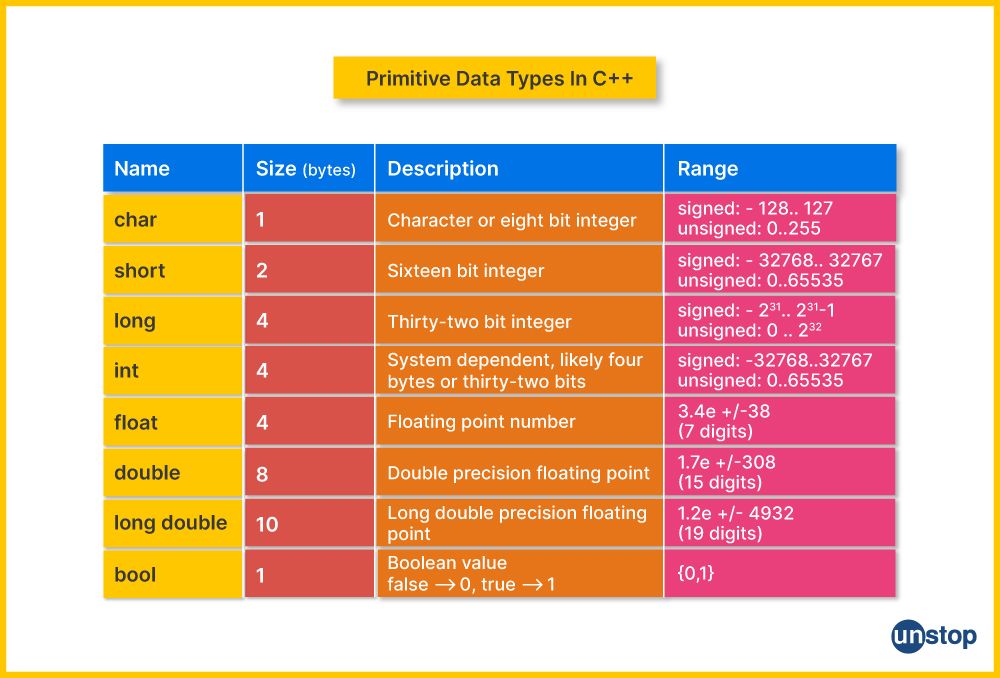
So, with several types available, which one should you choose? Experience is the best teacher, but here is some expert advice to get you started.
The highly-respected book 'C++ Primer' offers some excellent rules of thumb for choosing the right type in everyday programming.
Read the box titled 'Advice: Deciding which Type to Use'. These four points are practical guidelines that will serve you well throughout your C++ journey.
In short:
- Use
intfor integer math unless you have a reason not to. - Use
doublefor floating-point math. - Use
boolonly fortrue/falsevalues. - Use
charonly for characters.
Conclusion
You've taken another big step forward today! Storing and naming data is a core concept in programming.
Key Takeaways:
- A variable is a named storage location for data.
- Variables must be declared with a specific type (e.g.,
int myVar;). - Initialization gives a variable its first value (e.g.,
int myVar = 10;). - The fundamental types handle different kinds of data:
int: Whole numbers.double: Numbers with decimal points.char: Single characters.bool:trueorfalsestates.
- The
sizeofoperator tells you how many bytes a type occupies, which determines its range and can lead to overflow if exceeded.
In our next lesson, we'll learn what we can do with these variables. We will explore arithmetic, relational, and logical operators, which will allow us to perform calculations, make comparisons, and build expressions—the heart of program logic.