Hello! Welcome to your fourth lesson in the C++ Fundamentals module.
In our last lesson, you learned how to use operators to perform calculations and make comparisons. All our examples used hard-coded values, which isn't very flexible. Today, we'll change that by making our programs interactive.
This lesson addresses the learning outcome: Read user input using cin and display formatted output using cout. You'll learn how to prompt the user for information, read their keyboard input into variables, and then display the results back to them in a clean, formatted way. This is a fundamental skill for building any program that needs to communicate with a user.
1. The Concept of I/O Streams
At a high level, C++ handles input and output (I/O) using a concept called streams. Think of a stream as a flowing channel of characters. An input stream flows from an input device (like your keyboard) into your program. An output stream flows from your program to an output device (like your console window).
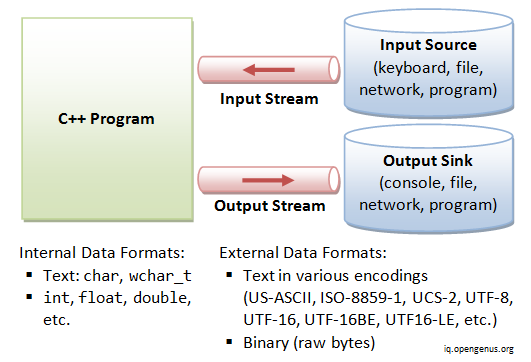
This diagram illustrates how a C++ program uses an input stream to receive data from a source (like the keyboard) and an output stream to send data to a sink (like the console).
To use these streams, we must first include the iostream library at the top of our code. This library provides us with the essential tools we need, primarily std::cin for input and std::cout for output.
Let's watch a short video that introduces these core concepts.
This video from Neso Academy provides a clear, foundational explanation of the iostream library and the concept of input and output streams in C++.
Watch from the beginning to 04:14. Focus on understanding that: iostream is the library that provides I/O functionality. istream and ostream are the types for input and output streams. cin is the standard object for console input (keyboard). cout is the standard object for console output (screen).
2. Displaying Formatted Output with std::cout
You've already used std::cout to print results. Now, let's formalize its use and learn how to create more complex, formatted output.
The << operator, known as the insertion operator, is used to "insert" data into the output stream. You can chain this operator to combine string literals (text in quotes) and variables in a single line.
#include <iostream>

int main() {
    int score = 95;
    std::cout << "Your final score is: " << score << ". Congratulations!";
    // Output: Your final score is: 95. Congratulations!
    return 0;
}
Newlines: '\n' vs. std::endl
When you want to move the cursor to the next line, you have two common options: '\n' and std::endl. While they seem to do the same thing, there's a key difference that is important for writing efficient code.
To understand this difference and master cout, let's read a section from a highly-regarded C++ tutorial.
1.5 — Introduction to iostream: cout, cin, and endl
The website LearnCpp.com provides excellent, in-depth explanations. This article will solidify your understanding of cout and teach you an important best practice regarding newlines.
Read the sections titled 'The input/output library', 'Using std::endl to output a newline', and 'std::endl vs \n'. Pay close attention to why \n is generally preferred over std::endl (it's about performance and buffer flushing).
From now on, we will follow the best practice of using '\n' for newlines in our output.
3. Reading User Input with std::cin
Now for the exciting part: getting input from the user. We use the std::cin object along with the >> operator, known as the extraction operator. It "extracts" data from the input stream (the keyboard) and stores it in a variable.
Let's see this in action by watching a complete program being built, which brings cin, cout, and the operators from our last lesson together.
We'll return to the Neso Academy video. The instructor will now walk you through a complete program that asks the user for two numbers, calculates their sum, and prints the result. This is a perfect demonstration of everything we've discussed so far.
Watch from 04:14 to 14:06. Follow along as the code is broken down piece by piece. Notice how: cout is used to prompt the user. cin is used to read the numbers into variables. cout is used again to display a formatted string including the original numbers and their calculated sum.
As you saw, you can chain the extraction operator to read multiple values:
#include <iostream>

int main() {
    int num1, num2;
    std::cout << "Enter two numbers separated by a space: ";
    std::cin >> num1 >> num2; // Reads the first number into num1, the second into num2
    std::cout << "You entered " << num1 << " and " << num2 << '\n';
    return 0;
}
Test your understanding!
What happens if you run the code above and, at the prompt, you type 10, press Enter, and then type 20 and press Enter again? Does it still work?
Show answer
Yes, it still works perfectly. std::cin is smart about whitespace (spaces, tabs, newlines). When it looks for the second number, it skips over the newline character you created by pressing Enter after the 10 and waits for the next valid input.
4. How cin Really Works: Buffering and Extraction
To truly master cin, it's helpful to understand what happens behind the scenes. User input is buffered, meaning it's stored temporarily before your program uses it. This has important implications for how your program behaves.
For a deeper understanding, which is one of your key goals, we'll dive into the details of the cin buffer.
1.5 — Introduction to iostream: cout, cin, and endl
Let's go back to the LearnCpp.com article. The next sections provide a superb explanation of how cin handles input, what happens when you enter different types of data, and why you might get unexpected results.
Read the sections 'std::cin', 'std::cin is buffered', and 'The basic extraction process'. Focus on the step-by-step process of how the >> operator extracts characters from the input buffer. This will clarify why entering 5a for an integer results in 5 being stored.
This knowledge of the input buffer is what separates a beginner from an intermediate programmer. It's essential for debugging tricky input-related problems later on.
5. Practice: Building an Interactive Program
Now it's time to put all this theory into practice. Your goal is to build strong problem-solving skills, and the best way to do that is by writing code.
Your Task:
Write a C++ program that calculates the area and perimeter of a rectangle.
- Prompt the user to enter the length of the rectangle (as a
double). - Read the length into a variable.
- Prompt the user to enter the width of the rectangle (as a
double). - Read the width into a variable.
- Calculate the area (
length * width). - Calculate the perimeter (
2 * (length + width)). - Display the results in a nicely formatted message, for example: "A rectangle with length 5.5 and width 10.0 has an area of 55.0 and a perimeter of 31.0."
Try to write this program yourself from scratch in your code editor. Compile and run it to see if it works as expected.
Stuck? Here's a hint.
Your program structure will look something like this:
#include <iostream>

int main() {
    // 1. Declare variables for length, width, area, and perimeter.
    double length, width, area, perimeter;

    // 2. Prompt for and read the length.
    std::cout << "Enter the length: ";
    std::cin >> length;

    // 3. Prompt for and read the width.
    // ... your code here ...

    // 4. Calculate area and perimeter.
    // ... your code here ...

    // 5. Display the results.
    // ... your code here ...

    return 0;
}
View Solution
#include <iostream>

int main() {
    // Declare variables
    double length, width, area, perimeter;

    // Prompt for and read the length
    std::cout << "Enter the length of the rectangle: ";
    std::cin >> length;

    // Prompt for and read the width
    std::cout << "Enter the width of the rectangle: ";
    std::cin >> width;

    // Calculate the area and perimeter
    area = length * width;
    perimeter = 2 * (length + width);

    // Display the results
    std::cout << "A rectangle with length " << length << " and width " << width
              << " has an area of " << area << " and a perimeter of " << perimeter << ".\n";

    return 0;
}
Conclusion
Fantastic work! You have now unlocked the ability to make your programs interactive. This is a huge step forward and the foundation for almost every application you will build.
Key Takeaways:
- You must
#include <iostream>to perform standard input and output. std::coutuses the insertion operator (<<) to send data to the console.std::cinuses the extraction operator (>>) to read data from the keyboard into variables.- For newlines,
'\n'is generally preferred overstd::endlfor better performance. - Both
<<and>>operators can be chained to handle multiple items in a single statement. cinuses a buffer and has specific rules for extracting data and handling whitespace, which are important to understand for debugging.
In the next lesson, we will learn how to implement conditional logic using if, else if, and else statements. Now that your program can receive user input, the next logical step is to make decisions and perform different actions based on that input.