Hello! Welcome to your fifth lesson on C++ fundamentals.
In our previous lesson, you learned how to make your programs interactive by reading user input with cin and displaying formatted output with cout. This was a major step, allowing your programs to communicate with the outside world. Now, we'll take the next logical step: making your programs intelligent enough to act differently based on that input.
Today's lesson addresses the learning outcome: Implement conditional logic using if, else if, and else statements. You will learn how to control the flow of your program, enabling it to make decisions and execute specific blocks of code only when certain conditions are met. This is the foundation of all logic in programming.
1. The if Statement: Making a Simple Decision
The most fundamental control structure is the if statement. Its logic is simple: "if a certain condition is true, then execute the following code." If the condition is false, the code block is simply skipped.
The basic structure looks like this:
if (condition) {
    // This code runs only if the 'condition' is true.
}
The condition inside the parentheses must be an expression that evaluates to a boolean value: true or false. As you learned in a previous lesson, comparison operators (>, <, ==, !=, etc.) are perfect for creating these conditions.
Let's begin with a foundational reading that explains this structure with a clear example.
C++ if, if...else and Nested if...else
This article from Programiz provides a concise introduction to the if statement. It clearly lays out the syntax and shows a simple program in action.
Read the sections 'C++ if Statement' and 'Example 1: C++ if Statement'. Pay attention to the syntax and notice how the code inside the if block is executed for a positive number but skipped for a negative one.
2. The if-else Statement: Providing an Alternative
The if statement is great, but what if you want to do something else when the condition is false? That's where the else statement comes in. It provides an alternative path for your program's execution.
The if-else structure guarantees that exactly one of the two code blocks will be executed.

Now, let's watch a video that demonstrates the if and else statements together, building on the concepts you've just read about.
Learn C++ With Me #8 - If, Else & Else If
This video from Tech With Tim clearly explains and demonstrates the if and else statements. He starts with a basic if and then adds an else to handle the alternative case.
Watch from 00:51 to 06:33. Focus on how the if-else structure is used to create a program that responds differently depending on whether the input matches a specific number.
Test your understanding!
Write a short C++ program that asks the user to enter a whole number.
- If the number is even, it should print "The number is even."
- If the number is odd, it should print "The number is odd."
Hint: You can check if a number is even by using the modulo operator (%). A number is even if number % 2 is equal to 0.
Show answer
#include <iostream>

int main() {
    int number;
    std::cout << "Enter a whole number: ";
    std::cin >> number;

    if (number % 2 == 0) {
        std::cout << "The number is even.\n";
    } else {
        std::cout << "The number is odd.\n";
    }

    return 0;
}
3. The if-else if-else Ladder: Handling Multiple Conditions
Sometimes, you need to check more than two possibilities. For this, you can create a "ladder" using else if. This allows you to check multiple conditions in sequence.
The logic flows from top to bottom:
- The
ifcondition is checked first. If it's true, its code block runs, and the rest of the ladder is skipped. - If the
ifcondition is false, the firstelse ifcondition is checked. If it's true, its block runs, and the rest of the ladder is skipped. - This continues for any other
else ifstatements. - If none of the
iforelse ifconditions are true, the finalelseblock runs.
This flowchart clearly illustrates the execution path.
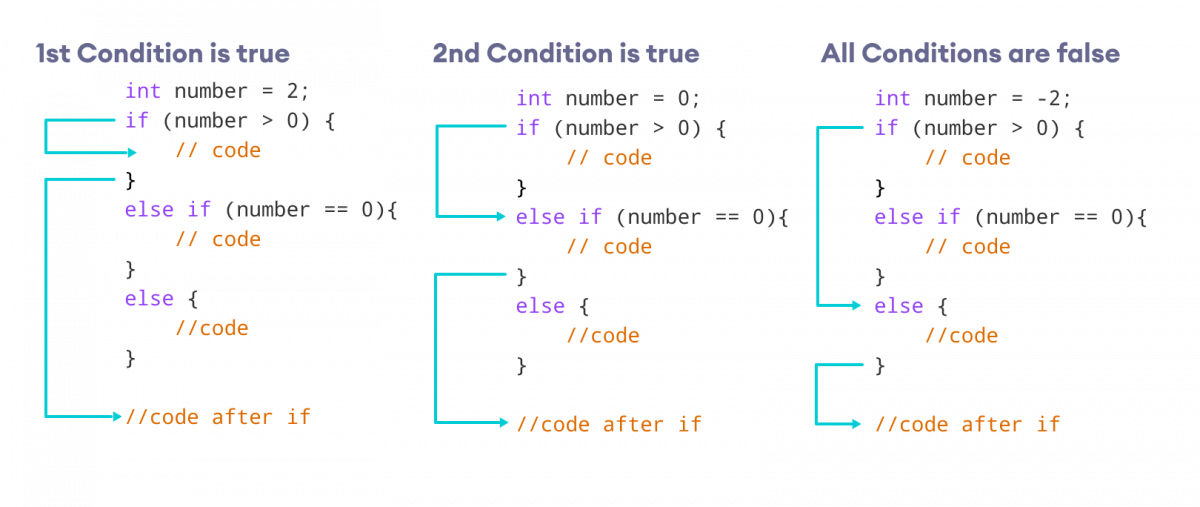
To solidify this, let's read about the syntax and see a practical example.
C++ if, if...else and Nested if...else
The Programiz article continues with a great explanation of the if-else if-else ladder.
Read the sections 'C++ if...else...else if statement' and 'Example 3: C++ if...else...else if'. The example of checking if a number is positive, negative, or zero is a classic use case for this structure.
4. Deep Dive: else if Chains vs. Multiple if Statements
This is one of the most important concepts to master for writing correct and efficient code. While they can look similar, an if-else if chain behaves very differently from a series of separate if statements.
if-else if-elseChain: Guarantees that at most one code block will be executed. The conditions are evaluated in order, and the chain is exited as soon as a true condition is found.- Multiple
ifStatements: Eachifstatement is independent. The program evaluates every singleifcondition, and it's possible for zero, one, or multiple code blocks to be executed.
Understanding this distinction is crucial for building robust logic, which is a key goal for you. The following video provides an excellent, clear comparison.
Learn C++ With Me #8 - If, Else & Else If
We'll return to the video from Tech With Tim. This section is extremely important as it highlights a common point of confusion for new programmers.
Watch the section from 11:53 to 16:23. Pay very close attention to the example he builds. He first writes it with an else if and then changes it to two separate ifs to show how the output changes for the same input. This will give you that deep understanding you're looking for.
Another critical point is that the order of your else if conditions matters. Since the chain stops after the first true condition, you must order them carefully to get the correct logic. Watch this short video for a great example of this.
This clip from Bro Code demonstrates why the order of your conditions is so important.
Watch from 03:43 to 04:35. Notice how checking for age >= 100 before checking for age >= 18 is necessary to make the logic work correctly.
Test your understanding!
Consider these two code snippets. For an input value of x = 15, what will each snippet print to the console? Explain why their outputs are different.
Snippet A:
if (x > 5) {
    std::cout << "x is greater than 5\n";
} else if (x > 10) {
    std::cout << "x is greater than 10\n";
}
Snippet B:
if (x > 10) {
    std::cout << "x is greater than 10\n";
} else if (x > 5) {
    std::cout << "x is greater than 5\n";
}
Show answer
For x = 15:
- Snippet A will print:
x is greater than 5 - Snippet B will print:
x is greater than 10
Explanation: In an if-else if chain, the conditions are checked in order.
- In Snippet A, the first condition
x > 5is true (since 15 > 5), so its block is executed, and the rest of the chain (else if (x > 10)) is skipped. - In Snippet B, the first condition
x > 10is true (since 15 > 10), so its block is executed, and theelse if (x > 5)is skipped.
This shows why ordering your conditions from most specific to least specific is often necessary for correct logic.
5. Common Mistakes and Best Practices
As a beginner, it's helpful to be aware of common pitfalls. Paying attention to these details will help you build good habits and write cleaner, bug-free code.
Conditional statements - If / Else in C++
This article from CodeChef has a useful section on common mistakes.
Read the section 'Common Mistakes and Tips'. Pay special attention to points 1 and 2: always using curly braces {} and the difference between assignment = and comparison ==.
To summarize the key takeaways for you:
=vs.==: A single equals sign (=) is for assignment (e.g.,x = 5;), while a double equals sign (==) is for comparison (e.g.,if (x == 5)). Using=inside anifcondition is a very common bug that can be hard to find.- Always Use Braces
{}: Even if aniforelseblock has only one line of code, it is a strong C++ convention to always use curly braces. This improves readability and prevents errors if you later add more lines to the block.
6. Practice Problem: The Grade Calculator
Let's combine everything you've learned. You'll write a program that takes a numerical grade and converts it to a letter grade using an if-else if-else ladder.
Your Task:
Write a C++ program that does the following:
- Prompts the user to enter a numerical grade (between 0 and 100).
- Reads the grade into an
intvariable. - Uses an
if-else if-elsestructure to determine the letter grade based on the following scale:- 90-100: "A"
- 80-89: "B"
- 70-79: "C"
- 60-69: "D"
- 0-59: "F"
- As a bonus, add a check for invalid input. If the grade is less than 0 or greater than 100, print an error message.
- Prints the corresponding letter grade or error message.
Try to write this yourself in your code editor. Remember the importance of condition order!
View Solution
#include <iostream>

int main() {
    int grade;
    std::cout << "Enter a numerical grade (0-100): ";
    std::cin >> grade;

    if (grade > 100 || grade < 0) {
        std::cout << "Error: Invalid grade entered.\n";
    } else if (grade >= 90) {
        std::cout << "Your letter grade is: A\n";
    } else if (grade >= 80) {
        std::cout << "Your letter grade is: B\n";
    } else if (grade >= 70) {
        std::cout << "Your letter grade is: C\n";
    } else if (grade >= 60) {
        std::cout << "Your letter grade is: D\n";
    } else {
        std::cout << "Your letter grade is: F\n";
    }

    return 0;
}
Notice the use of the logical OR operator (||) for the invalid input check, and how the else if conditions are ordered from highest to lowest. This is an efficient and correct way to implement this logic.
Conclusion
Excellent work! You've just learned one of the most powerful and fundamental tools in programming. The ability to control the flow of your program with conditional logic is what allows software to be dynamic, responsive, and "smart."
Key Takeaways:
- The
ifstatement executes code only if a condition is true. - The
if-elsestatement provides an alternative path for when the condition is false. - The
if-else if-elseladder allows you to check a sequence of conditions to handle multiple distinct cases. - In an
else ifchain, order matters and only one block of code will be executed. - A series of separate
ifstatements is fundamentally different, as each is evaluated independently and multiple blocks can execute. - Always use the comparison operator
==(not=) in conditions and use curly braces{}for allif/elseblocks.
In our next lesson, we will explore the switch statement. You'll see how it can be a cleaner and sometimes more efficient alternative to long if-else if chains when you need to check a single variable against many possible constant values.