Introduction
Welcome back! In our last lesson, you learned how to write the essential copy for a Facebook ad—the headline, primary text, and call to action. You now have the skills to create the message that will go in front of your target audience.
But once your ad is running, how do you know if it's actually working? Simply spending money isn't a strategy. To succeed, you must learn to read the data. This lesson is your introduction to the language of paid advertising metrics.
By the end of this 60-minute lesson, you will be able to define the foundational ad metrics (Reach, Clicks, CTR, CPC) and locate them in the Facebook Ads Manager. Understanding these "vital signs" is the first step toward making smart, data-driven decisions that will save you money and increase your chances of profitability.
1. Your Ad Performance Dashboard: The Ads Manager
When you run ads, the Facebook Ads Manager becomes your mission control. It's a dashboard that displays all the data about your campaigns. At first glance, it can seem overwhelming, but we're going to focus on just a few key columns to start.
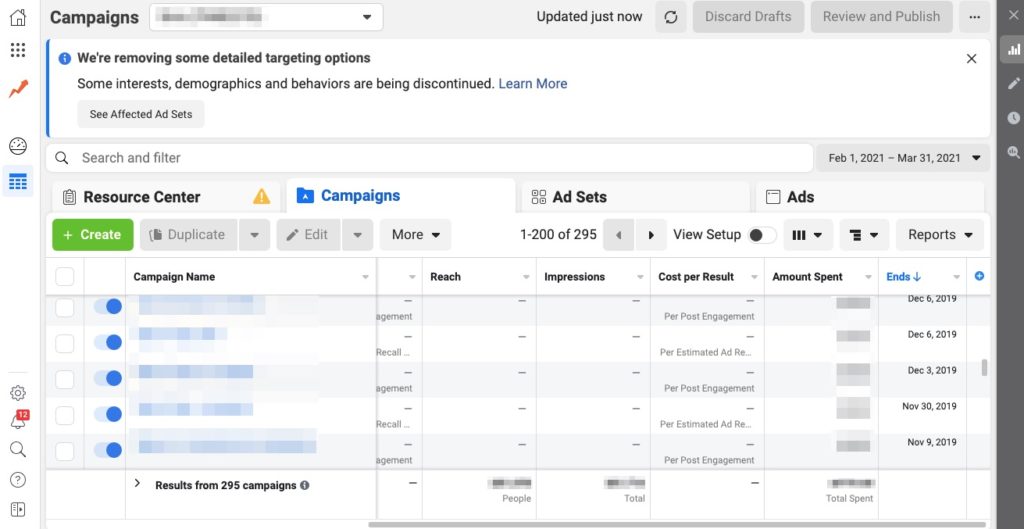
The core of your job as a media buyer is to interpret the numbers in this dashboard to understand what's happening with your ads and make decisions to improve them. Let's start by defining the most important numbers you'll see here.
2. The Four Foundational Metrics
To understand ad performance, you need to track how your ad moves through a logical flow:
- Is it being seen? (Reach and Impressions)
- Are people acting on it? (Clicks)
- How engaging is it? (CTR)
- How much is that engagement costing? (CPC)
Let's break these down one by one.
Every Important Meta Ad Metric Explained (2025)
This video from Michael Diaz provides a very clear explanation of the most important ad metrics. We'll watch a few key sections to define our core terms.
First, watch from 04:07 to 05:05 to understand the difference between Reach and Impressions. Then, watch from 06:31 to 08:35 to learn about Cost Per Click (CPC) and Click-Through Rate (CTR). Pay close attention to why he emphasizes 'unique outbound' clicks—this is especially important for affiliate marketers.
Now, let's solidify those definitions and add some detail.
A. Reach and Impressions: Is Your Ad Being Seen?
As you just saw in the video, these two metrics measure your ad's visibility.
- Reach: The number of unique people who saw your ad at least once. If 100 individuals see your ad, your Reach is 100.
- Impressions: The total number of times your ad was displayed on a screen. If those 100 people each see your ad twice, your Impressions will be 2000.
For a beginner, the main thing to know is that these numbers confirm your ad is being delivered by Facebook.
B. Clicks: Are People Taking Action?
This seems simple, but it's a critical point where many beginners get confused. Facebook tracks different types of clicks.
13 Essential Facebook Ads Metrics to Track
This article from AgencyAnalytics explains the different types of clicks. Understanding this distinction is crucial for accurate tracking.
Read section 10, 'Clicks'. Focus on the difference between 'Link Clicks' and 'Clicks (All)'.
As the article explains:
- Clicks (All): This includes clicks anywhere on your ad—liking the post, clicking to your Facebook page, clicking "read more" on long text, and clicking the actual link.
- Link Clicks (or Outbound Clicks): This only counts clicks on the link that leads to your destination URL (your affiliate presell page).
As an affiliate marketer, Link Clicks are what you care about. You only make money if someone leaves Facebook and goes to your page. Clicks (All) can be a misleading "vanity metric." Always focus on Link Clicks.
C. Click-Through Rate (CTR): How Engaging Is Your Ad?
CTR tells you what percentage of people who saw your ad were interested enough to click the link. It's the single best measure of how effective your ad creative and copy are at grabbing attention.
- What it measures: The percentage of impressions that resulted in a link click.
- How to calculate:
CTR = (Total Link Clicks / Total Impressions) x 100 - Why it matters: A low CTR tells you that your ad is not resonating with your audience. Either the image is boring, the copy is weak, or your targeting is wrong. A high CTR signals that you've created a compelling message for the right audience.
D. Cost Per Click (CPC): How Efficient Is Your Ad Spend?
CPC tells you, on average, how much you are paying for each link click. This is your primary measure of cost efficiency.
- What it measures: The average amount you pay each time someone clicks the link in your ad.
- How to calculate:
CPC = (Total Ad Spend / Total Link Clicks) - Why it matters: Your goal is to get high-quality traffic as cheaply as possible. A low CPC means you're getting more clicks for your budget, giving you more chances to make a sale. A high CPC can quickly drain your budget with very little traffic to show for it.
Here's a quick summary table of the definitions we've covered:
Facebook Ad Analytics: Metrics & Insights to Track for Better ROI
For a clear, written summary of these metrics, review this quick guide from Triple Whale. It provides concise definitions and formulas.
Scan the sections under 'Performance metrics' and 'Reach and frequency metrics'. Specifically, review the definitions for CTR, CPC, and Impressions.
3. How to Find and Analyze Metrics in Ads Manager
Now that you know the definitions, let's find these metrics in the real world. Facebook's default view doesn't always show the most important data, so you need to customize it.
How to read facebook ads data [ for affiliate marketing beginners ]
This video from Affiliate Conversion is made specifically for affiliate marketing beginners. It provides a practical, step-by-step walkthrough of how to set up your Ads Manager columns to see the data that truly matters.
Watch from 03:01 to 04:31 to see how to customize your columns. Then, watch from 05:08 to 07:24 as he discusses analyzing unique link clicks. Finally, watch from 11:22 to 12:55 to understand the crucial relationship between CTR and CPC.
As you saw in the video, customizing your columns is essential. Here’s a summary of the steps:
- In Ads Manager, navigate to the Campaigns, Ad Sets, or Ads tab.
- Click the "Columns" dropdown button.
- Select "Customize Columns...".
- In the search box, find and select the checkbox for the key metrics we've discussed:
- Reach
- Impressions
- Link Clicks (make sure it's not "Clicks (All)")
- CTR (Link Click-Through Rate)
- CPC (Cost per Link Click)
- Amount Spent
- You can drag and drop these on the right-hand side to arrange them in an order that makes sense to you.
- Click "Apply" and then save this as a preset for future use.

A key takeaway from the video is the relationship between CTR and CPC: A higher CTR often leads to a lower CPC. Why? Because Facebook's algorithm rewards ads that users find engaging. If your ad gets a lot of clicks (high CTR), Facebook sees it as high-quality and will show it to more people at a cheaper price. This is why writing good ad copy, as we did in the last lesson, is so important!
Practical Exercise
Let's test your understanding with a quick scenario. Imagine you've been running two ads for a day. Here is the data from your Ads Manager:
| Metric | Ad 1 | Ad 2 |
|---|---|---|
| Amount Spent | $50 | $50 |
| Impressions | 10,000 | 8,000 |
| Link Clicks | 100 | 120 |
Your Task (5 minutes):
- Calculate the CTR for both Ad 1 and Ad 2.
- Formula: (Link Clicks / Impressions) x 100
- Calculate the CPC for both Ad 1 and Ad 2.
- Formula: (Amount Spent / Link Clicks)
- Based on these numbers, which ad is more engaging? Which ad is more cost-efficient at getting traffic?
...take a moment to do the calculations before reading the solution below.
Solution:
- CTR:
- Ad 1 CTR = (100 / 10,000) x 100 = 1.0%
- Ad 2 CTR = (120 / 8,000) x 100 = 1.5%
- CPC:
- Ad 1 CPC = $50 / 100 = $0.50
- Ad 2 CPC = $50 / 120 = $0.42
- Analysis:
- Ad 2 is more engaging because it has a higher CTR (1.5% vs 1.0%). A larger percentage of people who saw Ad 2 decided to click.
- Ad 2 is also more cost-efficient because it has a lower CPC ($0.42 vs $0.50). You are paying less for each click.
This simple analysis tells you that Ad 2's creative and copy are performing better than Ad 1's.
Conclusion
Congratulations! You are no longer flying blind. You can now define the four most foundational metrics in paid advertising and, more importantly, you know where to find them and how to begin interpreting them.
Key Takeaways:
- Four foundational metrics are your campaign's vital signs:
- Reach: How many unique people saw your ad.
- Link Clicks: How many people clicked the link to your website (this is the click that matters!).
- CTR (Link Click-Through Rate): The percentage of viewers who clicked, measuring your ad's engagement level.
- CPC (Cost per Link Click): The cost for each click, measuring your ad's efficiency.
- You must customize columns in Ads Manager to focus on the metrics that matter, specifically Link Clicks, CTR (Link), and CPC (Link).
- A high CTR is a sign of a good ad and is often rewarded by Facebook with a lower CPC.
Preview of the next lesson:
Getting cheap clicks is great, but it doesn't pay the bills. The ultimate goal is to make sales. In the next lesson, we will cover the final and most important piece of the puzzle: conversions. You will learn what a conversion is and why tracking it is absolutely essential for building a profitable affiliate marketing business.