Hello! Welcome back to your course on mastering digital marketing.
In our last lesson, we configured your Meta Pixel to track key hotel-specific actions like ViewContent (viewing a room) and Purchase (completing a booking). Crucially, you also implemented a unique event_id for every event you tracked. This was an essential piece of groundwork for what we're about to cover.
Today's lesson addresses the learning outcome: Explain the role of the Meta Conversions API (CAPI) and how it complements the Pixel for robust tracking.
We'll explore why relying only on the browser-based Pixel you just set up is no longer enough. You'll learn what CAPI is, how it works directly from server to server, and why that event_id you configured is the critical link that makes these two systems work together as a powerful team. For your hotel, this means more accurate data on bookings, a clearer understanding of your ad performance, and ultimately, smarter decisions about where to invest your marketing budget.
1. The Problem: Why Your Pixel Data is Incomplete
The Meta Pixel works by running a piece of JavaScript code in a user's web browser. For years, this was a reliable way to track user actions. However, the digital landscape has changed dramatically.
- Privacy Updates: Apple's iOS 14 update and its App Tracking Transparency (ATT) framework significantly limited tracking on Apple devices.
- Browser Restrictions: Browsers like Safari (with Intelligent Tracking Prevention) and Firefox now block third-party cookies by default and limit the lifespan of others. Chrome is also phasing out third-party cookies.
- Ad Blockers: A growing percentage of users have ad blockers installed, which often prevent the Meta Pixel from loading or sending data at all.
When the Pixel is blocked, any action a user takes becomes invisible to Meta. If a guest books a room while using a privacy-focused browser, your ad account might never know. This leads to under-reported conversions, inaccurate Return on Ad Spend (ROAS), and poor ad optimization, as Meta's algorithm isn't learning from all your successful bookings.
Meta Ads CAPI Explained (2026): What It Is, How It Works ...
To understand the 'why' behind CAPI, let's start with this article from WeTracked. It clearly outlines the 'tracking crisis' that made a new solution necessary.
Please read the section titled 'Why CAPI Exists: The Tracking Crisis That Changed Everything'. Focus on how iOS 14, browser restrictions, and ad blockers combined to make browser-based tracking unreliable.
This isn't just a theoretical problem. Relying on incomplete data can cause you to make expensive mistakes, as you'll see in the following video.
Facebook Pixel is DEAD in 2026 (Use This Instead)
This video from Dr. Matt Shiver starts with a powerful real-world example of how inaccurate pixel data led to $10,000 in wasted ad spend. It perfectly illustrates the financial risk of not having robust tracking.
Watch the first 5 minutes of the video (00:00 - 05:00). Pay attention to his story about over-reported calls and how it caused Meta's algorithm to optimize for the wrong type of user. Think about how this could apply to your hotel—for example, if a pixel glitch made it seem like one ad was generating lots of bookings when it was actually driving low-quality traffic.
2. The Solution: Meta Conversions API (CAPI)
If sending data from the user's browser is unreliable, what's the alternative? Sending it directly from your server. This is exactly what the Conversions API does.
Meta CAPI is a server-side tracking method that sends conversion data directly from your website's server to Meta's servers, bypassing the user's browser entirely.
Think of it this way:
- The Meta Pixel is like sending a postcard. It might get lost, delayed, or intercepted.
- The Conversions API is like sending a secure, tracked courier package. It's a direct, reliable connection.
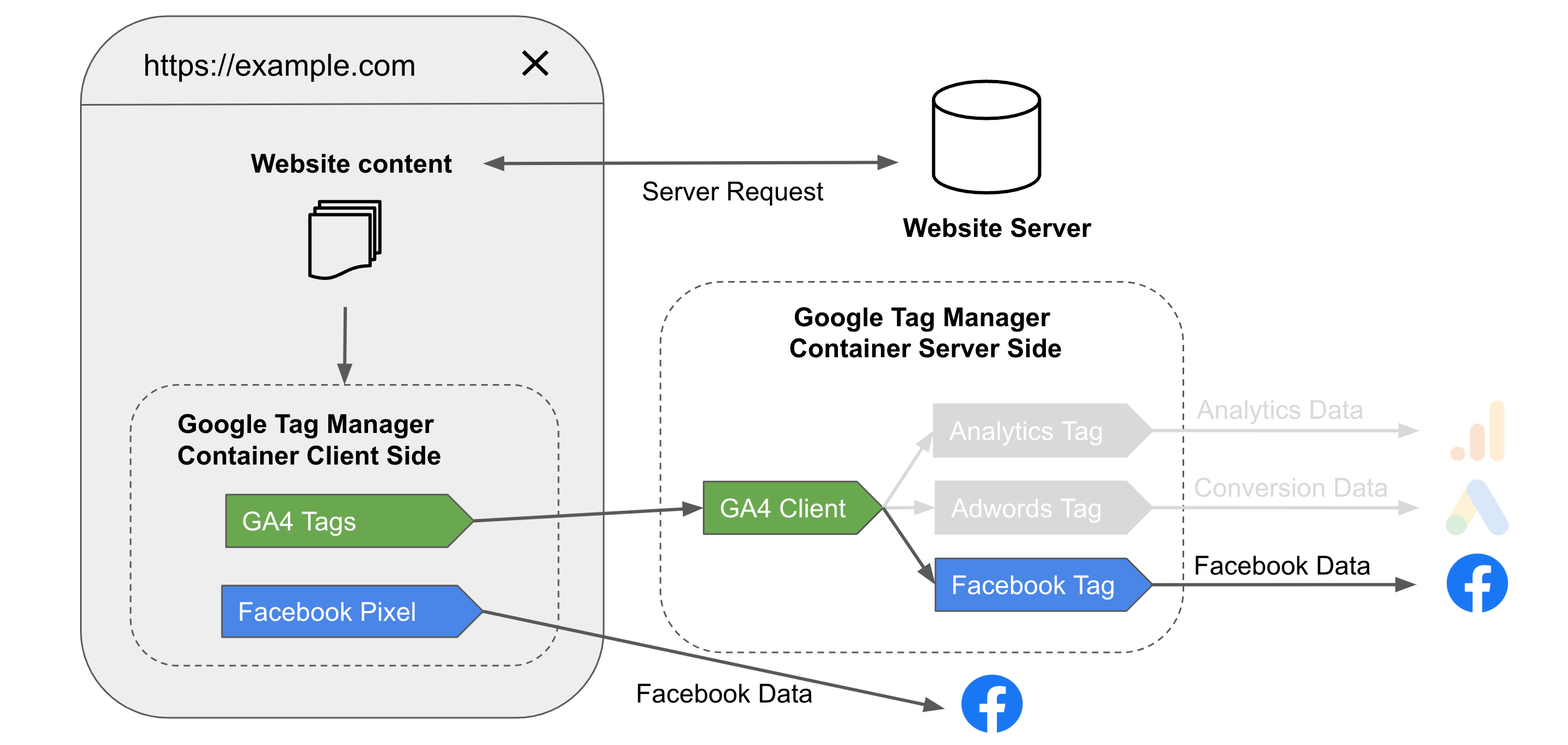
This server-to-server approach gives CAPI several key benefits.
Facebook Conversions API - Extended 2026 Setup Guide
This article from Stape provides a concise list of the main benefits of using CAPI. It also includes a great case study from Ray-Ban.
Read the section 'What are the main benefits of Facebook Conversions API?'. Note how it can help track users with ad blockers and even track offline events. In a hotel context, an 'offline event' could be a booking made over the phone by someone who saw your ad earlier.
3. A Team Effort: How the Pixel and CAPI Complement Each Other
A common misconception is that CAPI replaces the Pixel. It doesn't. The most robust setup uses both simultaneously.
- The Pixel is fast and great for capturing top-of-funnel browsing behavior in real-time (like page views).
- CAPI is reliable and perfect for ensuring critical, bottom-of-funnel conversion events (like a completed booking) are always captured.
When you use them together, Meta receives event data from two sources: the browser and your server. This is called redundant tracking, and it creates the most complete data picture possible.

This immediately brings up a critical question: If you send the same Purchase event from both the Pixel and CAPI, won't Meta count it as two separate bookings?
4. The Linchpin: Event Deduplication
The answer is no, thanks to a process called event deduplication. This is where the event_id you set up in our last lesson becomes so important.
When both the Pixel and CAPI send an event with the exact same event name (e.g., Purchase) and the exact same unique event_id, Meta understands that it's the same single event being reported from two different sources. It processes the first one that arrives and discards the second, preventing any double-counting.
If the Pixel event is blocked by a browser, the CAPI event still gets through. If both get through, they are correctly deduplicated. You get the best of both worlds: speed and reliability.
Understanding Facebook's Event ID and Deduplication
This video from Vision Labs provides an excellent explanation and visual demonstration of event deduplication. It will show you exactly why you configured the event_id in the previous lesson.
Please watch these three segments: 00:00 - 00:44: Introduction to why deduplication is critical. 01:40 - 02:55: A clear diagram showing how two events could be sent for one action. 08:07 - 09:58: A demonstration inside Meta Events Manager showing what properly deduplicated events look like. Notice the 'tree structure' where the server event is nested under the browser event. This will connect the theory of deduplication to the practical result you see in your Meta account.
Test your understanding!
You check your Meta Events Manager and see that for every booking, there are two separate Purchase events listed, each with a different event_id. What is the most likely problem with your tracking setup?
Show answer
The most likely problem is that the event_id variable is not being generated and sent consistently across both the Pixel (browser) tag and the CAPI (server) tag. For deduplication to work, the value for the event_id must be identical for the same event instance sent from both sources. If they are different, Meta sees them as two distinct events.
5. Advanced Accuracy: Event Match Quality
CAPI has one more powerful advantage. Because it operates on your server, it has access to more customer information that can be sent securely to Meta to help identify users.
When a guest makes a booking, they provide data like their email address and phone number. CAPI can send this data in a hashed format (a privacy-safe, irreversible encryption) along with the event.
This information dramatically improves Meta's ability to match the conversion event to a specific user's profile, even if that user clicked your ad on their phone but later booked on their laptop. This is measured by a score called Event Match Quality.
Facebook Conversions API - Extended 2026 Setup Guide
To learn more about this concept, please read the following sections from the Stape guide.
Read the sections 'Send user parameters using Facebook Conversions API' and 'Increase event match Quality'. Focus on understanding that sending more (hashed) user data helps Meta better match users, which in turn improves your ad campaign performance.
A higher Event Match Quality means more accurate attribution for you and better signals for Meta's algorithm to find more people like your existing high-value guests.
Conclusion
You have now unpacked one of the most important technical concepts in modern Meta advertising. A robust tracking setup is the foundation of any successful ad strategy.
Key Takeaways:
- Pixel-only tracking is unreliable due to browser privacy features, iOS updates, and ad blockers, leading to lost data.
- The Conversions API (CAPI) provides a reliable solution by sending event data directly from your server to Meta's server.
- The best practice is to use the Pixel and CAPI together in a complementary, redundant system.
- Event deduplication, which relies on a unique
event_idfor each event, is the mechanism that prevents double-counting. - CAPI can improve attribution by securely sending additional hashed user parameters, which increases the Event Match Quality score.
What's Next?
With this lesson, you have completed the technical foundation of tracking for Meta Ads. You now understand how to track events from both the browser and the server to create a complete and accurate data picture.
In our next module, "Advanced Meta Ads: Audience & Campaign Strategy," we will shift from technical setup to strategic application. The very first lesson, Structure Meta ad campaigns using the campaign-ad set-ad hierarchy, will show you how to organize your campaigns to effectively use the rich data you are now able to collect.