Hello! Welcome back.
In our last lesson, we explored how to use the Google Display Network for prospecting—finding new potential guests for your hotel using Affinity and In-Market audiences. This is a great way to fill the top of your marketing funnel and build brand awareness.
However, as you know from running a hotel, many potential guests visit your website, browse rooms, and even start the booking process, only to leave without confirming. Today's lesson is all about winning them back. We will focus on one of the most powerful and cost-effective strategies in digital advertising: remarketing.
By the end of this 60-minute lesson, you will be able to create a remarketing Display campaign that specifically targets website visitors who did not book, encouraging them to return and complete their reservation.
1. The 'Second Chance' Strategy: What is Remarketing?
Remarketing (often called "retargeting" for display ads) is the practice of showing ads to people who have already visited your website or used your app. Because these individuals have already shown interest in your hotel, they are a "warm" audience and are much more likely to convert than someone who has never heard of you.
The process is powered by a small piece of code, the Google Tag, which you've already learned about in our lessons on GA4 and GTM. This tag anonymously "tags" your website visitors, allowing Google to show your ads to them as they browse other websites in the Google Display Network.
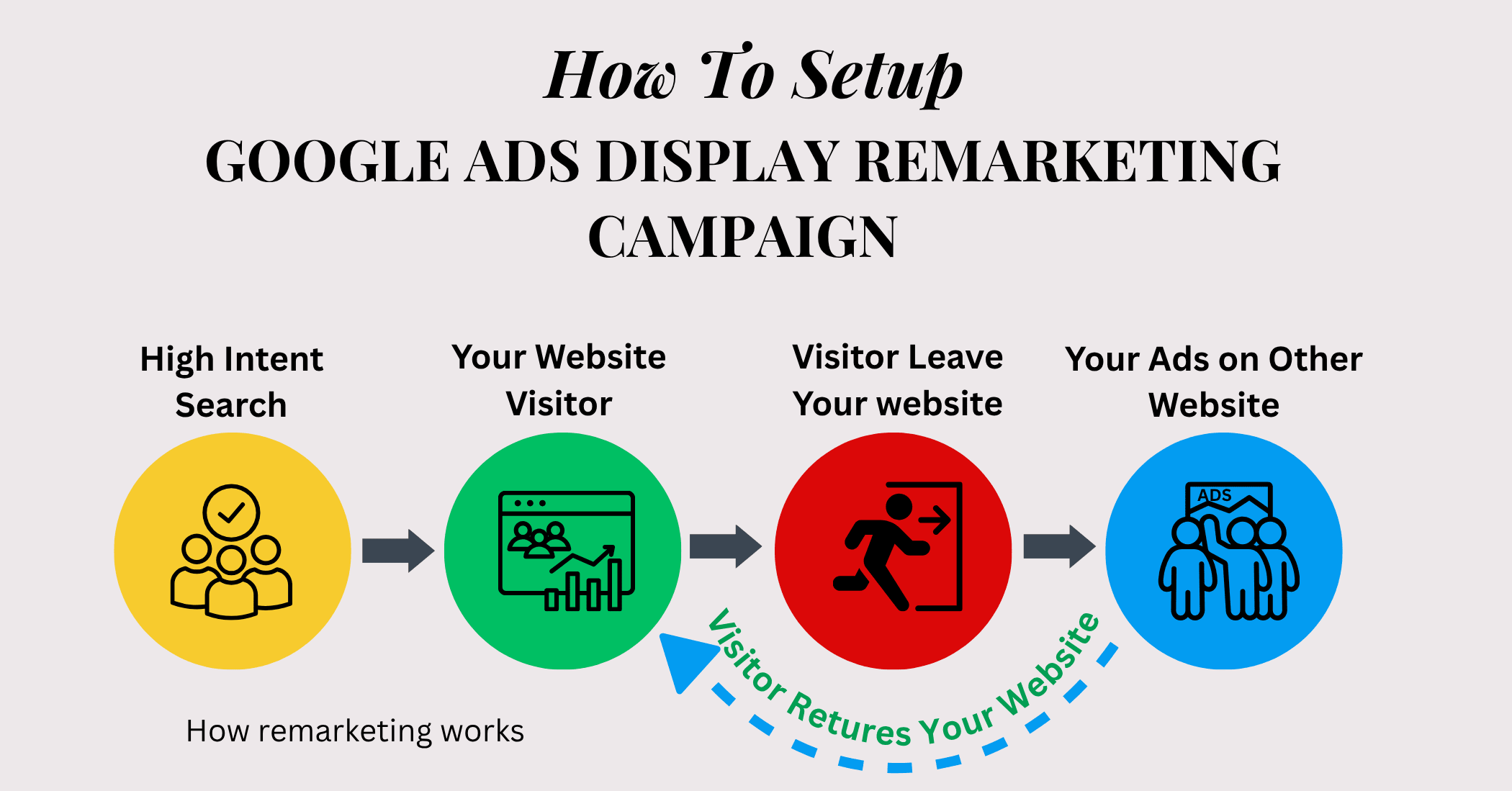
For a hotel, this is crucial. You can remind a visitor about the beautiful sea-view room they were looking at or entice them with a "Book Direct" offer.
Hotel Retargeting Ads: How to Reclaim Abandoned Bookings
To understand the fundamentals and why this is so important for hotels, let's read a short article from Cloudbeds tailored to the hospitality industry.
Please read the sections 'What are retargeting ads?' and 'Benefits of retargeting ads for hotels'. Pay attention to the distinction between retargeting and remarketing (though the terms are often used interchangeably) and the key benefits like driving direct bookings and cost-effectiveness.
2. Building Your Target Audience: The Foundation of Remarketing
Before you can build the campaign, you need to tell Google exactly who to target. Your goal is to reach "website visitors who did not book." This is achieved by creating audience segments in Google Ads.
You'll need two main lists:
- A list of all recent website visitors.
- A list of everyone who has successfully booked (converters).
Your campaign will then target the first list while excluding the second. This ensures you're not wasting money showing "Book Now!" ads to guests who have already booked their stay.
The data for these lists comes from your Google Tag or your linked Google Analytics 4 property. In Module 2, you learned how to set up tracking; this is where that work pays off directly.
The RIGHT Way to Set Up Google Ads Display Remarketing Campaigns | Step-by-Step Tutorial
This video provides an excellent, detailed walkthrough of how to create remarketing audiences inside Google Ads. It also covers linking your data sources, which is a crucial first step.
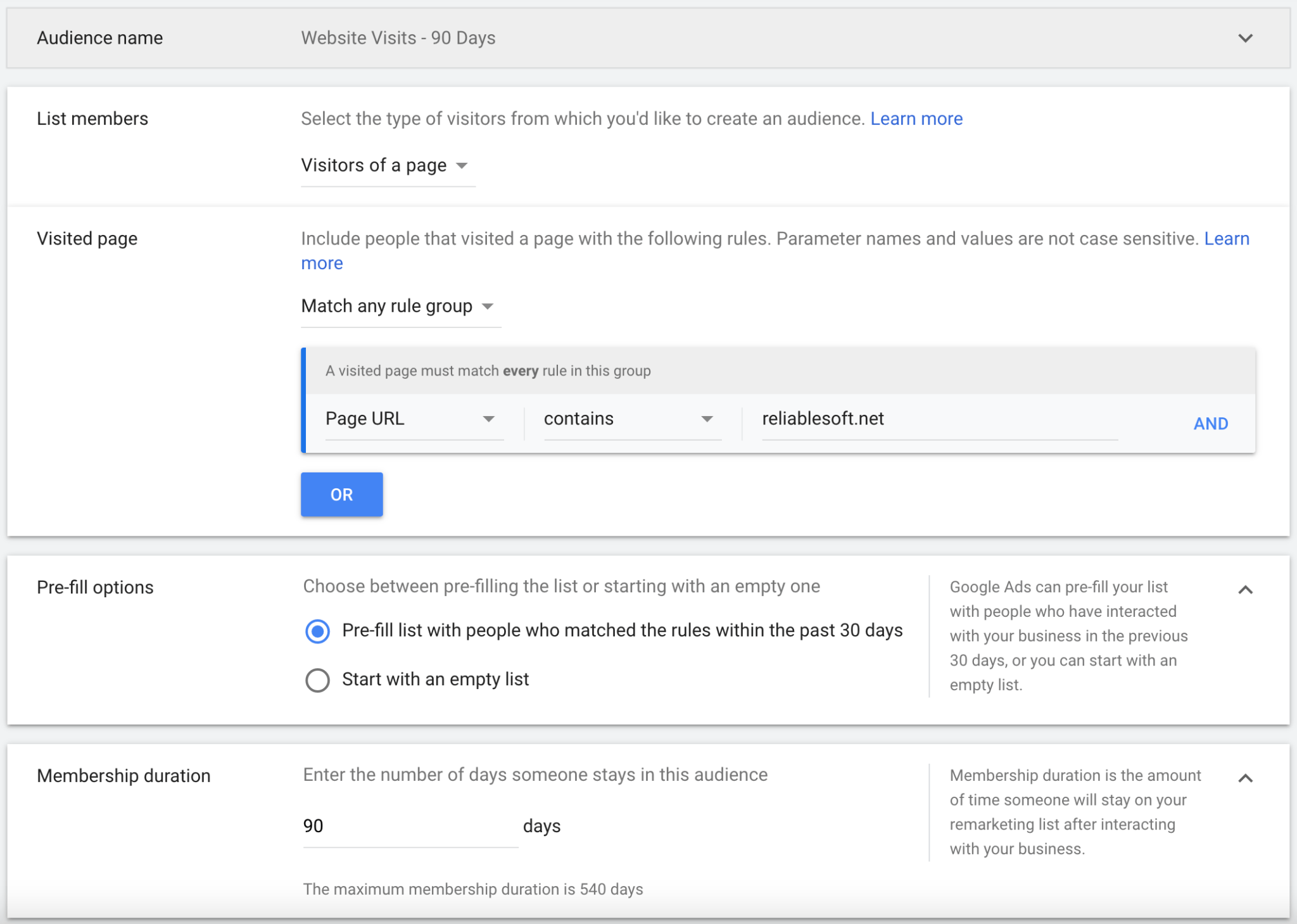
Watch from 00:32 to 04:29. The presenter will show you how to navigate to the Audience Manager and create a 'website visitors' audience. Notice how you can set the 'membership duration'—for example, you can target people who visited in the last 30, 60, or 90 days.
A Note for Hoteliers: Automatic Segments
Because you're in the hotel business, if your website's Google Tag is configured with the correct industry-specific parameters, Google Ads can automatically create highly relevant audience segments for you.
About automatically created data segments
This Google Support page explains these special, automatically created segments. It's a bit technical, but the 'Hotels and rentals' section is incredibly relevant to you.
First, read the introduction to understand the concept. Then, scroll down to the table under 'Hotels and rentals'. Pay close attention to the segments for 'Conversion abandoners' and 'Past converters'. These are precisely the lists we need to target and exclude!
3. Step-by-Step: Creating Your Display Remarketing Campaign
Now that you understand how to create the audience, let's build the campaign. The process is similar to the prospecting campaign you built in the last lesson, but with a few critical differences in the targeting settings.
We'll use a detailed video to guide us. The key steps are:
- Set up the campaign and ad group.
- Select your remarketing audience.
- Crucially, turn off 'Optimized Targeting'.
- Add your 'converters' list as an exclusion.
- Create your responsive display ad with messaging tailored for remarketing.
The RIGHT Way to Set Up Google Ads Display Remarketing Campaigns | Step-by-Step Tutorial
Let's walk through the full setup process. This video is one of the clearest guides available for creating a high-performing remarketing campaign.
Please watch these three segments: Campaign & Ad Group Setup (04:19 - 05:57): Follow along as he creates the campaign shell, selects the 'Display' type, and sets conversion goals. Targeting & The MOST Important Setting (12:45 - 15:03): This is the most critical part of the lesson. Watch carefully how he adds the audience segment and, most importantly, turns OFF 'Optimized targeting'. Leaving this on would allow Google to show your ads to people outside your remarketing list, defeating the purpose. Ad Creation (15:03 - 17:50): Observe how he builds the responsive display ad. For your hotel, think about what message would entice a visitor back. Instead of a general brand message, consider something more direct like, 'Still thinking about your getaway?' or 'Your room at [Hotel Name] awaits.'
Test your understanding!
You've just launched your new remarketing campaign. After a few days, you check the performance and notice in your placement report that a large portion of your budget was spent on various mobile game apps, with zero bookings resulting from those clicks. What likely went wrong, and what is one of the most effective ways to prevent this?
Show answer
The problem is that by default, Google Display campaigns can show ads on mobile apps, many of which (especially games) generate accidental clicks that waste your budget.
The most effective way to prevent this is to proactively exclude all mobile app categories from your campaign's placements. The video "The RIGHT Way to Set Up Google Ads Display Remarketing Campaigns" demonstrated a quick way to do this using Google Ads Editor (as shown between 20:00 - 22:45), which saves you from having to manually exclude 141+ app categories in the Google Ads interface.
4. Putting It All Together: The Complete Workflow
You now have all the pieces. Let's recap the full workflow for a successful hotel remarketing campaign.
- Verify Data Sources: Ensure your Google Ads account is linked to Google Analytics 4 and that your Google Tag is active on your website.
- Create Audiences: In Audience Manager, create a list of
All Visitors (30 Days)andAll Converters(or use the automatically generatedConversion abandonersandPast converterslists if available). - Create Campaign: Start a new 'Display' campaign with a 'Sales' or 'Leads' objective.
- Configure Ad Group:
- Set a daily budget and
Maximize conversionsbidding. - In 'Targeting', add your
All VisitorsorConversion abandonersaudience segment. - Turn OFF Optimized Targeting.
- In 'Exclusions', add your
All ConvertersorPast convertersaudience.
- Set a daily budget and
- Build Ad Creative: Create a Responsive Display Ad with high-quality images of your hotel and copy that acknowledges the user's prior visit (e.g., "Ready to book your stay?", "Don't miss out on [Your City]").
- Refine Placements: Exclude all mobile app categories to prevent wasted spend.
- Launch & Monitor: Launch the campaign and monitor its performance, paying close attention to metrics like CTR, Conversion Rate, and ROAS.
Conclusion
Fantastic work! You have now added a critical, high-ROI tool to your digital advertising toolkit. While prospecting campaigns fill the top of your funnel, remarketing campaigns are your workhorses for efficiently converting interested lookers into confirmed bookers.
Key Takeaways:
- Remarketing targets "warm" users who have already visited your site, making it a highly effective strategy for increasing direct bookings.
- The core setup involves targeting an audience of website visitors while excluding converters (those who have already booked).
- It is absolutely critical to turn OFF 'Optimized Targeting' to ensure your ads are only shown to your remarketing list.
- Your ad creative for remarketing should be different from prospecting; it should be a reminder or a gentle nudge to encourage the visitor to return and complete their booking.
- Proactively excluding mobile app placements can save a significant portion of your budget from being wasted on accidental clicks.
What's Next?
So far in this module, we've focused on static image and text ads on the Google Display Network. But what about the most engaging format of all—video? In our next lesson, we will dive into the world of YouTube and learn how to set up a YouTube video campaign to drive awareness or website traffic, adding another powerful platform to your advertising arsenal.