Hello! Welcome to the next stage of your Google Ads journey.
In our last lesson, we focused on refining your Search campaigns by digging into the Search Terms Report. You learned how to eliminate wasted ad spend with negative keywords and discover new, high-performing keywords to improve your ROAS. This is a vital skill for capturing existing demand.
Today, we're shifting gears from capturing demand to creating it. We'll move up the marketing funnel from the "consideration" phase to the "awareness" phase. You'll learn how to use the Google Display Network to place visually engaging ads in front of potential guests before they even start searching for a hotel.
By the end of this 60-minute lesson, you will be able to set up a Google Display campaign specifically designed to reach potential travelers for your hotel by using two powerful targeting methods: in-market and affinity audiences.
1. From Search to Display: A New Advertising Playground
So far, we've operated exclusively on the Google Search Network, where your text ads appear when someone actively searches for keywords you've chosen.
Now, we'll explore the Google Display Network (GDN). This is a massive collection of over three million websites, apps, and videos (including YouTube and Gmail) where you can show visual ads. Instead of targeting keywords, you target people based on their characteristics, interests, and recent online behaviors.
How To Use Google Ads For Your Hotel: A Complete Guide
To start, let's get a clear definition of the Google Display Network and the types of targeting it enables, specifically in a hotel context. This article from Innsight provides an excellent overview.
First, read the short section 'Google Display Network (GDN)' to understand what the network is. Then, review the list under '1. Targeting - Find Your Relevant Audience' to see the different ways you can target users on the GDN. We'll be focusing on 'Affinity' and 'In-market' today.
For your hotel, the GDN allows you to build brand awareness and plant the seed of an idea for a future stay. You might show a beautiful image of your hotel's pool to someone who reads travel blogs or an ad about your weekend getaway package to someone who has been researching flights to your city.
2. Targeting the Right Travelers: Affinity vs. In-Market Audiences
The key to a successful Display campaign is reaching the right audience. Google provides powerful tools to do this, and for prospecting (finding new customers), two of the most important are Affinity and In-Market audiences.
- Affinity Audiences: These group people based on their long-term interests, passions, and lifestyle. It's about "who they are." Think of these as broad, TV-style audience segments. For your hotel, relevant affinity audiences might be
Luxury Travelers,Foodies, orFamily Vacationers. This is great for broad brand awareness.

- In-Market Audiences: These are people Google has identified as being actively in the market to buy a certain product or service. It's about "what they are actively researching." This is much more focused and closer to the point of purchase. For a hotelier, this is incredibly valuable. You can target people who are
In-market for Travel > Hotels & Accommodationsor evenIn-market for Flights to [Your City].
Understanding the distinction is crucial:
- Affinity: "I want to reach people who like luxury travel." (Building long-term awareness)
- In-Market: "I want to reach people who are currently planning a trip." (Driving consideration and bookings)
Google Display Ads Tutorial (2024 Updated Guide)
This video from Ivan Mana gives a very clear explanation of the different targeting options available in a Display campaign, with a great breakdown of the difference between Affinity and In-Market audiences.
Watch from 09:45 to 13:00. Focus on how he explains the distinction between Affinity ('people's interests') and In-Market ('people actively searching or trying to buy something'). This conceptual understanding is key before you start building.
3. Step-by-Step: Setting Up a Display Campaign for Your Hotel
Now for the practical part. We'll walk through the process of creating a new Display campaign from scratch. A crucial best practice is to separate your different targeting methods into their own ad groups. This means you'll have one ad group for your Affinity audiences and a separate one for your In-Market audiences. This allows you to monitor performance and tailor your ad creative for each group.
We will use a detailed video walkthrough to guide us through the Google Ads interface.
Step 1: Campaign Creation and Settings
First, you'll create the campaign, choose your objective, and set the foundational rules like budget, location, and bidding.
How To Set Up Google Ads Display Campaigns [Secret Structure Used by Top Companies]
Let's begin the setup. This video by Aaron Young provides a clear, step-by-step guide. We'll start with the main campaign settings.
Watch from 07:25 to 11:40. Follow along as he: Clicks 'New Campaign' and selects an objective (e.g., 'Leads' or 'Sales'). Selects 'Display' as the campaign type and importantly, chooses Standard Display Campaign for manual control. Enters the campaign name, location, and language. Sets a daily budget and a bidding strategy (starting with 'Maximize conversions' is a good choice if you have conversion tracking set up).
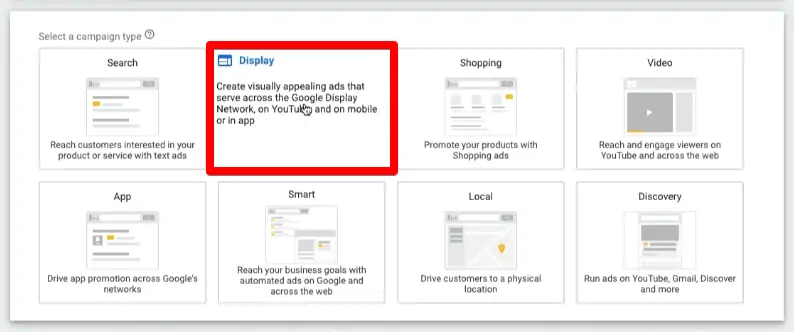
Step 2: Creating Ad Groups for In-Market & Affinity Audiences
Once the campaign shell is created, you'll be prompted to create your first ad group. This is where you'll define your audience targeting.
Following our best practice, you'll create one ad group targeting "In-Market" audiences and a second one targeting "Affinity" audiences.
How to Set Up Google Display Ads: Complete Step-by-Step ...
This guide from the Define Digital Academy provides a concise, text-based walkthrough of the process that you can use as a checklist.
Read 'Step 3: Set Up Targeting and Audiences'. Note how it distinguishes between audiences for 'prospecting' (like in-market and interests) and 'retargeting'. For this lesson, we are focused on prospecting.
Now, let's see how to find and add these specific audiences in the interface.
How To Set Up Google Ads Display Campaigns [Secret Structure Used by Top Companies]
Let's return to Aaron Young's video. Although he sets up different ad groups in his example, the process for finding and adding Affinity and In-Market audiences is the same. This clip shows exactly how to search for and select them.
Watch from 17:44 to 18:55. Pay close attention to how he clicks 'Add targeting', goes to 'Audience segments', and then uses the 'Search' tab. In the search bar, he types in terms relevant to his business ('bali'). For your hotel, you would search for terms like: Hotels (to find 'Hotels & Accommodations' in-market segment) Travel (to find travel-related affinity and in-market segments) [Your City Name] (to find people interested in or planning travel to your location)
Step 3: Creating Your Responsive Display Ads
The final step in the setup is creating the ads themselves. On the Display Network, you'll primarily use Responsive Display Ads. You provide the ingredients—images, logos, headlines, and descriptions—and Google automatically mixes and matches them to create ads that fit different placements across the network.
Google Display Ads Tutorial (2024 Updated Guide)
Let's see how to build a Responsive Display Ad.
Watch from 18:30 to 24:00. Observe how he uploads images and a logo, and writes multiple headlines and descriptions. The key is to provide a variety of high-quality assets so Google's system has a lot to work with to find the best-performing combinations.
For your hotel, make sure to use:
- Images: High-quality photos of your rooms, lobby, pool, restaurant, and unique features.
- Logo: A clear version of your hotel's logo.
- Headlines: Short, punchy text like "Luxury Stays in [Your City]" or "Your Perfect Urban Oasis."
- Descriptions: Longer text to elaborate on amenities, special offers, or what makes your hotel unique.
Test your understanding!
You run a boutique hotel in a city known for its culinary scene. You want to run a Display campaign to attract two types of new customers:
- People who love fine dining and travel.
- People who are actively planning a trip to your city.
How would you use Affinity and In-Market audiences to structure this campaign? Which audience type would you use for each customer group?
Show answer
You would create one Display Campaign with two separate ad groups:
-
Ad Group 1: Affinity Targeting
- Audience: You would target Affinity audiences like "Foodies," "Luxury Travelers," and "Travel Buffs."
- Purpose: This would reach people with a general, long-term interest in topics relevant to your hotel (Group 1). The ad creative could be more brand-focused, highlighting the unique experience and your hotel's restaurant.
-
Ad Group 2: In-Market Targeting
- Audience: You would target In-Market audiences like "In-market for Travel > Hotels & Accommodations in [Your City]" and "In-market for Flights to [Your City]."
- Purpose: This would reach people actively planning a trip right now (Group 2). The ad creative for this group could be more direct, perhaps with a call-to-action like "Book Your Stay" or mentioning seasonal availability.
Conclusion
Congratulations! You've just learned how to expand your advertising from capturing existing intent on the Search Network to generating new demand on the Display Network. This is a fundamental skill for building a full-funnel marketing strategy.
Key Takeaways:
- The Google Display Network (GDN) allows you to show visual ads on millions of websites and apps to build brand awareness.
- Affinity audiences target people based on their long-term interests and are great for broad, top-of-funnel marketing.
- In-Market audiences target people actively researching products or services, allowing you to reach potential guests who are closer to making a booking decision.
- The best practice is to separate your targeting types into different ad groups for better control, measurement, and message tailoring.
- Responsive Display Ads are the standard, requiring you to provide a variety of creative assets (images, logos, text) for Google to optimize.
What's Next?
Today we focused on prospecting—reaching people who don't know you yet. But what about all the people who have already visited your website but didn't book a room? The Display Network is the perfect tool for bringing them back.
In our next lesson, you'll learn how to create a remarketing Display campaign to target website visitors who did not book, a highly effective strategy for increasing your conversion rate.