Hello! Welcome back to your Google Ads training.
In our last lesson, we completed a crucial step by setting up conversion tracking. Now that you can see which ad clicks lead to actual bookings—and how much revenue each booking generates—you can start making truly data-driven decisions.
Today, we'll dive into one of the most important optimization routines for any Google Ads advertiser: analyzing the Search Terms Report. You'll learn how to look at the exact queries people typed into Google that triggered your ads. This is where you find out what's really happening "on the ground."
By the end of this lesson, you will be able to use the Search Terms Report to identify promising new keywords to add to your campaigns and, just as importantly, add negative keywords to stop wasting your budget on irrelevant clicks. Mastering this regular task is key to improving your Return On Ad Spend (ROAS) and running profitable campaigns for your hotel.
1. Keywords vs. Search Terms: The Critical Distinction
First, it's essential to understand the difference between a keyword and a search term.
- A Keyword is what you, the advertiser, bid on in your ad account. For example, you might bid on the phrase match keyword
"hotel with pool london". - A Search Term (or search query) is what the user actually types into the Google search bar.
Because you use match types (broad, phrase, exact), a single keyword can be triggered by many different search terms. For example, your keyword "hotel with pool london" could be triggered by search terms like "family hotel with indoor pool london" or "what's the best hotel with a pool in central london."
The Search Terms Report is your window into this world, showing you every user query that led to an impression or a click.
How To Use The Google Ads Search Terms Report
To start, let's get a formal definition of the Search Terms Report and see where to find it in the Google Ads interface. This article from Search Engine Journal explains it perfectly.
Read the sections 'What Is The Google Ads Search Terms Report?' and 'How To Create A Search Terms Report'. Focus on understanding the difference between a search term and a keyword.
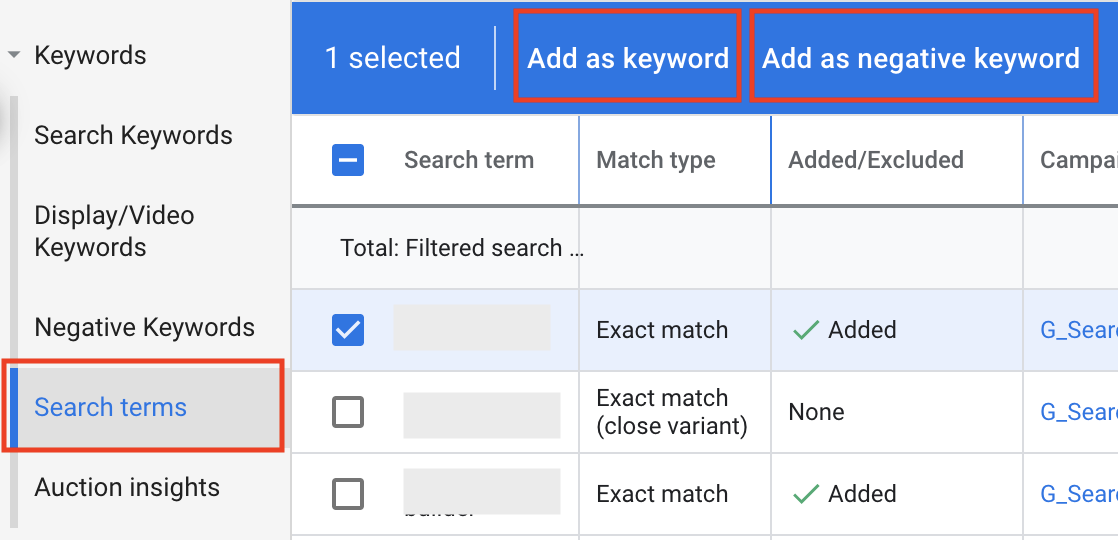
As you can see, the report is located under the "Keywords" section in your left-hand navigation menu.

2. Eliminating Waste: Finding and Adding Negative Keywords
Your first and most frequent task in the Search Terms Report is to act like a gardener and prune away the weeds. These "weeds" are irrelevant search terms that cost you money without any chance of resulting in a booking.
For a hotel, common irrelevant searches include:
- Competitor names: Clicks from users looking for a different, specific hotel.
- Job searches: "hotel front desk jobs"
- Irrelevant amenities: "hotels with kennel" (if you're not pet-friendly)
- Unwanted locations: Searches for your hotel brand but in a different city.
- Price-based terms: "cheap," "free," or "hostel" (if you are a luxury or mid-range hotel).
How To Use Google Ads For Your Hotel: A Complete Guide
This guide for hoteliers provides specific examples of how to use negative keywords to stop this kind of wasted spend.
Read the section titled 'Wasted Spend [use of negative keywords]'. It directly applies the concept of negative keywords to a hotel business context.
Now, let's watch a practical demonstration of how to identify these terms in a live account.
How To Optimize Google Ads Search Campaigns
This video from Ben Heath shows you exactly how to navigate the report and what to look for when identifying irrelevant searches.
Watch from 01:50 to 06:08. Pay attention to how he identifies search terms that are clearly not what his business offers and decides to exclude them.
Once you've identified an irrelevant term, you can select it and add it as a negative keyword.
How to Add Negative Keywords: Match Types and Lists
Simply adding a negative keyword isn't enough; you need to do it correctly using match types and lists. This is one of the most powerful and misunderstood parts of Google Ads. For negative keywords, the match types work differently than for positive keywords.
This next video provides an exceptionally clear breakdown of negative keyword match types and the best-practice method for managing them with lists. This is a critical concept to master.
Google Ads Negative Keywords: The RIGHT Way to Find and Add Negatives | Step-by-Step Tutorial
Let's dive deep into the 'how' of adding negative keywords. This tutorial covers the different match types for negatives and, most importantly, how to use Negative Keyword Lists to stay organized.
Watch from 10:50 to 24:46. This is a dense but vital segment. Pay close attention to: The difference between adding a negative to a campaign vs. a list (10:50 - 14:23). The specific behavior of broad, phrase, and exact match for negative keywords (14:23 - 21:02). The real-world example of being too aggressive with a negative keyword and accidentally blocking good traffic (21:02 - 24:46).
Key best practice: Always use Negative Keyword Lists. For your hotel, you might create lists like:
CompetitorsJob-related termsIrrelevant FeaturesNon-served locations
You can then apply these lists across multiple campaigns, making your account much easier to manage and scale.
3. Finding Hidden Gems: Discovering New Keywords
The Search Terms Report isn't just about cutting out waste; it's also a goldmine for finding new opportunities. Since you now have conversion tracking set up, you can sort the report by Conversions or Conversion value to see which specific search terms are driving the most revenue.
You will often discover high-performing search terms that you aren't bidding on directly. These are your hidden gems.
How To Optimize Google Ads Search Campaigns
Let's return to Ben Heath's video, where he explains how to find these valuable new keyword ideas.
Watch from 06:08 to 07:15. The process is simple but powerful: sort by conversions and look for valuable phrases you haven't thought of yet.
For example, imagine you're bidding on phrase match "london hotel". In your Search Terms Report, you might see that the search term "boutique hotel near covent garden with balcony" resulted in a high-value booking. This is a fantastic new keyword! You should add it as an exact or phrase match keyword to a relevant ad group (or even create a new, highly specific ad group for it) to capture more of this high-intent traffic.
Test your understanding!
You are managing ads for a luxury hotel in central London. You review your Search Terms Report and see the following data:
| Search Term | Clicks | Cost | Conversions (Bookings) |
|---|---|---|---|
| hotel jobs london | 15 | £25 | 0 |
| five star hotel london for anniversary | 3 | £12 | 1 |
| cheap hotel near victoria station | 20 | £18 | 0 |
What two actions would you take based on this report, and why?
Show answer
-
Add "jobs" and "cheap" as negative keywords. The terms "hotel jobs london" and "cheap hotel near victoria station" are generating clicks and costing money (£43 total) but are not leading to bookings. Adding "jobs" and "cheap" as broad or phrase match negatives to a list applied to your campaigns will prevent your ad from showing on these and similar irrelevant searches in the future.
-
Add "five star hotel london for anniversary" as a new keyword. This search term is highly specific, shows strong intent, and has already led to a conversion. You should add it as a phrase or exact match keyword to a relevant ad group to ensure you capture more of this valuable traffic. You might even consider creating ad copy that specifically mentions "anniversary" or "romantic getaway."
Conclusion
You've now learned one of the most fundamental skills for successful search advertising. Regularly analyzing your Search Terms Report is the primary feedback loop that allows you to continuously refine your campaigns. By methodically adding negative keywords and discovering new, high-performing keywords, you directly improve your targeting, reduce wasted spend, and increase your ROAS.
Key Takeaways:
- Keywords are what you bid on; Search Terms are what users type. The report connects the two.
- Add negative keywords to stop paying for irrelevant clicks. Use Negative Keyword Lists for efficient management and be mindful of match types.
- Find new keyword ideas by sorting the report by conversions. Add high-performing search terms as new keywords to capture more high-intent traffic.
- This is not a one-time task but a regular optimization routine that should be performed weekly or bi-weekly, depending on your ad spend.
What's Next?
So far, we've focused entirely on Google Search campaigns, which capture people actively looking for a hotel. But what about reaching potential guests before they start searching?
In our next module, we'll move up the marketing funnel. The next lesson will show you how to set up a Google Display campaign to reach travelers using in-market and affinity audiences, allowing you to build awareness and create demand for your hotel.