Hello! Welcome back to your Google Ads training.
In our last lesson, we covered the theory behind Performance Max (PMax), understanding it as an AI-driven campaign that reaches across all of Google's channels. We learned that its success hinges on providing high-quality creative "ingredients" organized into themed Asset Groups.
Today, we're moving from theory to practice. You'll learn how to take those ingredients and build a complete PMax campaign from start to finish. Our focus will be on structuring the campaign to effectively promote the different services a hotel offers, like room bookings, event spaces, or restaurant promotions.
Your learning outcome for this lesson is to configure and launch a PMax campaign with asset groups tailored to different hotel services.
1. Preparation: The Hotel Properties Feed
Before we even click "New campaign," there's a crucial step unique to PMax for travel goals. We need to tell Google which hotel properties we want to advertise. This is done by creating a "Hotel properties feed" in your account's Business Data section.
This feed acts as the foundation, allowing PMax to pull in property-specific details and enabling specialized reporting later on.
How To Use Performance Max For Travel Campaigns
This article from Search Engine Journal clearly explains this preparatory step. Getting this right is essential before building the campaign.
Please read 'Step 1: Prepare the Account Settings'. Pay attention to where you find the 'Hotel Properties' feed and the options for adding your hotel(s) (e.g., using the hotel picker on a map).
Once this feed is set up, Google knows which hotel(s) are available for the campaign, and we can proceed with the main setup.
2. Building the PMax Campaign Shell
Now we'll create the campaign itself. This involves setting the objective, choosing the campaign type, and configuring the budget and bidding strategy.
This video from Google's own Ads channel provides a direct, travel-focused walkthrough of these initial steps.
Create a campaign for Performance Max for travel goals: Google Ads Tutorials
Watch this official Google Ads tutorial to see the initial campaign setup process for a PMax for travel goals campaign.
Watch from 00:37 to 03:21. Focus on these actions: Objective & Campaign Type (00:37 - 02:17): Note the selection of 'Sales' as the objective, 'Purchases' as the conversion action, and how selecting 'Performance Max' leads to the hotel-specific setup. Bidding & Settings (02:17 - 03:21): Understand the difference between 'Conversion value' and 'Conversions' for your bid strategy. For a hotel with rooms at different price points, 'Conversion value' is almost always the right choice.
A Note on Bidding Targets (Target ROAS/CPA)
As the video mentioned, you have the option to set a target ROAS (Return On Ad Spend) or CPA (Cost Per Acquisition). In the previous lesson, we learned that PMax needs data to perform well. Setting a target too early can act as a "brake" and prevent the AI from exploring and learning effectively.
A common best practice, especially for a new PMax campaign, is to launch without a target ROAS or CPA. Let the campaign run on "Maximize conversion value" for a few weeks to establish a performance baseline. Once you have reliable data on the ROAS your campaign is achieving, you can then set a realistic target to maintain profitability.
3. The Core Strategy: Tailoring Asset Groups to Hotel Services
This is where your strategy as a marketer truly comes into play. A single PMax campaign can contain multiple Asset Groups. The best way to structure this is to create a separate Asset Group for each distinct service or offer your hotel has.
Why? Because it allows you to pair highly specific creative assets and audience signals with each service. A person interested in booking a wedding venue needs to see different images and headlines than someone looking for a last-minute room.
A great way to think about this is to mirror the main sections of your hotel's website. If you have separate pages for "Rooms," "Weddings," and "Spa," you should have corresponding Asset Groups.
Let's walk through creating a campaign with two distinct Asset Groups for a hotel:
- General Room Bookings: Targeting travelers looking for accommodation.
- Wedding Venue Hire: Targeting couples planning their wedding.
The following video provides an excellent demonstration of this concept. Although the example is for an e-commerce product, the principle of creating separate, themed asset groups is identical for a hotel.
Performance Max Campaign Set Up in 2026 | Step by Step Tutorial
This tutorial by Aaron Young provides a clear, practical example of how to structure asset groups and then add a second one to the campaign.
First, watch the segment from 08:27 to 09:58. Pay close attention to how he explains the logic of creating separate asset groups for 'one-bedroom villas' and 'two-bedroom villas.' This is the exact strategy we'll apply to our hotel services. Then, watch from 14:04 to 14:43 to see the simple process of adding a secondary asset group to the campaign after the first one is built.
Asset Group 1: Standard Room Bookings
This asset group is your bread and butter, aimed at generating direct bookings.
- Asset Group Name:
General Room Bookings - Final URL: The main bookings page of your website.
- Assets:
- Images: High-quality photos of your best rooms, the hotel exterior, the lobby, the pool, and the restaurant.
- Headlines: "Luxury Hotel in [Your City]", "Book Direct & Save 10%", "Free Breakfast Included".
- Descriptions: "Enjoy stunning city views from our well-appointed rooms. Perfect for business or leisure. On-site pool, spa, and dining."
- Videos: A 30-second virtual tour of the hotel and its amenities.
- Audience Signals:
- Your data: "All Website Visitors," "Visitors who viewed room pages."
- Interests/demographics: In-market segments like "Travel > Hotels" for your specific city.
- Search themes: "hotel in [city]", "luxury hotel downtown", "hotel with a pool".
Asset Group 2: Wedding Venue Hire
Now, within the same campaign, we click "Create an asset group" to add our second theme.
- Asset Group Name:
Wedding & Event Venues - Final URL: The "Weddings" page of your website.
- Assets:
- Images: Professional photos of your ballroom set up for a wedding, happy couples in the venue, catering displays. Avoid using standard room photos here.
- Headlines: "Your Dream Wedding Venue", "Host Your Wedding With Us", "Bespoke Wedding Packages".
- Descriptions: "Our elegant ballroom and dedicated event team will make your special day unforgettable. Enquire today for a personalized quote."
- Videos: A short video showcasing a past wedding at the hotel (with permission!), highlighting the space and atmosphere.
- Audience Signals:
- Your data: "Visitors who viewed the wedding page."
- Interests/demographics: In-market segments like "Wedding Planning," Custom segments based on people who have visited competitor wedding venue sites.
- Search themes: "wedding venues near me", "hotel wedding packages", "ballroom for hire".
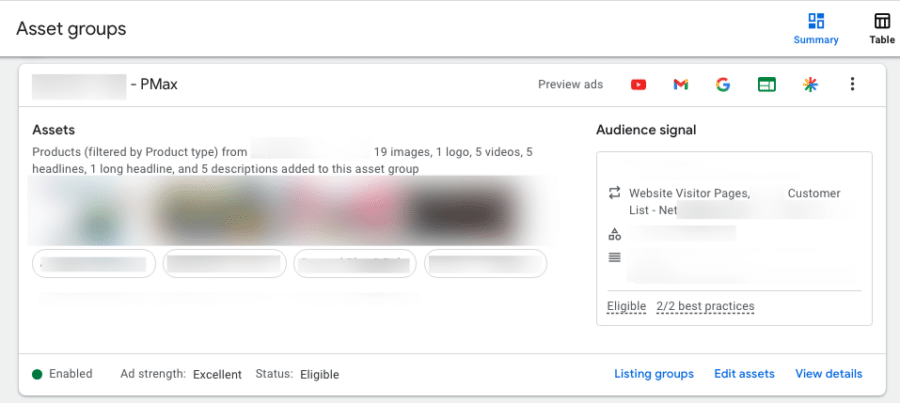
Here is what a well-configured Asset Group looks like within the Google Ads interface, showing the collection of assets and the associated audience signal.
Test your understanding!
Imagine your hotel also has a luxury spa that you want to promote. You decide to create a third Asset Group within your PMax campaign.
For this new "Spa Packages" Asset Group, what would you set for the following?
- Final URL:
- One example of a Headline:
- One example of an Image idea:
- One example of an Audience Signal:
Show answer
Here are some great examples:
- Final URL: The dedicated Spa page on your hotel's website (
yourhotel.com/spa). - Headline:
Unwind at Our Luxury SpaorBook a Relaxing Spa Day. - Image idea: A serene photo of your spa's relaxation area, a treatment room, or someone enjoying a massage.
- Audience Signal: An in-market audience for "Spas & Beauty Services" or a remarketing list of website visitors who viewed the spa page but didn't book.
4. Finalizing and Launching Your Campaign
Once your asset groups are built, the final steps are straightforward.
- Extensions (now called Assets): Just as with other campaign types, add Sitelinks, Callouts, and Call extensions. These provide extra information and make your ads more prominent. For a hotel, useful sitelinks could be "View Our Rooms," "Dining," and "Contact Us."
- Budget: Set a daily budget that you are comfortable with. As PMax reaches across all networks, it can spend its budget quickly. Start with a moderate amount, and you can increase it later once you see good performance.
- Review and Publish: Google will show you a summary of your entire campaign. Review your settings, asset groups, and budget one last time, and then click Publish campaign.
Congratulations! Your multi-faceted PMax campaign is now ready to go live and start finding guests for all aspects of your hotel business.
Conclusion
You have now walked through the entire process of creating and launching a strategic Performance Max campaign. By understanding how to tailor asset groups to specific services, you've moved beyond a simple setup to a sophisticated structure that gives Google's AI the best possible chance to succeed.
Key Takeaways:
- Always start by setting up your Hotel Properties Feed in Business Data.
- Launch with a "Maximize conversion value" bid strategy without a target ROAS to allow the campaign to gather data.
- The most effective PMax structure for a hotel involves creating separate Asset Groups for each distinct service (e.g., rooms, weddings, spa).
- Each Asset Group should have a unique and highly relevant set of assets (images, text, video), final URL, and audience signals.
- After building your asset groups, complete the setup by adding extensions and setting a daily budget.
What's Next?
Launching the campaign is just the beginning. The real work of a digital marketer involves monitoring, analyzing, and optimizing. In our next and final lesson of this module, we will learn how to evaluate the performance of PMax by analyzing asset and listing group reports, so you can understand what's working and make intelligent decisions to improve your results.