Hello! Welcome back.
In our last lesson, we established the strategic importance of Customer Lifetime Value (LTV) and Customer Acquisition Cost (CAC). We saw that to grow your hotel business profitably, you need to ensure the lifetime profit from a guest outweighs the cost of acquiring them. But how can we confidently measure the data needed for these calculations, especially when a guest's journey might span multiple visits to your website over weeks or months?
This brings us to the technical foundation of all modern digital marketing: the measurement stack. Your learning outcome for today is to describe the modern measurement stack: GA4, Google Tag Manager (GTM), and server-side tagging concepts.
Think of these tools as the central nervous system of your digital marketing. They collect, process, and analyze the data that tells you what's working and what isn't. Understanding their roles is crucial before we dive into the hands-on setup in the next module.
1. The Core Partnership: GA4 and GTM
Many people get confused about the difference between Google Analytics and Google Tag Manager. The best way to think about them is as a powerful partnership, not as competitors.
- Google Analytics 4 (GA4) is the destination. It's the analytics tool where you store, analyze, and report on user behavior. It answers the question: "What are people doing on my hotel website?"
- Google Tag Manager (GTM) is the delivery system. It's a management tool that allows you to deploy and manage tracking codes (called "tags") on your site without having to edit the code directly. It answers the question: "How do I collect the data I need and send it to the right places?"
Google Tag Manager vs Google Analytics
To solidify this distinction, please read the introductory sections of the article 'Google Tag Manager vs Google Analytics: The Definitive 2026 Guide' from Improvado. It does an excellent job of clarifying the unique roles of each tool.
Read from the beginning down to the comparison table in the section 'Google Tag Manager vs Google Analytics: The Key Differences'. Focus on the 'Key Takeaways' and the definitions of what GA4 and GTM each do. The comparison table is an especially useful summary.
Google Tag Manager (GTM): Your Control Center
As the article explained, GTM acts as a container on your website. Instead of asking a developer to add separate code snippets for Google Analytics, Meta Pixel, Google Ads, etc., you ask them to add the GTM container once. From then on, you can manage all your tracking tags from the GTM interface. This gives you, the marketer, immense speed and flexibility.
To understand how GTM works, it's essential to grasp its three core components: Tags, Triggers, and Variables.
Google Tag Manager tutorial for beginners 2025 || GTM Course
This 'Google Tag Manager tutorial for beginners' from Analytics Mania provides a brilliant conceptual overview. We'll focus on the sections that explain what GTM is and its core building blocks.
Please watch the following two segments: What is Google Tag Manager? (00:00 - 03:28) Tags, Triggers, and Variables (17:24 - 21:08) Pay close attention to the 'What, When, How' analogy used to explain the relationship between Tags, Triggers, and Variables.
To recap that excellent explanation:
- Tags (The "What"): These are the actual tracking codes. For example, a "GA4 Event Tag" or a "Meta Pixel Tag". What do you want to do? "I want to send a purchase event to GA4."
- Triggers (The "When"): These are the rules that tell a tag when to fire. For example, a trigger could be a page view, a form submission, or a button click. When do you want to do it? "When a guest lands on the booking confirmation page."
- Variables (The "How"): These provide additional information. They can be used in triggers (e.g., fire a tag only when the
Page URLvariable contains/thank-you) or in tags (e.g., send thePurchase Valuevariable along with the event). How exactly do you define the 'When' or add detail to the 'What'?
For your hotel, this means you could create a trigger for when someone clicks the "Check Availability" button, and use it to fire a GA4 tag to track that interaction, all without writing a single line of code.
2. The Problem with Traditional Tracking (Client-Side)
The system we've just described—where GTM running in a user's web browser directly sends data to Google, Meta, etc.—is called client-side tagging. The "client" is the user's browser.
For years, this was the standard. However, it now faces significant challenges:
- Ad Blockers & Privacy Features: Browsers like Safari (with Intelligent Tracking Prevention) and Firefox, as well as popular ad-blocking extensions, are increasingly blocking requests sent directly to known tracking domains like
google-analytics.comorfacebook.com. This results in incomplete and inaccurate data. - Website Performance: Each new marketing tool you add (analytics, ads, heatmaps, live chat) requires its own script. Loading all these scripts in the browser can slow down your website, harming user experience and SEO.
- Data Control: Data is sent directly from the user's browser to third-party vendors, giving you less control over what information is shared.
3. The Modern Solution: Server-Side Tagging
To address these challenges, the industry is moving towards server-side tagging.
In this setup, you introduce a middleman: a secure server that you control.
- The user's browser makes a single, lightweight data request to your own server (e.g.,
data.yourhotel.com). - This server, running a special server-side GTM container, receives the data.
- From your server, you can then process, enrich, or redact the data before forwarding it to multiple destinations like GA4, Google Ads, and the Meta Conversions API.
This diagram clearly shows the difference in data flow:
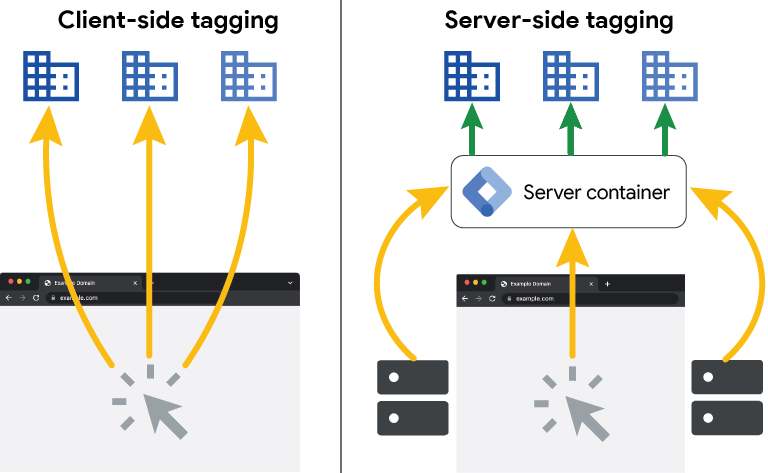
The benefits of this approach are significant:
- Increased Data Resiliency: Because the browser is sending data to your own domain (which is less likely to be blocked) instead of a third-party tracking domain, more data gets through.
- Improved Site Performance: Fewer heavy tracking scripts need to be loaded in the user's browser.
- Enhanced Security & Control: You can remove sensitive user information (like IP addresses) on your server before forwarding the data to third parties, helping with privacy compliance.
- Extended Cookie Lifetime: This is a crucial benefit. Server-side tagging allows you to set first-party cookies that are not subject to the 7-day or 24-hour limitations imposed by browsers like Safari. This is vital for tracking the long and complex journeys of guests planning a vacation.
This second diagram visualizes how the server acts as an intermediary for data enrichment:

Let's watch a short video that summarizes these concepts.
Google Tag Manager Server-side Tagging Tutorial 2026 || Server-side tracking with GTM
The expert from Analytics Mania provides a very clear explanation of server-side tagging, its benefits, and its drawbacks in this tutorial.
Watch just the introduction, from the beginning to 03:45. Focus on the explanation of how server-side differs from client-side and the summary of its pros and cons.
As the video mentions, the main drawbacks are added complexity and cost (for server hosting). However, for any business serious about data-driven marketing in 2026 and beyond, the benefits of improved data quality and control often outweigh these costs.
Test your understanding!
Imagine your hotel wants to track when a user clicks the "Book Spa Appointment" button and send this event to both GA4 and Meta Ads.
- Which tool would you use to define the button click as the condition for tracking?
- Which tool would you use to package the event data and send it to GA4 and Meta?
- Where would you go to build a report analyzing how many of these clicks came from your recent Instagram campaign?
- If you are concerned that many of your high-value guests use Safari and their tracking might be blocked, what architectural change would you consider for your measurement stack?
Show answer
- You would use a Trigger in Google Tag Manager (GTM).
- You would use Tags in Google Tag Manager (GTM) to send the data to GA4 and the Meta Pixel.
- You would go to Google Analytics 4 (GA4) to analyze the data and build reports.
- You would consider implementing server-side tagging to make your data collection more resilient to browser tracking restrictions.
Key Takeaways
- The Measurement Stack is a System: GA4, GTM, and Server-Side Tagging work together. GTM is the control center that feeds data into GA4, your analysis hub.
- GTM Provides Agility: By centralizing tag management, GTM allows you to implement and update tracking quickly without relying on developers for every change.
- Server-Side is the Future: While client-side tagging is still common, server-side tagging is the modern standard for robust, accurate, and privacy-conscious data collection. It's a key strategy for navigating the challenges of ad blockers and browser restrictions.
What's Next?
We have now covered the 'what' and 'why' of the modern measurement stack. You understand the roles of these essential tools and how they fit together to form the foundation of your data strategy.
In the next module, we will move from theory to practice. Our first lesson will be very hands-on: Set up a new Google Analytics 4 property and configure its data stream. This is the first practical step in building the measurement foundation for your hotel.