Introduction
Hello! In our last lesson on std::map, we saw how to check if a key exists using if (my_map.find(key) != my_map.end()). The find method doesn't return a boolean true or false; it returns something called an iterator. You used it to check against my_map.end(), but we didn't explore what iterators are or why they're so fundamental to the C++ Standard Template Library (STL).
Today, we will dive deep into that concept. Your goal for this lesson is to learn how to use iterators to traverse and manipulate container elements. We'll see that iterators are the "glue" of the STL, providing a powerful and consistent way to work with any collection, whether it's a std::vector, a std::map, or something else entirely. Understanding iterators unlocks the full power of C++'s standard library.
1. What is an Iterator and Why Do We Need It?
In your work with languages like Python or Java, you're used to iterating over collections with for-each loops. In C++, we've used range-based for loops for the same purpose. But what happens under the hood? How does the language provide a single, unified way to "walk through" data structures as different as a contiguous array (std::vector) and a node-based tree (std::map)?
The answer is the iterator. An iterator is an object that behaves like a pointer, "pointing" to an element within a container. It abstracts the process of traversal, giving you a standard set of operations to move through a sequence of elements, regardless of how the container stores them.

Let's start by reading a brief motivation for why iterators are so essential in C++.
The article "CS 225 | Iterators" from the University of Illinois provides an excellent, concise explanation of the problem that iterators solve.
Read the first section titled "Motivation for iterators". It will help you frame the purpose of this concept.
This next video clip reinforces the core idea, especially highlighting why iterators are non-negotiable for containers like std::map that don't have a simple numerical index.
In this clip from his "ITERATORS in C++" video, The Cherno explains the high-level concept of an iterator.
Watch from 0:40 to 2:00. Pay attention to his point about data structures that don't support simple indexing.
2. The Mechanics: Iterating with a std::vector
The best way to understand the mechanics of iterators is with std::vector, a container you're already familiar with. An iterator-based loop has three main parts:
- Initialization: Get an iterator that points to the first element using the
.begin()method. - Condition: Loop as long as the iterator has not reached the "end" of the container, which is checked against the
.end()method. - Advancement: Move the iterator to the next element using the increment operator (
++).
Crucially, the iterator returned by .end() does not point to the last element. It points to a conceptual position one-past-the-end. This is why the loop condition is it != container.end(), not it <= container.end().
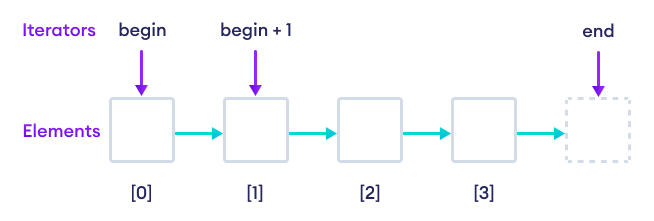
The Explicit Iterator Loop
Let's see how this looks in code, compared to the loops you already know.
#include <iostream>
#include <vector>

int main() {
    std::vector<int> values = {1, 2, 3, 4, 5};

    // Method 1: Classic index-based loop
    std::cout << "Index-based loop: ";
    for (int i = 0; i < values.size(); ++i) {
        std::cout << values[i] << " ";
    }
    std::cout << std::endl;

    // Method 2: Range-based for loop (uses iterators implicitly!)
    std::cout << "Range-based loop: ";
    for (int value : values) {
        std::cout << value << " ";
    }
    std::cout << std::endl;

    // Method 3: Explicit iterator-based loop
    std::cout << "Iterator-based loop: ";
    for (std::vector<int>::iterator it = values.begin(); it != values.end(); ++it) {
        // Use the dereference operator (*) to get the value
        std::cout << *it << " ";
    }
    std::cout << std::endl;
}
Output for all three loops:
1 2 3 4 5
Notice a few things in the iterator-based loop:
- The type is verbose:
std::vector<int>::iterator. Modern C++ often usesautoto simplify this:for (auto it = values.begin(); ...). - We use
*itto dereference the iterator and get the value it's pointing to, just like with a C-style pointer. - Range-based for loops are just "syntactic sugar" for this iterator loop. The compiler writes the more verbose version for you.
This video provides a great walkthrough of this exact comparison.
Let's return to The Cherno's video. This section demonstrates the explicit iterator loop and compares it with the loops you already know.
Watch from 3:54 to 8:51. The video first shows the index-based and range-based loops, then breaks down the explicit iterator loop piece by piece.
3. Iterators Across Different Containers
The real power of iterators is that the same syntax works for almost any container. Let's revisit std::map from our last lesson. Since maps are not stored in a simple, contiguous block of memory, we must use iterators to traverse them (even when using a range-based loop).
When you dereference an iterator from a std::map, you get a std::pair object. You can access its key with .first and its value with .second. A more convenient way is to use the arrow operator (->) which combines dereferencing and member access: it->first and it->second.
This is the most important part of the video. It shows how the same iterator pattern you just saw for a vector applies to a std::map.
Watch from 10:18 to 13:10. He demonstrates iterating through a map and accessing the key (it->first) and value (it->second). This directly builds on our last lesson.
Here is the code from the video for your reference:
#include <iostream>
#include <string>
#include <map> // Note: the video uses unordered_map, but the principle is identical for std::map

int main() {
    std::map<std::string, int> scores;
    scores["Cherno"] = 5;
    scores["C++"] = 2;

    for (auto it = scores.begin(); it != scores.end(); ++it) {
        const std::string& key = it->first;
        int& value = it->second;
        std::cout << key << " = " << value << std::endl;
    }
}
4. Manipulating Elements and Iterator Types
So if range-based for loops are simpler, why ever use an explicit iterator loop? The main reason is manipulation.
- Modifying Elements: You can change the value of an element by dereferencing its iterator.
- Erasing/Inserting Elements: Range-based loops are not designed for adding or removing elements from the container while you are iterating. Doing so requires the careful control that an explicit iterator provides.
std::vector<int> data = {10, 20, 30};
auto it = data.begin(); // 'it' points to 10
++it;                   // 'it' now points to 20

*it = 25; // The vector is now {10, 25, 30}
Constant and Reverse Iterators
The STL provides several iterator variations for different needs. Two important ones are:
const_iterator: A read-only iterator. You can dereference it to read the value, but you cannot use it to modify the value. These are obtained usingcbegin()andcend(). Usingconstiterators is a good practice for ensuring code safety when you only intend to read data.reverse_iterator: Traverses the container backwards. You get them usingrbegin()(which points to the last element) andrend()(which points to one position before the first element).
Iterators in C++ STL - GeeksforGeeks
This GeeksforGeeks article serves as a great reference. We'll use it to quickly review the different iterator-returning functions and operations.
Skim the tables and code examples in the sections "Container Iterator Functions" and "Iterators Operations". This will give you a good overview of begin, cbegin, rbegin, ++, *, etc.
5. Practical Exercise: Finding and Modifying an Element
Let's put this into practice. You'll write a function that finds a specific value in a vector of integers and, if found, multiplies it by 10.
- Set up your
mainfunction. Include<iostream>and<vector>. - Create a
std::vector<int>with some sample data, e.g.,{5, 12, 23, 8, 23, 42}. - Write an explicit iterator
forloop to traverse the vector. - Inside the loop, get the current value by dereferencing the iterator (
*it). - Check if the current value is
23. - If it is, update the value in the vector by assigning to the dereferenced iterator:
*it = *it * 10;. - After your loop finishes, use a simple range-based
forloop to print out all the elements of the vector to verify that they were changed correctly.
Your final output should look like this:
5 12 230 8 230 42
This exercise demonstrates the core reason for using explicit iterators: inspecting and manipulating elements as you traverse a collection.
Conclusion
You've now demystified one of the most powerful and initially confusing aspects of the C++ STL. Iterators are a core concept that enables the library's components to work together seamlessly.
Key Takeaways:
- An iterator is a unified, pointer-like interface for traversing any STL container.
- The standard traversal loop uses
begin()to start, checks againstend()to stop, and uses++to advance. - The
end()iterator points one past the last element. - You use the
*operator to dereference an iterator and access its element. - Range-based
forloops are syntactic sugar for an iterator-based loop. - Explicit iterator loops are essential when you need to modify the container's elements (e.g., changing values, erasing, or inserting) during traversal.
- Specialized iterators like
const_iterator(for read-only access) andreverse_iterator(for backward traversal) provide additional capabilities.
Next Up
In this lesson, we focused on using iterators for manual traversal. However, their true power is realized when you combine them with the STL's rich set of algorithms. In the next lesson, we will see how you can pass pairs of iterators to functions like std::sort and std::find to perform complex operations on any container with a single line of code.