Introduction
Hello! In our previous lessons, you've worked with std::vector to manage sequential data and mastered using range-based for loops to iterate over collections efficiently. This is great for ordered lists, but often in programming, we need to associate one piece of data with another—a key with a value.
Given your experience with Python, you're likely familiar with dictionaries, and with Java, you've probably used HashMap. These are examples of associative containers. Today, we'll explore C++'s primary equivalent: std::map. Your goal for this lesson is to learn how to use std::map to store and retrieve data as key-value pairs.
We will cover what a std::map is, how to perform basic operations like inserting, accessing, and finding elements, and how it compares to other data structures. This knowledge is fundamental for tasks ranging from data analysis to managing complex application states.
1. What is an Associative Container?
Unlike a std::vector, which stores elements in a sequence accessible by an integer index, an associative container uses a key to look up a corresponding value. This is perfect for situations like storing user IDs and user objects, configuration settings, or, in a data analysis context, counting the frequency of words in a text.
std::map is the C++ Standard Template Library's (STL) primary sorted associative container. Let's start with a video that explains the core concept.
Maps in C++ (std::map and std::unordered_map)
The video "Maps in C++" by The Cherno provides an excellent introduction to why you would choose a map over a vector.
Watch from the beginning to 1:45. Focus on the core problem that maps solve: efficient lookup based on a custom key, rather than an integer index.
Under the Hood: Sorted Keys and Performance
A key characteristic of std::map is that it keeps its elements sorted by key. This is because it is typically implemented as a self-balancing binary search tree (specifically, a Red-Black Tree).
This has two important implications:
- Ordered Traversal: When you iterate over a
std::map, the elements are guaranteed to be visited in key-sorted order. - Logarithmic Time Complexity: Finding, inserting, or deleting an element is very efficient, taking O(log N) time, where N is the number of elements in the map. This means the map scales well even with large amounts of data.
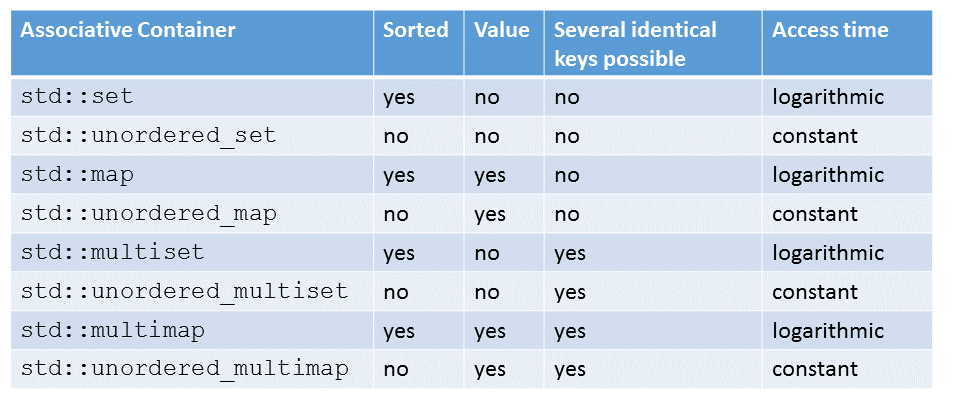
This table provides a nice overview of where std::map fits within the STL's family of associative containers.
2. Working with std::map
To use std::map, you need to include the <map> header. The basic syntax for declaring a map is:
std::map<KeyType, ValueType> my_map;
Let's build a simple example to store the scores of players in a game. The key will be the player's name (std::string) and the value will be their score (int).
#include <iostream>
#include <map>
#include <string>

int main() {
    std::map<std::string, int> player_scores;
}
Inserting and Updating Elements
The most intuitive way to insert or update elements is using the subscript [] operator, just like with a Python dictionary.
// Inserting new elements
player_scores["Alice"] = 1000;
player_scores["Bob"] = 850;

// Updating an existing element
player_scores["Alice"] = 1150;
If you use the [] operator with a key that doesn't exist, it will automatically insert a new element with that key and a default-constructed value (e.g., 0 for int, an empty string for std::string) before performing the assignment.
Accessing Elements: [] vs. .at()
You can also retrieve a value using the [] operator. However, there's a crucial difference between using [] and the .at() member function for access.
my_map[key]: Ifkeyexists, it returns a reference to its value. Ifkeydoes not exist, it inserts a new element withkeyand a default value, then returns a reference to that new value.my_map.at(key): Ifkeyexists, it returns a reference to its value. Ifkeydoes not exist, it throws anstd::out_of_rangeexception and does not modify the map.
This distinction is critical for safe programming. Let's watch a segment that clarifies this behavior.
Maps in C++ (std::map and std::unordered_map)
Let's return to The Cherno's video. This section explains the important differences between the subscript operator [] and the .at() function.
Watch from 16:32 to 20:33. Pay close attention to how [] can unintentionally insert elements and why you cannot use it on a const map.
Safely Checking for a Key
Because [] can silently add elements, you often need to check if a key exists before trying to access it. The standard way to do this is with the .find() member function.
my_map.find(key)searches for an element with the givenkey.- If the key is found, it returns an iterator pointing to the key-value pair.
- If the key is not found, it returns an iterator equal to
my_map.end().
The canonical way to check for a key is:
#include <iostream>
#include <map>
#include <string>

int main() {
    std::map<std::string, int> player_scores;
    player_scores["Alice"] = 1150;
    player_scores["Bob"] = 850;

    std::string search_key = "Charlie";

    if (player_scores.find(search_key) != player_scores.end()) {
        // Key was found, safe to access
        std::cout << search_key << "'s score is: " << player_scores.at(search_key) << std::endl;
    } else {
        // Key was not found
        std::cout << search_key << " is not in the score map." << std::endl;
    }

    // Output: Charlie is not in the score map.
    return 0;
}
Iterating Over a std::map
This is a great opportunity to apply what you learned in the last lesson about range-based for loops. When you iterate over a map, each element is a std::pair containing the key and the value.
Since C++17, you can use structured bindings to unpack this pair directly, which is very clean and readable.
Maps in C++ (std::map and std::unordered_map)
This final clip from The Cherno demonstrates how to iterate through a map using modern C++ features, which directly builds on our last lesson.
Watch from 21:01 to 24:45. The video shows iteration using both the older pair.first/pair.second method and the modern structured bindings syntax [key, value]. Notice how using std::map results in alphabetically sorted output.
Here's a complete example using structured bindings:
#include <iostream>
#include <map>
#include <string>

int main() {
    std::map<std::string, int> player_scores = {
        {"Bob", 850},
        {"Charlie", 950},
        {"Alice", 1150}
    };

    std::cout << "Player Scores (alphabetical order):" << std::endl;
    for (const auto& [name, score] : player_scores) {
        std::cout << "- " << name << ": " << score << std::endl;
    }

    return 0;
}
Expected Output:
Player Scores (alphabetical order):
- Alice: 1150
- Bob: 850
- Charlie: 950
Notice the output is sorted by the key (the name), demonstrating one of the core features of std::map.
3. A Quick Look at std::unordered_map
For completeness, it's important to know about std::map's sibling, std::unordered_map.
| Feature | std::map |
std::unordered_map |
|---|---|---|
| Underlying Structure | Self-Balancing Binary Search Tree | Hash Table |
| Ordering | Keys are sorted | No inherent order |
| Performance | O(log N) for access, insert, delete | Average O(1) for access, insert, delete |
| Header | <map> |
<unordered_map> |
The choice between them depends on your needs:
- Use
std::mapwhen you need sorted keys or when you require guaranteed worst-case performance. - Use
std::unordered_mapwhen insertion/access speed is the top priority and you don't care about the order of elements.
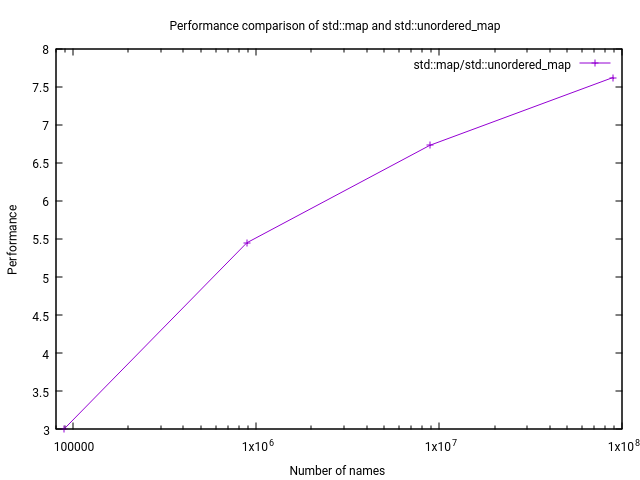
For someone in data analysis, this performance difference can be significant with large datasets. This graph illustrates how std::unordered_map's performance advantage grows as the number of elements increases.
For now, we will focus on std::map. It's a robust and versatile default choice.
Map in C++ STL - GeeksforGeeks
For a quick reference on all the operations we've discussed, the GeeksForGeeks article is a great summary.
Skim through the sections on "Inserting Elements", "Accessing Elements", "Finding Elements", "Traversing", and "Deleting Elements". This will serve as a good text-based reinforcement of the video clips.
4. Practical Exercise: Word Frequency Counter
Let's put this all together. A classic use case for a map is counting the frequency of items in a collection. You'll write a program that counts the occurrences of each word in a list.
- Set up your
mainfunction. Include<iostream>,<string>,<vector>, and<map>. - Create a
std::vector<std::string>to hold your input words.std::vector<std::string> words = {"hello", "world", "c++", "is", "fun", "hello", "c++", "world", "c++"}; - Create a
std::map<std::string, int>to store the word counts. Let's call itword_counts. - Iterate through the
wordsvector using a range-basedforloop. - Inside the loop, for each
word, use the[]operator on yourword_countsmap to increment its count. The line of code for this is surprisingly simple:
Think about why this works. If the// For each word from the vector... word_counts[word]++;wordis not yet in the map,word_counts[word]will insert it and initialize its count to0. The++operator then increments it to1. If the word already exists, it simply increments the existing count. - Finally, iterate through your
word_countsmap and print out each word and its frequency. Use structured bindings for a clean and readable loop.
Your final output should be sorted alphabetically by word and look like this:
c++: 3
fun: 1
hello: 2
is: 1
world: 2
Conclusion
You've now learned how to use std::map, one of the most useful containers in the C++ STL. It provides an efficient way to manage key-value data, a pattern that appears constantly in software development.
Key Takeaways:
std::mapis a sorted associative container that stores unique keys and their associated values.- It's implemented as a Red-Black Tree, which guarantees O(log N) performance for lookups, insertions, and deletions, and keeps keys in sorted order.
- The subscript operator
map[key]is convenient for insertion and updates, but be aware that it inserts a default value if the key doesn't exist. - Use
map.at(key)for access when you expect the key to exist, as it throws an exception if it doesn't. - The standard way to safely check for a key is
if (map.find(key) != map.end()). - Iterating with a range-based
forloop and structured bindings (for (const auto& [key, value] : my_map)) is the modern, preferred way to traverse a map.
Next Up
In this lesson, you saw that methods like .find() don't return the element itself, but something called an "iterator". We used it to check against .end(), but iterators are a much more powerful and general concept. In our next lesson, we will dive deep into iterators, exploring how they provide a uniform mechanism for accessing elements across all STL containers, not just maps.