Introduction
Hello! In our last lesson, we explored iterators and saw how they provide a unified way to "walk through" any STL container. We learned that an iterator pair, like container.begin() and container.end(), defines a sequence of elements. This was a crucial piece of theory.
Today, you'll see the practical payoff of that concept. This lesson focuses on applying common STL algorithms, specifically std::sort and std::find, to these iterator-defined ranges. Instead of writing manual loops for common tasks like searching and sorting, you can use these powerful, highly-optimized, and pre-built functions. This is a cornerstone of modern C++ programming, leading to code that is more readable, maintainable, and often faster.
1. The Power of <algorithm>: Searching with std::find
The <algorithm> header in C++ is a treasure trove of functions that perform operations on sequences of elements. The key idea is that they don't care about the container itself, only about the iterators you give them.
Let's start with one of the most common tasks: searching for an element. For this, we use std::find.
Its signature is straightforward:std::find(first_iterator, last_iterator, value_to_find)
It searches the range [first, last) and returns an iterator.
- If the value is found, it returns an iterator pointing to the first occurrence of that value.
- If the value is not found, it returns the
last_iteratoryou passed in (e.g.,container.end()).
This "return end() on failure" pattern is a fundamental STL idiom and directly uses what we learned in the last lesson.
#include <iostream>
#include <vector>
#include <algorithm> // Don't forget to include this!

int main() {
    std::vector<int> numbers = {10, 25, 8, 42, 15, 25};
    int value_to_find = 42;

    // Use std::find to search the vector
    auto it = std::find(numbers.begin(), numbers.end(), value_to_find);

    // Check the result
    if (it != numbers.end()) {
        std::cout << "Found " << value_to_find << " in the vector." << std::endl;
    } else {
        std::cout << value_to_find << " was not found." << std::endl;
    }
}
This next video provides a clear, practical demonstration of how to use std::find and interpret its result.
C++ STL algorithm - search (find, find_if, search, adjacent_find) | Modern Cpp Series Ep. 143
This video from Mike Shah's Modern C++ series provides an excellent walkthrough of std::find.
Watch from 01:23 to 05:40. He explains the function's parameters, demonstrates its use, and shows how to check the returned iterator against .end() to determine if the search was successful.
2. Searching with Conditions: std::find_if
What if you don't want to find a specific value, but rather the first element that satisfies a certain condition? For example, the first even number, or the first string longer than 10 characters. For this, we use std::find_if.
It's very similar to std::find, but instead of a value, its third argument is a predicate—a function (or function-like object) that takes an element and returns true or false. Since you're familiar with languages like Python and Java, you'll feel right at home using a lambda expression for this.
#include <iostream>
#include <vector>
#include <algorithm>

int main() {
    std::vector<int> numbers = {1, 3, 5, 8, 9, 12};

    // Find the first even number
    auto it = std::find_if(numbers.begin(), numbers.end(), [](int n) {
        // This is the predicate lambda
        return (n % 2) == 0;
    });

    if (it != numbers.end()) {
        std::cout << "The first even number is: " << *it << std::endl; // Output: 8
    } else {
        std::cout << "No even numbers found." << std::endl;
    }
}
This is significantly more flexible and powerful for complex search criteria, a common need in data analysis.
Let's return to the same video to see std::find_if in action.
C++ STL algorithm - search (find, find_if, search, adjacent_find) | Modern Cpp Series Ep. 143
Mike Shah now explains std::find_if, showing how to use a lambda function as a predicate.
Watch from 09:32 to 14:00. Pay close attention to how he defines the lambda function and passes it to std::find_if. This pattern is extremely common in modern C++.
3. Sorting Collections with std::sort
Sorting is another fundamental operation. The STL provides std::sort, an incredibly efficient algorithm (typically an Introsort, which is a hybrid of Quicksort, Heapsort, and Insertion sort).
The basic version takes a pair of random-access iterators (which std::vector and std::array provide) and sorts the elements in-place.
#include <iostream>
#include <vector>
#include <algorithm>

void print_vector(const std::vector<int>& vec) {
    for (int n : vec) {
        std::cout << n << " ";
    }
    std::cout << std::endl;
}

int main() {
    std::vector<int> numbers = {10, 2, 8, 42, 15};
    std::cout << "Before sort: ";
    print_vector(numbers);

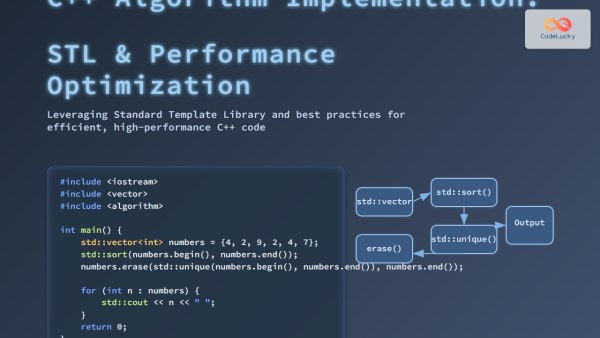
    std::sort(numbers.begin(), numbers.end());

    std::cout << "After sort:  ";
    print_vector(numbers);
}
Output:
Before sort: 10 2 8 42 15
After sort:  2 8 10 15 42
Custom Sorting
By default, std::sort uses the < operator to compare elements. But what if you want to sort in descending order, or sort a collection of custom objects by a specific property?
std::sort has an overload that accepts a third argument: a custom comparison function. Again, a lambda is the perfect tool for this. The comparator lambda should take two arguments (of the element type) and return true if the first argument should come before the second in the sorted order.
Let's see a demonstration of both default and custom sorting.
Sort, Stable_sort, Partial_sort and Nth_element - Algorithms from the C++ standard library
The channel BitsOfQ has a great video covering the standard library's sorting algorithms. This first clip focuses on the primary std::sort function.
Watch from 00:21 to 01:57. The video explains the basic usage of std::sort and then shows how to provide a custom comparison using both std::greater (for descending order) and a custom lambda function.
4. Choosing the Right Algorithm
A key skill in using the STL is knowing which algorithm to choose. Using std::find on an unsorted vector is fine, but if you know your data is sorted, you can do much better.
For example, std::binary_search can check for an element's existence in O(log n) time on a sorted range, which is drastically faster than the O(n) linear scan of std::find. This is a trade-off you often make in data processing: spend time sorting upfront to enable much faster searching later.
The article below provides excellent advice on this and reinforces the main idea of this lesson.
STL Algorithms in C++: From Beginner to Expert - DEV Community
This DEV Community article, "STL Algorithms in C++: From Beginner to Expert", offers concise best practices for using the algorithm library.
Read the sections titled "Practice #1: Prefer Algorithms Over Manual Loops" and "Practice #2: Choose the Right Algorithm". These sections summarize the core philosophy of using the STL and highlight the performance difference between std::find and std::binary_search.
One final point on sorting: std::sort does not guarantee the relative order of equal elements. If you need this guarantee (e.g., sorting a list of people by name, while preserving a pre-existing sort order by age for people with the same name), you should use std::stable_sort. This is a critical distinction in data analysis. The BitsOfQ video explains this concept well from 02:08 to 03:37 if you're interested.
5. Practical Exercise: Sorting and Finding Songs
Let's combine these concepts in an exercise that reflects your interests. We'll create a list of songs and then sort and search through them.
Instructions:
- Create a
structnamedSongwith two members:std::string title;andint year;. - In
main, create astd::vector<Song>and initialize it with a few songs from different decades. - Sort the vector: Use
std::sortwith a custom lambda to sort the songs by year in ascending order. - Print the sorted list: Use a range-based
forloop to print the title and year of each song, confirming they are sorted. - Find a song: Use
std::find_ifto find the first song in your vector from the 1980s (i.e., whereyear >= 1980andyear < 1990). - Print the result: If a song is found, print its title and year. Otherwise, print a "not found" message.
Here's a starting point for your main function:
#include <iostream>
#include <vector>
#include <string>
#include <algorithm>

struct Song {
    std::string title;
    int year;
};

int main() {
    std::vector<Song> playlist = {
        {"Bohemian Rhapsody", 1975},
        {"Like a Prayer", 1989},
        {"Smells Like Teen Spirit", 1991},
        {"Billie Jean", 1983},
        {"Stairway to Heaven", 1971}
    };

    // Your code here for sorting and finding...
}
This exercise will solidify your understanding of how to apply std::sort and std::find_if to a vector of custom objects using lambda functions for the logic.
Conclusion
You have now added some of the most powerful tools from the C++ standard library to your arsenal. By understanding how to combine iterators with algorithms, you can write expressive, efficient, and robust code for a huge variety of common programming tasks.
Key Takeaways:
- The
<algorithm>header contains dozens of functions that operate on iterator ranges ([first, last)). std::findperforms a linear search for a specific value.std::find_ifperforms a linear search for the first element that satisfies a given predicate (often a lambda).- Both
findandfind_ifreturnend()if the search is unsuccessful. std::sortefficiently sorts a range in-place. By default, it uses the<operator.- You can provide a custom comparison function (like a lambda) to
std::sortto define any sorting logic you need. - A core principle of effective C++ is to prefer standard algorithms over manual loops whenever possible.
Next Up
You've learned how to create containers, traverse them with iterators, and process their contents with algorithms. But so far, our data has been hard-coded into the source file. In the next lesson, we'll address this by learning how to read from and write to text files using C++ file streams (ifstream, ofstream). This will enable you to build programs that can load, process, and save data, a complete and fundamental workflow.