Introduction
Hello! In our last lesson, you mastered some of the most powerful tools in the C++ Standard Template Library: the algorithms in the <algorithm> header. We saw how to use std::sort and std::find_if with iterators and lambdas to process data stored in containers like std::vector.
So far, however, all our data has been "ephemeral"—it disappears the moment the program ends. Today, we'll solve that. This lesson introduces C++ file streams, which allow your programs to read from and write to text files. This is the crucial step that enables your applications to load, process, and save data, making them truly useful. We'll be working with ofstream (output file stream) for writing and ifstream (input file stream) for reading, both found in the <fstream> header. You'll find they behave very similarly to std::cout and std::cin, which will make them feel familiar.
1. Writing to a Text File with ofstream
The simplest way to save data is to write it to a plain text file. In C++, we use the ofstream class for this. The process is straightforward:
- Include the header:
#include <fstream> - Create an
ofstreamobject: When you create the object, you pass the filename as an argument. This opens the file for writing.- If the file doesn't exist, it will be created.
- If the file does exist, its contents will be overwritten by default.
- Check if the file opened: It's critical to verify that the file was successfully opened before you try to write to it. A file might fail to open due to permissions issues or an invalid path.
- Write to the file: Use the insertion operator
<<, just like you do withstd::cout. - Close the file: The file is closed automatically when the
ofstreamobject goes out of scope (a principle called RAII). However, it's also good practice to sometimes close it explicitly with the.close()member function.
Here is a basic example:
#include <iostream>
#include <fstream>
#include <string>

int main() {
    // 1. Create an ofstream object for writing
    std::ofstream outFile("greetings.txt");

    // 2. Check if the file was opened successfully
    if (!outFile.is_open()) {
        std::cerr << "Error: Could not open the file for writing." << std::endl;
        return 1; // Indicate an error
    }

    // 3. Write data to the file
    std::string line1 = "Hello, C++ File I/O!";
    outFile << line1 << "\n";
    outFile << "This is the second line." << "\n";

    // 4. The file is closed automatically when outFile goes out of scope.
    //    Or you could explicitly call: outFile.close();

    std::cout << "Successfully wrote to greetings.txt" << std::endl;

    return 0;
}
Now, let's watch a video that demonstrates this process live.
C++ file handling for beginners! The easiest way to read/write into text files!
The video "C++ file handling for beginners!" from the CodeBeauty channel provides a clear, step-by-step guide to writing your first file.
Watch from 01:52 to 06:15. The presenter explains how to open a file, check if it's open, write to it, and then shows the resulting text file in the file explorer. This visual confirmation is very helpful.
2. Reading from a Text File with ifstream
Once data is in a file, you need a way to read it back. For this, we use the ifstream class. The process mirrors writing:
- Create an
ifstreamobject, passing the filename. - Check if the file opened successfully. This is even more important for input, as trying to read from a non-existent file is a common error.
- Read from the file. You have two main options:
- Formatted input (
>>): This works likestd::cin, reading data and stopping at whitespace (spaces, tabs, newlines). It's useful for reading individual numbers or words. - Line-based input (
std::getline): This is often more useful. It reads an entire line of text until it hits a newline character. This is the preferred method for parsing text files, which we'll do in the next lesson.
- Formatted input (
A common and robust pattern for reading an entire file is to use std::getline in a while loop condition.
#include <iostream>
#include <fstream>
#include <string>

int main() {
    // 1. Create an ifstream object for reading
    std::ifstream inFile("greetings.txt");

    // 2. Check if the file was opened successfully
    if (!inFile.is_open()) {
        std::cerr << "Error: Could not open the file for reading." << std::endl;
        return 1;
    }

    std::string line;
    std::cout << "Contents of greetings.txt:" << std::endl;

    // 3. Loop as long as getline successfully reads a line
    while (std::getline(inFile, line)) {
        std::cout << line << std::endl;
    }

    // 4. File is closed automatically when inFile goes out of scope.

    return 0;
}
The while (std::getline(inFile, line)) construct is elegant. The std::getline function returns a reference to the stream (inFile), which is then evaluated in a boolean context. The stream evaluates to true as long as it's in a "good" state. When getline reaches the end of the file and can't read any more lines, it sets an internal state flag in the stream, causing it to evaluate to false, which gracefully ends the loop.
Let's see this in action.
C++ file handling for beginners! The easiest way to read/write into text files!
Returning to the CodeBeauty video, we'll now see the reading part.
Watch from 10:28 to 14:15. This section demonstrates how to open a file for reading and use the while(getline(...)) loop to read and print all of its content.
3. Under the Hood: The Stream Hierarchy and File Modes
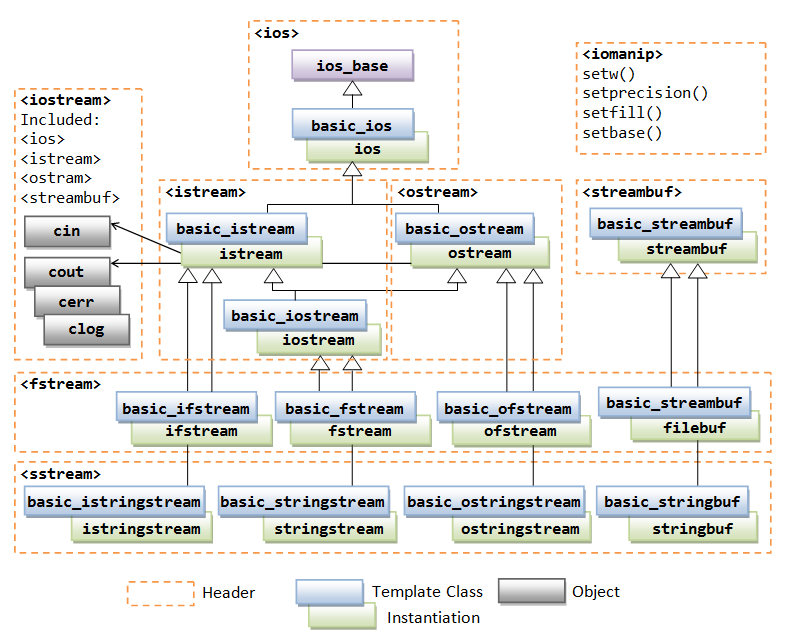
Your intuition that ifstream/ofstream work like cin/cout is correct. They are all part of the same class hierarchy. ifstream inherits from istream (the class of cin), and ofstream inherits from ostream (the class of cout). This is why they share the same operators and behaviors.
File Modes
What if you don't want to overwrite a file, but add to it instead? You can control the behavior of the file stream by providing a second argument when you open it, called a file mode.
The most common modes are:
std::ios::out: Open for writing (the default forofstream).std::ios::in: Open for reading (the default forifstream).std::ios::app: Append mode. All output is added to the end of the file.
You can combine modes with the bitwise OR operator (|). For example, to open a file to both append and read, you would use std::ios::app | std::ios::in.
// This will add a new line to the end of our existing file
std::ofstream outFile("greetings.txt", std::ios::app);

if (outFile.is_open()) {
    outFile << "This line was appended." << "\n";
}
The following reading will give you a concise overview of the most important file modes and provides clear code examples for appending to a file.
The article "Basic file I/O" from Learn C++ is an excellent reference for file operations.
Read the sections titled "File modes" and the code example that follows it. The table clearly lists the different modes, and the example shows exactly how to use std::ios::app.
This article also briefly mentions buffered output. This is an optimization where the system collects your output in memory and writes it to the disk in larger, more efficient chunks. This is why it's important to properly close a file—it ensures any remaining data in the buffer is "flushed" to the disk.
4. Practical Exercise: Saving and Loading a Playlist
Let's apply what you've learned. We will extend the exercise from the previous lesson by saving our Song playlist to a file and then reading it back.
Instructions:
- Start with the
Songstruct and thestd::vector<Song>from the last lesson. - Write a function
save_playlist:- It should take a
const std::string& filenameandconst std::vector<Song>& playlistas parameters. - Inside the function, open an
ofstreamwith the given filename. - Perform an error check to ensure the file opened.
- Loop through the vector and write each song to the file. For simplicity, write the year and title on the same line, separated by a comma. Example:
1975,Bohemian Rhapsody.
- It should take a
- Modify
main:- Call
save_playlistto write your playlist to a file namedplaylist.txt. - After saving, add code to read
playlist.txtback. - Use an
ifstreamand awhile(getline(...))loop. - For this exercise, simply print each raw line you read from the file to the console. This will confirm that both your writing and reading logic works.
- Call
Here is a skeleton to get you started:
#include <iostream>
#include <fstream>
#include <vector>
#include <string>

struct Song {
    std::string title;
    int year;
};

// Your save_playlist function implementation here...
void save_playlist(const std::string& filename, const std::vector<Song>& playlist) {
    std::ofstream outFile(filename);
    if (!outFile.is_open()) {
        std::cerr << "Could not open " << filename << " for writing." << std::endl;
        return;
    }

    for (const auto& song : playlist) {
        outFile << song.year << "," << song.title << "\n";
    }

    std::cout << "Playlist saved to " << filename << std::endl;
}

int main() {
    std::vector<Song> playlist = {
        {"Bohemian Rhapsody", 1975},
        {"Like a Prayer", 1989},
        {"Smells Like Teen Spirit", 1991},
        {"Billie Jean", 1983},
        {"Stairway to Heaven", 1971}
    };

    // Save the playlist to a file
    save_playlist("playlist.txt", playlist);

    // Now, read the file back and print its contents to verify
    std::cout << "\nReading from playlist.txt:\n";
    std::ifstream inFile("playlist.txt");
    if (!inFile.is_open()) {
        std::cerr << "Could not open playlist.txt for reading." << std::endl;
        return 1;
    }

    std::string line;
    while (std::getline(inFile, line)) {
        std::cout << line << std::endl;
    }

    return 0;
}
This exercise directly sets the stage for our next lesson, where we'll take those raw text lines and parse them back into Song objects.
Conclusion
You've now learned the fundamentals of C++ file I/O, a critical skill for building applications that can interact with the outside world. You can now save the state of your program to disk and load it back later.
Key Takeaways:
- Include the
<fstream>header for file operations. - Use
std::ofstreamto write to files, which works much likestd::cout. By default, it creates or overwrites files. - Use
std::ifstreamto read from files, which works much likestd::cin. - Always check if a file was opened successfully using
is_open()or by testing the stream object directly (if (!my_file)). - The
while (std::getline(file, line))pattern is the standard, robust way to read a text file line by line. - You can use file modes like
std::ios::appto change the default behavior and append to files instead of overwriting them.
Next Up
In this lesson, we successfully read our playlist.txt file as a series of raw strings. The next logical step is to make that data useful again. In the next lesson, we will learn how to parse a simple text file into a std::vector of structs. You'll learn techniques to split strings and convert them into the right data types, completing the full cycle of saving and loading complex data.