Hello! Welcome to the next lesson in our journey through C.
Introduction
In our last lesson, you mastered the fundamental mechanics of pointers: using the address-of operator (&) to get a memory address and the dereference operator (*) to access the data at that address. We even saw a preview of today's topic with the scanf function, which uses an address to modify a variable outside of its own scope.
Today, we will formalize this concept. You will learn to distinguish between pass-by-value and pass-by-reference and, most importantly, how to use pointers to write functions that can modify their arguments. This is one of the most common and powerful applications of pointers in C.
Understanding this mechanism is crucial for writing efficient C code. It allows functions to operate on data without making expensive copies and is the standard way to have a function "return" multiple values. This technique will be a cornerstone for both the complex desktop applications and the low-level Arduino programming you're aiming for.
The Default: Pass-by-Value
By default, C passes all function arguments by value. This means that when you call a function, the function receives a copy of the arguments, not the original variables themselves. Any changes the function makes are to its own local copies, which are destroyed when the function returns. The original variables in the calling function remain untouched.
This is a common source of confusion for new C programmers. Let's see it in action.
#include <stdio.h>

void increment(int num) {
    printf("  Inside increment, received value: %d\n", num);
    num = num + 1; // Modify the local copy
    printf("  Inside increment, new value: %d\n", num);
}

int main() {
    int value = 10;
    printf("Before calling increment, value is: %d\n", value);

    increment(value);

    printf("After calling increment, value is: %d\n", value); // Did it change?

    return 0;
}
If you compile and run this, the output will be:
Before calling increment, value is: 10
  Inside increment, received value: 10
  Inside increment, new value: 11
After calling increment, value is: 10
Notice that value in main is unchanged. To understand exactly why this happens at the memory level, the following video provides an excellent explanation using the concept of stack frames.
Pointers as function arguments - call by reference
This video from mycodeschool demonstrates the problem with pass-by-value and visualizes how local variables are stored on the program's stack during a function call.
Watch from 00:41 to 11:12. The video will: Present the exact problem we just saw. Explain why the variables in main and increment are separate entities with different memory addresses. Visualize the stack, showing how a new 'stack frame' is created for each function call with its own local variables. Summarize this mechanism as 'call by value'.
As the video explains, the num in increment and the value in main are completely separate variables in memory. The function only receives the value 10, not a connection to the original value variable.
The Solution: Simulating Pass-by-Reference with Pointers
So, how can we write a function that can modify a variable from its caller? The answer lies in what you've already learned: we pass the address of the variable.
If the function knows the memory address of the original variable, it can use the dereference operator (*) to reach back into the caller's stack frame and modify the data stored there. This technique is commonly called pass-by-reference.
Here is the corrected increment function:
#include <stdio.h>

// The parameter is now a pointer to an integer
void increment(int *p_num) {
    printf("  Inside increment, received address: %p\n", (void *)p_num);
    printf("  Value at that address: %d\n", *p_num);

    // Dereference the pointer to modify the original value
    *p_num = *p_num + 1;

    printf("  Inside increment, new value at address: %d\n", *p_num);
}

int main() {
    int value = 10;
    printf("Before calling increment, value is: %d (at address %p)\n", value, (void *)&value);

    // Pass the ADDRESS of 'value' using the & operator
    increment(&value);

    printf("After calling increment, value is: %d\n", value); // It changed!

    return 0;
}
Now, the output will be what we originally intended:
Before calling increment, value is: 10 (at address 0x7ffc...)
  Inside increment, received address: 0x7ffc...
  Value at that address: 10
  Inside increment, new value at address: 11
After calling increment, value is: 11
It worked! The following resources will walk you through this solution step-by-step.
Pointers as function arguments - call by reference
Let's return to the mycodeschool video, which now explains the pointer-based solution.
Watch from 11:12 to 13:44. This segment shows exactly how to modify the code to use pointers, passing an address and dereferencing it to change the original value.
The classic example used to teach this concept is a function that swaps two values. Let's look at a textual explanation with excellent visualizations.
Understanding Functions, Memory, and Pointers in C
The article 'Understanding Functions, Memory, and Pointers in C' provides a fantastic breakdown of this topic. We'll look at both the failed and successful attempts to write a swap function.
Please read 'Part 3: Pointers Demystified'. Focus on these two subsections: 'The Truth About Pass By Value': This covers the swap_broken example, reinforcing why pass-by-value doesn't work. Pay attention to the stack frame visualization. '"Pass By Reference" is Really Pass By Value of an Address': This shows the swap_working example, explaining how passing pointers solves the problem. The memory diagrams here are key to understanding the mechanism.
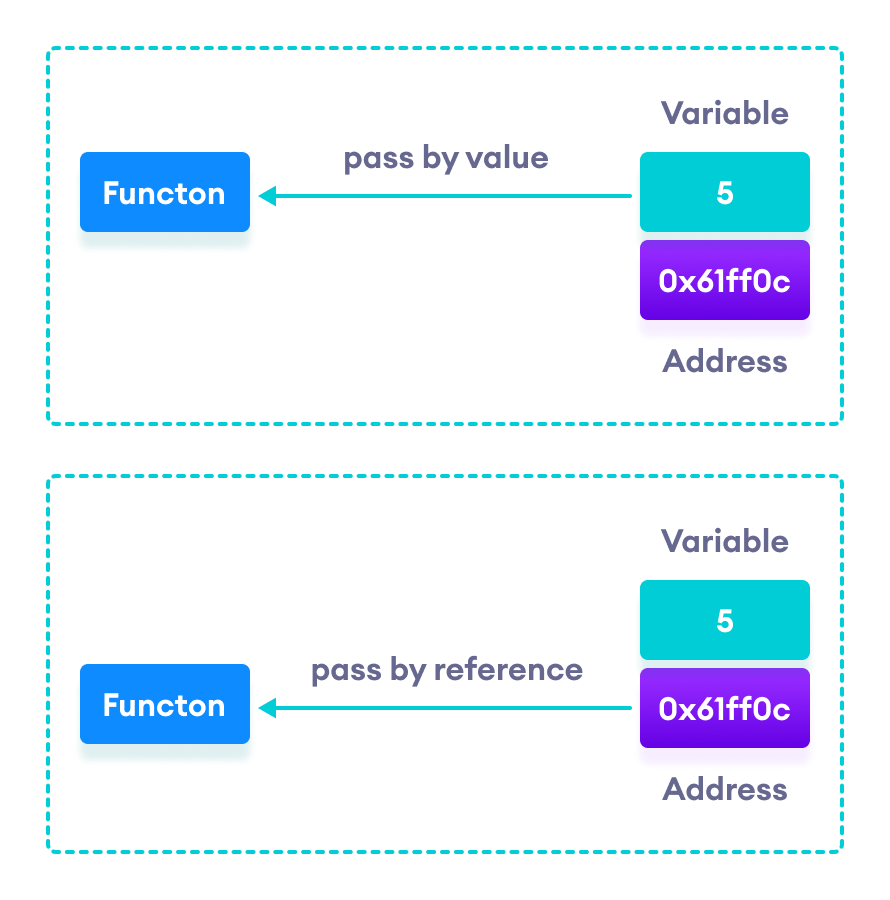
This image provides a simple, direct comparison of the two concepts.
A Deeper Insight: C is Always Pass-by-Value
Here is a crucial point that will deepen your "under the hood" understanding. Many programmers will talk about "pass-by-reference" in C, but technically, C is always a pass-by-value language, with no exceptions.
When we pass a pointer to a function, we are not passing a magical "reference." We are passing the value of the address. The function receives a copy of the memory address.
increment(value);-> A copy of the integer10is passed.increment(&value);-> A copy of the address (e.g.,0x7ffc...) is passed.
Because the function has a copy of the address, it can follow it to the original data. This simulates pass-by-reference behavior. The article you just read, from blog.jyotiprakash.org, summarizes this beautifully in "The Key Insight" box. This is an important distinction from languages like C++, which has true reference types, or how object references are handled in Java and Python.
Hands-on Practice: Multi-return with Pointers
A very common use for this pattern in C is to allow a function to "return" multiple values. Since a function can only have one actual return value, we use pointers to pass additional results back to the caller.
Your Task:
Write a program that calculates the area and circumference of a circle. Your main function should get the radius from the user, but the calculations should happen in a separate function.
- Create a file named
circle_calc.c. - Write a function with the following signature:
void calculate_circle(double radius, double *p_area, double *p_circumference) - Inside this function, calculate the area () and circumference (). Store the results in the memory locations pointed to by
p_areaandp_circumference. Use3.14159for . - In
main, declare variables forradius,area, andcircumference. - Prompt the user to enter a radius.
- Call
calculate_circle, passing theradiusby value and theareaandcircumferencevariables by reference (i.e., pass their addresses). - Print the calculated area and circumference from
mainto verify that the function worked correctly.
Click here for a solution if you get stuck.
#include <stdio.h>

const double PI = 3.14159;

/*
 * Calculates the area and circumference of a circle.
 * radius: The radius of the circle (input, passed by value).
 * p_area: Pointer to a double where the calculated area will be stored (output).
 * p_circumference: Pointer to a double where the calculated circumference will be stored (output).
 */
void calculate_circle(double radius, double *p_area, double *p_circumference) {
    // Check for null pointers as a good safety practice
    if (p_area != NULL) {
        *p_area = PI * radius * radius;
    }
    if (p_circumference != NULL) {
        *p_circumference = 2 * PI * radius;
    }
}

int main() {
    double radius = 0.0;
    double area = 0.0;
    double circumference = 0.0;

    printf("Enter the radius of the circle: ");
    scanf("%lf", &radius);

    // Pass radius by value, and the addresses of area and circumference
    // so the function can write its results into them.
    calculate_circle(radius, &area, &circumference);

    printf("Radius: %f\n", radius);
    printf("Calculated Area: %f\n", area);
    printf("Calculated Circumference: %f\n", circumference);

    return 0;
}
Conclusion
You've now learned one of the most practical and essential C programming patterns. By understanding how to pass addresses to functions, you can write code that is both efficient and powerful.
Key Takeaways:
- Pass-by-value: C's default mechanism. Functions get copies of arguments, and original variables are unaffected.
- Pass-by-reference (simulated): Achieved by passing a pointer to a variable. The function gets the variable's address, allowing it to dereference the pointer and modify the original data.
- Syntax: You use
&in the function call (my_func(&var);) and a pointer type*in the function declaration (void my_func(int *p_var);). - Use Cases: This is essential for modifying function arguments, "returning" multiple values, and avoiding the performance cost of copying large data structures like
structs.
In our next lesson, we will build directly on this by exploring pointer arithmetic. You'll learn how to use pointers to navigate through blocks of memory, which is the key to understanding the deep relationship between pointers and arrays in C.