Hello! Welcome back to our exploration of pointers in C.
Introduction
In our last lesson, we established what a pointer is: a variable that holds a memory address. You learned how to declare a pointer and use the address-of operator (&) to assign the memory location of another variable to it. We ended by confirming that the value of a pointer is indeed the address of the variable it points to.
But simply holding an address isn't very useful on its own. The real power comes from being able to use that address to access and manipulate the data stored there. This lesson focuses on that crucial step. You will learn to use the dereference operator (*) to "follow" a pointer to its destination and interact with the data it points to.
Mastering this concept is fundamental for your goals. Whether you're building efficient desktop applications or programming an Arduino, you'll be constantly using pointers to manage memory and interact with different parts of your system. This lesson unlocks the practical, active side of using pointers.
A Quick Review: The Address-Of Operator (&)
As a brief recap, the & operator retrieves the memory address of a variable.
int score = 100;
int *p_score = &score; // p_score now holds the address of score
You have already used this operator to initialize a pointer. It's also used in other common scenarios. For example, you have previously used the scanf function to read user input. Have you ever wondered why it requires an ampersand before the variable name?
int age;
printf("Enter your age: ");
scanf("%d", &age); // We pass the ADDRESS of age
The reason is that scanf needs to modify the age variable. Since C functions operate on copies of their arguments (a concept called "pass-by-value"), we can't just pass age. If we did, scanf would modify its own local copy, and the original age variable in main would be unchanged. By passing &age, we give scanf the memory address where it should store the user's input, allowing it to modify the original variable. This is a perfect, practical example of why passing addresses is so important.
The Main Event: The Dereference Operator (*)
Now, let's learn how to go in the other direction. If you have a pointer holding an address, how do you get the value stored at that address? For this, we use the dereference operator, which, somewhat confusingly, is also the asterisk (*).
The context is key:
- In a declaration,
*creates a pointer:int *p; - When used with an existing pointer variable,
*dereferences it:*p
When you dereference a pointer, you are essentially saying, "Go to the address stored in this pointer and give me the value that lives there."
To get a clear visual and verbal explanation of this process, the following video is excellent.
you will never ask about pointers again after watching this video
This video segment clearly explains the syntax and meaning of the dereference operator.
Watch from 04:26 to 05:51. Pay close attention to the verbalization trick: when you see *px by itself, think 'the thing pointed to by px'.
Reading and Writing Through Pointers
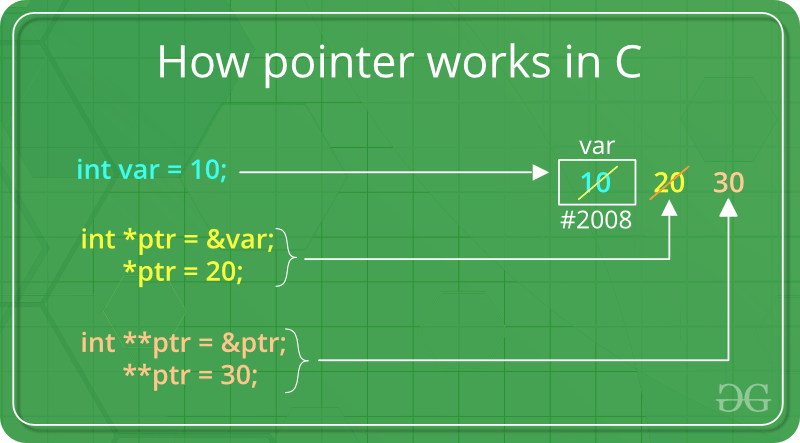
Dereferencing isn't just for reading; you can also use it to write data, modifying the original variable indirectly.
Let's look at a text resource that provides clear code examples for both reading and writing.
Pointers in C/C++ - Complete Guide with Examples
The following article, 'Pointers in C/C++ - Complete Guide with Examples', gives concise examples of how to use the dereference operator.
Read the section titled "Dereferencing pointers - using the thing pointed to by". It clearly demonstrates how *px can be used on the right side of an assignment to read a value and on the left side to write a value.
As the article shows:int y = *px; reads the value from the address px points to.*px = 10; writes the value 10 to the address px points to.
This image provides a great visual summary of the process.
Hands-On Practice
Given your preference for hands-on learning, let's put this into practice. We'll write a program that uses both the & and * operators to indirectly manipulate a variable.
Your Task:
- Create a file named
dereference.c. - Write a C program that performs the following steps:
- Declare an integer variable, let's call it
fuel_level, and initialize it to100. - Declare a pointer to an integer,
p_fuel. - Assign the address of
fuel_leveltop_fuel. - Print the initial value of
fuel_leveland the address it is stored at. - Now, use the dereference operator
*with your pointerp_fuelto change the value offuel_levelto75. Do not use thefuel_levelvariable directly in this assignment (e.g.,*p_fuel = 75;). - Print the new value of
fuel_levelto confirm it was changed via the pointer. - Declare a new integer variable
current_fueland initialize it by reading the value from the pointer (current_fuel = *p_fuel;). - Print the value of
current_fuelto confirm the read was successful.
- Declare an integer variable, let's call it
Compile and run your code as you did in the previous lesson:gcc -Wall -g -o dereference dereference.c && ./dereference
Click here for a solution if you get stuck.
#include <stdio.h>

int main() {
    int fuel_level = 100;
    int *p_fuel = NULL;

    p_fuel = &fuel_level;

    printf("Initial fuel level: %d\n", fuel_level);
    printf("Address of fuel_level: %p\n\n", (void *)p_fuel);

    // Now, let's change the value using the pointer
    printf("Using pointer to decrease fuel...\n");
    *p_fuel = 75;

    printf("Current fuel level (read from original variable): %d\n", fuel_level);

    // Let's read the value using the pointer
    int current_fuel = *p_fuel;
    printf("Current fuel level (read from pointer): %d\n\n", current_fuel);

    printf("Both variables show the same, updated value. The change was successful!\n");

    return 0;
}
For a more comprehensive walkthrough that covers many of the scenarios you might encounter, this video provides a live coding demonstration.
C_72 Pointers in C- part 2 |Address of(&) and Indirection (*) operator in Pointers I C Programming
This video from Jenny's Lectures CS IT provides a practical coding session that demonstrates the concepts we've discussed.
Watch the coding demonstration from 15:01 to 20:30. The instructor shows how to declare variables and pointers, assign addresses, and then use both the original variable and the dereferenced pointer to print and change values. This reinforces exactly what you just did in your own exercise.
Conclusion
Today you've completed the other half of the puzzle. You now know how to both get a memory address and, more importantly, how to use that address to read and write data. This ability to indirectly manipulate variables is one of C's most defining characteristics.
Key Takeaways:
- The address-of operator (
&) gets a variable's memory address. We use it to tell pointers where to point and to give functions likescanfthe ability to modify our variables. - The dereference operator (
*), when applied to a pointer variable, accesses the data at the stored memory address. - You can read a value through a pointer:
value = *pointer;. - You can write a value through a pointer, which modifies the original variable:
*pointer = new_value;.
In our next lesson, we will combine these concepts to see one of the most common and powerful uses of pointers: passing arguments to functions by reference. This will allow you to write functions that can efficiently modify their inputs, a technique essential for building complex programs and data structures.