Hello! Welcome to the first lesson of our second module, where we'll dive deep into one of C's most powerful and defining features: pointers.
Introduction
In our last lesson, we explored the difference between character arrays and pointers to string literals. You saw that a declaration like const char *ptr_str = "hello"; creates a pointer ptr_str that doesn't hold the string itself, but rather the memory address of where the read-only string "hello" is stored.
Today, we will formalize and expand on that idea. This lesson officially introduces pointers, explaining what they are and how they relate to a program's memory. Since you're interested in what happens "under the hood" and have goals involving embedded systems, mastering pointers is non-negotiable. They are the primary tool in C for direct memory manipulation, which is essential for performance-critical code and hardware interaction.
By the end of this lesson, you will be able to explain what a pointer is and how it stores a memory address.
The Foundation: Memory and Addresses
Before we can talk about pointers, we must first solidify our mental model of computer memory. In your work with languages like Python or Java, the memory location of a variable is an abstraction you rarely need to consider. In C, it's front and center.
At its core, you can think of a computer's memory as a long, sequential series of numbered mailboxes. Each mailbox has a unique number (its address) and can hold a small amount of data (typically one byte).
Understanding Memory Management, Part 1: C
To start, let's read a brief section that establishes this conceptual model of memory as a giant table of values, each with an address.
Read the first two subsections, "How Programs Use Memory" and "Storing a List". Focus on the core idea that memory is a sequence of addressable locations where values are stored. Don't worry too much about the string-sorting example itself; the key concept is the Memory Address | Value table.
When you declare a variable in C, the compiler reserves one or more of these "mailboxes" to store its value. The number of bytes reserved depends on the variable's data type.
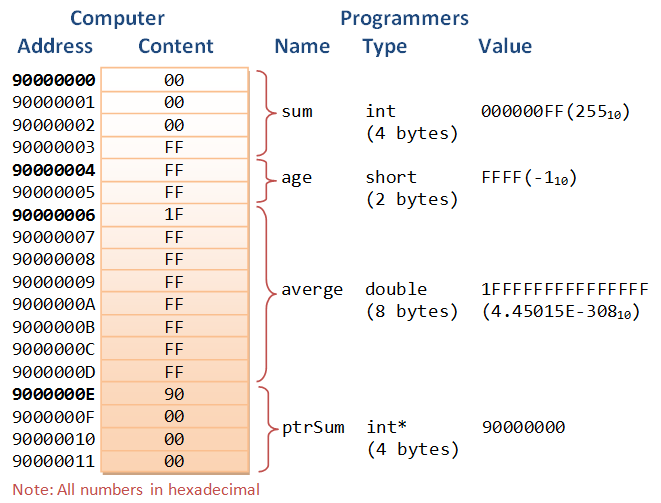
What is a Pointer?
Now for the main event. The concept is surprisingly simple, and this video puts it beautifully.
you will never ask about pointers again after watching this video
This short video provides a very direct and clear definition of a pointer. It cuts right to the core of the idea.
Watch from 00:50 to 02:12. The key takeaway is the simple but powerful statement: 'a pointer is just a value that happens to be an address'.
As the video explains, a pointer is a variable whose value is the memory address of another variable.
That's it. Instead of storing an int, a float, or a char, a pointer stores an address. We say it "points to" the data at that address.

Declaring Pointers and Getting Addresses
To work with pointers in C, you need two fundamental operators:
- The address-of operator (
&): A unary operator that returns the memory address of a variable. - The asterisk (
*): Used in a declaration to create a pointer variable.
Let's see how they work together. If you have an integer variable:int num = 42;
You can declare a pointer that is capable of storing the address of an integer:int *ptr;
This declaration reads as "ptr is a pointer to an int". It's crucial that the pointer's type matches the type of the variable it will point to. This is because the compiler needs to know what kind of data is at that address (e.g., is it a 1-byte char or a 4-byte int?).
Finally, you can assign the address of num to the pointer:ptr = #
Now, the variable ptr contains the memory address of num.
A TUTORIAL ON POINTERS AND ARRAYS IN C
The following reading from a classic C tutorial provides a more formal and detailed walkthrough of these concepts. It reinforces the ideas of variables, memory, and introduces the syntax for pointer declaration and the address-of operator.
Read all of Chapter 1, "What is a pointer?" (starts on page 5). Pay special attention to: The distinction between a variable's value (rvalue) and its address (lvalue). The syntax for declaring a pointer (int *ptr;). The use of the & operator to get an address (ptr = &k;). The sample code in Program 1.1, which we will replicate.
A Practical Demonstration
Let's write a small program, similar to Program 1.1 from the PDF, to see this in action. This exercise will help you solidify the difference between a variable's value, its address, a pointer's value, and a pointer's own address.
- Create a file named
pointer_intro.c. - Type or paste the following code:
#include <stdio.h>
int main() {
int num = 99; // A regular integer variable.
int *p_num = NULL; // A pointer to an integer, initialized to NULL.
p_num = # // Assign the address of 'num' to the pointer 'p_num'.
printf("--- Analyzing Variables and Pointers ---\n\n");
// Use '%d' for the value of the integer.
printf("Value of 'num': %d\n", num);
// Use '%p' to print addresses in a standard hexadecimal format.
// &num gives us the memory address of the variable 'num'.
printf("Address of 'num': %p\n", (void *)&num);
printf("\n----------------------------------------\n\n");
// The value stored inside the pointer is the address it points to.
printf("Value of pointer 'p_num': %p\n", (void *)p_num);
// The pointer itself is a variable, so it also has its own address in memory.
printf("Address of pointer 'p_num': %p\n", (void *)&p_num);
// We can also see the size of these variables in memory.
printf("\n--- Memory Sizes ---\n\n");
printf("sizeof(num): %zu bytes\n", sizeof(num));
printf("sizeof(p_num): %zu bytes\n", sizeof(p_num));
return 0;
}
Note: The (void *) cast is used with %p because printf technically expects a void * for printing generic pointer addresses. It's a good practice for ensuring code is portable and warning-free.
-
Compile and run it from your terminal:
gcc -Wall -g -o pointer_intro pointer_intro.c && ./pointer_intro -
Analyze your output. You should see that the "Address of 'num'" is the exact same hexadecimal value as the "Value of pointer 'p_num'". This is the core concept in action! You will also notice that the "Address of pointer 'p_num'" is different—proving it is its own variable.
Conclusion
In this lesson, we established the fundamental concepts of memory addresses and pointers. You've learned that a pointer is simply a variable that holds a memory address, and you've seen the syntax for declaring pointers (*) and obtaining a variable's address (&).
Key Takeaways:
- Every variable in a C program resides at a specific memory address.
- A pointer is a special variable designed to store a memory address.
- The address-of operator (
&) retrieves the memory address of a variable. - The asterisk (
*) is used in a declaration to specify that a variable is a pointer (e.g.,int *p;). - A pointer has a type (e.g.,
int *,char *) which tells the compiler what kind of data it points to. - A pointer is a variable itself, so it has its own memory address and size (which is typically 4 or 8 bytes, depending on your system's architecture).
You might be wondering, "Why go to all this trouble?" In our next lesson, we will answer that question by exploring the other side of the coin: using the dereference operator (*) to access and manipulate the data at the address a pointer is holding. This will unlock one of the primary uses of pointers: passing arguments to functions by reference.