Hello! Let's dive into our next lesson on C pointers.
Introduction
In our last lesson, we saw how to use pointers to simulate "pass-by-reference," allowing a function to modify a variable in its caller's scope. We did this by passing the variable's address (&var) and using the dereference operator (*p_var) to access its value.
Today, we'll explore what happens when we perform arithmetic operations like addition and subtraction directly on pointers. This is known as pointer arithmetic, and it is the key to understanding the deep and powerful relationship between pointers and arrays in C. Mastering this concept will give you a fundamental "under the hood" view of how C handles contiguous blocks of memory, a skill essential for both performance-critical applications and low-level embedded systems programming.
The Core Principle of Pointer Arithmetic
When you perform arithmetic on a regular integer, x + 1 simply adds one to its value. With pointers, it's different. The C compiler is smart; it knows the type of data the pointer points to.
When you add an integer n to a pointer p, the address that p holds is not increased by n bytes. Instead, it is increased by n * sizeof(type), where type is the data type the pointer points to.
Let's break this down:
- If
pis anint *andsizeof(int)is 4 bytes,p + 1advances the address by 4 bytes, pointing to the next integer in memory. - If
pis achar *andsizeof(char)is 1 byte,p + 1advances the address by 1 byte, pointing to the next character. - If
pis adouble *andsizeof(double)is 8 bytes,p + 1advances the address by 8 bytes, pointing to the next double.
This automatic scaling is what makes pointer arithmetic so powerful for navigating arrays.
To see this in action, let's watch a short video that demonstrates the concept with an integer array.
Master Pointer Arithmetic In 10 Minutes (The Ultimate Guide For C Programmers).
The video 'Master Pointer Arithmetic In 10 Minutes' provides a clear, concise introduction to this topic.
Watch from the beginning to 05:41. Focus on how incrementing the pointer (p++ or p + 1) doesn't add 1 to the raw memory address, but instead moves it by sizeof(int) to point to the next element in the array.
The Deep Connection Between Pointers and Arrays
Now for one of the most important concepts in C: the relationship between pointers and arrays.
In most situations, when you use the name of an array in your code, it decays into a pointer to the array's first element.
Given the declaration int arr[10];, the expression arr is equivalent to &arr[0].
This has a profound consequence: array indexing is just a convenient syntax for pointer arithmetic. The expression arr[i] is defined by the C standard to be exactly equivalent to *(arr + i).
Let's visualize this:
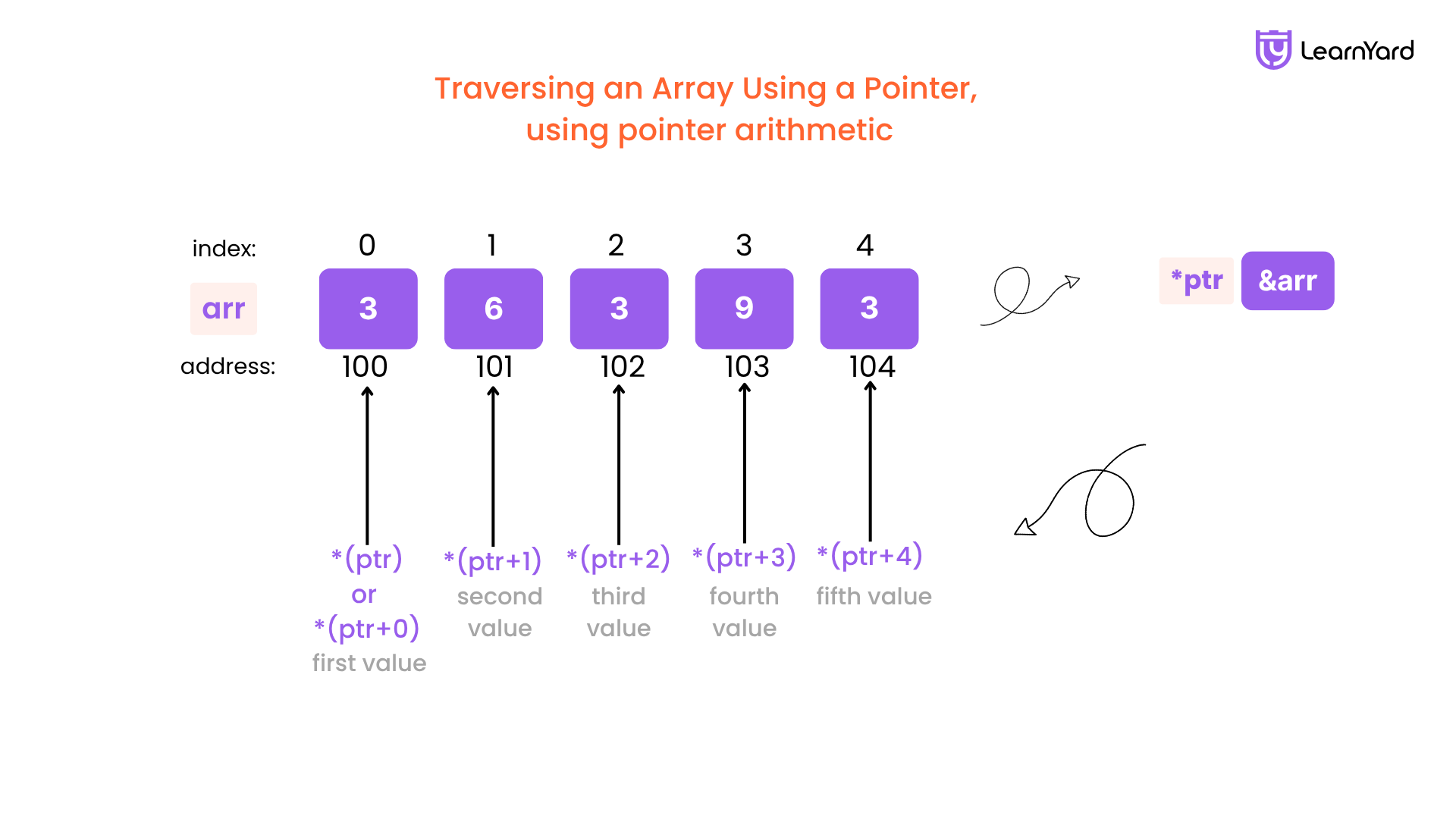
To get a more formal understanding, the following reading breaks down pointer arithmetic and its connection to arrays in detail.
Understanding Pointers in C: A Deep Dive into Memory and Control
The article 'Understanding Pointers in C' provides a great textual explanation of these concepts.
Please read Section 5, 'Pointer Arithmetic,' and Section 6, 'Pointers and Arrays: The Subtle Connection.' Pay close attention to the equivalence arr[i] == *(arr + 2) and the explanation of how an array name 'decays' into a pointer.
Traversing Arrays with Pointers
With this knowledge, we can now iterate through an array using a pointer instead of an index. This is a very common idiom in C programming.
Here's an example of a for loop that prints all elements of an array using three slightly different but equivalent methods:

Note that while the image shows C++ code, the syntax and concepts for this specific example are identical in C.
A key difference to remember is that an array name is a constant address, whereas a pointer is a variable.
- You can do
p++to make a pointer variable point to the next element. - You cannot do
arr++, becausearrrepresents a fixed location in memory that cannot be changed.
A Common Pitfall and an "Under the Hood" Look
A common mistake for beginners is to think they need to manually calculate the offset. For example, they might write p = p + sizeof(int). This is wrong! The compiler already does this for you.
So what happens if you do this? The pointer will advance by sizeof(int) * sizeof(int) bytes, jumping far ahead in memory and leading to bugs.
The following video does an excellent job of demonstrating this mistake and, fitting your interest in how things work at a lower level, even shows the assembly code generated by the compiler to prove how pointer arithmetic is correctly handled.
you will never ask about pointer arithmetic after watching this video
This video from the 'Low Level' channel explains exactly why manually adding sizeof is wrong and what the compiler does instead.
Watch from the beginning to 07:12. The key takeaways are: The common mistake of writing p_person += sizeof(struct person). The correct way: p_person += 1, and why the compiler understands this. (Optional but interesting) The demonstration in the assembly code (around 06:30) where adding 1 to the pointer results in the compiler adding 0x44 (68 bytes), the correct size of the struct.
Hands-on Practice: Summing an Array
Let's apply what you've learned. Your task is to write a function that calculates the sum of elements in an integer array using pointer arithmetic.
- Create a file named
array_sum.c. - Write a function with the signature
int sum_array(int *arr, int size). - Inside
sum_array, use a loop that iteratessizetimes. In each iteration, dereference the pointer to get the current element's value, add it to a running total, and then increment the pointer to move to the next element. Do not use the[]array indexing operator. - In
main, create an integer array, call yoursum_arrayfunction, and print the result to verify it works correctly.
Click here for a solution if you get stuck.
#include <stdio.h>

/*
 * Calculates the sum of elements in an integer array using pointer arithmetic.
 * arr: A pointer to the first element of the array.
 * size: The number of elements in the array.
 * Returns the sum of the elements.
 */
int sum_array(int *p_start, int size) {
    int total = 0;
    int *p_end = p_start + size; // Calculate the end address (one past the last element)

    // Loop while our moving pointer is before the end address
    while (p_start < p_end) {
        total += *p_start; // Add the value at the current address
        p_start++;         // Move the pointer to the next integer
    }

    return total;
}

// An alternative implementation using a for loop with a counter
int sum_array_for_loop(int *arr, int size) {
    int total = 0;
    for (int i = 0; i < size; i++) {
        // *(arr + i) accesses the i-th element without modifying 'arr'
        total += *(arr + i);
    }
    return total;
}

int main() {
    int my_numbers[] = {10, 20, 30, 40, 50};
    int count = sizeof(my_numbers) / sizeof(my_numbers[0]);

    int sum = sum_array(my_numbers, count);

    printf("The array contains: ");
    for(int i = 0; i < count; i++) {
        printf("%d ", my_numbers[i]);
    }
    printf("\n");

    printf("The sum of the array elements is: %d\n", sum);

    // Verifying with the for-loop version
    int sum2 = sum_array_for_loop(my_numbers, count);
    printf("The sum calculated with the for-loop version is: %d\n", sum2);

    return 0;
}
Conclusion
You've now uncovered the mechanics behind one of C's most fundamental features. Understanding that arrays are essentially contiguous blocks of memory and that pointers are the tool for navigating them is a huge step toward mastering the language.
Key Takeaways:
- Pointer arithmetic is scaled: Adding
nto a pointer increases its address byn * sizeof(type). - Arrays decay to pointers: An array name like
arris usually equivalent to a pointer to its first element,&arr[0]. - Indexing is syntactic sugar:
arr[i]is identical to*(arr + i). - Iteration with pointers: You can traverse an array by creating a pointer to its first element and incrementing it in a loop (
p++) until you reach the end.
In our previous lessons, all the variables and arrays we've created were stored in a memory region called the stack. This memory is managed automatically for us. In the next lesson, we will explore a different memory region called the heap, where you can request and manage memory yourself using malloc() and free(). This will allow you to create data structures whose size isn't known until your program is running.