In our last lesson, we established the strategic difference between broad head terms and specific long-tail keywords, concluding that for most conversion-focused campaigns, long-tail keywords offer a more efficient path to profitability. This session transitions from that strategic framework to hands-on analysis.
Today, you will learn how to use Google Keyword Planner, the foundational tool for any Google Ads practitioner. Our goal is to move beyond theory and equip you with the practical skills to evaluate a keyword list using real-world data. By the end of this lesson, you will be able to analyze keywords based on their search volume, advertiser competition, and estimated bid costs. Mastering this tool is not just about pulling data; it's about interpreting that data to make informed strategic decisions, a core competency you will be expected to demonstrate in any digital marketing interview.
Getting Started: Accessing and Understanding the Tool
Google Keyword Planner is housed within the Google Ads platform. Before we dive into its features, it's crucial to understand a key detail about data accuracy. Your ability to see precise data versus broad ranges often depends on your account's activity level.
How To Use The Google Keyword Planner (Beginner's Keyword Tutorial)
This short clip from the "Ben Heath - Google Ads" channel explains a critical nuance about data visibility in Keyword Planner.
Watch this important note on how an inactive account can affect the data you see. The advice to run a very small campaign to unlock precise data is a valuable, practical tip used by many professionals.
Once inside your Google Ads account, you can find the tool under Tools & Settings > Planning > Keyword Planner. You will be presented with two primary options.
How to do Google Ads Keyword Research in 2025
This segment from Aaron Young's channel provides a quick and clear demonstration of how to navigate to the Keyword Planner.
Watch this simple path to locate the tool.
The two choices, "Discover new keywords" and "Get search volume and forecasts," serve different purposes. The following reading explains this distinction perfectly.
Google Keyword Planner: How to Find Keywords, Search Volume ...
This section from the ALM Corp guide clearly defines the two core functions of Keyword Planner and when to use each.
Read the text under the heading "The Two Core Features You Need to Understand," starting from the explanation of each feature. This distinction is key to an efficient workflow: one is for exploration, the other for validation.
For today's objective of evaluating a pre-existing keyword list, you would typically use "Get search volume and forecasts." However, the data columns we are about to analyze are present in both views.
Deconstructing the Data: The Three Pillars of Evaluation
After you input your keywords, Keyword Planner presents a table of data. To make strategic decisions, you must understand what these columns mean and, more importantly, what they imply.
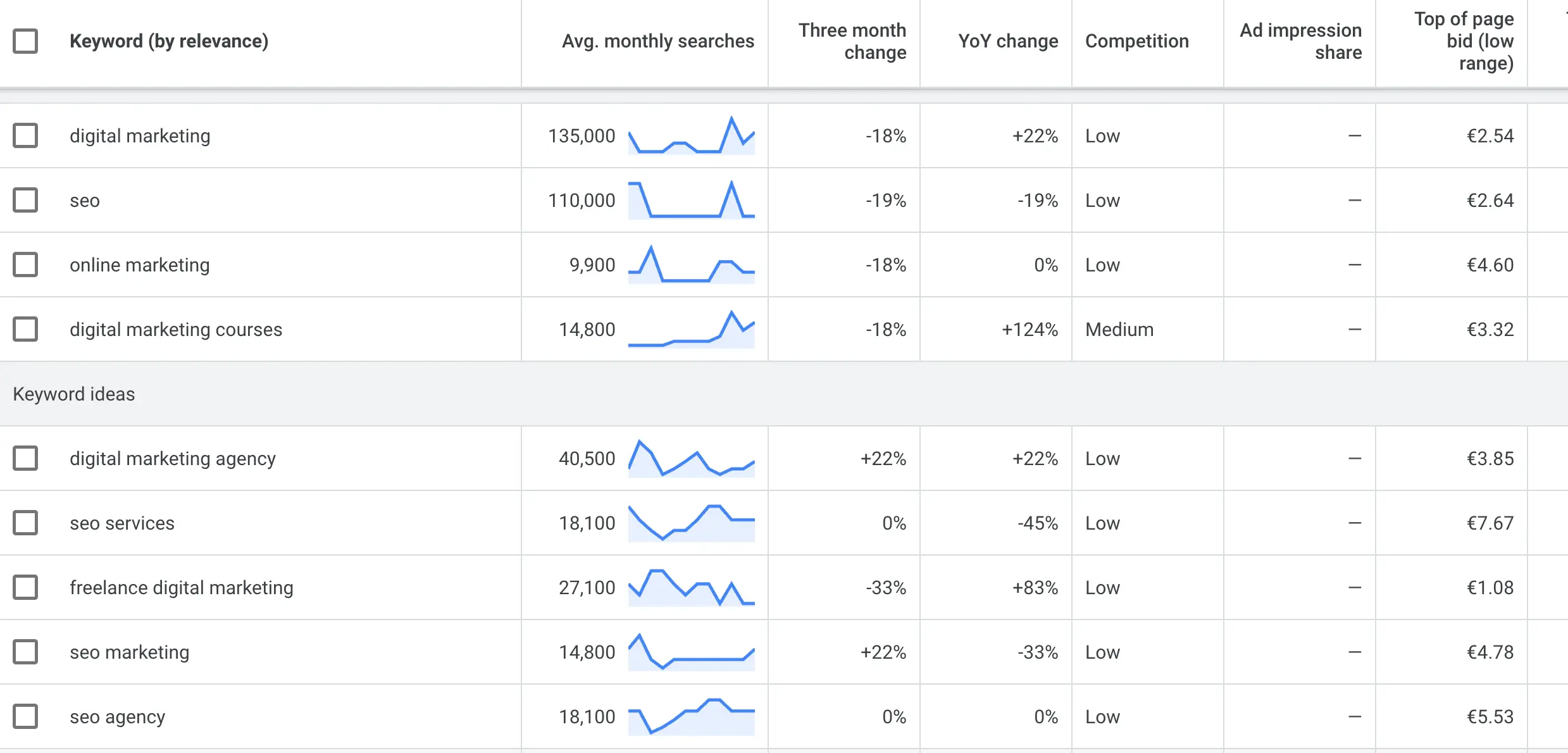
Let's break down the three most important metrics for evaluation.
1. Average Monthly Searches
This column shows an estimate of how many times a keyword is searched per month within your selected geographic location and language. While it seems straightforward, interpreting it requires nuance. High volume does not automatically equal high value.
Google Keyword Planner: How to Find Keywords, Search Volume ...
This is a critical section from the ALM Corp guide that explains the common pitfalls of misinterpreting search volume data.
Read the subsection titled Interpret Average Monthly Searches Correctly. Pay close attention to the cautions listed, as they directly address the strategic thinking required for interview questions about keyword selection.
The key takeaway is that search volume is a measure of demand, not intent or value. A low-volume, high-specificity keyword can be far more valuable than a high-volume, generic one.
2. Competition
This column displays a qualitative rating of "Low," "Medium," or "High." It is one of the most frequently misunderstood metrics in the tool.
Crucially, this metric refers to advertiser competition, not organic (SEO) ranking difficulty. It tells you how many advertisers are bidding for ad space on that keyword.
How to do Google Ads Keyword Research in 2025
Aaron Young's video offers a concise definition of the Competition column.
Watch this very short segment from this explanation to solidify your understanding.
A "High" competition level is not necessarily a bad sign. In fact, it's often a strong indicator that other businesses find this keyword profitable, signaling significant commercial value.
3. Top of Page Bid (Low and High Range)
This is arguably the most powerful metric for gauging a keyword's commercial intent. It provides an estimated Cost-Per-Click (CPC) range that advertisers have historically paid to appear at the top of the search results page.
- Top of page bid (low range): The lower end of what advertisers typically pay for a top ad spot (e.g., positions 2-4).
- Top of page bid (high range): The higher end of what advertisers typically pay for a premium ad spot (e.g., position 1).
Why is this so important? Because it translates search behavior into economic terms. If advertisers are willing to bid $5, $10, or even more for a single click, it's because that click has a high probability of converting into a valuable sale. This makes bid data an invaluable proxy for commercial value.
Google Keyword Planner: How to Find Keywords, Search Volume ...
The ALM Corp guide provides an excellent analysis of how to use bid data for strategic prioritization in both PPC and SEO.
Please read the subsection titled Use Bid Data to Estimate Commercial Value. This section directly connects to answering the "why" behind prioritizing certain keywords over others.
A Practical Evaluation Workflow
Let's synthesize these concepts. Imagine you have a preliminary keyword list for a new line of anti-aging skincare products sold in India. Your list includes:
- "skincare"
- "anti-aging cream"
- "best retinol serum for wrinkles"
Step 1: Get Data. You would paste this list into Keyword Planner's "Get search volume and forecasts" section.
Step 2: Set Filters. Before analyzing, you must set the correct location. This is a non-negotiable step to ensure data relevance.
How To Use The Google Keyword Planner (Beginner's Keyword Tutorial)
This clip from Ben Heath's tutorial demonstrates the importance of correctly setting your geographic targeting.
Watch how to adjust the location setting. For our example, you would change the default location to "India."
Step 3: Analyze and Interpret.
Here is what you would likely find and how you would interpret it:
-
"skincare" (Head Term):
- Volume: Very High (e.g., 1M - 10M searches)
- Competition: Low/Medium
- Bid Range: Low (e.g., ₹5 - ₹20)
- Interpretation: Massive volume, but the intent is extremely broad and mostly informational. The low competition and bids reflect its low commercial value per click. This is a poor choice for a conversion-focused campaign.
-
"anti-aging cream" (Mid-Tail Term):
- Volume: High (e.g., 100K - 1M searches)
- Competition: High
- Bid Range: Medium (e.g., ₹30 - ₹90)
- Interpretation: Strong volume with much clearer commercial intent. The "High" competition and significant bid range confirm that advertisers find this keyword valuable. This is a core keyword to target.
-
"best retinol serum for wrinkles" (Long-Tail Term):
- Volume: Moderate (e.g., 1K - 10K searches)
- Competition: Medium/High
- Bid Range: High (e.g., ₹50 - ₹150)
- Interpretation: The lowest search volume, but the highest specificity and intent. The user knows exactly what they want. The high bid range demonstrates its immense commercial value. This is an excellent keyword for driving high-quality, conversion-ready traffic.
This analytical process—linking volume, competition, and bid data to the concepts of intent and specificity—is the heart of professional keyword research.
Conclusion
You are now equipped with the methodology to use Google Keyword Planner not just as a data source, but as a strategic analysis tool. By moving beyond surface-level numbers and understanding their implications, you can build keyword strategies that are efficient, profitable, and defensible in an interview setting.
Key Takeaways:
- Key Metrics: Your evaluation of a keyword list should be based on three main data points: Average Monthly Searches, Competition, and Top of Page Bid estimates.
- Volume Is Demand, Not Value: High search volume indicates popularity but says little about a user's readiness to buy.
- Competition Is Commercial Signal: The "Competition" column reflects advertiser density, which often correlates with a keyword's profitability. It is not an SEO difficulty metric.
- Bids Are Intent Proxy: The Top of Page Bid range is your most direct indicator of a keyword's commercial intent. High bids signal high-value traffic.
In our previous lessons, we defined different keyword types and their strategic roles. Today, you learned how to measure their characteristics using Google's own data. In our next lesson, we will put all this knowledge into practice. You will be tasked with generating, classifying, and prioritizing a full keyword list for a new product launch, using the evaluation framework you've mastered today.