Recommended resources
The freely available resources this lesson will direct you to.
- Instructor and Pydantic - Structured LLM outputs for easy data extraction!www.youtube.com
- OpenAI Structured Output - All You Need to Knowwww.youtube.com
- Building Production-Ready LLM Applications: Bulletproof LLM Tool Calling with Advanced JSON…medium.com
- How Function Calling Actually Works Under the Hood | Let's Data Scienceletsdatascience.com
In our previous lesson, we established a robust framework for general agent error handling, covering retries, self-correction, and human-in-the-loop interventions. Now, we will apply those principles to one of the most common and critical failure points in any agentic system: tool calls. An agent's ability to interact with the outside world is its superpower, but it's also a significant source of unreliability if not managed carefully.
This lesson focuses on implementing input validation and error handling specifically for tool calls. You will learn how to defend your system against malformed arguments and hallucinated function calls, ensuring that your agent's actions are both safe and effective. Mastering these techniques is not just about preventing crashes; it's about building the trust and reliability necessary for production-grade AI applications.
The Anatomy of a Failed Tool Call
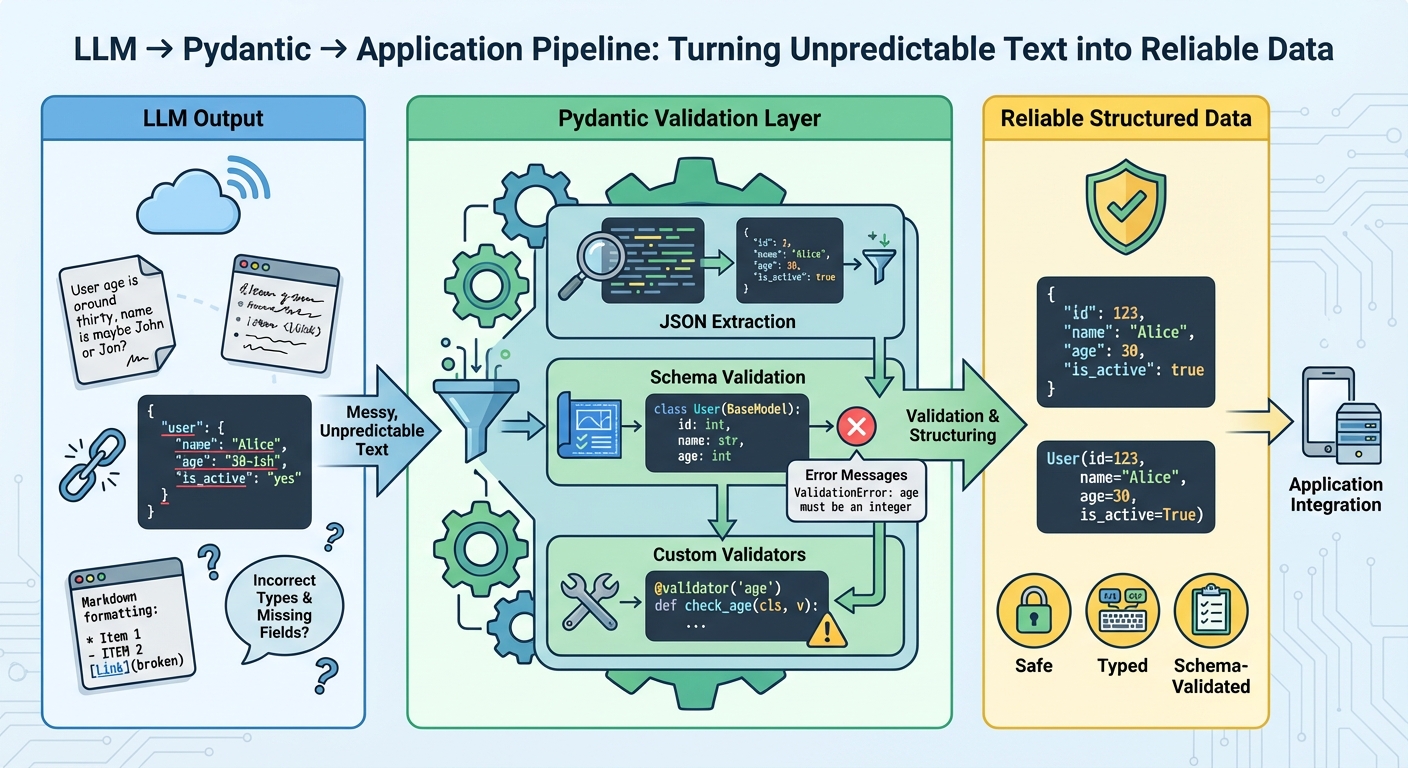
When an LLM decides to use a tool, it generates a JSON object containing the tool's name and its arguments. In a perfect world, this JSON is always correct. In reality, it can fail in several ways:
- Syntactic Errors: The output isn't valid JSON (e.g., a missing comma, unquoted strings).
- Semantic Errors: The JSON is valid, but the content is wrong.
- Type Mismatch: Providing a string where a number is expected (e.g.,
"amount": "one hundred"instead of"amount": 100). - Invalid Values: Using a value that isn't allowed, even if the type is correct (e.g.,
account_type: "investment"when only"checking"or"savings"are valid). - Hallucinated Arguments: Inventing parameters that the function doesn't accept.
- Hallucinated Function Names: Calling a function that doesn't exist (e.g.,
check_balanceinstead ofget_balance).
- Type Mismatch: Providing a string where a number is expected (e.g.,
These errors can cause your application to crash, perform incorrect actions, or enter a state of silent failure. Our goal is to build a multi-layered defense to prevent this.
Layer 1: Proactive Prevention with Schemas and Structured Outputs
Your first line of defense is to give the LLM the clearest possible instructions and use modern API features to enforce them.
Designing Precise Tool Schemas
The schema you provide to the LLM isn't just documentation; it's a contract. A well-designed schema dramatically reduces the likelihood of errors. You're already familiar with defining tools for function calling, but let's focus on the properties that are critical for validation.
How Function Calling Actually Works Under the Hood | Let's Data Science
This article provides excellent best practices for defining tool schemas.
Please read the section on schema design. Pay close attention to the example tools list. Notice the strategic use of: description: Provides clear, intent-focused descriptions to help the model choose the right tool. enum: Explicitly lists all valid string values for a parameter, preventing the model from hallucinating other options. additionalProperties: false: Forbids the model from inventing extra parameters that your function doesn't accept.
Leveraging Constrained Decoding
Historically, even with a good schema, you might get back syntactically invalid JSON. Modern LLM providers like OpenAI have largely solved this with a feature often called structured output or constrained decoding. When enabled, the API guarantees that the output will be a syntactically valid JSON object that conforms to the provided schema's types.
OpenAI Structured Output - All You Need to Know
This video from Dave Ebbelaar clearly explains the evolution from the old "JSON mode" to modern structured output.
First, watch the section from the introduction to understand the problem this feature solves. It guarantees not just the JSON format but also the content structure. Then, review the key benefits outlined from this point. The guarantee of reliable type safety removes an entire category of runtime errors.
This feature is a powerful preventative measure. It ensures that if your schema defines amount as a number, you will never receive "amount": "five hundred".
Layer 2: Application-Side Validation with Pydantic
Constrained decoding is powerful, but it can't enforce all your rules. For instance, it can ensure an amount is a number, but it can't ensure the amount is positive or below a certain transaction limit. For this, we need application-side validation, and the industry-standard tool for this in Python is Pydantic.
Pydantic allows you to define your data structures as Python classes. When you feed a JSON object into a Pydantic model, it automatically:
- Parses the JSON.
- Coerces types where possible (e.g., a string
"2024-01-01"can be converted to adatetimeobject). - Validates the data against the types and any custom validation rules you've defined.
- If validation passes, it gives you a clean, type-hinted Python object to work with.
- If validation fails, it raises a detailed
ValidationError.
This makes Pydantic the perfect bridge between the LLM's output and your application's core logic.
OpenAI Structured Output - All You Need to Know
Let's return to the "OpenAI Structured Output" video to see how Pydantic integrates directly with the OpenAI client. This is the modern, recommended approach.
Watch the segment on using Pydantic models. The key takeaways are: You define your desired output as a Pydantic BaseModel. You pass this model class directly to the API call. The API returns a ready-to-use instance of your Pydantic model, with all validation already completed. This workflow is exceptionally clean and robust. You can see how much more concise and readable it is compared to writing a raw JSON schema.
For even more advanced validation scenarios, or when working with LLM frameworks, a helper library like instructor can be useful. It patches clients like OpenAI's to make structured outputs even more powerful, for example, by automatically retrying if validation fails.
Instructor and Pydantic - Structured LLM outputs for easy data extraction!
This video from BugBytes gives a great practical look at using Pydantic for data extraction, highlighting the instructor library.
First, watch the section from this timestamp to see a clear example of defining a Pydantic BaseModel for extracting structured data from an invoice. Notice how it defines fields with types like string, float, and datetime. Next, jump to the validation section. This highlights a key feature: if you add custom Pydantic validators (e.g., to check if a value is within a certain range), libraries like instructor can automatically catch the validation error and trigger a retry with the LLM.
Layer 3: Handling Validation Errors and Hallucinations
Even with two layers of prevention, errors can still occur. A model might hallucinate a function name, or Pydantic might catch a business logic violation. This is where we connect back to the error handling patterns from our last lesson.
The Correction Loop
When a tool call fails validation, we don't just give up. We provide the specific error message back to the LLM and ask it to try again. This creates a self-correction loop that is incredibly effective at resolving issues.
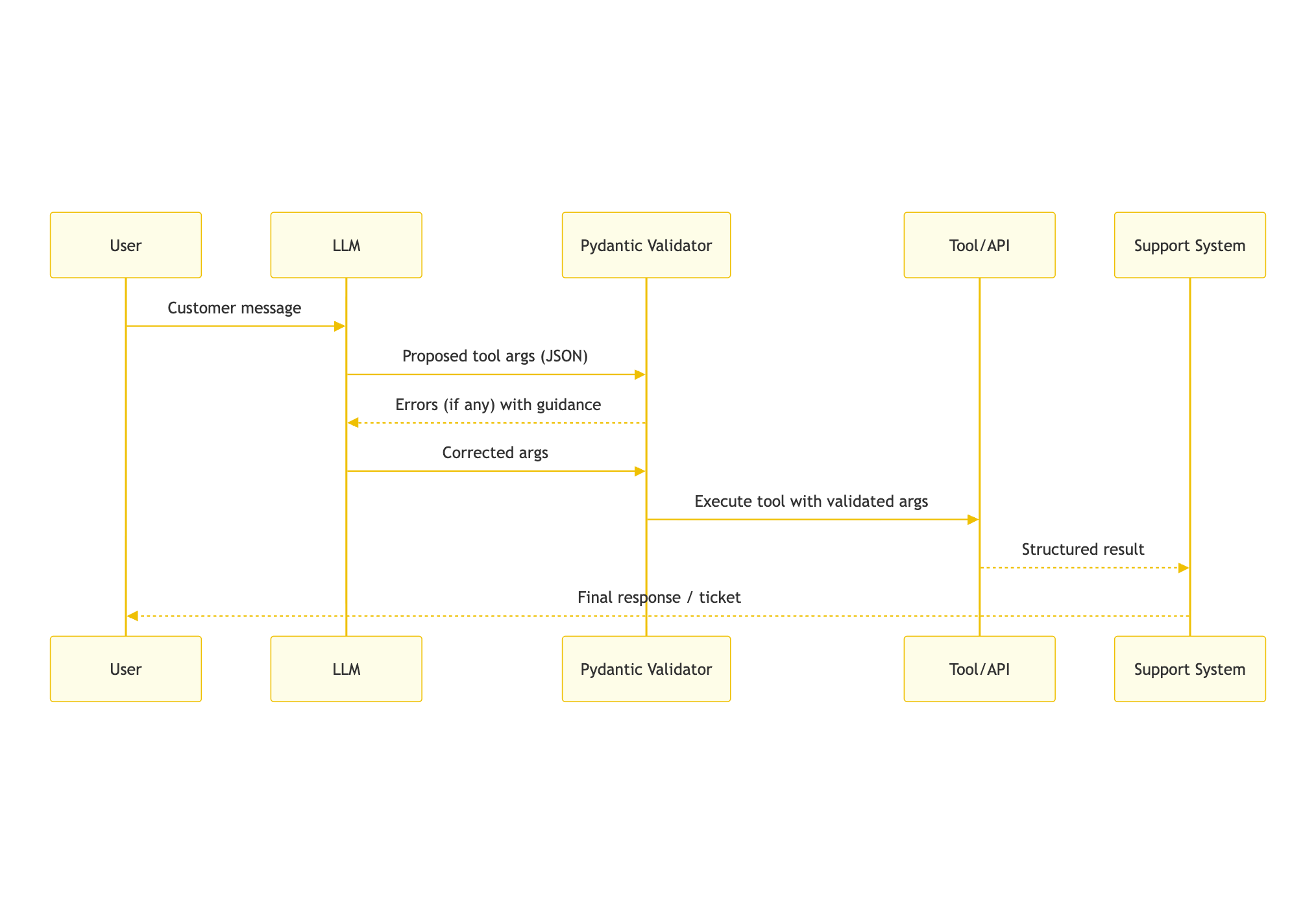
Here’s how you handle the most common validation failures:
-
Hallucinated Function Name: Before executing any tool, check if the function name exists in a predefined registry of available tools. If not, return an error message to the LLM listing the available functions.
-
Malformed Arguments (Pydantic
ValidationError): If Pydantic fails to validate the arguments, catch theValidationError. The error object contains a detailed, human-readable description of what went wrong. Pass this description back to the LLM in the next turn.
This "retry with error feedback" strategy is a targeted application of the Reflection pattern we discussed previously.
Building Production-Ready LLM Applications: Bulletproof LLM Tool Calling with Advanced JSON…
This Medium article provides a great step-by-step guide to building a resilient tool-calling architecture.
Focus on the section titled Stage 2: JSON Validation and Parameter Checking. This section details the exact steps for a robust validation process: Function Existence Verification: Corresponds to handling hallucinated function names. JSON Structure & Parameter Schema Validation: Handled by Pydantic. Advanced Validation with Pydantic: Where you'd add custom business logic. Retry with Error Feedback: This is the crucial step of passing the validation error back to the LLM for correction.
By combining proactive schema design with reactive validation and correction, you build a system that is resilient to the inherent unpredictability of LLMs, turning unreliable tool calls into a dependable workflow.
Conclusion
In this lesson, you've learned to build a defense-in-depth strategy for handling tool call errors, a critical skill for any AI Engineer.
Key Takeaways:
- Layered Defense is Key: Don't rely on a single mechanism. Combine precise schemas, constrained decoding, and application-side validation for maximum robustness.
- Schemas are Your First Defense: Use
enum,required, andadditionalProperties: falsein your JSON schemas to proactively prevent common errors. - Pydantic is the Standard for Validation: Leverage Pydantic to define your expected data structures in Python. It provides type safety, data coercion, and a framework for custom business logic validation.
- Integrate Pydantic with Your LLM Client: Use the native Pydantic support in the OpenAI client for a seamless and highly recommended workflow that returns validated data objects directly.
- Close the Loop with Self-Correction: When validation fails, don't just fail. Feed the specific
ValidationErrormessage back to the LLM to allow it to reflect and correct its own mistake.
You now have the tools to ensure that when your agent decides to act, it does so correctly and safely. However, what happens if an agent gets stuck in a loop, repeatedly trying and failing to call a tool? In our next lesson, we will address this by learning how to implement turn and step limits to prevent and handle infinite loops in agentic workflows.