Recommended resources
The freely available resources this lesson will direct you to.
Introduction
In our previous module, we established a robust framework for training deep neural networks, covering optimization, backpropagation, and a suite of regularization techniques. We concluded by exploring classical methods like L1 regularization and early stopping, which provided valuable context for the more modern techniques we use today.
We now pivot from these general-purpose architectures to our first specialized model, designed explicitly for processing grid-like data such as images. This begins our journey into Convolutional Neural Networks (CNNs), the very models that catalyzed the deep learning revolution in computer vision. To truly understand a CNN, we must first master its fundamental building block: the convolution. This lesson will build that crucial "Classical to Modern Bridge" by exploring the 2D convolution operation through the lens of classical image processing. You will see how this single, elegant mathematical operation can be used to achieve a variety of effects—like blurring, sharpening, and detecting edges—simply by changing a small matrix of weights known as a kernel. This foundation is essential for understanding how a CNN later learns these kernels automatically to solve complex visual tasks.
The Convolution Operation: A Filtered View
At its core, a convolution is a mathematical operation that takes two functions and produces a third, representing a "blending" or "mixing" of the two. In image processing, we convolve an input image with a small matrix called a kernel or filter. The process works as follows:
- Place the kernel over a region of the input image, starting at the top-left corner.
- Perform an element-wise multiplication between the kernel's values and the pixel values of the image patch underneath it.
- Sum all the results of these multiplications. This single sum becomes the value of the corresponding pixel in the output image.
- Slide the kernel across the entire image, repeating this process for every location.
This "sliding window" of weighted sums is a powerful and general mechanism for transforming an image. The video below from 3Blue1Brown provides a superb visual introduction to the concept, starting with a 1D analogy (a moving average) and extending it to 2D image blurring.
The video "But what is a convolution?" by 3Blue1Brown offers an excellent intuition for this operation.
Watch from the moving average to understand the 1D case. Then, continue through the demonstrations of 2D image blurring with a simple box filter and the more elegant Gaussian blur. Pay close attention to how the kernel's values determine the final effect.
As the video shows, a kernel where all values are equal (e.g., a 3x3 matrix of 1/9) acts as a blurring filter. It replaces each pixel with the average of its neighbors, smoothing out sharp details. This is an example of a low-pass filter, as it allows low-frequency information (smooth areas) to pass through while attenuating high-frequency information (sharp edges).
From Blurring to Sharpening and Edge Detection
If blurring is achieved by averaging, how might we do the opposite and sharpen an image? Let's think from first principles.
A blurred image can be seen as the original image with its fine details (high frequencies) removed. What if we could isolate these details? We can approximate them by subtracting the blurred image from the original:
Details ≈ Original - Blurred
To create a sharpened image, we can then add these details back to the original image, effectively amplifying them:
Sharpened = Original + α * (Original - Blurred)
where is a scaling factor that controls the amount of sharpening. This entire operation can be expressed as a single convolution. For instance, the popular sharpening kernel below comes from this principle.
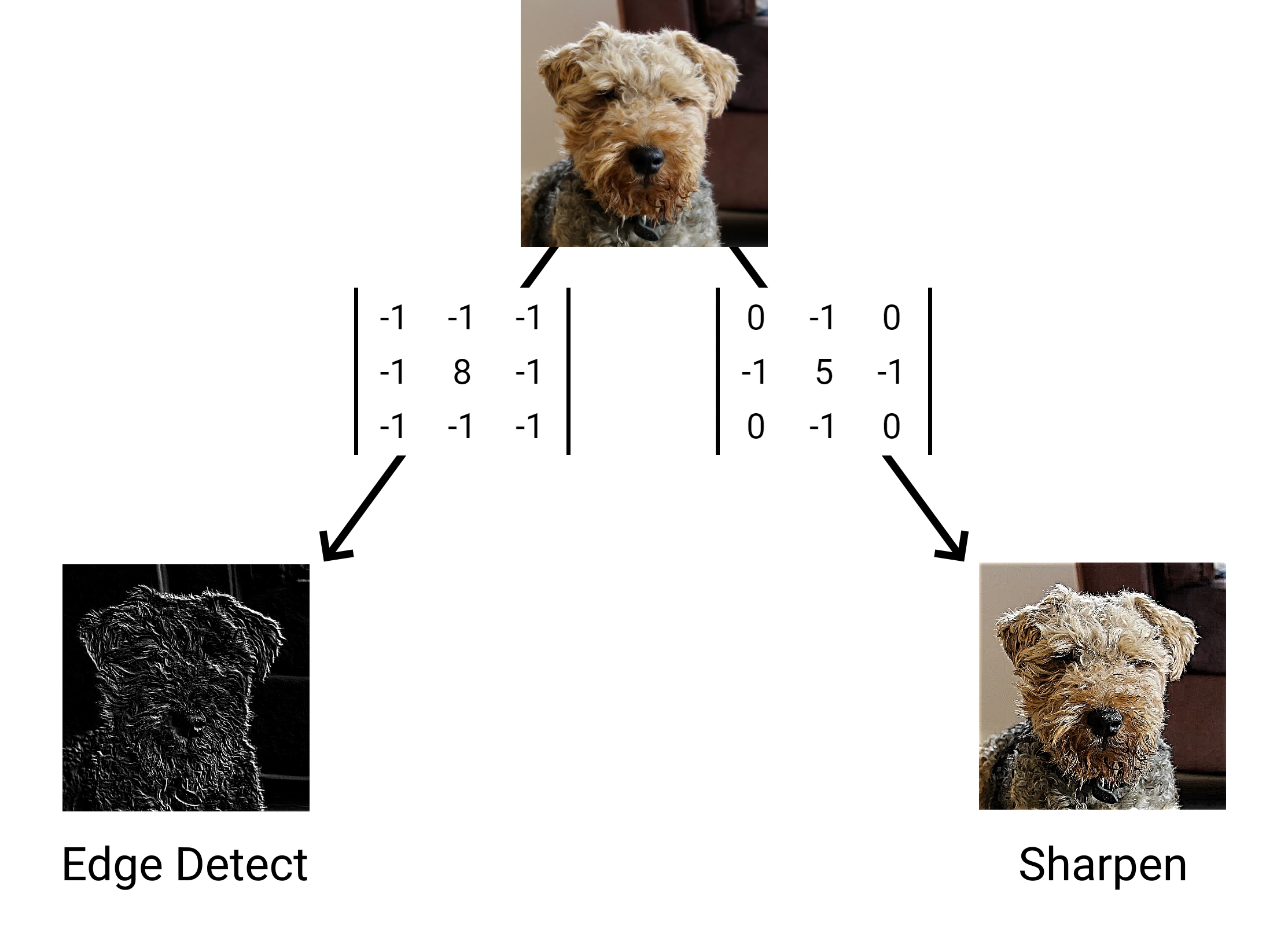
An illustration of how different kernels produce distinct image processing effects. The "Sharpen" kernel on the right amplifies details, while the "Edge Detect" kernel on the left highlights regions of sharp intensity change.
This demonstrates that by carefully choosing the kernel's weights—including negative values—we can achieve more than just blurring. The most powerful application of this, and the most relevant to our study of neural networks, is edge detection.
The First Principles of Edge Detection: The Image Gradient
What is an edge in an image? Mathematically, it's a location with a rapid change in intensity. In our study of multivariable calculus, we learned that the gradient, , points in the direction of the steepest ascent of a function , and its magnitude measures the rate of that change.
If we model our image as a 2D function of pixel intensities, , then edges will occur where the magnitude of the image gradient, , is large.
However, an image is not a continuous function; it's a discrete grid of pixels. We cannot compute true partial derivatives. Instead, we must approximate them using finite differences. For example, the partial derivative with respect to at a pixel can be approximated by:
How can we apply this calculation across the entire image? With a convolution! A convolution with the kernel [-1, 0, 1] effectively computes this centered difference.
The following article provides a clear bridge from the continuous world of calculus to the discrete world of image pixels, showing how derivative approximations become convolution kernels.
Image derivative | Towards Data Science
This article from Towards Data Science formally connects the calculus of derivatives to the practice of edge detection using convolution.
First, review Section 1, "Notions of continuous differential calculus," to refresh your memory on gradients. Then, read Sections 2 and 2.1, "Edge detection" and "Discrete partial derivative," which show how partial derivatives are approximated with finite differences and implemented via convolution. Finally, read Section 2.2, "Discrete gradient," to see how these convolutions produce feature maps that highlight edges.
The Sobel Operator: A Robust Gradient Approximation
While a simple [-1, 0, 1] kernel approximates the derivative, it is very sensitive to noise. A more robust approach is the Sobel operator, which is one of the most classic edge detection algorithms. The Sobel kernels are designed to compute the gradient while also performing a slight blur in the perpendicular direction to average out noise.
The Sobel operator uses two kernels, and , to approximate the partial derivatives in the horizontal and vertical directions:
Notice how contains the [-1, 0, 1] difference pattern, while the [1, 2, 1] weighting in the columns provides smoothing. is simply the transpose of .
To get the final edge map, we convolve the input image with both kernels to get two gradient images, and . The magnitude of the gradient at each pixel is then calculated as:
This produces an image where the intensity of each pixel corresponds to the strength of the edge at that location. The following video provides a complete walkthrough of this entire process, from the concept of the derivative to the application of the Sobel operator.
Edge Detection Using Gradients | Edge Detection
This video, "Edge Detection Using Gradients" from First Principles of Computer Vision, perfectly summarizes the concepts we've discussed.
Watch the entire video. It begins by explaining edges in terms of the 1D first derivative, extends this to the 2D gradient, and shows how this is implemented with discrete convolution filters. The sections on operator trade-offs and the final example provide excellent practical context.
For a deeper mathematical treatment, you can also explore how the Sobel operator is derived from first principles by considering the sum of all directional derivatives in a 3x3 pixel neighborhood. The article "Edge detection in images: how to derive the Sobel operator" (LINK) walks through this derivation in detail, which you may find interesting for independent study.
Conclusion
In this lesson, we have connected the 2D convolution operation, the future cornerstone of our neural networks, to its classical roots in image processing. We've seen that this single operation is remarkably versatile.
Key Takeaways:
- 2D convolution is a process of sliding a small kernel over an image and computing a weighted sum at each location to produce a new, filtered image.
- The effect of the convolution is entirely determined by the values within the kernel.
- An averaging kernel produces a blur (a low-pass filter).
- A kernel that amplifies differences results in sharpening (a high-pass filter).
- Edges are regions of high-intensity change, which can be found by computing the image gradient.
- In discrete images, the gradient is approximated using finite differences, which are implemented as convolutions with derivative kernels like the Sobel operator.
In all these classical examples, the kernels were intelligently hand-designed by engineers and mathematicians. The paradigm shift introduced by Convolutional Neural Networks is that we no longer have to design these filters. Instead, the network learns the optimal kernel values needed to extract features that are useful for a specific task, all through the process of backpropagation and gradient descent.
Preview of the Next Lesson:
Now that we have the core intuition behind the convolution operation, we will formalize its use within a neural network. In the next lesson, we will define a complete convolutional layer, introducing key architectural parameters like stride and padding, and explore how they affect the output shape and the layer's receptive field.