Recommended resources
The freely available resources this lesson will direct you to.
Introduction
In our previous lesson, we built a bridge from classical image processing to the world of neural networks by exploring the 2D convolution operation. We saw how hand-designed kernels could perform tasks like blurring, sharpening, and edge detection, all based on the principle of a sliding, weighted sum. This established the "what" of convolution.
Now, we will formalize this operation into a fundamental building block of modern computer vision: the convolutional layer. This lesson will introduce the key hyperparameters that govern a convolutional layer's behavior—filters (kernels), stride, and padding. You will learn how the network learns the filters and how an architect controls the flow of information and the spatial dimensions of the data as it passes through the network. This moves us from "what is a convolution?" to "how do we build with it?".
The Convolutional Layer: Filters, Depth, and Shared Weights
In the last lesson, we treated filters like the Sobel operator as fixed, hand-crafted tools. The power of a Convolutional Neural Network (CNN) comes from treating the values in these filters as learnable parameters, or weights. Just as a fully-connected layer learns a weight matrix, a convolutional layer learns the optimal values for its filters to extract features that are useful for the task at hand.
A convolutional layer doesn't just learn one filter; it learns an entire bank of them. Each filter specializes in detecting a different pattern. For example, in the first layer of a network trained on images, one filter might learn to detect vertical edges, another might learn to detect horizontal edges, and others might learn to detect specific colors or textures.
-
Filters and Output Depth: The number of filters in a convolutional layer is a crucial hyperparameter that you, the architect, must choose. This number determines the depth of the output volume. If your input is a single-channel grayscale image and you apply 12 filters, the output will be a volume with 12 channels, where each channel is a "feature map" representing the locations where a specific learned feature was detected.
-
Parameter Sharing: A key insight that makes CNNs efficient, especially for someone with an interest in high-performance systems, is parameter sharing. In a fully-connected layer, every input neuron is connected to every output neuron with a unique weight. If you flattened a 256x256 image and fed it to a layer with 1000 neurons, you'd need 256 * 256 * 1000 = 65.5 million weights for that layer alone. A convolutional layer makes a powerful assumption: if a feature detector (a filter) is useful in one part of the image, it's probably useful in other parts too. Therefore, it uses the same filter (the same set of weights) across the entire image. This single filter, say of size 5x5, only has 25 weights, which are applied everywhere. This dramatically reduces the number of parameters, makes the model less prone to overfitting, and builds in a desirable property called translation equivariance.
To solidify these ideas, the following reading from the renowned CS231n course at Stanford provides an excellent deep dive.
https://cs231n.github.io/convolutional-networks/
This text from the CS231n course materials provides a detailed explanation of the convolutional layer.
First, read the section "Overview and intuition" for a conceptual summary. Then, focus on the section "Parameter Sharing". Pay close attention to the calculation comparing the number of parameters in a fully-connected vs. a convolutional layer.
Controlling Spatial Dimensions: Padding and Stride
Beyond the number and size of the filters, two other critical hyperparameters control the geometry of the convolution operation: padding and stride. They determine the spatial dimensions (width and height) of the output volume.
Padding
When you slide a filter across an image, what happens at the borders? If you have a 5x5 input and a 3x3 filter, you can only center the filter on the interior 3x3 pixels, resulting in a 3x3 output. The input shrinks with each layer. This creates two problems:
- Information Loss at Borders: Pixels near the edge are processed fewer times than pixels in the center, and information at the very edge is quickly "washed away" as the feature maps shrink.
- Rapid Shrinking of Dimensions: If every layer shrinks the spatial dimensions, a deep network would only be able to process very small images or would require very few layers.
Zero-padding solves this. We add a border of zeros around the input image before the convolution. This allows the filter to be centered on every original pixel, including those at the very edge.
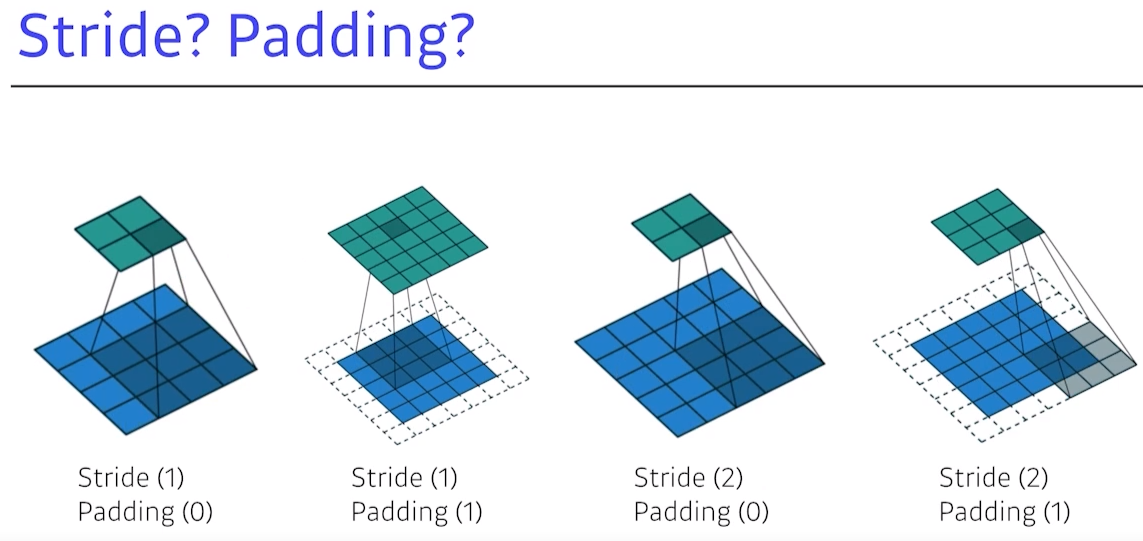
The most common use of padding is to preserve the spatial dimensions of the input. This is often called "same" padding.
Stride
Stride defines the step size the filter takes as it moves across the image. In all our examples so far, we've used a stride of 1, moving the filter one pixel at a time.
However, we can use a larger stride, like 2. This means the filter skips every other pixel.

Using a stride greater than 1 has the primary effect of downsampling the feature map. This is useful for two main reasons:
- Computational Efficiency: Smaller feature maps require less computation in subsequent layers.
- Increasing the Receptive Field: By downsampling, neurons in later layers can "see" a larger area of the original input, allowing them to learn more complex, larger-scale patterns.
The following video gives a clear visual explanation of both padding and stride and how they affect the output dimensions.
CNN Explained Visually: Padding, Stride, Pooling, Receptive Fields, Dilation & Layer Architecture
This video from ByteQuest provides excellent animations for these core concepts.
First, watch the segment on padding to understand why it's used and how it affects the output. Then, watch the segment on stride to see how it controls the filter's movement and leads to downsampling.
The Output Size Formula: A First-Principles Calculation
Given an input volume of size , we can precisely calculate the dimensions of the output volume. Let's consider just the width, , for simplicity. The calculation for height, , is analogous.
Let:
- = input width
- = filter width (assuming a square filter)
- = padding amount (the number of zeros added to each side of the input)
- = stride
The total width of the padded input is . As we slide the filter across this padded input, the first position is at the start, and each subsequent step moves the filter by pixels. The number of steps we can take is given by . We subtract because the last possible position of the filter must leave enough room for the filter's full width.
Since the number of output pixels is one more than the number of steps taken (think of fenceposts and the spaces between them), the output width, , is:
This formula is fundamental to designing CNN architectures. You must ensure that the hyperparameters are chosen such that is divisible by , otherwise the filter won't fit neatly across the input.
Let's test this with a question.
Consider an input image of size 32x32. We apply a 3x3 filter ().
- If we want the output feature map to also be 32x32, what values for stride () and padding () should we choose?
- Now, what if we wanted to downsample the feature map to be exactly half the size, 16x16, using the same 3x3 filter? What stride and padding would be appropriate?
Think about how you would use the formula to solve for the required hyperparameters.
Answer
-
To get a 32x32 output from a 32x32 input with a 3x3 filter:
The most common choice is a stride of . Plugging this in:
So, with a stride of 1 and padding of 1, we preserve the spatial dimensions. This is why is a very common configuration. This also shows why odd-sized filters are convenient; they allow for symmetric padding.
-
To get a 16x16 output:
To halve the dimensions, a stride of is the natural choice.
Since we can't have half a pixel of padding, this combination doesn't fit perfectly. A common approach is to use and . This yields: . This is also not an integer. Deep learning frameworks handle this by either rounding (e.g.,
floor(16.5) = 16) or adding extra padding on one side to make it work. For example, if we use an input of 224, , we get , which isn't an integer. This mismatch is a famous quirk of the original AlexNet paper. The key is to be aware that these hyperparameters must be chosen carefully to ensure the dimensions work out as intended.
For a rigorous walkthrough of these calculations, the following resources are excellent.
https://cs231n.github.io/convolutional-networks/
Let's return to the CS231n notes for a more formal treatment.
Read the section "Spatial arrangement" which provides the output size formula and a clear 1D visualization. Then, read the short "Use of zero-padding" and "Constraints on strides" subsections. Finally, review the "Summary" section for a concise list of all hyperparameters and their effects, and the "Architectural Guidelines" for some common rules of thumb used in practice.
Extending to Multiple Input Channels
So far, we have mostly focused on single-channel (grayscale) inputs. How does convolution work on a multi-channel input, like a color image with Red, Green, and Blue channels (Depth = 3)?
The rule is simple: the depth of the filter must match the depth of the input.
If the input is 32x32x3, then a 5x5 filter must actually be a 5x5x3 volume. When this filter is placed over a patch of the input image, the operation is a full 3D dot product: element-wise multiplication of all 5 * 5 * 3 = 75 values, which are then summed to produce a single number.
This is a critical point: one 3D filter, when convolved with a 3D input volume, produces a 2D feature map.
How do we get an output volume with depth? We use multiple filters. If we apply 12 different 5x5x3 filters to our 32x32x3 input, each one will produce its own 2D feature map. By stacking these 12 feature maps together, we create an output volume of size, for example, 32x32x12 (assuming S=1, P=2).
CNN Explained Visually: Padding, Stride, Pooling, Receptive Fields, Dilation & Layer Architecture
This final segment from the ByteQuest video clearly illustrates the convolution operation over a multi-channel RGB image.
Watch the section on RGB images. Notice how the filter also has 3 channels and how multiple filters are used to create an output volume with a new depth.
Conclusion
In this lesson, we have moved beyond the simple idea of convolution and formalized the structure of a modern convolutional layer. We've defined the three key sets of hyperparameters that give an architect control over its behavior.
Key Takeaways:
- Filters/Kernels: These are the learnable weights of the layer. A convolutional layer learns a bank of filters, each one tuned to detect a specific feature. The number of filters determines the depth of the output volume.
- Parameter Sharing: The same filter is applied across all spatial locations of the input, making CNNs highly efficient and giving them built-in translation equivariance.
- Padding: Adding a border (usually of zeros) to the input allows us to control the output's spatial dimensions. It is commonly used to prevent the feature maps from shrinking and to ensure border information is not lost.
- Stride: This is the step size the filter takes as it moves across the input. A stride greater than 1 results in downsampling, which reduces computational cost and increases the effective receptive field of later layers.
- Output Dimensions: The spatial size of the output is a direct function of the input size, filter size, padding, and stride, governed by the formula .
Preview of the Next Lesson:
We've seen that a stride greater than 1 is one way to downsample feature maps. However, there is another common and powerful technique used for this purpose: pooling. In the next lesson, we will introduce pooling layers, specifically max pooling and average pooling, and explain their role in creating spatial invariance and further reducing dimensionality within a CNN architecture.