Recommended resources
The freely available resources this lesson will direct you to.
Introduction
In our last lesson, we laid the strategic foundation for your professional brand by defining your niche and crafting a personal brand statement. This statement is your North Star, articulating the unique value you deliver as a developer. Now, it's time to put that statement to work on the most critical platform for your career visibility: LinkedIn.
This lesson focuses on transforming your LinkedIn profile from a simple digital resume into a powerful magnet for recruiters and senior-level opportunities. We will treat your profile as a strategic asset, optimizing each key section—your headline, "About" summary, and experience—with the right keywords and messaging. By the end of this lesson, you will understand how to structure your profile to rank highly in recruiter searches and clearly communicate your journey toward a senior developer and leadership role.
1. Thinking Like a Recruiter: LinkedIn as a Search Engine
The single most important mindset shift is to stop viewing LinkedIn as a resume and start seeing it as a search engine. Recruiters don't leisurely browse profiles; they use a powerful tool called LinkedIn Recruiter to search for candidates using specific filters. If your profile isn't optimized with the keywords they're searching for, you are effectively invisible.
The article "LinkedIn Profile Optimization: The New Resume" is written by a former FAANG recruiter and gives an invaluable look behind the curtain.
LinkedIn Profile Optimization: The New Resume
This article explains exactly how recruiters find candidates, which is the key to understanding how to optimize your own profile.
Please read the introduction and the section How Recruiter Search Works. Pay close attention to the list of filters recruiters use: keywords, location, years of experience, companies, and skills. This is the "algorithm" you need to satisfy.
Your profile either matches these filters or it doesn't. Our goal is to ensure it matches precisely for the roles you want. LinkedIn's own interface for job applications gives you a clue about how this matching works.
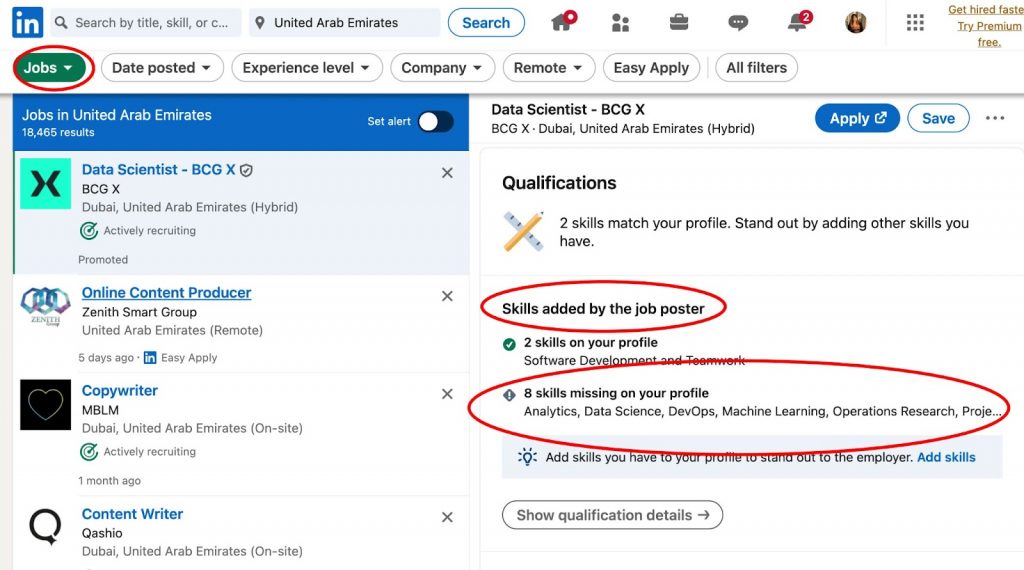
This constant matching process is why keyword optimization isn't just a good idea—it's essential for being discovered.
2. The Headline: Your 220-Character Billboard
Your headline is the most critical piece of real estate on your entire profile. It follows you everywhere on the platform—in search results, comments, and connection requests—and it carries enormous weight in the search algorithm. A generic "Software Engineer at [Company]" is a massive missed opportunity.
Your brand statement from the previous lesson is the perfect source material for a powerful headline. A former recruiter, in the video below, shares a highly effective formula to structure it.
Ex-Recruiter Reveals The Best LinkedIn Headline Formula To Land Jobs!
This video, "Ex-Recruiter Reveals The Best LinkedIn Headline Formula," breaks down the components of a headline that gets you found.
Please watch two key segments: First, watch the section explaining the two essential elements of a great headline: relevant industry keywords and a unique value proposition. Then, skip to the part where she reveals her preferred formula for job seekers. This is the structure we will use.
The formula she recommends is:
Target Job Title | Years of Experience | 2-3 High-Priority Keywords | Value Proposition
Let's translate this using your background and the brand statement we workshopped. Assume your target is "Senior Software Engineer" and your niche involves modernizing Java applications.
- Target Job Title: Senior Software Engineer
- Years of Experience: 3+ Years of Experience (or simply "Software Engineer" if "Senior" feels premature)
- High-Priority Keywords: Java, Spring Boot, React, Microservices
- Value Proposition: Building scalable & maintainable backend systems.
Resulting Headline:Senior Software Engineer | Java, Spring Boot, React | Building Scalable & Maintainable Backend Systems
This headline is packed with the exact terms a recruiter would search for, instantly communicating your level, core skills, and the type of problems you solve.
3. The "About" Section: Your Narrative and Keyword Hub
If the headline is your billboard, the "About" section is your sales page. This is where you expand on your brand statement, weaving a compelling narrative about your professional journey, your passions, and your technical strengths. It should be written for a human, but optimized for a search engine.
Two resources offer a perfectly balanced perspective on this. One emphasizes storytelling, the other keyword strategy.
The Software Engineer's Guide to Writing a Stand-Out ...
This article encourages you to use the "About" section to tell a story and reveal your personality.
Read the section titled Core Content. Focus on the questions it poses: "What was the journey that got you here today? What’s your superpower?" This will help you craft a narrative that goes beyond a dry list of skills.
Now, let's combine that with the recruiter's perspective on keywords.
LinkedIn Profile Optimization: The New Resume
This resource shows you how to integrate keywords naturally into your narrative.
Read the subsection About Section. Notice how the example seamlessly includes terms like "distributed systems," "microservices architecture," and "API design" within a professional summary.
A great "About" section starts with a 1-2 sentence summary of your brand statement, then elaborates with 2-3 short paragraphs about your technical specializations, your approach to software development (e.g., passion for clean code, mentorship, TDD), and what you are looking for next in your career.
4. The Experience Section: Quantifying Your Accomplishments
Your experience section is where you provide the evidence for the claims made in your headline and "About" section. Each job entry should be a collection of your greatest hits, not a list of your daily duties. The key is to shift from describing responsibilities to showcasing quantified impact.
Instead of:
- "Responsible for developing new features for the main application."
Write:
- "Developed and launched a new user profile module using React and Spring Boot, resulting in a 15% increase in user engagement metrics."
- "Refactored a critical legacy service, reducing API response times by 200ms and cutting server costs by 10%."

To make this section even more powerful for search, adopt this best practice.
LinkedIn Profile Optimization: The New Resume
This article provides a clear before-and-after example for writing experience descriptions.
Focus on the subsection Experience Descriptions. The most important takeaway is to always include a "Technologies:" line at the end of each role's description. This is a simple, highly effective way to feed the search algorithm with keywords.
Practical Application: Optimize Your Profile
It's time to apply these principles directly to your LinkedIn profile. Open your profile in one tab and your Obsidian vault in another to draft the new text.
1. Keyword Research (10 mins)
- Go to LinkedIn Jobs and search for 3-5 job descriptions that represent your target role (e.g., "Senior Java Developer," "Full Stack Engineer Spring Boot").
- Copy and paste the text of these descriptions into a word cloud generator or a simple text editor.
- Identify the top 10-15 technical keywords and soft skills that appear most frequently. This is your keyword list.
2. Draft Your New Headline (10 mins)
- Use the formula:
Target Job Title | Years of Experience | 2-3 High-Priority Keywords | Value Proposition. - Incorporate the most important keywords from your research. Draft 2-3 versions and choose the one that feels most powerful.
3. Draft Your New "About" Section (20 mins)
- Start with your personal brand statement from the last lesson.
- Write 2-3 paragraphs that tell your story. Answer: What are you passionate about in tech? What makes you a great team member? What are your career aspirations?
- Naturally weave in at least 5-7 keywords from your list. Read it aloud to ensure it sounds authentic.
4. Rewrite Your Current "Experience" Entry (15 mins)
- Take your current role at your company.
- Rewrite the description to include 3-4 bullet points.
- Start each bullet with a strong action verb (e.g., Built, Led, Optimized, Implemented, Designed).
- Focus on accomplishments and quantify the impact with a metric wherever possible (%, $, ms, etc.).
- Add a
Technologies:line at the bottom and list the stack you use.
5. Update Your "Skills" Section (5 mins)
- Review your current skills. Add skills from your keyword list until you have at least 40-50 skills listed. LinkedIn allows up to 50, and you should use them all.
- Pin your top 3 most important skills (e.g., Java, Spring Boot, React) to the top.
Once you have drafted these sections in Obsidian, copy and paste them into your live LinkedIn profile.
Conclusion
In this lesson, you've learned to treat your LinkedIn profile as a dynamic career tool, not a static document. By reverse-engineering how recruiters search, you can strategically position yourself to be found for the best opportunities.
Here are the key takeaways:
- LinkedIn is a search engine. Your profile must be populated with the keywords recruiters use in their filters.
- Your headline is your #1 asset. Use a formula that includes your target title, experience, keywords, and value proposition.
- Quantify your impact. Replace vague responsibilities with specific, metric-driven accomplishments in your experience section.
- Tell a story. Use the "About" section to connect with readers on a human level while still being keyword-conscious.
You have now built a strong, optimized foundation for your professional brand on LinkedIn. In our next lesson, we will build on this by learning how to structure LinkedIn posts using a 'build-in-public' content strategy to demonstrate technical depth and consistency, turning your static profile into an active showcase of your expertise.