Recommended resources
The freely available resources this lesson will direct you to.
Hello. Last lesson ended with a useful boundary: a GitHub Actions run tests your backend and frontend images, then publishes both to ACR under the same run-specific tag. This lesson uses those published images to release new Azure Container Apps revisions. The workflow will test the revisions before directing users to them, check the public endpoints after the switch, and restore the previous traffic allocation if verification fails.
Allow about 50–60 minutes, including the reading, configuration, and one workflow run. We will extend the existing workflow rather than introduce a second system that could deploy the same images independently.
Keep the current release serving while you test the next one
A Container Apps revision is a version of an app’s revision-scoped configuration, including its container image. In multiple-revision mode, the old and new revisions can remain active together. Traffic weights determine which revision receives requests at the app’s normal address; a revision label provides a separate address for testing a particular revision.
The image illustrates an 80%/20% split. That is useful for gradual rollout, but this lab will use a simpler rule: 100% old while testing; 100% new after testing; 100% old again if the public check fails.
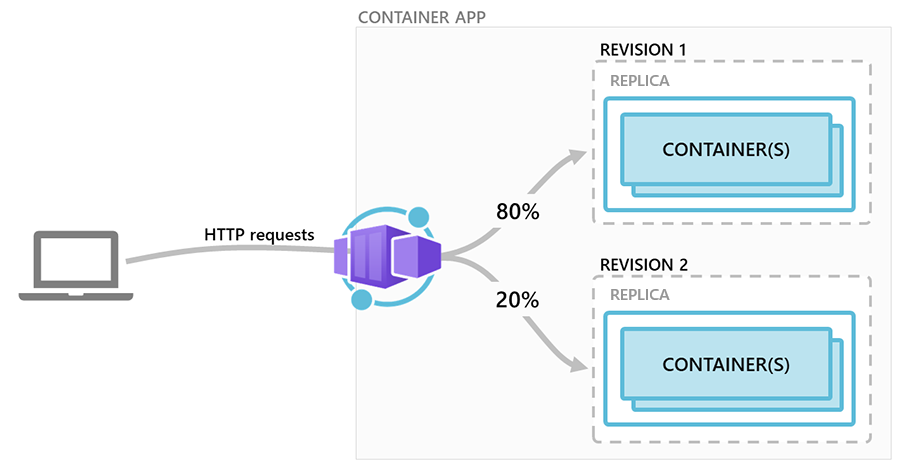
Read Microsoft Learn’s Blue-green deployment in Azure Container Apps for the revision, label, and traffic operations behind this approach:
Blue-Green Deployment in Azure Container Apps | Microsoft Learn
Read Microsoft's explanation of how an existing revision can serve users while a new one is tested, then how traffic can be switched or restored.
Start with the opening explanation, from the release model. Under “Create a container app with multiple active revisions enabled,” read the mode requirements; you can skip the long Bicep example. Then inspect the CLI examples under “Deploy a new revision and assign labels,” especially the new-revision update, label assignment, and label-specific test address. Finish with the traffic commands under “Send production traffic to the green revision” and “Roll back the deployment if there were problems.” Focus on what changes during rollback: traffic, not the image stored in ACR.
For two apps, there is an important limitation: switching backend and frontend traffic is not one atomic operation. Our script will test both candidate revisions first, then switch each app, then verify the public addresses. On failure it will attempt to restore both old revisions. Brief mixed-version traffic is still possible during those operations; keep your API changes compatible with the preceding frontend and backend version.
Establish the release boundary and its cost
Reuse the existing resource group, Container Apps, environment, registry, database, probes, and application configuration. This release must not recreate them or copy database credentials into GitHub. In particular, the backend’s existing registry-pull authorization and database configuration must already work for a new revision.
Before running the lab:
- Configure both Container Apps for multiple active revisions in the Terraform-managed app configuration. Confirm that the currently serving revision of each app is explicitly assigned 100% traffic by revision name, rather than using a “latest revision” traffic rule. With “latest,” creating a revision could move traffic before validation. The script below refuses either unsafe starting state.
- Treat Terraform as the owner of stable infrastructure and GitHub Actions as the owner of image releases and revision traffic. A later
terraform applymust not silently reset the released image or traffic weights: inspect its plan and reconcile this ownership in your configuration before applying. Do not run a Terraform apply or make portal traffic changes concurrently with this workflow. - Disable any portal-generated continuous-deployment workflow targeting these apps. There should be one release controller.
- Choose an existing, safe read-only backend REST path that returns a successful response when the service works. You will provide it as
RELEASE_REST_PATH;/health/readyis checked separately.
Cost of preparation: changing workflow files and checking configuration creates no resources. If you enable multiple-revision mode, an additional active revision can consume billable Container Apps compute while it runs. Your existing ACR, PostgreSQL, logging, and any AKS resources left running retain their normal charges. Review your Azure budget and resource list before keeping both revisions active.
The OIDC application from the last lesson currently has AcrPush on ACR. That role does not authorize Container Apps updates. Grant the same dedicated CI identity Contributor on the two existing Container App resources, not on the resource group or subscription. Using your own appropriately authorized Azure CLI login, adapt the following:
export AZURE_RESOURCE_GROUP="your-existing-resource-group"
export BACKEND_APP="your-existing-backend-container-app"
export FRONTEND_APP="your-existing-frontend-container-app"
export APP_ID="client-id-of-your-existing-github-oidc-application"

SP_OBJECT_ID=$(az ad sp show --id "$APP_ID" --query id -o tsv)

for APP in "$BACKEND_APP" "$FRONTEND_APP"; do
  APP_RESOURCE_ID=$(az containerapp show \
    --resource-group "$AZURE_RESOURCE_GROUP" \
    --name "$APP" --query id -o tsv)

  az role assignment create \
    --assignee-object-id "$SP_OBJECT_ID" \
    --assignee-principal-type ServicePrincipal \
    --role Contributor \
    --scope "$APP_RESOURCE_ID"
done
Cost of access setup: role assignments do not start compute, but they persist as security grants until removed. Your account must be permitted to assign roles at these scopes; an authorization error is not a reason to widen the scope. Allow time for new assignments to propagate.
Add these GitHub Actions repository variables alongside those from the previous lesson:
| Variable | Value |
|---|---|
AZURE_RESOURCE_GROUP |
Existing app resource group |
BACKEND_APP |
Existing backend Container App name |
FRONTEND_APP |
Existing frontend Container App name |
RELEASE_REST_PATH |
Your safe backend GET path, beginning with / |
No database password, registry admin credential, or new Azure client secret is needed.
Define what a passing release means
A successful image push proves neither that Azure can start it nor that users can use it. Our release check will require:
- The candidate backend to answer
/health/readyand your chosen REST request at its label-specific address. - The candidate frontend to serve
/at its label-specific address. - Both checks to pass again at the apps’ normal public addresses after the traffic switch.
This is a practical baseline, not a comprehensive application test. An HTTP response from the frontend does not prove that its browser-side REST configuration or WebSocket connection works. If WebSockets are essential to your release decision, extend the verification script with an application-specific WebSocket handshake and message check before relying on it for an unattended release. Similarly, choose a REST path that checks useful behavior without changing data or exposing secrets. The current script requires a successful HTTP status; it does not inspect a response body.
Create ci/verify-containerapps-release.sh:
#!/usr/bin/env bash
set -euo pipefail

BACKEND_URL="${1:?backend URL required}"
FRONTEND_URL="${2:?frontend URL required}"
REST_PATH="${RELEASE_REST_PATH:?set RELEASE_REST_PATH to a safe GET path}"

if [[ "$REST_PATH" != /* || "$REST_PATH" == //* ]]; then
  echo "RELEASE_REST_PATH must be an absolute path on the backend" >&2
  exit 1
fi

check() {
  local description="$1"
  local url="$2"

  echo "Checking $description"
  curl --fail --silent --show-error --location \
    --retry 6 --retry-delay 3 --retry-connrefused \
    --max-time 15 \
    --output /dev/null "$url"
}

check "backend readiness" "$BACKEND_URL/health/ready"
check "backend REST endpoint" "$BACKEND_URL$REST_PATH"
check "frontend page" "$FRONTEND_URL/"
The retries allow for startup; they do not turn a consistently failing response into success. If your REST endpoint needs authentication, replace its check with an appropriate non-secret lab test rather than putting a user token in a repository variable or workflow log.
Cost of verification: editing and running the script locally is free apart from resources already running. In GitHub, checks consume runner time and send a small number of requests to your existing apps. Additional active revisions—and requests made to them—can increase Container Apps charges. Check current pricing and your budget rather than assuming a fixed dollar amount.
Add a release script with a traffic rollback
The next script is intentionally strict about its starting point. It records exactly one 100%-weighted, explicitly named, active revision per app. It then creates candidates using the tag from this same workflow attempt—the tag format established last lesson. New candidate revisions receive unique probe labels for testing without receiving ordinary production traffic.
Create ci/release-containerapps.sh:
#!/usr/bin/env bash
set -euo pipefail

: "${AZURE_RESOURCE_GROUP:?}"
: "${BACKEND_APP:?}"
: "${FRONTEND_APP:?}"
: "${REGISTRY:?}"
: "${RELEASE_REST_PATH:?}"
: "${GITHUB_SHA:?}"
: "${GITHUB_RUN_ID:?}"
: "${GITHUB_RUN_ATTEMPT:?}"

RG="$AZURE_RESOURCE_GROUP"
TAG="sha-${GITHUB_SHA}-run-${GITHUB_RUN_ID}-attempt-${GITHUB_RUN_ATTEMPT}"
LABEL="probe-${GITHUB_RUN_ID}-${GITHUB_RUN_ATTEMPT}"
BACKEND_IMAGE="$REGISTRY/backend:$TAG"
FRONTEND_IMAGE="$REGISTRY/frontend:$TAG"

app_field() {
  az containerapp show -g "$RG" -n "$1" --query "$2" -o tsv
}

production_revision() {
  local app="$1"
  local mode revision

  mode=$(app_field "$app" "properties.configuration.activeRevisionsMode")
  if [[ "$mode" != "multiple" ]]; then
    echo "$app must use multiple active revisions" >&2
    return 1
  fi

  revision=$(
    az containerapp show -g "$RG" -n "$app" \
      --query "properties.configuration.ingress.traffic" -o json |
      jq -er '
        if length == 1
           and .[0].weight == 100
           and (.[0].revisionName? != null)
           and (.[0].latestRevision? != true)
        then .[0].revisionName
        else error("Expected one explicitly named revision at 100%")
        end'
  )

  az containerapp revision show -g "$RG" -n "$app" \
    --revision "$revision" -o json |
    jq -e '.properties.active == true' >/dev/null

  printf '%s\n' "$revision"
}

set_traffic() {
  az containerapp ingress traffic set -g "$RG" -n "$1" \
    --revision-weight "$2=100" --output none
}

label_url() {
  local app="$1"
  local fqdn
  fqdn=$(app_field "$app" "properties.configuration.ingress.fqdn")
  printf 'https://%s---%s.%s\n' "$app" "$LABEL" "${fqdn#*.}"
}

public_url() {
  printf 'https://%s\n' \
    "$(app_field "$1" "properties.configuration.ingress.fqdn")"
}

# Exit without deploying if either app has an unsafe starting traffic rule.
OLD_BACKEND=$(production_revision "$BACKEND_APP")
OLD_FRONTEND=$(production_revision "$FRONTEND_APP")
echo "Previous backend: $OLD_BACKEND"
echo "Previous frontend: $OLD_FRONTEND"

PROMOTION_STARTED=0

finish() {
  local result=$?
  trap - EXIT
  set +e

  if (( result != 0 && PROMOTION_STARTED == 1 )); then
    echo "Verification or traffic switch failed; restoring old traffic."
    set_traffic "$BACKEND_APP" "$OLD_BACKEND" ||
      echo "URGENT: backend traffic restoration failed" >&2
    set_traffic "$FRONTEND_APP" "$OLD_FRONTEND" ||
      echo "URGENT: frontend traffic restoration failed" >&2
  fi

  # A probe label is not a production traffic allocation.
  az containerapp revision label remove -g "$RG" -n "$BACKEND_APP" \
    --label "$LABEL" --output none 2>/dev/null || true
  az containerapp revision label remove -g "$RG" -n "$FRONTEND_APP" \
    --label "$LABEL" --output none 2>/dev/null || true

  exit "$result"
}
trap finish EXIT

az containerapp update -g "$RG" -n "$BACKEND_APP" \
  --image "$BACKEND_IMAGE" --output none
NEW_BACKEND=$(app_field "$BACKEND_APP" "properties.latestRevisionName")

az containerapp update -g "$RG" -n "$FRONTEND_APP" \
  --image "$FRONTEND_IMAGE" --output none
NEW_FRONTEND=$(app_field "$FRONTEND_APP" "properties.latestRevisionName")

for entry in "$BACKEND_APP|$NEW_BACKEND|$BACKEND_IMAGE" \
             "$FRONTEND_APP|$NEW_FRONTEND|$FRONTEND_IMAGE"; do
  IFS='|' read -r app revision image <<< "$entry"

  if [[ -z "$revision" ]]; then
    echo "No new revision reported for $app" >&2
    exit 1
  fi

  deployed_image=$(az containerapp revision show -g "$RG" -n "$app" \
    --revision "$revision" \
    --query "properties.template.containers[0].image" -o tsv)

  if [[ "$deployed_image" != "$image" ]]; then
    echo "Unexpected image in $revision" >&2
    exit 1
  fi

  az containerapp revision label add -g "$RG" -n "$app" \
    --revision "$revision" --label "$LABEL" --output none
done

echo "Testing candidate revisions without switching public traffic."
bash ci/verify-containerapps-release.sh \
  "$(label_url "$BACKEND_APP")" \
  "$(label_url "$FRONTEND_APP")"

echo "Candidate checks passed; switching public traffic."
PROMOTION_STARTED=1
set_traffic "$BACKEND_APP" "$NEW_BACKEND"
set_traffic "$FRONTEND_APP" "$NEW_FRONTEND"

echo "Checking the public addresses after the switch."
bash ci/verify-containerapps-release.sh \
  "$(public_url "$BACKEND_APP")" \
  "$(public_url "$FRONTEND_APP")"

echo "Release verified: $NEW_BACKEND and $NEW_FRONTEND"
This example assumes one application container per Container App, as in the earlier deployment labs; that is why its image check examines the first container in each revision. It also assumes both apps have the external HTTPS ingress needed for these checks. Adjust the verification approach if you deliberately use internal-only ingress.
Notice where rollback is armed: immediately before the first production traffic change. If a candidate fails its isolated check, the old traffic never needs switching back. If a traffic command or post-switch check fails, the exit handler attempts to give both old revisions 100%. The old revisions must remain active for that to work. A failed rollback command prints an urgent message and requires manual investigation; no shell script can guarantee recovery from an Azure control-plane failure.
Cost of one release attempt: it uses GitHub runner minutes and may run two new Container Apps revisions alongside the old ones during validation. The existing database, registry, and logs continue to incur their normal charges; more revisions and log volume can add charges. A failed attempt can leave new revisions behind even after traffic is restored. Inspect and deactivate unused revisions after diagnosis, while retaining the known-good revisions needed for rollback. There is no safe universal fixed price for this attempt: duration, replica settings, usage, and your region matter. Keep the lab short and check actual charges against your roughly USD 50/month budget.
Attach release to the successful publish run
Extend .github/workflows/publish-images.yml from the previous lesson. Keep its main guard, OIDC permissions, build, tests, Azure Login, ACR login, and “Tag and push tested images” step. Add a job-level concurrency setting so this workflow does not intentionally overlap another release run:
jobs:
  publish:
    if: github.ref == 'refs/heads/main'
    runs-on: ubuntu-latest
    concurrency:
      group: containerapps-release-main
      cancel-in-progress: false
    permissions:
      contents: read
      id-token: write
Preserve the other existing job fields and steps. Then append this step after both image pushes:
      - name: Release and verify Container Apps
        shell: bash
        env:
          AZURE_RESOURCE_GROUP: ${{ vars.AZURE_RESOURCE_GROUP }}
          BACKEND_APP: ${{ vars.BACKEND_APP }}
          FRONTEND_APP: ${{ vars.FRONTEND_APP }}
          RELEASE_REST_PATH: ${{ vars.RELEASE_REST_PATH }}
        run: bash ci/release-containerapps.sh
The prior workflow already defines REGISTRY at job level and signs in to Azure through OIDC. A failed build, test, login, or push prevents this step from running. cancel-in-progress: false avoids intentionally terminating a release mid-switch, but do not treat concurrency as protection against separate workflows, portal edits, or Terraform applies.
Cost of attaching the step: committing YAML costs nothing. A triggered run has the runner and Azure usage described above. Avoid repeatedly triggering runs to diagnose a missing variable; check configuration first.
Observe a release and a controlled failure
For a first run, watch the GitHub Actions log in order: tests, both image pushes, candidate creation, candidate checks, traffic switch, public checks. Inspect the two Container Apps’ revision lists and traffic settings afterward. Each public app should point 100% to the revision whose image tag contains that run’s ID and attempt number. The script removes its temporary probe labels on exit; it does not delete revisions.
To check the failure path without breaking your running application, use a manual run from main only after reviewing its cost. Temporarily set RELEASE_REST_PATH to a nonexistent, safe path. The candidate check should fail before promotion, leaving old traffic unchanged. Restore the correct variable afterward. To test post-switch rollback, you need a deliberately failing post-switch-only check; design that test carefully on disposable lab traffic, because it briefly sends users to the new revisions. Do not infer that rollback has been tested merely because the pre-promotion failure worked.
If a real run fails after promotion, inspect both apps’ traffic settings immediately. Successful traffic restoration does not undo database migrations, external side effects, or image publication. Keep schema changes compatible with the old app version, and do not delete the old image or revision until you no longer need that rollback path.
Cost of failure testing: each triggered run consumes GitHub minutes and may create additional billable active revisions and logs; the retained PostgreSQL and other infrastructure continue charging. One pre-promotion test is sufficient for this lab. Deactivate failed revisions you no longer need, and follow your earlier cleanup plan when finished.
Key takeaways
You have extended CI into a validated Container Apps release: published images become separate revisions; label-specific requests check them while old revisions serve users; explicit traffic weights promote them; and a failed post-switch check triggers a best-effort return to the previous revisions. The two-app switch is not atomic, so compatibility and inspection remain part of a safe release.
Next, you will instrument the FastAPI backend with OpenTelemetry and send request metrics, traces, and failures to Application Insights. That telemetry will give future release decisions stronger evidence than HTTP smoke checks alone.