Recommended resources
The freely available resources this lesson will direct you to.
- GitHub Azure AD OIDC Authenticationwww.youtube.com
- Build and Deploy Custom Container Images from GitHub Action to Azure App Service using ACRwww.youtube.com
- Authenticate to Azure from GitHub Actions by OpenID Connect | Microsoft Learnlearn.microsoft.com
- GitHub Action to login against a Docker registrygithub.com
Hello. In the previous lesson, you deployed your frontend and backend to AKS from images that you built and pushed manually. This lesson moves that image-production step into GitHub Actions: a push to your main branch will build both images, run checks, and publish versioned images to your private Azure Container Registry (ACR).
Allow about 45–55 minutes, including the readings and a first workflow run. We will use OpenID Connect (OIDC) so GitHub does not need an Azure client password or an ACR admin password. Publishing images is the boundary for this lesson; deploying a new Container Apps revision comes next.
Understand what GitHub must prove to Azure
A workflow needs two distinct things before it can push to ACR. First, it must authenticate: Azure must establish which identity the workflow is allowed to use. Second, that identity must be authorized to push to your registry.
With OIDC, GitHub issues a short-lived identity token to an eligible workflow run. Azure checks that token against a federated credential attached to a Microsoft Entra application. If the token matches—for example, it identifies your repository’s main branch—Azure Login can obtain an Azure access token for that application. An Azure role assignment then determines what the application may do. No reusable Azure client secret needs to be stored in GitHub.
The diagram shows where today’s work ends. GitHub Actions will publish images to the container registry; the new Azure Container Apps revision shown on the right is a later delivery step, not something this workflow creates.
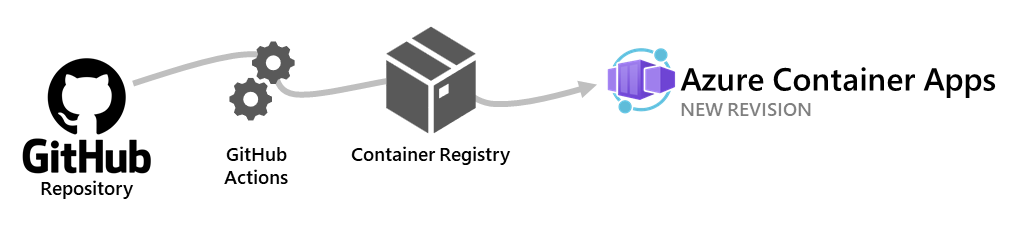
Authenticate to Azure from GitHub Actions by OpenID Connect | Microsoft Learn
Read Microsoft's Azure Login guide to see the federated-identity prerequisite, the three identifiers supplied to the action, and the workflow permission OIDC requires.
In “Prerequisites,” note the choice of a Microsoft Entra application or user-assigned managed identity; we will use an application. In “Create GitHub secrets,” read the settings steps for the client, tenant, and subscription IDs. Then, under “Set up Azure Login action with OpenID Connect in GitHub Actions workflows” → “The workflow sample to only run Azure CLI,” read the login explanation and sample. Pay particular attention to id-token: write.
Microsoft's example stores the three IDs as GitHub secrets. They identify an application, tenant, and subscription; none is an Azure password. For this lab, we will store them as GitHub Actions variables and avoid creating a client secret altogether. You could choose secrets for the IDs instead, but doing so would not replace the federated credential or the role assignment.
Set a spending and access boundary before configuring CI
This workflow will reuse your existing ACR; it does not create another registry, cluster, database, or running application. Creating an Entra application, federated credential, and role assignment is not expected to add an Azure compute charge. ACR continues to incur its existing registry and storage charges, and publishing two images increases stored data. GitHub-hosted runner minutes may count against your plan’s allowance or become billable; check your GitHub billing settings before repeatedly rerunning the workflow.
For your roughly USD 50/month personal budget, the larger risk may be infrastructure left over from the deployment labs: AKS nodes, disks, PostgreSQL, and public networking can keep accruing charges while you work on CI. Check your Azure budget and running resources now. If you do not need AKS for this lesson, use your previously reviewed cleanup plan rather than leaving it running solely to publish images.
Use a dedicated CI identity with permission at the ACR resource scope, not Contributor over the whole subscription. The procedure below assumes your registry uses the registry-level RBAC permissions model, where the AcrPush role applies. If your registry instead uses repository-scoped ABAC permissions, stop before assigning that role: its authorization setup differs, and you should not change the registry’s permissions mode merely to make the example work.
Establish trust for one repository and branch
The practical setup has three parts: create an Entra application and its service principal, tell Azure which GitHub branch may impersonate it, and grant it push access to your registry. You need an Azure identity permitted to create app registrations and assign the registry role. If role assignment is denied, do not broaden the scope as a workaround.
Set these values in a local shell, substituting your own names:
export AZURE_SUBSCRIPTION_ID="your-subscription-id"
export ACR_NAME="your-existing-registry-name"
export GH_OWNER="your-github-owner"
export GH_REPO="your-github-repository"

az account set --subscription "$AZURE_SUBSCRIPTION_ID"

ACR_ID=$(az acr show --name "$ACR_NAME" --query id -o tsv)
ACR_LOGIN_SERVER=$(az acr show \
  --name "$ACR_NAME" --query loginServer -o tsv)

printf 'Registry login server: %s\n' "$ACR_LOGIN_SERVER"
Cost of these checks: they create no resources. The existing registry and any infrastructure still running continue to accrue their normal charges.
Create an application specifically for image publishing, then create its service principal:
APP_ID=$(az ad app create \
  --display-name "grasp-github-acr-publisher" \
  --query appId -o tsv)

SP_OBJECT_ID=$(az ad sp create \
  --id "$APP_ID" --query id -o tsv)

AZURE_TENANT_ID=$(az account show --query tenantId -o tsv)

printf 'Client ID: %s\nTenant ID: %s\n' \
  "$APP_ID" "$AZURE_TENANT_ID"
Here, APP_ID is the client ID GitHub will provide to Azure Login. SP_OBJECT_ID identifies the associated service principal for the Azure role assignment. Neither command creates a client password.
For a workflow running on main without a GitHub environment, configure the federated credential as follows:
cat > federated-credential.json <<EOF
{
  "name": "github-main-image-publish",
  "issuer": "https://token.actions.githubusercontent.com",
  "subject": "repo:${GH_OWNER}/${GH_REPO}:ref:refs/heads/main",
  "audiences": ["api://AzureADTokenExchange"]
}
EOF

az ad app federated-credential create \
  --id "$APP_ID" \
  --parameters federated-credential.json
The subject must match the repository owner, repository name, and branch used by the workflow exactly. A workflow job configured to use a GitHub environment can have a different subject; this example deliberately does not use one. The JSON file contains no password, but keep this lab-specific configuration with your other infrastructure notes rather than accidentally committing it as an unexplained application credential.
Finally, authorize the service principal to push to this registry:
az role assignment create \
  --assignee-object-id "$SP_OBJECT_ID" \
  --assignee-principal-type ServicePrincipal \
  --role AcrPush \
  --scope "$ACR_ID"
Cost of identity setup: these commands are not expected to create a billable Azure compute resource. They do create a persistent security grant. Record the application and registry scope so you can remove the grant when you retire the lab. Role assignments may take a short time to become effective.
In your GitHub repository, open Settings → Secrets and variables → Actions → Variables and create these repository variables:
| Variable | Value |
|---|---|
AZURE_CLIENT_ID |
The printed APP_ID |
AZURE_TENANT_ID |
The printed AZURE_TENANT_ID |
AZURE_SUBSCRIPTION_ID |
Your selected subscription ID |
ACR_NAME |
Your existing registry name |
ACR_LOGIN_SERVER |
The printed registry login server |
Do not add an AZURE_CLIENT_SECRET, an ACR admin password, or a personal Azure login token. Your repository’s main branch now represents an important security boundary: someone able to change and run its workflow may be able to publish images under this role. Review changes to workflow files and protect that branch appropriately.
Build and check the images before asking Azure for access
Your application already has backend and frontend Dockerfiles, but their build contexts and startup requirements are specific to your repository. The example below assumes:
backend/Dockerfilebuilds withbackend/as its context and serves port8000;frontend/Dockerfilebuilds withfrontend/as its context and serves port80;- the backend can start in a CI smoke-test configuration without production credentials, and
/health/livesucceeds.
Adjust these assumptions to your actual containers. In particular, do not pass a production database password into a GitHub runner merely to make a liveness check pass.
Create ci/test.sh as an initial container smoke-test script:
#!/usr/bin/env bash
set -euo pipefail

docker run -d --name grasp-backend-ci \
  -p 127.0.0.1:18000:8000 \
  grasp-backend:ci

docker run -d --name grasp-frontend-ci \
  -p 127.0.0.1:18080:80 \
  grasp-frontend:ci

trap 'docker rm -f grasp-backend-ci grasp-frontend-ci \
  >/dev/null 2>&1 || true' EXIT

curl --retry 10 --retry-delay 2 --retry-connrefused \
  --fail --silent --show-error \
  http://127.0.0.1:18000/health/live

curl --retry 10 --retry-delay 2 --retry-connrefused \
  --fail --silent --show-error \
  http://127.0.0.1:18080/ -o /dev/null
If your backend requires non-sensitive CI environment settings to start, add them to its docker run command. If it cannot start without PostgreSQL, use a local test database or substitute an existing backend test command; do not weaken the application configuration or connect CI smoke tests to your production database. Add your existing unit or integration test commands to this script as appropriate. A successful /health/live response establishes that the container starts; it does not prove all REST or WebSocket behavior.
Cost of local test design: editing the script costs nothing. When GitHub runs it, container builds and tests use GitHub runner time; they do not provision Azure resources.
Publish only after the checks succeed
For ACR authentication, Azure Login first signs in through OIDC. The workflow then obtains a short-lived ACR access token and passes it to Docker’s registry login action. That token is a runtime credential: it should be masked in logs and never committed or stored as a long-lived GitHub secret.
GitHub Action to login against a Docker registry
Read the Docker login action's ACR OIDC example to see how Azure Login, an exposed ACR access token, and Docker login fit together without a registry password.
In “Azure Container Registry (ACR)” → “OpenID Connect (OIDC),” start at the OIDC explanation. Inspect the YAML immediately below through its “Login to ACR” step. Notice both the token-masking command and the special all-zero Docker username. Skip the neighboring “Service principal” password example; this lab does not use it.
Create .github/workflows/publish-images.yml:
name: Build and publish application images

on:
  push:
    branches: [main]
  workflow_dispatch:

jobs:
  publish:
    if: github.ref == 'refs/heads/main'
    runs-on: ubuntu-latest
    permissions:
      contents: read
      id-token: write

    env:
      ACR_NAME: ${{ vars.ACR_NAME }}
      REGISTRY: ${{ vars.ACR_LOGIN_SERVER }}

    steps:
      - name: Check out source
        uses: actions/checkout@v4

      - name: Build both images
        run: |
          docker build -f backend/Dockerfile \
            -t grasp-backend:ci backend
          docker build -f frontend/Dockerfile \
            -t grasp-frontend:ci frontend

      - name: Test containers
        run: bash ci/test.sh

      - name: Log in to Azure using OIDC
        uses: azure/login@v2
        with:
          client-id: ${{ vars.AZURE_CLIENT_ID }}
          tenant-id: ${{ vars.AZURE_TENANT_ID }}
          subscription-id: ${{ vars.AZURE_SUBSCRIPTION_ID }}

      - name: Obtain short-lived ACR token
        id: acr-token
        shell: bash
        run: |
          set -euo pipefail
          ACR_TOKEN=$(az acr login \
            --name "$ACR_NAME" \
            --expose-token \
            --output tsv \
            --query accessToken)
          echo "::add-mask::$ACR_TOKEN"
          echo "token=$ACR_TOKEN" >> "$GITHUB_OUTPUT"

      - name: Log Docker in to ACR
        uses: docker/login-action@v4
        with:
          registry: ${{ vars.ACR_LOGIN_SERVER }}
          username: 00000000-0000-0000-0000-000000000000
          password: ${{ steps.acr-token.outputs.token }}

      - name: Tag and push tested images
        shell: bash
        run: |
          set -euo pipefail
          TAG="sha-${GITHUB_SHA}-run-${GITHUB_RUN_ID}-attempt-${GITHUB_RUN_ATTEMPT}"

          docker tag grasp-backend:ci "$REGISTRY/backend:$TAG"
          docker tag grasp-frontend:ci "$REGISTRY/frontend:$TAG"

          docker push "$REGISTRY/backend:$TAG"
          docker push "$REGISTRY/frontend:$TAG"

          echo "Published $REGISTRY/backend:$TAG"
          echo "Published $REGISTRY/frontend:$TAG"
The test step runs before Azure Login, and a failed command stops the job before either image is pushed. The tag records the commit and the particular workflow run attempt. That matters because rerunning a build for the same commit can produce a different image; a plain commit-SHA tag could silently be overwritten. The published image digest is an even more precise reference for a later deployment.
The job’s id-token: write permission lets it request a GitHub OIDC token; contents: read lets it check out the repository. Neither permission grants Azure access by itself. Azure still requires the matching federated credential and ACR role assignment. The main check also prevents a manual dispatch on another branch from publishing under this workflow.
Cost of a workflow run: GitHub runner usage depends on your GitHub plan. Azure charges are principally your existing ACR plus any additional image storage and applicable data transfer; this workflow does not start AKS or Container Apps. Avoid repeated builds while diagnosing a configuration error, and keep an eye on the Azure resources you left running from earlier labs.
Verify the result and retain only what you need
Push the files to main, or manually dispatch the workflow from main. In the GitHub Actions run, verify the order: both builds, the smoke tests, Azure Login, Docker login, then both pushes. The final log lines should show the same version tag on the backend and frontend images.
You can also inspect ACR using your own Azure CLI login:
az acr repository show-tags \
  --name "$ACR_NAME" \
  --repository backend \
  --output table

az acr repository show-tags \
  --name "$ACR_NAME" \
  --repository frontend \
  --output table
Cost of verification: listing tags creates no new Azure resource. The registry and any other retained infrastructure continue to incur their normal charges.
If the run fails, locate its first failing step:
- Azure Login fails: check the three IDs,
id-token: write, and the exact federated-credential subject. Confirm that the run is onmain. - ACR token or push fails: check the registry name, login server,
AcrPushassignment at the registry scope, and whether your registry uses the assumed permissions model. Allow for a newly created role assignment to propagate. - Tests fail: inspect container startup, ports, health paths, and CI-only configuration before changing Azure permissions. A role assignment cannot fix an image that does not start.
For cleanup, retain the registry and images only if the next delivery lesson will use them. Old test tags consume ACR storage; remove unused ones according to your lab cleanup plan, but do not delete images still referenced by AKS or Container Apps. When you retire this CI workflow entirely, remove its dedicated role assignment, federated credential, and application as part of your documented identity cleanup. Do not destroy a shared registry just to remove this workflow.
Key takeaways
You now have a build-and-publish boundary: source on main is built and checked before versioned backend and frontend images are pushed to ACR. OIDC replaces a stored Azure client password, while the federated credential limits which GitHub run may authenticate and AcrPush limits what that identity may do in Azure. Keep the resulting image tags—and ideally their digests—available: the next lesson will use published images to automate and verify a Container Apps release, then handle a failed release without treating “push succeeded” as proof that the application works.