Recommended resources
The freely available resources this lesson will direct you to.
Welcome back! In our previous lesson, you learned how to define the architecture of a neural network by creating a class that inherits from torch.nn.Module. You now have the skills to build the "skeleton" of a model, complete with its layers.
However, a model definition alone is just a static structure. To bring it to life, we need a way to train it. Training involves showing the model data, evaluating how well it performs, and systematically updating its parameters to improve its performance.
This lesson focuses on the two crucial components that enable this process: the loss function and the optimizer. Our goal is to select and instantiate an appropriate loss function and optimizer for a defined model. By the end of this lesson, you will have all the pieces ready to assemble a complete training loop.
As this diagram shows, selecting a loss function and optimizer is the next logical step after defining the model's architecture.
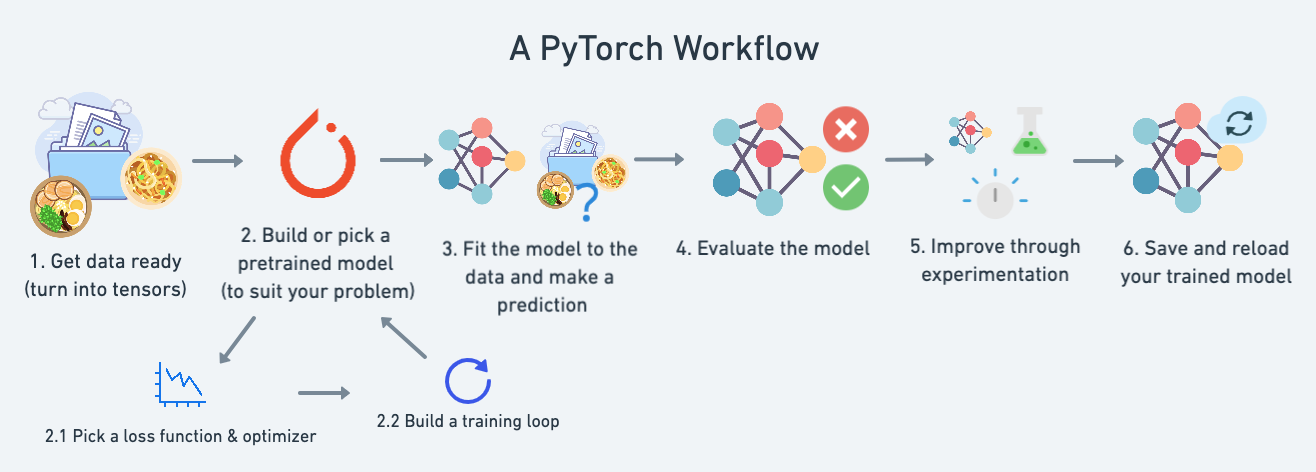
1. The Loss Function: Measuring Your Model's Error
A loss function (or criterion) is a method of measuring how far a model's prediction is from the correct answer, or "ground truth." The value it computes, the "loss," is a single scalar number that we aim to minimize during training. The choice of loss function is critical and depends entirely on the type of problem you are trying to solve.
Let's explore the most common scenarios.
Choosing a Loss Function Based on Your Task
- Regression: Your goal is to predict a continuous value (e.g., the price of a house). The most common loss function is Mean Squared Error (MSE), which measures the average squared difference between the predicted and actual values. In PyTorch, this is
nn.MSELoss. - Binary Classification: Your goal is to predict one of two classes (e.g., spam or not spam). The standard choice is Binary Cross-Entropy (BCE). In PyTorch, you'll typically use
nn.BCEWithLogitsLoss, which is numerically more stable than using a Sigmoid layer followed bynn.BCELoss. - Multi-Class Classification: Your goal is to predict one of more than two classes (e.g., classifying an image as a cat, dog, or bird). The go-to loss function is Cross-Entropy Loss, available in PyTorch as
nn.CrossEntropyLoss.
For your work in deep learning, especially in areas like image classification and NLP, multi-class classification is extremely common. Therefore, understanding nn.CrossEntropyLoss is essential.
A Closer Look at nn.CrossEntropyLoss
The nn.CrossEntropyLoss in PyTorch is particularly important to understand because it combines two operations for efficiency and numerical stability:
- A Softmax function: It converts the model's raw output scores (called "logits") into a probability distribution.
- A Negative Log-Likelihood Loss (NLLLoss): It computes the loss based on the predicted probabilities and the correct class.
Because PyTorch combines these for you, there are two critical rules you must follow when using nn.CrossEntropyLoss:
- Do NOT apply a Softmax layer at the end of your model. The model's output layer should produce raw logits. The loss function handles the softmax internally.
- The ground truth labels (
y) should be integers representing the class index (e.g.,0for cat,1for dog,2for bird), not one-hot encoded vectors.
The following video provides an excellent explanation of softmax and cross-entropy, clearly demonstrating how to use nn.CrossEntropyLoss in PyTorch and contrasting it with the binary classification case.
PyTorch Tutorial 11 - Softmax and Cross Entropy
This video from Patrick Loeber clearly explains the concepts of Softmax and Cross-Entropy loss, and more importantly, demonstrates the correct way to use them in PyTorch, highlighting the common pitfalls.
Please watch the following segments: Cross-Entropy Loss Explained (03:12 - 06:15): Understand the concept and how it's calculated in NumPy. nn.CrossEntropyLoss in PyTorch (06:15 - 13:52): Pay close attention to the two crucial points: the loss function expects raw logits (no softmax in the model) and class indices (not one-hot vectors) for the labels. Also, notice how it handles batches of data. Binary vs. Multi-class Setups (15:43 - 17:51): See the structural difference in a model's output layer and loss function choice for binary classification (nn.BCELoss with a sigmoid) versus multi-class.
To instantiate a loss function in PyTorch, you simply create an instance of the class:
# For a multi-class classification problem
loss_fn = nn.CrossEntropyLoss()


# For a regression problem
# loss_fn = nn.MSELoss()


# For a binary classification problem
# loss_fn = nn.BCEWithLogitsLoss()
2. The Optimizer: The Engine of Learning
You now have a model that produces predictions and a loss function that calculates the error of those predictions. The loss.backward() call, as you learned, computes the gradient of the loss with respect to every model parameter ().
But how do we use these gradients to update the parameters and actually improve the model? That is the job of the optimizer.
An optimizer is an algorithm that updates the model's parameters (weights and biases) based on the computed gradients. The simplest form of this update is a core concept of deep learning, gradient descent:
Where:
- represents a model parameter (a weight or bias).
- (eta) is the learning rate, a hyperparameter that controls the step size of the update.
- is the gradient of the loss with respect to the parameter.
In practice, we rarely use this simple form of gradient descent. Modern deep learning relies on more advanced optimizers that adapt the update rule to make training faster and more stable.
The video 'Optimizers - EXPLAINED!' from CodeEmporium provides an excellent, intuitive overview of why we need more than just simple gradient descent. It visualizes the challenges of navigating the loss landscape and introduces the core ideas behind popular optimizers.
Watch the following clips to build an intuition for different optimization strategies: What is an Optimizer? (00:00 - 00:37): A quick introduction to the role of optimizers. Stochastic Gradient Descent (01:19 - 01:56): Understand the noisy but efficient updates of SGD. Momentum (02:03 - 02:32): See how momentum helps smooth out the noisy updates and accelerate in the right direction. Adam (05:34 - 06:37): Learn how Adam combines the ideas of momentum and adaptive learning rates, making it a powerful default.
Choosing an Optimizer
While there are many optimizers, you will primarily encounter two families in practice: SGD and Adam.
- SGD (
torch.optim.SGD): Stochastic Gradient Descent, often used with a momentum term. It's a robust and well-understood optimizer. For some tasks, particularly in computer vision, a well-tuned SGD with momentum can lead to models that generalize better. However, it can be more sensitive to the choice of learning rate. - Adam and AdamW (
torch.optim.Adam,torch.optim.AdamW): The Adam family of optimizers are adaptive, meaning they maintain a per-parameter learning rate. They are known for their fast convergence and are generally less sensitive to the initial learning rate. AdamW is a more modern and improved version of Adam that handles weight decay (a regularization technique) correctly. It has become the de-facto standard for training Transformer models and is an excellent default choice for most deep learning projects.
To start, you can't go wrong with AdamW. The following reading provides a fantastic "cheat sheet" and decision guide.
Choosing the Right Optimizer for Your Deep Learning Problem
This guide from GenMind provides a practical, decision-oriented overview of modern optimizers. It will help you understand when and why to choose one over the other.
Please read the following sections: 'Quick Decision Guide': This table is an invaluable reference for quickly selecting an optimizer. 'AdamW: The Modern Default': Understand why AdamW is often the recommended starting point and see how to implement it. 'Wrapping Up': This provides a concise summary of the key takeaways for optimizer selection.
To instantiate an optimizer in PyTorch, you must pass it the model's parameters that it needs to update, along with the learning rate lr.
# Assume 'model' is an instance of a class inheriting from nn.Module
# A robust default choice for most problems
optimizer = torch.optim.AdamW(model.parameters(), lr=1e-3)


# Alternatively, using SGD with momentum
# optimizer = torch.optim.SGD(model.parameters(), lr=0.01, momentum=0.9)
The model.parameters() method is a convenience of nn.Module that returns an iterator over all the learnable parameters you defined in your model's layers. The optimizer now knows exactly which tensors to update during training.
3. Putting It All Together
Let's combine what you've learned today with the model you built in the last lesson. Here is a complete snippet that defines a model, then instantiates a loss function and an optimizer for it.
import torch
import torch.nn as nn


# 1. Define the model (from the previous lesson)
class SimpleMLP(nn.Module):
    def __init__(self, input_size, hidden_size, num_classes):
        super().__init__()
        self.network = nn.Sequential(
            nn.Linear(input_size, hidden_size),
            nn.ReLU(),
            nn.Linear(hidden_size, num_classes)
        )

    def forward(self, x):
        return self.network(x)


# --- Define hyperparameters ---
input_dim = 784  # e.g., for a 28x28 image
hidden_dim = 512
class_count = 10 # e.g., for digits 0-9
learning_rate = 0.001


# --- Instantiate the components ---


# 2. Instantiate the model
model = SimpleMLP(input_size=input_dim, hidden_size=hidden_dim, num_classes=class_count)
print("Model created:")
print(model)


# 3. Instantiate the loss function for multi-class classification
loss_fn = nn.CrossEntropyLoss()
print(f"\nLoss function: {loss_fn}")


# 4. Instantiate the optimizer, passing it the model's parameters and a learning rate
optimizer = torch.optim.AdamW(model.parameters(), lr=learning_rate)
print(f"Optimizer: {optimizer}")
This code prepares all the necessary components for training. You have a model ready to make predictions, a loss function to score them, and an optimizer ready to update the model based on that score.
Conclusion
In this lesson, you've added the final two essential components to your deep learning toolkit before you can start training. You are no longer just building static model architectures; you are now preparing them for learning.
Key Takeaways:
- Loss functions quantify a model's error. Your choice depends on the task:
nn.MSELossfor regression, andnn.CrossEntropyLossfor multi-class classification are common choices. nn.CrossEntropyLossis a special case in PyTorch that combinesSoftmaxandNLLLoss. This means your model should output raw logits, and your labels should be class indices.- Optimizers update the model's parameters using the gradients computed during backpropagation.
- While
SGDis fundamental,AdamWis an excellent and robust default optimizer for most modern deep learning tasks. - To instantiate an optimizer, you must provide it with the model's parameters (
model.parameters()) and a learning rate (lr).
You are now fully prepared to assemble these components. In the next lesson, we will do just that by implementing the complete training step sequence: zeroing gradients, performing a forward pass, computing the loss, running the backward pass, and updating the weights.