Recommended resources
The freely available resources this lesson will direct you to.
- Dive into Deep Learning – Lec 6: Basics of Object-Oriented Programming in PyTorch (torch.nn.Module)www.youtube.com
- Pytorch for Beginners: #10 | Implement Simple Neural Network using nn.Linear modulewww.youtube.com
- Build the Neural Networkdocs.pytorch.org
- Mastering the Basics of torch.nn: A Comprehensive Guide ...medium.com
Hello again! Welcome to our third lesson on PyTorch.
In our last lesson, we dove into autograd, PyTorch's automatic differentiation engine. You saw how it frees us from the manual gradient calculations you performed in the NumPy module. By simply calling loss.backward(), we can compute gradients for all learnable parameters, which are tracked in a computational graph.
This automation is powerful, but so far our parameters (weights and biases) have been loose tensors. For any network of realistic size, this approach would become disorganized and difficult to manage. Today, we'll solve that problem by learning how to structure our models professionally.
Our goal for this lesson is to define a neural network using nn.Module and nn.Linear layers. This is the standard, object-oriented way to build any deep learning model in PyTorch, providing a clean, reusable, and powerful framework for your projects.
1. From Manual Tensors to Packaged Layers
Remember when you implemented a neural network in NumPy? You had to manually initialize and keep track of each weight matrix and bias vector. In our last lesson with PyTorch, we turned those into tensors with requires_grad=True. While functional, this approach doesn't scale well. Imagine a network with dozens of layers!
PyTorch provides a far more elegant solution through its torch.nn library. It allows us to encapsulate layers, their parameters, and their operations within a single object. To see just how much cleaner this is, let's start by comparing the two approaches directly.
Comparing Neural Network Implementation With and Without torch.nn
This article from Medium provides a great side-by-side comparison of building a simple network manually versus using torch.nn. This will clearly illustrate the benefits of the approach we are learning today.
Read the section 'Comparing Neural Network Implementation With and Without torch.nn'. Notice how the torch.nn version bundles the weights, biases, and operations into a neat SimpleNN class.
As you saw, using torch.nn offers several key advantages:
- Encapsulation: All layers and their associated parameters are contained within a single model class.
- Parameter Tracking: PyTorch automatically knows that the parameters inside these layers need to be trained. You no longer have to set
requires_grad=Trueon each one. - Readability and Reusability: The code is much cleaner, more organized, and easier to debug or adapt for other tasks.
2. The Core Building Blocks: nn.Module and nn.Linear
At the heart of every PyTorch model are two key components: nn.Module and the layers that inherit from it, such as nn.Linear.
nn.Module: The Base Class for All Models
nn.Module is the base class from which all neural network modules (from single layers to entire models) should inherit. When you create your own network, you will define it as a Python class that subclasses nn.Module.
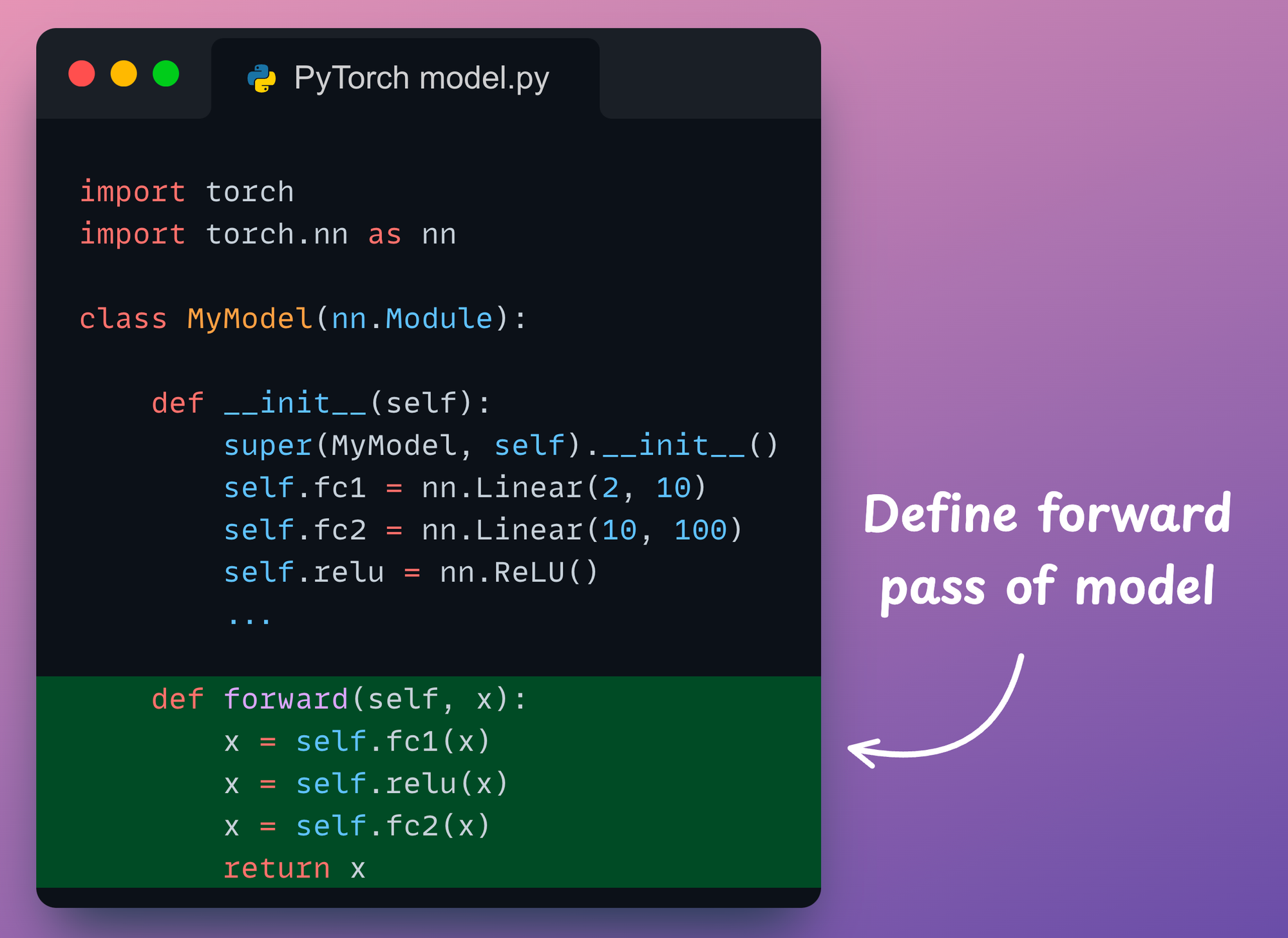
By doing this, your model automatically inherits a vast amount of functionality, including the crucial ability to track all its internal parameters. To create a custom model, you typically override two main methods:
__init__(self): The class constructor. This is where you define and initialize the layers your network will use (e.g., linear layers, convolutional layers). The first line must always besuper().__init__()to properly initialize the parentnn.Module.forward(self, x): This method defines the forward pass of your network. You specify how the input dataxflows through the layers you defined in__init__. The backward pass is handled automatically byautograd, so you don't need to define it!
nn.Linear: The Fully Connected Layer
The nn.Linear layer implements a standard fully connected layer. It performs a linear transformation on the incoming data: .
When you create an nn.Linear layer, you specify the in_features (size of each input sample) and out_features (size of each output sample). The layer automatically creates and initializes the weight and bias tensors for you.
Let's watch a short video that puts these pieces together to build a simple one-layer network.
Pytorch for Beginners: #10 | Implement Simple Neural Network using nn.Linear module
The video 'Implement Simple Neural Network using nn.Linear module' by Makeesy AI provides a very clear, step-by-step demonstration of defining a network class, initializing an nn.Linear layer, and implementing the forward pass.
Please watch the following segments: Class Definition (02:09 - 03:09): See how the NeuralNet class is created by inheriting from nn.Module. Initializing the Linear Layer (03:09 - 03:36): Observe how nn.Linear is instantiated within the __init__ method. Implementing the Forward Pass (05:26 - 06:20): Watch how the forward method is defined to pass the input through the linear layer.
The video demonstrates the fundamental pattern for building any model in PyTorch. The official documentation also provides an excellent, canonical example that's worth reviewing.
Build the Neural Network - PyTorch documentation
The official PyTorch documentation provides a complete, best-practice example of defining a neural network. This will solidify your understanding of the structure.
Read the section 'Define the Class' and study the NeuralNetwork code block. It shows a multi-layer network, but the core principle is the same: layers are defined in __init__ and used in forward.
To summarize the structure visually, here is a simple example:
3. Assembling a Multi-Layer Network
A single linear layer is not very powerful. The real strength of neural networks comes from stacking multiple layers with non-linear activation functions in between. Let's build a simple Multi-Layer Perceptron (MLP).
An MLP consists of:
- An input layer.
- One or more hidden layers, each composed of a linear transformation followed by a non-linear activation (e.g., ReLU).
- An output layer.
We can define this by creating multiple nn.Linear layers in __init__. For simple, sequential stacks of layers, PyTorch provides a convenient container called nn.Sequential. It allows you to group modules into a single module, and it automatically calls them in the order they are defined.
Dive into Deep Learning – Lec 6: Basics of Object-Oriented Programming in PyTorch (torch.nn.Module)
This video from Dr. Data Science explains how to use nn.Sequential to easily define a stack of layers within an nn.Module class.
Please watch from 16:25 to 19:40. Pay attention to how nn.Sequential simplifies the definition of the linear_relu_stack in __init__ and how it makes the forward method very concise.
Let's synthesize everything we've learned into a complete, runnable example. Here is the code for a simple MLP with one hidden layer.
import torch
import torch.nn as nn

class SimpleMLP(nn.Module):
    def __init__(self, input_size, hidden_size, output_size):


        # Call the constructor of the parent class (nn.Module)
        super().__init__()


        # Define the network layers using a Sequential container
        self.network = nn.Sequential(
            nn.Linear(input_size, hidden_size),  # First linear layer (input -> hidden)
            nn.ReLU(),                           # Non-linear activation function
            nn.Linear(hidden_size, output_size)  # Output linear layer (hidden -> output)
        )

    def forward(self, x):


        # The forward pass is just one call to our sequential container
        return self.network(x)


# --- Let's instantiate and inspect the model ---


# Define model dimensions
input_dim = 20
hidden_dim = 64
output_dim = 1 # e.g., for a regression task


# Create an instance of our model
model = SimpleMLP(input_dim, hidden_dim, output_dim)


# PyTorch provides a nice way to print the model's architecture
print("Model Architecture:")
print(model)


# --- Let's do a forward pass ---


# Create a dummy input tensor (batch of 5 samples, 20 features each)
dummy_input = torch.randn(5, input_dim)


# Pass the input through the model. This implicitly calls the forward() method.
# We do NOT call model.forward(dummy_input) directly.
output = model(dummy_input)

print("\n--- Forward Pass ---")
print("Input shape:", dummy_input.shape)
print("Output shape:", output.shape)
Take a moment to run this code yourself. Notice how printing the model object gives you a clean summary of its architecture. This is one of the many benefits of using the nn.Module framework.
Conclusion
You have now learned the standard and most fundamental skill for building models in PyTorch. By subclassing nn.Module, you can create clean, modular, and powerful neural networks of any complexity, while PyTorch handles the tedious work of parameter tracking for you.
Key Takeaways:
- All custom PyTorch models should be defined as classes that inherit from
nn.Module. - The
__init__method is where you define the layers of your network (e.g.,nn.Linear). Remember to callsuper().__init__()first. - The
forwardmethod defines the data flow through the network. The backward pass is handled automatically byautograd. nn.Linear(in_features, out_features)creates a fully connected layer with its own weights and biases.nn.Sequentialis a useful container for creating simple, feed-forward stacks of layers, making your code even more concise.
You can now define a model's architecture. But a model is useless without a way to measure its performance and a strategy to improve it. In our next lesson, we will complete our training setup by learning how to select and instantiate an appropriate loss function and optimizer.