Recommended resources
The freely available resources this lesson will direct you to.
Hello! In our last lesson, we established a clear, quantifiable goal for our LLM service: a target for throughput (in tokens/second) that must be met within a specific latency Service Level Objective (SLO). We defined what our system needs to achieve.
Today, we'll answer the next logical question: how many resources do we need to meet that goal? This lesson bridges the gap between performance requirements and infrastructure provisioning. As an experienced SRE and infrastructure automation specialist, you're familiar with capacity planning for traditional services. We'll now apply that same rigor to the unique world of GPU-based inference.
By the end of this lesson, you will be able to take a defined throughput requirement and map it to a specific number of GPU instances needed to power your LLM service, completing the capacity planning cycle.
1. The Core Capacity Planning Equation
At its heart, the calculation for GPU capacity is straightforward. You need two key pieces of information:
- Total Required Throughput: The target tokens per second your service must deliver, which we determined in the previous lesson.
- Effective Throughput per GPU: The actual, sustainable token throughput a single GPU can deliver for your specific model and workload, while staying within your latency SLO.
The calculation is then a simple division:
The challenge lies in accurately determining the "Effective Throughput per GPU". We'll explore two approaches: theoretical estimation and empirical benchmarking.
Let's start with a simple framing of this concept.
LLM inference optimization: Architecture, KV cache and Flash attention
This clip from the "LLM inference optimization" talk by YanAITalk provides a high-level example of this calculation.
Watch this short segment from calculating GPUs. The speaker demonstrates the basic idea of dividing the target Queries Per Second (QPS) by the QPS achievable on a single GPU to find the total number of GPUs needed. Our approach will be more detailed, using tokens-per-second, but the principle is identical.
2. Estimating Single-GPU Throughput
To use our core equation, we must find the denominator: the effective throughput of one GPU.
Method 1: Theoretical Estimation (The "Rooftop" Model)
We can create a theoretical upper-bound estimate, often called a "rooftop" model, using the GPU's specifications. This is useful for quick, back-of-the-napkin calculations to see if a certain GPU is even a candidate for your workload.
In the last lesson, we saw that the token generation (decode) phase is typically memory-bound. This means its speed is limited by the GPU's memory bandwidth, not its computational power (FLOPS). We can use this to estimate the time to generate one token.
A guide to LLM inference and performance
The Baseten blog "A guide to LLM inference and performance" provides a clear formula for this estimation.
Read the subsection titled "Generating a single token on each GPU". Focus on the formula provided: time/token = total number of bytes moved (the model weights) / accelerator memory bandwidth
Let's apply this to our ongoing example: a Llama-3-8B model on an NVIDIA L40s GPU.
- Model Weights: 8 billion parameters × 2 bytes/parameter (for FP16) = 16 GB
- L40s Memory Bandwidth: 864 GB/s (You can find this in Table 1 of the VMware blog from our previous lesson, or look it up on the GPU's spec sheet).
Now, we calculate the theoretical time per token:
And the theoretical throughput is simply the inverse:
Important: This is a theoretical maximum that assumes 100% efficiency and ignores overhead from the serving framework, batching dynamics, and network latency. It's a useful sanity check but is not accurate enough for final provisioning.
Method 2: Empirical Benchmarking (The Ground Truth)
To get a reliable number, you must benchmark. This aligns with your preference for practical, applied learning and is standard practice in production environments. The goal is to simulate your expected traffic on a single GPU and measure its performance.
A robust benchmarking process looks like this:
- Deploy the Model: Set up your chosen model (e.g., Llama-3-8B) on a single instance of your target GPU (e.g., L40s) using your intended serving framework (e.g., vLLM, TGI).
- Configure the Load Test: Use a tool like NVIDIA's AI Perf, Locust, or k6 to send requests that mimic your expected production workload (average input/output token lengths).
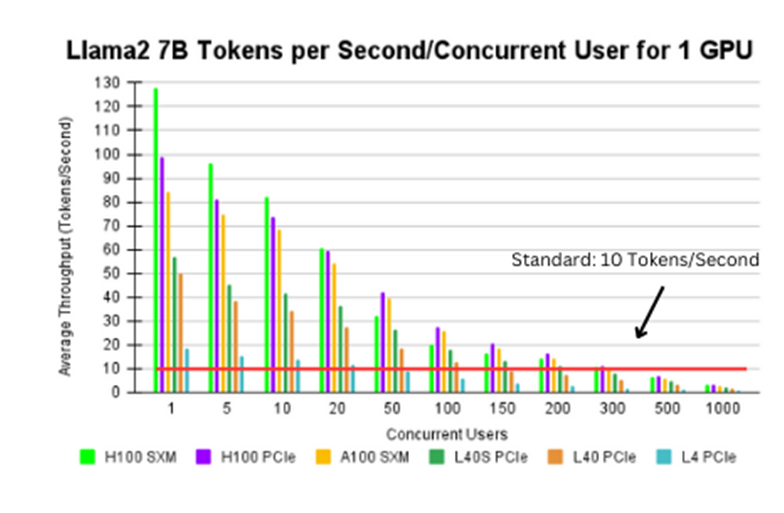
- Sweep Concurrency: Run a series of tests, varying the number of concurrent users (e.g., 1, 5, 10, 20, 50, 100...).
- Find the SLO Breaking Point: For each concurrency level, record the resulting output throughput (tokens/sec) and P99 end-to-end latency. The effective throughput per GPU is the highest throughput achieved before your P99 latency crosses your SLO threshold.
AI Perf benchmarking - Dynamo and other LLM endpoints
The "AI Perf benchmarking" video from NVIDIA Developer demonstrates exactly how to perform this concurrency sweep to find the performance sweet spot for a GPU.
Watch the section from finding the sweet spot. The speaker explains how to run benchmarks at different concurrency levels to create a "Pareto chart," which visualizes the tradeoff between throughput per GPU (resource efficiency) and throughput per user (user experience/latency). This process allows you to pinpoint the optimal operating point for your hardware.
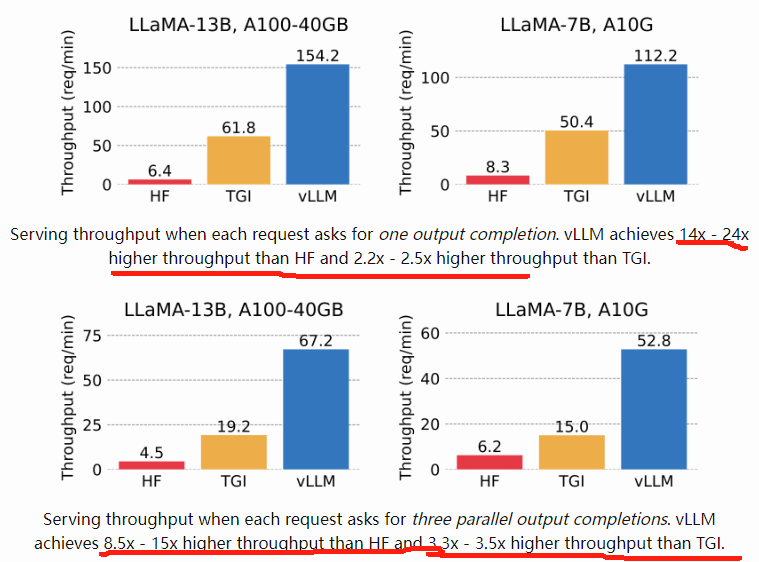
Your choice of serving framework significantly impacts these results. High-performance frameworks like vLLM use advanced techniques like PagedAttention to achieve much higher throughput than a basic Hugging Face pipeline. This is why benchmarking your entire stack is critical.
3. Calculating the Final GPU Count
Let's complete our example. In the last lesson, we established a requirement:
- Total Required Output Throughput: 10,000 tokens/sec
- Latency SLO: P99 End-to-End Latency < 5 seconds
Now, imagine we ran our benchmark on a single L40s GPU with vLLM. The results show that we can sustain an output of 500 tokens/sec while keeping the P99 latency at 4.8 seconds. If we increase the load further, the latency exceeds our 5-second SLO.
Therefore, our Effective Throughput per GPU is 500 tokens/sec.
Now we can perform the final calculation:
This is our baseline number.
4. From Baseline to Production: Adding Buffers
A raw calculation isn't sufficient for a production system. Your SRE experience will tell you that we need to account for reliability and unexpected load.
- Headroom for Spikes: You need a buffer to handle traffic spikes that exceed your average peak forecast. A common practice is to add 20-30% capacity for headroom.
GPUs with Headroom = 20 GPUs × 1.3 = 26 GPUs
- Redundancy for High Availability (HA): You need extra capacity to tolerate a node failure without impacting users. For a deployment of this size, an
N+1orN+2strategy is appropriate. This means provisioning 27 or 28 GPUs to ensure the service remains healthy even if one or two instances go down. - Cost-Performance Analysis: Is it cheaper to run 28 L40s GPUs or perhaps 15 of the more powerful H100 GPUs? To answer this, you would repeat the benchmark and calculation for the H100, then compare the total cost. This is the central tradeoff between capital expenditure and operational performance.
AI Perf benchmarking - Dynamo and other LLM endpoints
Let's revisit the AI Perf video for a final thought on balancing these factors.
Watch the discussion on prioritizing metrics. The speaker articulates the fundamental balance between cost (efficiency per GPU) and customer experience (latency). Your benchmarking data allows you to make an informed, data-driven decision about where to operate on that curve.
For a more automated way to run these estimations, you can use helper scripts.
LLM Inference Sizing and Performance Guidance - VMware Blogs
The VMware blog we've referenced provides capacity tables and a helpful Python script to automate these calculations.
First, quickly review the section "Calculate Estimated Capacity". The tables show pre-calculated estimates for the maximum number of concurrent requests different GPU setups can handle for various models, which is a great starting point. Then, review the final section, "Use the Estimation Calculator Script". This introduces a practical Python script that encapsulates many of the formulas we've discussed, allowing you to quickly iterate on different scenarios. This is a great tool to have in your toolbox.
Conclusion
You have now completed the entire capacity planning workflow, from translating business needs into traffic forecasts, to establishing throughput requirements, and finally to calculating a specific number of required GPU instances.
Key Takeaways:
- The Core Formula: The number of required GPUs is the total required throughput divided by the effective, SLO-compliant throughput of a single GPU.
- Benchmarking is Non-Negotiable: Theoretical estimates are for initial feasibility checks only. Empirical benchmarking on your target hardware and software stack is the only way to get a reliable performance figure.
- Sweep Concurrency to Find the Limit: The "effective throughput per GPU" is the maximum throughput you can achieve just before violating your latency SLO.
- Plan for Production: Always add capacity for headroom (traffic spikes) and redundancy (high availability) on top of your baseline calculation.
This lesson concludes our module on advanced routing and cost modeling. You are now equipped with the skills to design, cost, and provision an LLM serving architecture from the ground up.
In our final module, we will begin the Capstone Project. You will apply everything you've learned—from inference fundamentals and GPU architecture to observability and release engineering—to design and document a complete, end-to-end LLM deployment pipeline. The capacity planning skills you've just mastered will be a cornerstone of that project.