Recommended resources
The freely available resources this lesson will direct you to.
- Understanding the LLM Inference Workload - Mark Moyou, NVIDIAwww.youtube.com
- Mastering LLM Inference Optimization From Theory to Cost Effective Deployment: Mark Moyouwww.youtube.com
- LLM Inference Sizing and Performance Guidance - VMware Blogsblogs.vmware.com
- Lenovo LLM Sizing Guidelenovopress.lenovo.com
Hello! In our last lesson, we constructed a model to calculate cost-per-request and cost-per-successful-task, turning observability data into financial insights. This gave us a powerful retrospective view of our LLM service's financial performance.
Today, we shift from looking backward to planning forward. We will tackle a core responsibility of any Site Reliability or Platform Engineer: capacity planning. You will learn how to translate user traffic forecasts and business requirements into a precise technical specification for your LLM inference system. Your background in SRE and infrastructure automation will be highly relevant here, as we'll be applying familiar capacity planning principles to the unique, stateful, and resource-intensive nature of LLM workloads.
By the end of this lesson, you will be able to take a set of user traffic projections and Service Level Objectives (SLOs) and estimate the required inference throughput your system must support.
1. Gathering Requirements: The Inputs for Sizing
Before any calculation, we must gather the right inputs. Just as in traditional system design, accurately sizing an LLM deployment starts with understanding the requirements. For LLMs, these requirements have some specific nuances.
This guide from Lenovo provides an excellent framework for gathering the necessary requirements before estimating inference performance. It mirrors a classic capacity planning discovery process, tailored for LLMs.
Please read the section "Gathering requirements." Focus on the five key pieces of information you need to collect from your stakeholders: Model Selection: The specific LLM you will serve. Input Tokens: The average size of the prompt. Output Tokens: The average size of the generated response. Average Requests per Second (RPS): The anticipated user load, with a focus on peak usage. Latency Requirements: The SLOs for the user experience, typically Time to First Token (TTFT) and End-to-End latency.
These five inputs form the foundation of our capacity plan. A small change in any of them—especially average token lengths or latency SLOs—can dramatically alter the required infrastructure.
For a more advanced characterization of the workload, you can analyze the distribution of your input and output token lengths. Instead of just using averages, plotting a 2D histogram can reveal common request patterns (e.g., many short prompts generating long answers vs. long prompts generating short answers). This helps you optimize for the most frequent use cases.
Mastering LLM Inference Optimization From Theory to Cost Effective Deployment: Mark Moyou
In his talk "Mastering LLM Inference Optimization," Mark Moyou from NVIDIA discusses these patterns and how to visualize them.
Watch the section from querying patterns. The speaker identifies four common querying patterns (long-in/short-out, etc.) and introduces the 2D histogram of input vs. output sequence length as a tool to statistically understand your user base's behavior. This is the kind of data-driven insight that informs robust capacity planning.
2. The Fundamental Tradeoff: Throughput vs. Latency
With our requirements in hand, we must understand the central tradeoff in any serving system: throughput versus latency.
- Throughput is the rate at which the system can process work. For LLMs, this can be measured in Requests Per Second (RPS) or, more accurately, Output Tokens Per Second (TPS).
- Latency is the time it takes to process a single request. We care about Time to First Token (TTFT) for responsiveness and End-to-End (E2E) Latency for total generation time.
For a fixed amount of hardware, these two metrics are inversely related. You can increase throughput by batching more requests together, but this makes each individual request wait longer, increasing its latency. Your latency SLO, therefore, puts a hard constraint on the maximum throughput your system can achieve.
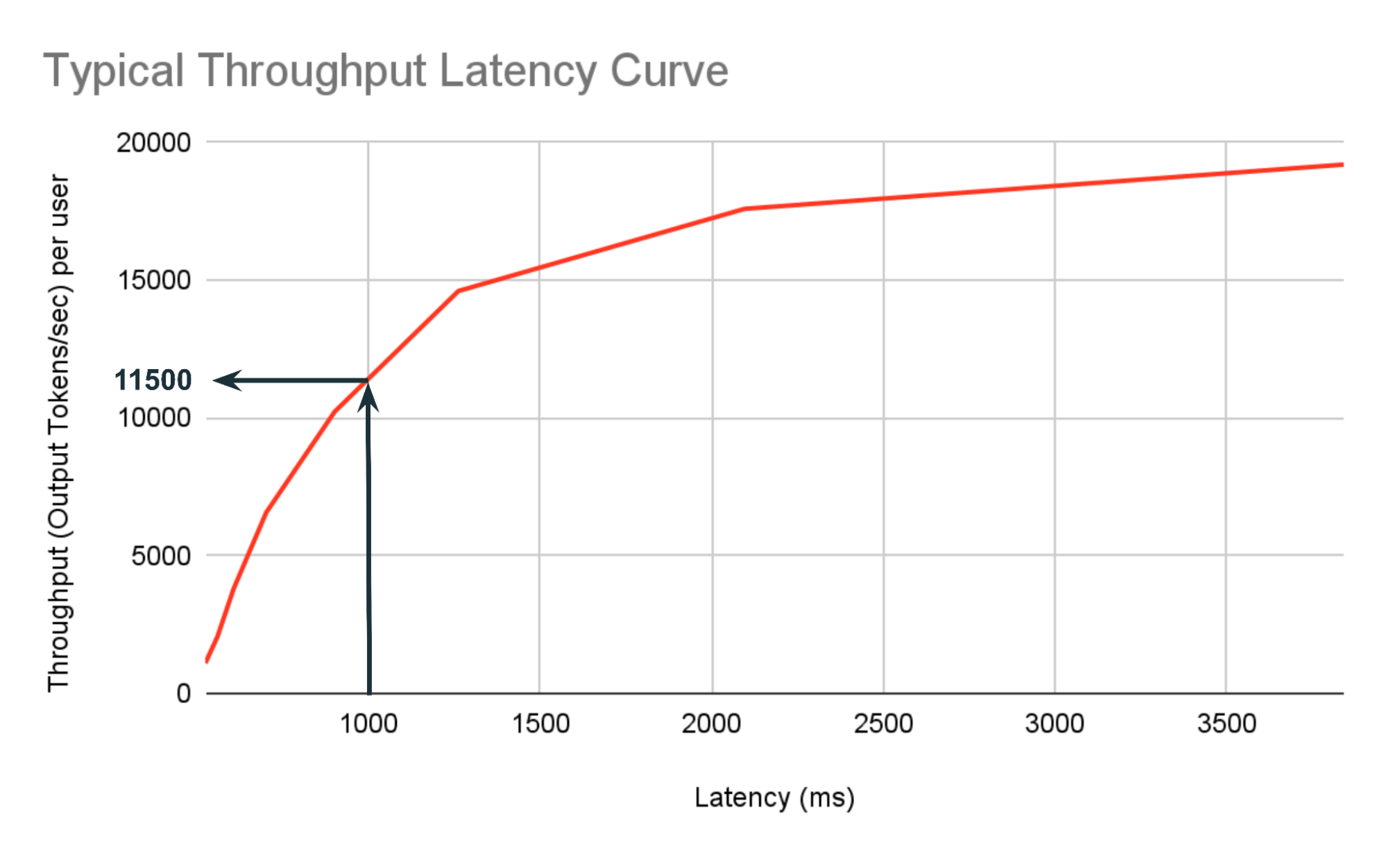
The Lenovo Sizing Guide you read earlier also has a great section explaining how to interpret these curves to make sizing decisions.
Let's revisit the Lenovo guide to solidify this concept.
Please read the section "Throughput vs Latency" for a clear explanation of the tradeoff. Then, review the section "Additional Information - Reading the graphs for sizing," which shows a practical example of how a latency constraint (e.g., "TTFT under 1 sec") directly determines the maximum number of concurrent users and throughput the system can handle.
3. The Estimation Workflow
Now we can combine the requirements and the throughput-latency principle into a step-by-step workflow to estimate our required throughput.
Step 1: Calculate Required Throughput in Tokens/Second
First, we translate the business-level requirement (RPS) into a system-level requirement (tokens per second).
Let's use a concrete example:
- Peak Traffic: 20 RPS
- Average Input: 2000 tokens
- Average Output: 500 tokens
The required throughput is:
- Input Throughput: 20 RPS × 2000 input tokens/request = 40,000 input tokens/sec
- Output Throughput: 20 RPS × 500 output tokens/request = 10,000 output tokens/sec
These two numbers are our targets. The system we build must be able to ingest prompts at 40k tokens/sec and generate responses at 10k tokens/sec.
Step 2: Validate Feasibility Against Latency SLOs
This is a critical sanity check. Can we even achieve this throughput while respecting our latency SLOs? To answer this, we need to estimate the latency of a single, average request on our target hardware.
LLM latency has two phases:
- Prefill: Processing the input prompt. This phase is typically compute-bound.
- Decode (Generation): Generating output tokens one by one. This phase is typically memory-bound.
The total latency is the sum of the time spent in these two phases.
LLM Inference Sizing and Performance Guidance - VMware Blogs
This VMware blog post provides simplified but powerful formulas for estimating latency. It breaks down the calculation into the prefill and generation components.
Please read the entire section "Calculate Estimated Latency," including the subsections on Prefill_time_per_token and Generation_time_per_token. Pay close attention to the formulas provided. Prefill Time: model weights per GPU ÷ accelerator compute capability Generation Time: model weights per GPU ÷ accelerator memory bandwidth
Let's apply these formulas to our example. Assume we are considering a Llama-3-8B model on a single NVIDIA L40s GPU.
Using the values from the tables in the VMware blog:
Prefill_time_per_token(Llama-3-8B on L40s): ~0.044 msGeneration_time_per_token(Llama-3-8B on L40s): ~18.5 ms
Now, we calculate the estimated E2E latency for our average request (2000 input, 500 output tokens):
- Prefill Latency: 2000 tokens × 0.044 ms/token = 88 ms
- Generation Latency: 500 tokens × 18.5 ms/token = 9250 ms
- Estimated E2E Latency: 88 ms + 9250 ms = 9338 ms ≈ 9.3 seconds
This is the estimated latency for a single request with no other traffic. If our E2E latency SLO was, for example, 5 seconds, we would immediately know that a single L40s GPU is insufficient to even serve one user within the SLO, let alone 20 concurrent users.
This sanity check is crucial. It tells us whether our target hardware is in the right ballpark before we even consider batching and concurrent load.
4. Finalizing the Throughput Requirement
The process culminates in a clear statement of required capacity. Based on our workflow:
- Characterize Workload: We've defined our traffic (20 RPS), average prompt size (2000 tokens), and average response size (500 tokens).
- Define SLOs: We've set a hypothetical E2E latency SLO of 5 seconds.
- Calculate Throughput Target: We need to sustain 40,000 input tokens/sec and 10,000 output tokens/sec.
- Perform Sanity Check: Our initial check showed that a single L40s GPU would have a single-request latency of ~9.3 seconds, which violates our 5-second SLO.
Our final requirement for the next stage of capacity planning is therefore:
The system must be able to sustain a load of 20 RPS (40,000 input tokens/sec and 10,000 output tokens/sec) while maintaining an E2E latency of under 5 seconds for an average request.
This statement is the direct input for the next step in our journey: calculating the specific number and type of GPU instances required to meet this demand.
Conclusion
In this lesson, you've learned a systematic process for translating business requirements into a concrete inference throughput target. This is a foundational skill in LLM Ops, bridging the gap between user expectations and infrastructure provisioning.
Key Takeaways:
- Systematic Requirement Gathering: Capacity planning for LLMs starts with five key inputs: model choice, input/output token counts, peak RPS, and latency SLOs.
- The Throughput-Latency Tradeoff: For a given hardware configuration, achieving higher throughput (via batching) comes at the cost of increased latency. Your SLOs determine your operating point on this curve.
- Translate RPS to Tokens/Second: The ultimate goal is to determine the required input and output token throughput your system must sustain during peak load.
- Latency as a Sanity Check: Before provisioning, use hardware-specific estimates for prefill and generation time to check if your SLOs are even feasible on the target GPU for a single request.
We have now defined what our system needs to do. In our next lesson, we will determine how to do it by calculating the number of GPU instances required to meet these specific throughput and latency goals.