Recommended resources
The freely available resources this lesson will direct you to.
Introduction
In our previous lessons, we've systematically built up your testing expertise from the ground up. You started by writing unit tests for isolated React components and Java methods, then moved up to integration tests to ensure your Spring Boot controllers correctly interacted with their dependencies. Now, we reach the top of the testing pyramid to provide the ultimate confidence in your application: end-to-end (E2E) testing.
This lesson will teach you how to write E2E tests for a complete user flow using Cypress. Unlike unit or integration tests, which verify small parts of your system in isolation, an E2E test simulates a real user's journey through your live application. It will click buttons in your React frontend, trigger API calls to your Spring Boot backend, and verify that the UI updates as expected. This is where you confirm that all the pieces—frontend, backend, and database—work together harmoniously to deliver value to the user.
1. What is End-to-End Testing?
End-to-end testing verifies the functionality of your application by simulating a complete user workflow from start to finish. It's the most comprehensive form of testing because it doesn't mock any part of the application; it tests the integrated system as a whole.
The diagram below perfectly illustrates the scope of an E2E test compared to the tests we've covered so far.
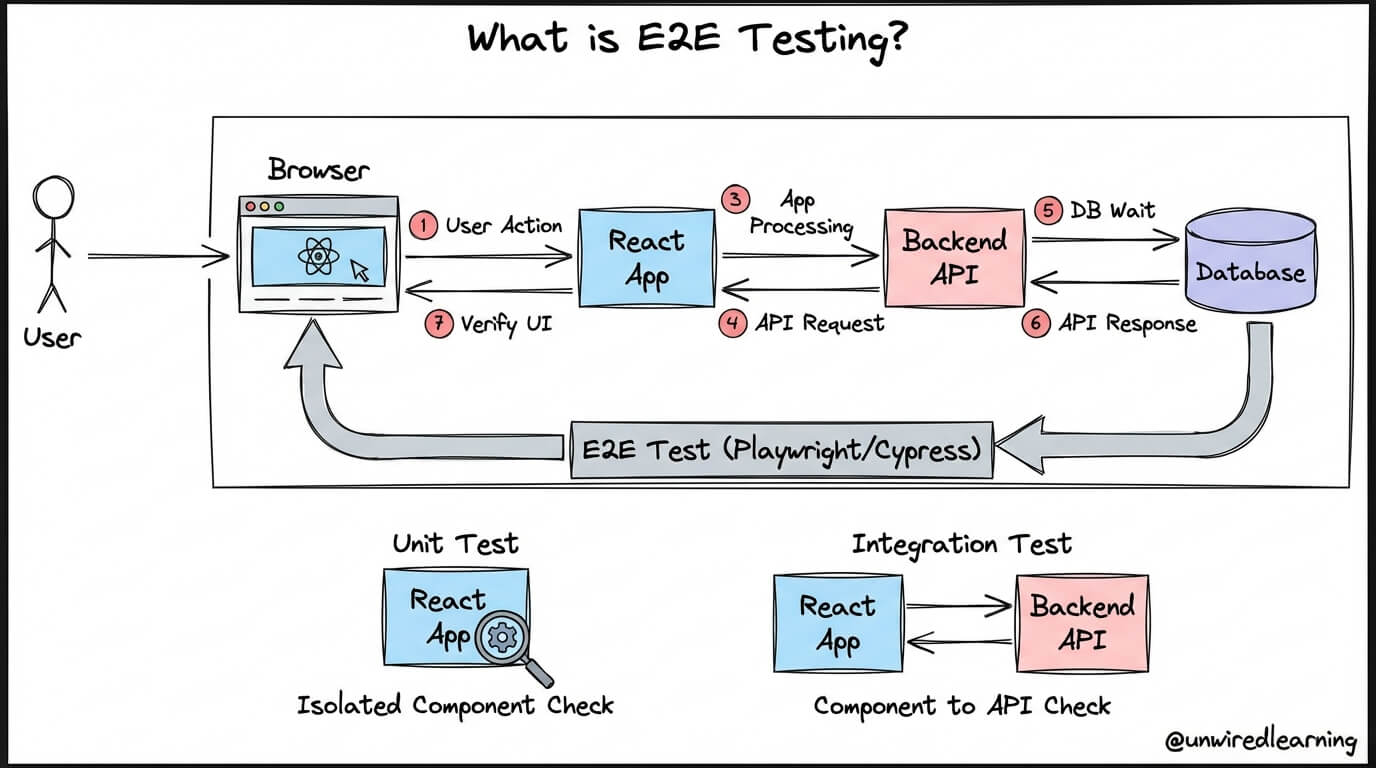
As you can see, a unit test might check a single React component, and an integration test might check the communication between the React app and the Backend API. An E2E test, however, covers the entire sequence:
- A user performs an action in the browser.
- The React app processes this action.
- An API request is sent to the backend.
- The backend processes the request, potentially interacting with a database.
- An API response is sent back to the frontend.
- The React app updates the UI based on the response.
- The test verifies that the UI has changed correctly.
This approach is invaluable for catching bugs that only surface when different parts of your system interact. To learn more about the importance of testing user flows, the following resource provides an excellent overview.
This article from the UI Testing Handbook explains why testing complete user flows is critical for preventing bugs in production.
Read the introduction and the section titled "Does your UI work end-to-end?". Focus on how it describes user flows involving multiple components, state updates, and API calls—the exact scenarios E2E tests are designed to cover.
2. Introducing Cypress
To perform E2E testing, we need a tool that can programmatically control a browser, and our tool of choice is Cypress. Cypress is a modern, all-in-one testing framework designed specifically for web applications. Since you work with React, you'll find its JavaScript-based API intuitive and powerful.
One of Cypress's standout features is its automatic waiting. Modern web apps are asynchronous; data fetches and UI updates don't happen instantly. This can make tests "flaky" or unreliable. Cypress solves this by automatically waiting for elements to appear on the page before interacting with them, a concept illustrated below.
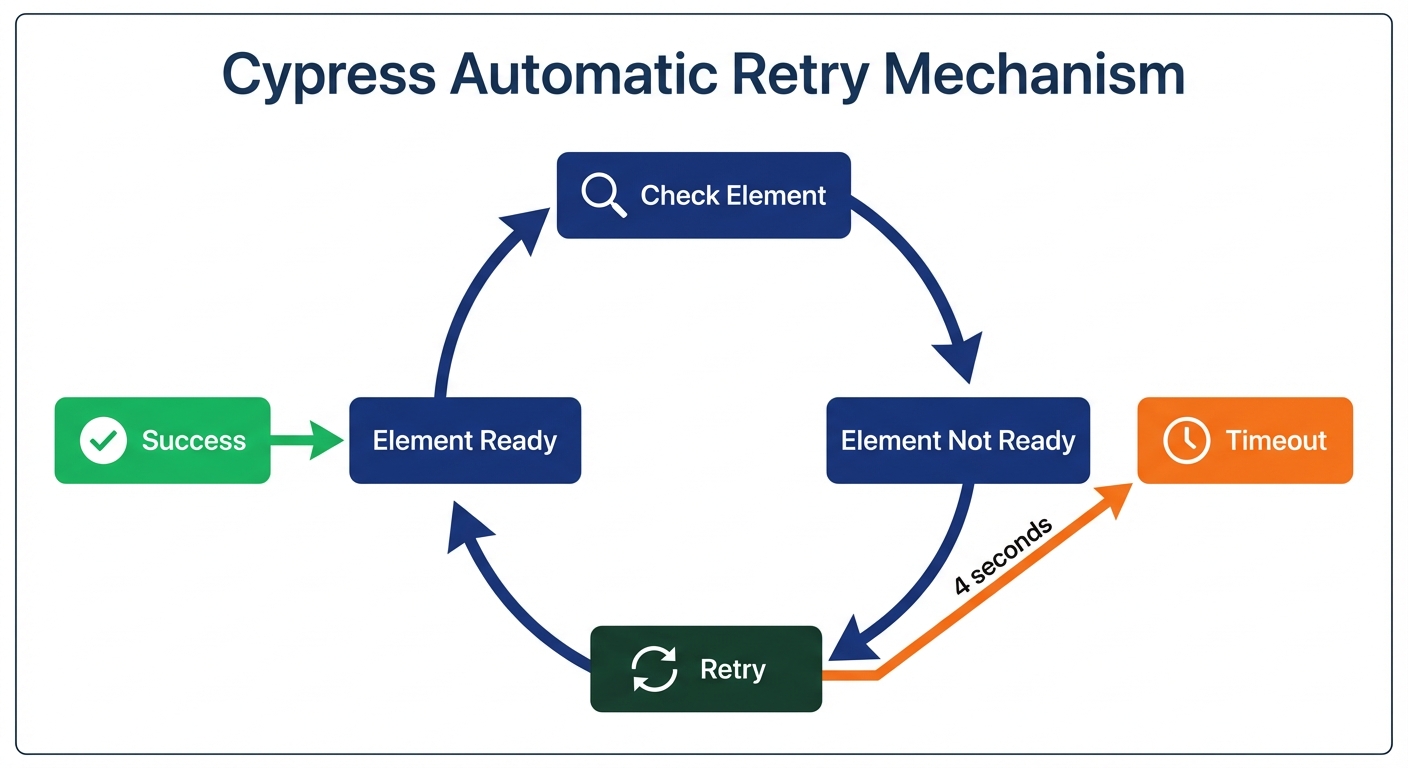
This retry-ability means you don't need to litter your tests with manual waits or sleeps, leading to cleaner and more robust code.
3. Setting Up Your First Cypress Test
Let's get hands-on. Setting up Cypress in a modern JavaScript project is straightforward. You'll install it as a development dependency and then open the Cypress Test Runner, which guides you through the rest.
The following video provides a clear, step-by-step guide to installing and initializing Cypress for the first time.
Cypress Complete Beginners Masterclass 1 | Step by Step | Raghav Pal |
This masterclass by Raghav Pal on Automation Step by Step provides a comprehensive walkthrough of the entire Cypress setup process.
Please watch the following segments to get your project ready: Project Setup: Watch from this point to see how to create a project folder, initialize a Node project with npm init -y, and install Cypress using npm install cypress. Opening Cypress: Continue watching from here to learn how to open the Cypress Test Runner using npx cypress open, configure it for E2E testing, and see the folder structure it creates.
After following these steps, you will have a cypress folder in your project root, ready for you to write your tests.
4. Writing a Cypress Test for a User Flow
A well-structured test follows the Arrange-Act-Assert pattern, which you're already familiar with from unit and integration testing. In Cypress, this translates to:
- Arrange: Visit a page using
cy.visit(). - Act: Find elements with
cy.get()and interact with them using commands like.click()or.type(). - Assert: Verify the outcome using
.should()to check the application's state, such as URL changes or new text appearing on the page.
The official Cypress documentation provides the definitive guide for writing your first real test.
End-to-End Testing: Your First Test with Cypress
This official Cypress guide walks you through the fundamental commands for writing a meaningful E2E test.
Please read the entire section titled "Write a real test". Pay close attention to how it breaks down a test into four steps: visiting a page, querying for an element, clicking it, and making an assertion. The "chaining" of commands like cy.contains('type').click() is a core concept to grasp.
To see this in the context of a React application, the following video is particularly useful. It demonstrates a best practice for selecting elements: using a data-test-id attribute. Using a dedicated test ID makes your tests resilient to UI changes like refactoring class names for styling or altering text content.
Cypress Testing with React - Simple Tutorial
In this tutorial, Cosden Solutions demonstrates how to write a simple but robust Cypress test for a React application.
Watch the segment from this timestamp. It shows how to: Add a data-test-id attribute to your React component's JSX. Use cy.get('[data-test-id="your-id"]') to select that element reliably. Use .should('exist') to verify the element is present. Use .should('have.text', 'Expected Text') to assert its content.
Putting it all together, a test for a login flow would look something like this. Note the use of data-test-id for robust element selection.
// In your React component:
// <input data-test-id="login-email" type="email" />
// <input data-test-id="login-password" type="password" />
// <button data-test-id="login-submit">Sign In</button>

// In your cypress/e2e/login.cy.js file:
describe('Login Flow', () => {
  it('allows a user to log in and see their dashboard', () => {
    // Arrange: Visit the login page
    cy.visit('/login');

    // Act: Fill in the form and submit
    cy.get('[data-test-id="login-email"]').type('testuser@example.com');
    cy.get('[data-test-id="login-password"]').type('password123');
    cy.get('[data-test-id="login-submit"]').click();

    // Assert: Check that we are on the dashboard and see a welcome message
    cy.url().should('include', '/dashboard');
    cy.get('[data-test-id="welcome-message"]').should(
      'have.text',
      'Welcome, testuser!'
    );
  });
});
This test provides high confidence that your authentication flow works correctly from the user's perspective, involving both your React frontend and Spring Boot backend.
Practical Application
Now it's time to apply what you've learned to your own project. Your task is to write an E2E test for a critical user flow. A login flow is a great candidate, but you could also choose a flow for creating or searching for an item.
- Identify a User Flow: Choose a simple but important multi-step interaction in your application.
- Add Test IDs: Go into your React code and add
data-test-idattributes to the key elements involved in the flow (inputs, buttons, and the elements that show the final result). - Prepare the Environment: For a true E2E test, you need both your frontend and backend running.
- Start your Spring Boot application.
- Start your React development server (
npm run startor similar).
- Write the Cypress Spec:
- Create a new test file in your
cypress/e2edirectory (e.g.,my-flow.cy.js). - Write a test using the Arrange-Act-Assert pattern:
- Arrange: Use
cy.visit()to navigate to the starting page of your flow (e.g.,http://localhost:3000/login). You may want to set abaseUrlin yourcypress.config.jsfile to simplify this. - Act: Use
cy.get()with yourdata-test-idselectors, followed by.type()and.click()to simulate the user's actions. - Assert: Use
cy.url().should('include', ...)to verify navigation andcy.get(...).should(...)to confirm that the UI updated correctly (e.g., a success message appears, a new item is visible in a list).
- Arrange: Use
- Create a new test file in your
- Run the Test: Open the Cypress Test Runner (
npx cypress open) and run your new spec. Watch it execute the user flow automatically and pass.
This exercise will give you a powerful "paper trail of competence"—a tangible, automated test that guards against regressions in a critical part of your application.
Conclusion
Congratulations on reaching the summit of the testing pyramid! You now have the ability to verify that your entire application works together as intended, providing the highest level of confidence before shipping code.
Key Takeaways:
- E2E testing simulates a real user's journey through your live, integrated application, testing the frontend, backend, and database together.
- Cypress is a modern testing framework that makes writing E2E tests intuitive, especially for JavaScript developers.
- Cypress's automatic waiting feature makes tests more stable and less "flaky" by default.
- The core workflow follows the Arrange-Act-Assert pattern using commands like
cy.visit(),cy.get(),.click(),.type(), and.should(). - Using
data-test-idattributes is a best practice for creating robust selectors that are decoupled from styling and content changes.
In our next lesson, we will explore Test-Driven Development (TDD). Now that you are proficient in writing unit, integration, and E2E tests, you will learn a powerful methodology where you write the test before you write the feature code, letting your tests guide your development process.