Recommended resources
The freely available resources this lesson will direct you to.
Introduction
In our last lesson, you successfully wrote your first unit tests using JUnit and React Testing Library, mastering the art of verifying individual components in isolation. This was the crucial first step in building a safety net for your code and establishing a foundation for quality.
Today, we're moving one level up the testing pyramid to focus on integration testing. While unit tests ensure that individual bricks are solid, integration tests check that the bricks are mortared together correctly. Specifically, you will learn how to write integration tests for your Spring Boot REST API endpoints. We will focus on testing the web layer—your controllers—to ensure they correctly handle HTTP requests, process data, and interact with the service layer. You will use Spring's powerful testing tools and the Mockito framework to mock dependencies, allowing you to test these interactions in a controlled and predictable way.
1. Beyond Unit Tests: Why Controllers Need Integration Testing
You might wonder, "If I've unit-tested my service, why do I need another test for the controller that calls it?" The reason is that a controller's responsibilities go far beyond just delegating to a service. It's the gatekeeper for your API, handling tasks that a simple unit test can't validate:
- Request Mapping: Does the controller respond to the correct URL and HTTP method (e.g.,
GET /api/users/{id})? - Data Serialization/Deserialization: Can it correctly convert an incoming JSON request body into a Java object (
@RequestBody)? Can it serialize a Java object back into a JSON response? - HTTP Status Codes: Does it return the correct status codes for success (
200 OK), creation (201 Created), or errors (404 Not Found,400 Bad Request)? - Validation: Does it correctly trigger and handle validation rules (e.g.,
@Valid)?
Testing these concerns requires a framework that understands the Spring MVC environment. A plain unit test would miss all of this context.
This short video explains perfectly why we need more than just Mockito and JUnit to properly test our Spring controllers.
Setup MockMvc to Test Your Spring MVC @Controller and @RestController in Isolation
The video "Setup MockMvc to Test Your Spring MVC" by Philip Riecks clearly explains the limitations of unit tests for controllers and introduces MockMvc as the solution.
Please watch the first two minutes to understand the motivation for this lesson: Why a Plain Unit Test is Not Enough: This section details what's missed when you only unit test a controller's method. Introducing MockMvc: This part explains how MockMvc allows us to test our controllers in a mocked servlet environment, covering all the web-specific concerns.
2. Isolating the Web Layer with Mockito
As you just saw, MockMvc lets us test the web layer. But what about the controller's dependencies, like a service that talks to a database? If our test controller calls a real service, which in turn calls a real database, our test becomes slow, complex, and brittle. It could fail because of a database connection issue, not a bug in our controller.
This is where mocking comes in. For our controller integration test, we want to test the Controller ↔ Service interaction in isolation from the Service ↔ Database interaction. We will use Mockito to create a "test double" or a mock of our service. This mock looks and acts like the real service, but we control its behavior entirely.
This video provides an excellent introduction to the core concepts of Mockito: why we mock and how the fundamental when(...).thenReturn(...) pattern works.
Mock, When and ThenReturn with Mockito - JUnit Tutorial
The video "Mock, When and ThenReturn with Mockito" by Aneesh Mistry is a clear, concise tutorial on the fundamentals of the Mockito framework.
Watch these key segments to understand the "what, why, and how" of mocking: Why Mock? This section explains why depending on external resources like a database makes tests unreliable and how mocking solves this. What is a Mock? This short segment introduces the concept of a "test double." Defining Mock Behavior: This is the most important part. It demonstrates the when(...).thenReturn(...) pattern, which you will use to tell your mock object what to return when a specific method is called. Recap: This recap summarizes the key keywords and benefits.
3. Integration Testing with @WebMvcTest, @MockBean, and MockMvc
Now, let's combine these two ideas—testing the web layer with MockMvc and isolating dependencies with Mockito—using Spring Boot's dedicated testing support. The three key annotations you'll use are:
@WebMvcTest(YourController.class): This powerful annotation creates a "slice" of your application context. Instead of loading your entire application (all services, repositories, etc.), it loads only the beans necessary for the web layer, plus the specific controller you list. This makes your test much faster.@MockBean: Because@WebMvcTestdoesn't load your service beans, the controller's dependency on a service would be unfulfilled. This annotation solves that by creating a Mockito mock of the specified class (e.g., your service) and adding it to the application context. Your controller will be injected with this mock instead of the real thing.@Autowired: You'll use this to inject an instance ofMockMvcinto your test class, which is automatically configured by@WebMvcTest.
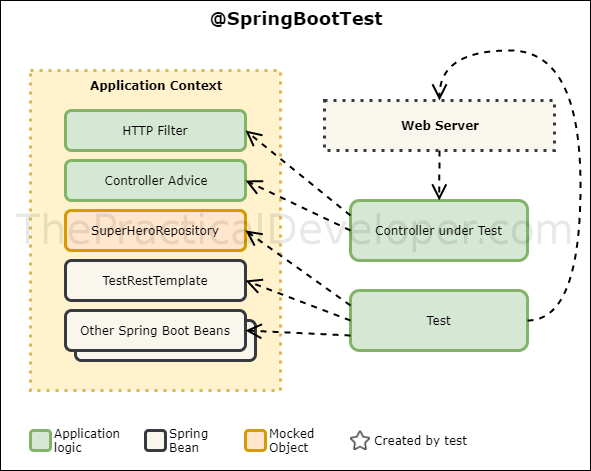
The diagram below illustrates this concept perfectly. The test operates within a limited "Application Context." The Controller under Test is a real bean, but its dependency, SuperHeroRepository (in our case, this would be a service), is a Mocked Object. The test then sends a request through the web layer and verifies the controller's behavior.
A Complete Example
Let's imagine you have a BookController that depends on a BookService to fetch book details.
// The Controller
@RestController
public class BookController {
    private final BookService bookService;

    public BookController(BookService bookService) {
        this.bookService = bookService;
    }

    @GetMapping("/books/{id}")
    public ResponseEntity<Book> getBookById(@PathVariable Long id) {
        return bookService.findBookById(id)
                .map(ResponseEntity::ok) // If found, return 200 OK with the book
                .orElse(ResponseEntity.notFound().build()); // If not found, return 404
    }
}

// The Service and Model (simplified)
@Service
public class BookService {
    // In a real app, this would talk to a repository
    public Optional<Book> findBookById(Long id) { /* ... database logic ... */ return Optional.empty(); }
}

public class Book {
    private Long id;
    private String title;
    private String author;
    // getters and setters...
}
Now, let's write an integration test for BookController using @WebMvcTest.
import org.junit.jupiter.api.Test;
import org.springframework.beans.factory.annotation.Autowired;
import org.springframework.boot.test.autoconfigure.web.servlet.WebMvcTest;
import org.springframework.boot.test.mock.mockito.MockBean;
import org.springframework.test.web.servlet.MockMvc;

import java.util.Optional;

import static org.mockito.Mockito.when;
import static org.springframework.test.web.servlet.request.MockMvcRequestBuilders.get;
import static org.springframework.test.web.servlet.result.MockMvcResultMatchers.jsonPath;
import static org.springframework.test.web.servlet.result.MockMvcResultMatchers.status;

// 1. Specify the controller to test
@WebMvcTest(BookController.class)
class BookControllerTest {

    // 2. Autowire MockMvc to perform requests
    @Autowired
    private MockMvc mockMvc;

    // 3. Create a mock of the service dependency
    @MockBean
    private BookService bookService;

    @Test
    void whenBookExists_thenReturns200AndBook() throws Exception {
        // Arrange
        Book book = new Book(1L, "The Senior Developer", "Your Name");
        // Use Mockito to define the mock's behavior
        when(bookService.findBookById(1L)).thenReturn(Optional.of(book));

        // Act & Assert
        mockMvc.perform(get("/books/1"))
                .andExpect(status().isOk())
                .andExpect(jsonPath("$.id").value(1))
                .andExpect(jsonPath("$.title").value("The Senior Developer"))
                .andExpect(jsonPath("$.author").value("Your Name"));
    }

    @Test
    void whenBookDoesNotExist_thenReturns404() throws Exception {
        // Arrange
        // Tell the mock to return an empty Optional for ID 99
        when(bookService.findBookById(99L)).thenReturn(Optional.empty());

        // Act & Assert
        mockMvc.perform(get("/books/99"))
                .andExpect(status().isNotFound());
    }
}
Notice the structure:
- Arrange: We use
when(bookService.findBookById(...)).thenReturn(...)to program our mock. We're telling it, "When you are called with ID 1, return this specific book object." - Act: We use
mockMvc.perform(get(...))to simulate an HTTP GET request to our endpoint. - Assert: We use
andExpect(...)with helpers likestatus()andjsonPath()to verify the HTTP response code and the content of the JSON body.
This test validates the controller's logic completely, independent of any database.
To solidify your understanding, the following two articles from Baeldung and the official Spring documentation provide excellent written explanations and code examples.
Using MockMvc With SpringBootTest vs. Using WebMvcTest
This Baeldung article clearly compares different testing strategies and is a great resource for understanding when to use @WebMvcTest.
Please focus on these sections: First, read the definitions to understand the fundamental difference between @WebMvcTest and a full @SpringBootTest. Next, read the section about MockMvc usage and autoconfiguration. This explains why @MockBean is necessary with @WebMvcTest. Finally, read the section on dependencies and the code example. This provides a clear, practical example of using when().thenReturn() with MockMvc, which is exactly what you need to do.
The official Spring guide reinforces these concepts, though it uses a slightly different client for making requests. The underlying principle of using @WebMvcTest with a mocked bean remains the same.
Getting Started | Testing the Web Layer - Spring
This is the official guide from spring.io. It's always valuable to see the canonical example.
Focus your reading on the section titled "WebMockTest". It shows how a GreetingController with a GreetingService dependency is tested using @WebMvcTest and @MockitoBean. Notice the use of when(service.greet()).thenReturn("Hello, Mock");—it's the same pattern we've been discussing.
Practical Application
It's time to build your own "paper trail of competence." Your task is to apply these concepts directly to your work project.
- Identify a Target: In your Spring Boot application, find a
RestControllerwith a relatively simpleGETendpoint. This endpoint should rely on a service to fetch some data. - Create the Test Class: Create a new test class in your
testsource folder. Annotate it with@WebMvcTest(YourController.class). - Set Up Mocks:
- Add a field for
MockMvcand annotate it with@Autowired. - Add a field for the controller's service dependency and annotate it with
@MockBean.
- Add a field for
- Write Your First Integration Test:
- Create a test method annotated with
@Test. - Arrange: Use
when(...).thenReturn(...)to define the behavior of your mocked service for a specific input. Create a sample data object that you expect the service to return. - Act & Assert: Use
mockMvc.perform(get("/your/endpoint/path"))to execute the request. Chain.andExpect()calls to verify two things:- The HTTP status is
200 OK(status().isOk()). - At least one field in the JSON response is correct (
jsonPath("$.fieldName").value("expectedValue")).
- The HTTP status is
- Create a test method annotated with
Completing this exercise will give you your first real integration test, a tangible asset that improves the quality and maintainability of your project.
Conclusion
In this lesson, you've bridged the gap between unit and integration testing. You've learned how to test your Spring Boot controllers not just as Java classes, but as handlers of web requests, complete with URL mapping, data conversion, and status code logic.
Key Takeaways:
- Integration tests for controllers verify the web layer, including request mapping, serialization, and HTTP responses.
- The
@WebMvcTestannotation provides a lightweight test "slice" that loads only the web-related components, making tests fast. - The
@MockBeanannotation seamlessly integrates Mockito, allowing you to replace real service dependencies with mocks inside the Spring test context. - The Arrange-Act-Assert pattern is central:
- Arrange: Set up mock behavior with
when(...).thenReturn(...). - Act: Perform a request with
mockMvc.perform(...). - Assert: Verify the response with
andExpect(status().is...)andandExpect(jsonPath(...)).
- Arrange: Set up mock behavior with
In our next lesson, we will ascend to the final level of the testing pyramid: end-to-end (E2E) testing. You will learn how to write tests using Cypress that simulate a real user's journey through the frontend of your application, providing the ultimate confidence that your system works as a whole.