Recommended resources
The freely available resources this lesson will direct you to.
Introduction
Welcome to the next lesson in our journey through software testing. Over the past few lessons, you have built a comprehensive testing toolkit, learning to write unit tests with JUnit and React Testing Library, integration tests with Mockito, and most recently, end-to-end tests with Cypress. In all these cases, the process was to write the application code first, and then write tests to verify it. Today, we're going to flip that script entirely.
This lesson introduces you to Test-Driven Development (TDD), a powerful methodology where you write a failing test before you write the corresponding feature code. This seemingly small change in process has profound implications, shifting testing from a verification activity to a core part of the design process itself. By the end of this lesson, you will be able to apply the TDD cycle to guide your development, leading to more robust, well-designed, and maintainable code—a hallmark of a senior developer.
1. The TDD Mindset: Red, Green, Refactor
Test-Driven Development is more than just a testing technique; it's a disciplined development process that follows a short, repeating cycle. This cycle, often called "Red-Green-Refactor," is the heart of TDD.
- Red: Write a small, automated test for a new piece of functionality. Since the functionality doesn't exist yet, this test is guaranteed to fail. Seeing it fail (turn red) is crucial because it confirms the test is working correctly and that the feature is not already implemented by accident.
- Green: Write the absolute minimum amount of production code necessary to make the failing test pass (turn green). The goal here is not elegance or efficiency, but simply to pass the test.
- Refactor: With the safety net of a passing test, improve the design of the production code. You can clean up duplication, improve clarity, or enhance performance without fear of breaking the functionality, because you can re-run the test at any time to ensure it stays green.
This cycle is then repeated for the next small piece of functionality. To see a concise explanation of this powerful framework, please watch the following video segment.
Test Driven Development (TDD) in Spring Boot | Full Tutorial
This clip from the "Test Driven Development (TDD) in Spring Boot" tutorial by Daily Code Buffer clearly explains the Red-Green-Refactor cycle.
Watch the segment from this timestamp. Pay close attention to how the presenter describes the purpose of each step and how they flow into one another.
2. TDD in Practice: A Spring Boot Example
Let's apply this cycle to your backend stack. Imagine you need to add a feature to a UserService that prevents creating a user if their email already exists.
Step 1: Red - Write a Failing Test
You start not in the UserService class, but in UserServiceTest. You write a test method that asserts an exception is thrown when createUser is called with an existing email.
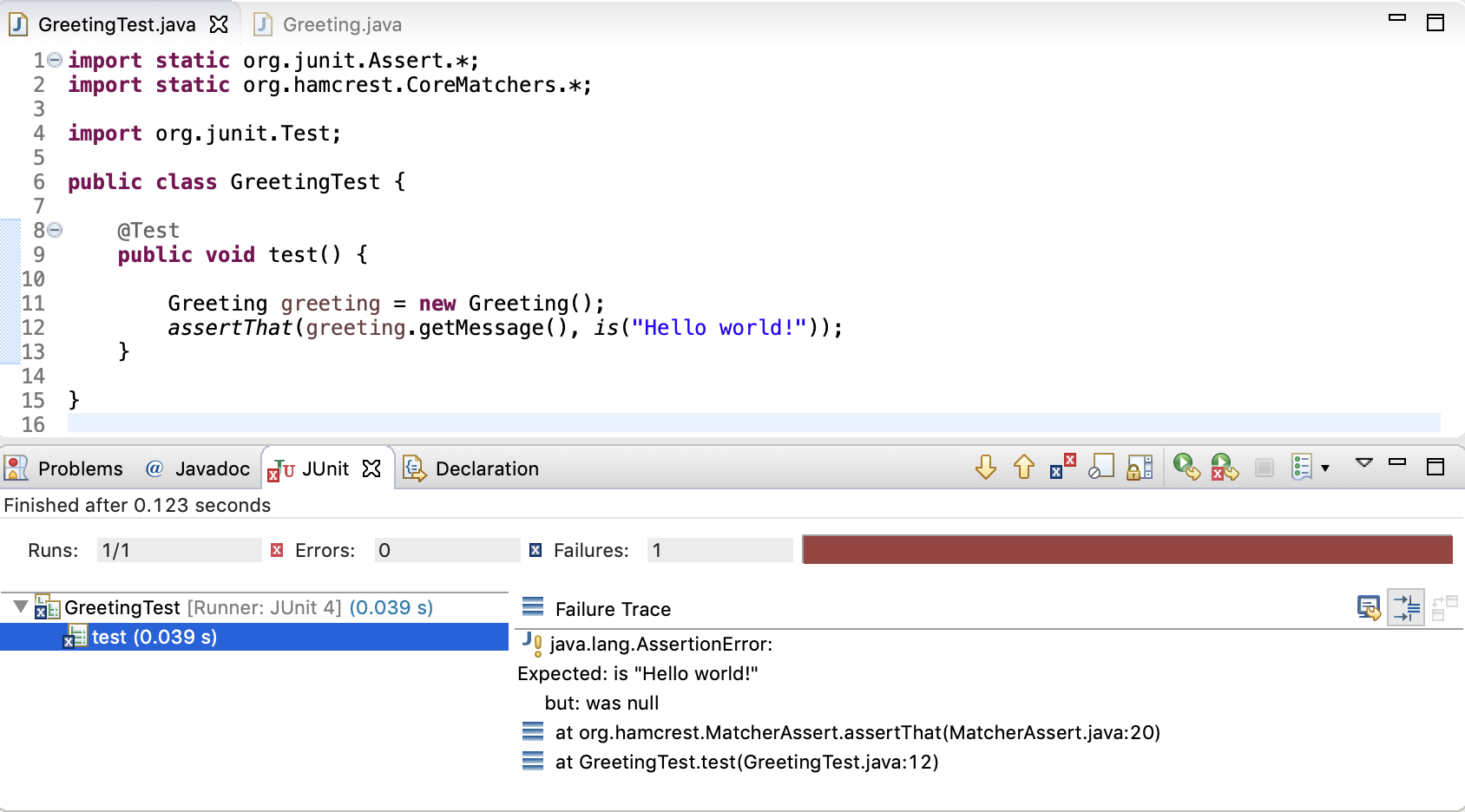
This is the "Red" phase. When you run this test, it will fail. It might fail because the UserAlreadyExistsException doesn't exist, or because the UserService doesn't throw it. This failure is expected and desired. The image below shows a similar scenario in a Java IDE where a test fails because the implementation is missing—the classic "Red" state.
Step 2 & 3: Green and Refactor - Implement and Improve
Next, you go into the UserService and write the simplest possible code to make the test pass. This might be a simple if statement that checks for the email and throws the exception.
// Green Phase: Minimal code to pass the test
public User createUser(String email, String name) {
    if (userRepository.existsByEmail(email)) {
        throw new UserAlreadyExistsException("User with email already exists");
    }
    // ... rest of the logic
}
Once the test is green, you can refactor. Perhaps you can extract the validation logic into a private helper method to make the createUser method cleaner and more readable.
The following article and video walk through this exact process in a Spring Boot application, providing a concrete example of the Red-Green-Refactor cycle.
Test Driven Development with Java & Spring Boot
This guide from dev.to provides a clear definition of the TDD cycle and a step-by-step example for building a UserService.
First, read the section "TDD Fundamentals" for a solid definition of the principles. Then, follow the hands-on example in the section titled "TDD Example: Building a User Service". Note how it moves from Step 1 (Red), to Step 2 (Green), and finally to Step 3 (Refactor).
For a live demonstration of this process, the video you watched earlier provides an excellent walkthrough.
Test Driven Development (TDD) in Spring Boot | Full Tutorial
This tutorial continues by applying the TDD cycle to build a Spring Boot REST controller from scratch.
Watch the following segments to see the cycle in action: Red Phase: From this segment, see how the initial failing test is created for an endpoint that doesn't exist yet. Green Phase: Continue from here to watch the minimal code being written to make the test pass. Notice the focus is on satisfying the test, not on perfect design. Refactor Phase: The segment from this timestamp discusses the next logical step: refactoring the hardcoded data into a proper service layer.
3. TDD in Practice: A React Example
The TDD cycle is language- and framework-agnostic. Let's see how it applies to your frontend React development. Imagine you need to build a simple login form.
Step 1: Red - Write a Failing Test
You would start in LoginForm.test.js. Using React Testing Library, you'd write a test that renders the component and expects to find a "username" input, a "password" input, and a "submit" button.
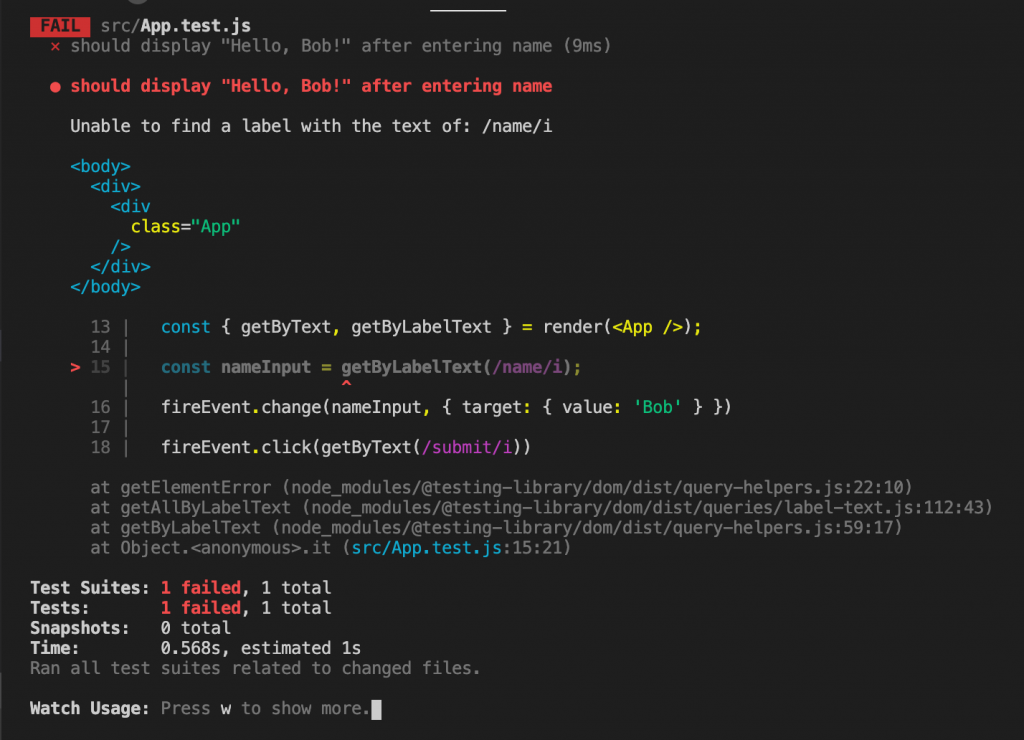
Since LoginForm.js is initially empty, this test will fail, unable to find the required elements. This is your "Red" state, confirming your test is set up correctly.
Step 2 & 3: Green and Refactor - Implement and Improve
For the "Green" phase, you would add the bare minimum JSX to LoginForm.js to make the test pass: two <input> fields with their corresponding <label>s and a <button>.
Once the test is green, you can refactor. You might wrap the elements in a <form> tag, add useState to manage the input values, and implement an onSubmit handler.
The following resources provide excellent, detailed walkthroughs of applying TDD to build React components.
How To Test Your React App With React Testing Library
This article by Naina Codes is a fantastic, hands-on tutorial that builds a complete Todo app using the TDD methodology.
Start by reading the section "What is TDD" to get a concise definition of the cycle in a React context. Then, follow the first TDD cycle under "Displaying items in todo list." Notice how the author first writes a failing test, then implements the component to make it pass, and finally does a refactor by creating a TodoItem component. To reinforce the concept, continue reading "Adding a new todo item." This section repeats the cycle: writing a new failing test for the add functionality and then implementing it.
This next video tutorial provides another great example, focusing on a login form, which is a very common task for a developer.
React JS Test Driven Development (TDD) | Beginners Tutorial 2021
This tutorial from Marius Espejo clearly demonstrates the iterative nature of TDD by building a React login form.
Follow the complete cycle: First Red/Green Cycle: The presenter first translates requirements into a failing test that checks for form elements, and then writes the minimal JSX to make it pass. Second Red/Green Cycle: He then writes a new, more complex failing test to verify form submission behavior. Finally, he implements the state and event handlers to make that test pass, completing the feature.
Practical Application
Now it's your turn to put TDD into practice. Your task is to develop a small feature or fix a bug in one of your current projects (either React or Spring Boot) by strictly following the Red-Green-Refactor cycle.
-
Choose a Small Task: Select a well-defined, small piece of work. For example:
- Adding a new validation rule to a form in React.
- Implementing a new filter parameter for a GET endpoint in Spring Boot.
- Fixing a bug where a calculation is incorrect.
-
Follow the Cycle:
- RED: Before writing any implementation code, write a single, specific test that defines the feature or reproduces the bug. Run your test suite and watch it fail. Capture a screenshot or copy the error message—this is your proof of the "Red" state.
- GREEN: Write the simplest, most direct code possible to make that specific test pass. Do not add any other logic or refactor yet. Run the test suite again and confirm it is now green.
- REFACTOR: Now that you have a passing test as a safety net, improve your code. Remove duplication, enhance readability, or improve the structure. After each small change, re-run your tests to ensure they remain green.
-
Document Your Work: As a "paper trail of competence," you can either use Git to commit at each step (
"RED: Add failing test for X","GREEN: Implement minimal code for X","REFACTOR: Clean up X implementation") or simply document the steps in your "brag document."
This exercise will internalize the TDD rhythm and demonstrate its power in guiding design and ensuring quality from the start.
Conclusion
You have now learned to invert your development process, using tests to drive the design of your code rather than simply verifying it after the fact. This is a significant step in your evolution as a developer.
Key Takeaways:
- TDD is a Design Methodology: It uses tests to guide the creation of well-designed, loosely-coupled, and highly maintainable code.
- The Red-Green-Refactor Cycle: This is the core engine of TDD. Writing a failing test first (Red), making it pass with minimal code (Green), and then cleaning up the implementation (Refactor) is a powerful and repeatable pattern.
- Increased Confidence: TDD creates a comprehensive suite of regression tests as a natural byproduct of development, giving you immense confidence to change and refactor your code.
You are now equipped with a full spectrum of testing knowledge. In our next and final lesson of this module, we will learn how to automate the execution of your entire test suite using a Continuous Integration (CI) pipeline with GitHub Actions, ensuring that every code change is automatically validated for quality.