Recommended resources
The freely available resources this lesson will direct you to.
Hello! Last time, you identified the customers and orders tables and saw how their keys relate rows. Today, we’ll follow a request for some of those rows: from a program on your computer, to PostgreSQL, and back to a result you can see. This client–server picture will make the Windows installation and connection steps in the next lessons easier to understand.
The client and the server have different jobs
A PostgreSQL client is a program you use to communicate with PostgreSQL. Two clients you’ll meet soon are pgAdmin, which has a graphical interface, and psql, which has a text interface. Neither is the database server. When you run a query, the client sends a request; the PostgreSQL server accesses the database and produces a response.
Read the opening of NetApp’s PostgreSQL architecture for its overview of the front end (client) and back end (server). Stop before the discussion of background processes; we do not need those yet.
Read NetApp’s overview to identify which side sends a request and which side executes it and returns results.
Under “PostgreSQL architecture,” read the first three paragraphs, beginning “PostgreSQL is an RDBMS based on client and server architecture” and ending with the sentence about results going directly to the client. Follow the client–server overview. For now, focus on the division of responsibilities, not the names of every server process.
For a beginner, the essential distinction is this: the client presents a way to ask; the server does the database work. A client may display a grid of results, but that does not mean it read PostgreSQL’s data files itself. It displays information the server sent back.
The client and server can run on the same Windows computer or on different computers. Even on one computer, they remain separate programs communicating through a connection. On Windows, the server will typically run as a service; opening pgAdmin does not, by itself, turn pgAdmin into the server.
Connect first, then send SQL
Before sending a query, a client needs to establish a connection to a particular PostgreSQL server and database. Connection settings ordinarily include:
- Host: where the server is running.
localhostmeans this computer. - Port: which numbered endpoint the server listens on.
5432is a common default, but the port can be chosen differently during installation. - Database: which database the session will use.
- User: the PostgreSQL identity requesting access, along with a password if the connection requires one.
These details answer different questions. A correct server address with the wrong port may not reach PostgreSQL at all. Reaching the server with the wrong password may fail authentication. Successfully connecting to the wrong database may leave you unable to find the table you expected. We’ll set up these details and inspect a real connection in later lessons.
Once connected, the client can send SQL over that session. You do not normally reconnect and enter a password for every statement. Suppose you enter this in pgAdmin’s query editor or at a psql prompt and tell the client to execute it:
SELECT order_id, total
FROM orders
WHERE customer_id = 101;
You do not need to know SQL syntax thoroughly yet. Read it as a request for the order_id and total columns from orders, limited to rows whose customer_id is 101. The client sends the SQL request; PostgreSQL interprets it and checks the database. The WHERE condition is applied as part of the server’s query work, not by manually filtering a spreadsheet shown on your screen.
Inside the server, PostgreSQL checks that the statement is valid and that the connected user is allowed to access the requested objects. It determines how to carry out the query, executes it, and prepares a response. There is substantial engineering behind those tasks, but you do not need to learn query plans to understand this exchange.
What comes back?
The supplied Simple Query Flow diagram shows a simplified exchange for a query that produces two rows. Read it from top to bottom: the client’s request travels toward the server; the responses travel back toward the client.
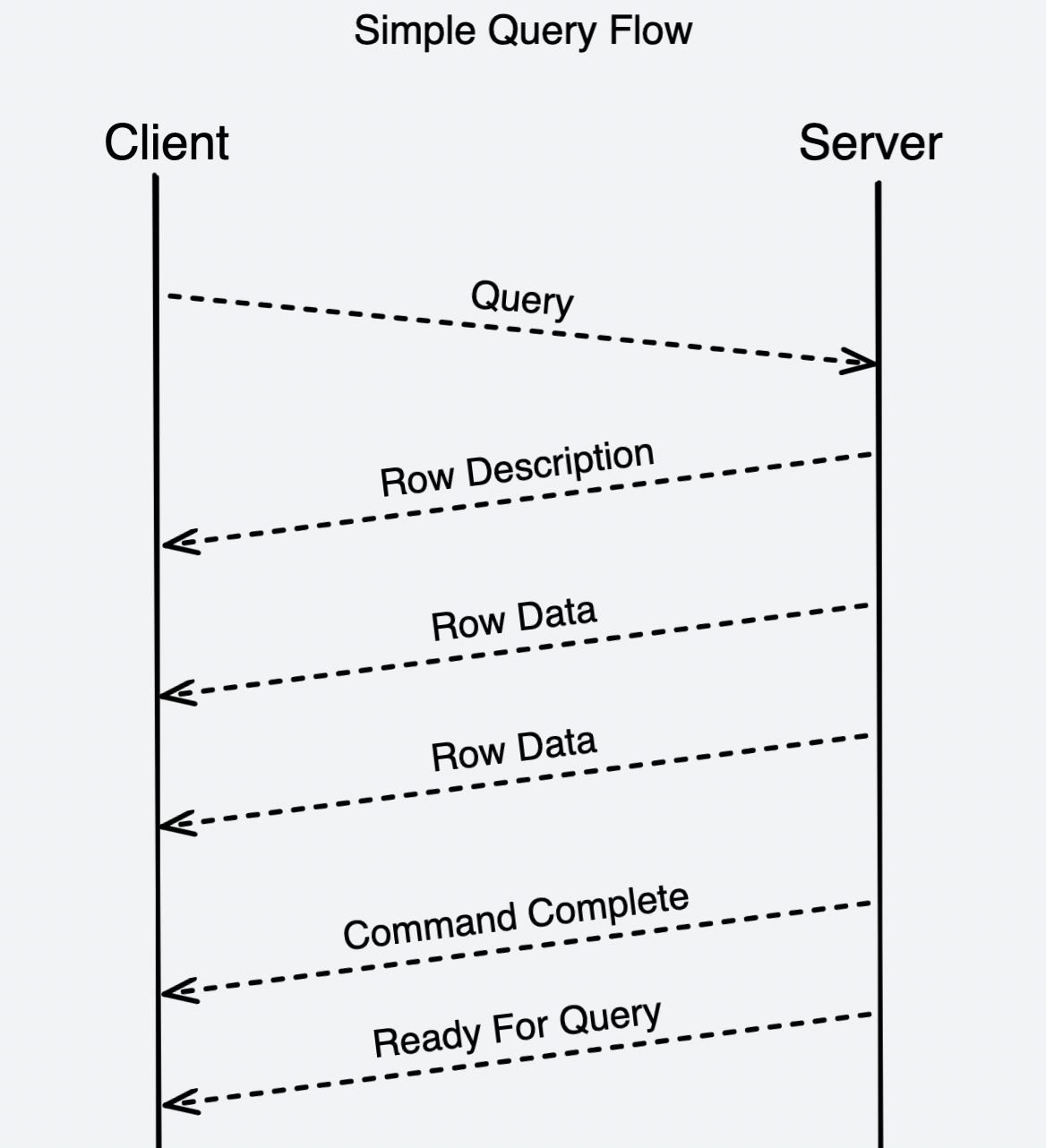
Think of the response as more than just the values in a grid. For our example, it helps to distinguish three kinds of information:
| Part of the response | What it tells the client |
|---|---|
| Row Description | What columns the result has and their types—for example, order_id and total |
| Row Data | The values of each returned row |
| Command Complete / Ready For Query | The command has finished, and the session is ready to accept another request |
Using the orders rows from last lesson, the two data rows would give the client enough information to display:
| order_id | total |
|---|---|
| 5001 | 29.90 |
| 5002 | 15.00 |
The diagram’s two “Row Data” messages fit this particular example: customer 101 has two orders. They are not a rule that queries return two rows. A query might return none, one, or many. If no order matches, a successful query can return column information and completion information with no data rows. Also, the example table happens to show order 5001 before 5002; without an explicit sorting instruction, SQL does not promise that order.
The diagram is a model of the exchange, not a requirement to recognize network packets. In particular, “Ready For Query” does not mean PostgreSQL found a matching row. It means the connected session is ready for another command.
A result is not always a table of rows
A SELECT request typically asks for rows, so a client such as pgAdmin can render its response as a result grid. Other SQL commands may change data or define database objects. Their successful response need not contain rows; it can instead report that the command completed. You’ll learn those commands later.
Errors are responses too. Consider three outcomes that can look superficially similar in a client:
- The connection fails: the client has not established a usable session, so it cannot send the query to that server.
- The connection succeeds, but the SQL fails: for example, the statement names a table that does not exist in the connected database. PostgreSQL returns an error rather than the requested result.
- The SQL succeeds, but matches zero rows: this is a valid, empty result—not a connection failure or a SQL error.
That distinction is useful when you begin using PostgreSQL. If you see an empty grid, ask whether the query ran successfully before changing connection settings. If you see “connection refused” or an authentication error, changing the WHERE condition will not help: the problem occurred before the server could execute that SQL.
You can now describe the whole interaction in ordinary language: a client establishes a session with a chosen PostgreSQL server and database; when you execute SQL, it sends the request through that session; the server processes the request and returns result information or an error; the client displays the response. The client is your interface, while the server remains responsible for the database.
Key takeaways
PostgreSQL uses a client–server model even when both programs run on the same Windows PC. pgAdmin and psql are clients; they send SQL rather than reading database files directly. A connection identifies the server endpoint, database, and user. For a successful row-producing query, the response describes the columns, supplies any matching rows, and reports completion. An empty result, a SQL error, and a failed connection are different outcomes.
Next, you’ll install PostgreSQL Server and pgAdmin on Windows and make deliberate choices about the port, data directory, and administrator password—the practical settings behind the connection we’ve just traced.