Recommended resources
The freely available resources this lesson will direct you to.
Hello! We’ll begin your SQL course with the structure that SQL works on: relational tables. In this first module, you’ll build that foundation before connecting to PostgreSQL on Windows. Today you’ll use a spreadsheet as a reference point, then see where the comparison stops being reliable. By the end, you should be able to look at a small database and identify its tables, rows, columns, data types, primary keys, and foreign keys.
From spreadsheet sheets to database tables
Imagine a spreadsheet used to track customers. Its header row might contain customer ID, name, and email. Each row beneath the headers describes one customer. A database table looks similar: it has named columns, and each row holds one set of values for those columns.
Read the opening of PostgreSQL’s Table Basics before looking at an example. Pay particular attention to two cautions that are easy to miss when thinking in spreadsheet terms.
PostgreSQL: Documentation: 18: 5.1. Table Basics
Read the opening paragraph of PostgreSQL's Table Basics to establish what rows and columns are—and what a table does not guarantee.
In Section 5.1, “Table Basics,” read the opening paragraph. Start with the comparison to a paper table and stop at the sentence about dealing with identical rows later in the chapter. Notice especially the statements about row order and unique identifiers.
Here is a small customers table:
| customer_id | name | |
|---|---|---|
| 101 | Maya Chen | maya@example.com |
| 102 | Ruben Ortiz | ruben@example.com |
| 103 | Ava Roy | ava@example.com |
The table concerns customers. A column describes the same kind of fact in every row: email, for instance, holds each customer’s email address. A row brings the facts about one customer together. The value maya@example.com is one value at the intersection of Maya’s row and the email column.
The spreadsheet comparison gives us a useful starting vocabulary:
| Spreadsheet idea | Relational-table idea |
|---|---|
| A sheet of customer records | A customers table |
| A header such as “Email” | A named column such as email |
| One customer’s line of data | One row |
| One filled-in cell | A value in a row and column |
But a spreadsheet’s row number is not a customer identifier. Maya might appear on spreadsheet row 2 today and row 9 after sorting. Likewise, a database table does not promise that its rows will come back in insertion order, alphabetical order, or any other order unless a query explicitly requests sorting. And merely having rows does not guarantee that each represents a distinct real-world customer. Keys help us establish reliable identity.
Columns have data types
A spreadsheet may let you put a date, a number, and a word into cells under the same heading. In PostgreSQL, each column is declared with a data type: a rule about what kind of value it holds and how that value can be used. Read the next part of the same documentation with that distinction in mind.
PostgreSQL: Documentation: 18: 5.1. Table Basics
Continue in Table Basics to see why a column's data type matters, beyond how its values look on screen.
In Section 5.1, “Table Basics,” begin at the data-type discussion. Read from the explanation of what a type constrains through the examples ending with timestamp; you can stop before the standalone list of type names. Focus on the contrast between numbers that support calculations and text that does not.
Suppose we also keep an orders table. Its columns might have these types:
| Column | Example value | Suitable PostgreSQL type | Why |
|---|---|---|---|
order_id |
5001 |
integer |
A whole-number identifier |
customer_id |
101 |
integer |
An identifier for the customer |
order_date |
2026-01-14 |
date |
A calendar date |
total |
29.90 |
numeric |
An amount for which exact decimal values matter |
The customers.name and customers.email columns could use text. A customer_id is an integer even though you would not ordinarily add two customer IDs together: its purpose is identification, not measurement. A total, by contrast, is an amount on which calculations make sense.
A type describes what a column can hold; a column name describes what its values mean. Two columns can both be integers while serving entirely different purposes. PostgreSQL also has types such as time and timestamp; you need not memorize its full type catalogue yet.
Why more than one table?
A single spreadsheet might put a customer’s name and email alongside every order they place. That seems convenient until the customer places many orders: the same details are copied repeatedly. If their email changes, which copy should be updated?
Watch Eddie Woo work through that problem. His example starts with an order-tracking spreadsheet and develops it into separate customer and order tables.
Watch “Primary & Foreign Keys” by Eddie Woo for a visual explanation of why an order spreadsheet becomes two related tables.
Begin with the spreadsheet problem, where repeat customers lead to repeated details. Continue through the two tables, noting where the customer ID is stored and which row it identifies. Finish with the foreign key, paying attention to why the same customer ID can occur in several orders. Stop as the explanation of how the tables connect concludes.
Here are two tables following that approach. The customers table above holds each customer’s details once; orders records the purchases:
| order_id | customer_id | order_date | total |
|---|---|---|---|
| 5001 | 101 | 2026-01-14 | 29.90 |
| 5002 | 101 | 2026-01-17 | 15.00 |
| 5003 | 102 | 2026-01-19 | 42.50 |
The first two order rows both contain customer ID 101. Looking that ID up in customers tells us that Maya placed both orders. We have not copied Maya’s name and email into each order row. Ava, customer 103, has no order row yet; she still exists in customers.
This is the central idea behind a relational database: information can be stored in separate tables and related through values they share. A table is usually organized around one subject—customers in one table, orders in another—rather than being one enormous grid of repeated details.
Keys give rows identity and connect tables
The two appearances of customer_id have different jobs. The diagram below shows that distinction. Its column names use capitals, while our examples use lowercase names; the relationship is the same.
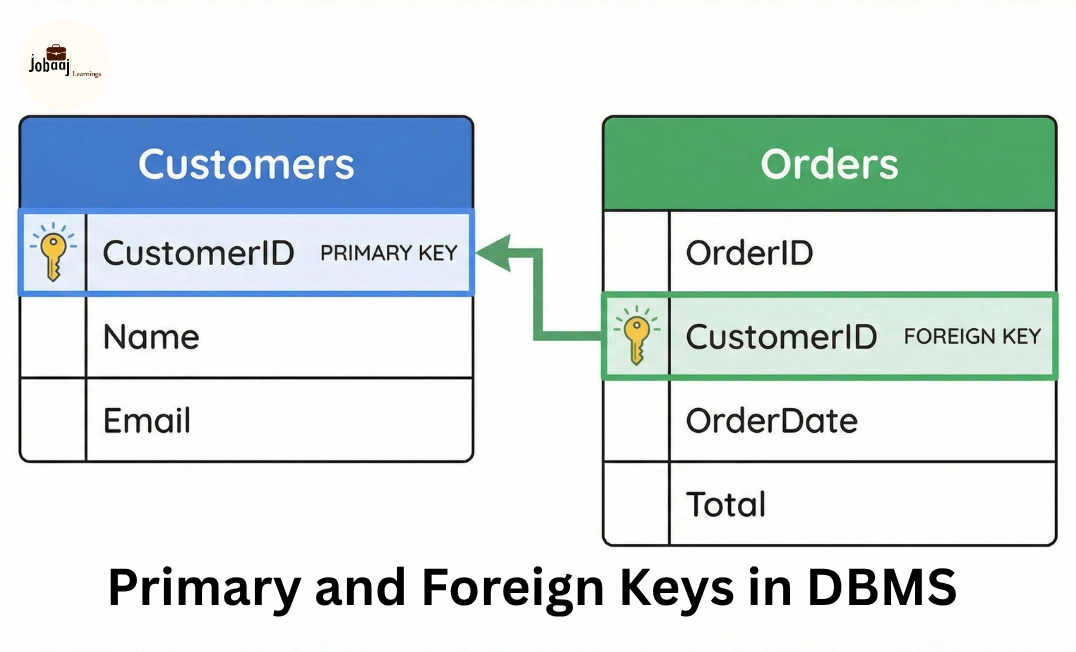
A primary key identifies a row within its own table. In our example, customers.customer_id is the primary key of customers: customer 101 identifies Maya’s row and cannot also identify another customer row. A primary key cannot be missing or duplicated. We would also choose orders.order_id as the primary key of our orders table, so 5001 identifies one particular order. A table can have a primary key made from more than one column, though a single ID column is enough for these examples.
A foreign key expresses a relationship to another table. Here, orders.customer_id refers to customers.customer_id. It answers, “Which customer does this order belong to?” Unlike the primary key in customers, the foreign-key value in orders can repeat: Maya can place several orders. If the relationship is enforced by PostgreSQL, an order cannot name a nonexistent customer ID. Depending on how a column is defined, a missing foreign-key value may also be permitted; our example assumes every order has a customer.
| Value or column | Its job in this example |
|---|---|
customers.customer_id = 101 |
Identifies Maya’s customer row |
orders.order_id = 5001 |
Identifies one order row |
orders.customer_id = 101 |
Says that order 5001 belongs to Maya |
Notice that matching column names alone do not create a foreign key. The relationship has to be defined in the database. Conversely, the column names need not be identical for a relationship to exist. What matters is which column references which key.
A primary key also has a precise limit: it prevents two rows with the same key, not every possible mistake in the data. If Maya were mistakenly entered again under a new customer ID, both IDs would be unique even though the business might regard the records as duplicates. We will return to rules for data quality and database design later in the course.
Putting the picture together
You can now describe the example without relying on spreadsheet position:
customersandordersare tables holding different subjects.- Each customer or order entry is a row;
emailandorder_dateare columns. - Column data types distinguish, for example, a
datefrom anumericamount. - Each table’s primary key identifies one of its rows.
orders.customer_idis a foreign key connecting an order to its customer. Its repeated value101represents multiple orders by the same customer, not an error.
This vocabulary will recur throughout your SQL studies. Later, you’ll use the key relationship to combine customer and order information in a query. Next, we’ll step back from the tables themselves and see how a PostgreSQL client sends a SQL request to the database server and receives a result.