Recommended resources
The freely available resources this lesson will direct you to.
In our last session, we focused on creating the building blocks of decisions: conditions. You learned to use comparison and logical operators to construct expressions that Python evaluates to either True or False.
This lesson is where we put those conditions to work. We will explore how to use the True or False outcomes to direct the path of your program, making it execute different code based on different situations. This is known as flow control, and it is one of the most fundamental concepts in programming. By the end of this lesson, you will be able to write conditional statements using if, elif, and else to control your program's flow. This skill is essential for building the interactive and intelligent applications you're interested in, like chatbots that need to decide how to respond based on a user's message.
The Anatomy of a Decision: Conditions and Code Blocks
Before we write our first conditional statement, it's crucial to understand two concepts that form its structure: conditions and code blocks.
A condition is simply an expression that evaluates to True or False, which you practiced creating in the last lesson.
A code block is a group of one or more lines of code that belong together. In Python, you define a block of code using indentation—typically four spaces. Any statement that ends with a colon (:) is followed by an indented block of code.
The resource Automate the Boring Stuff with Python provides a clear explanation of these core concepts.
This section explains the two essential components of any flow control statement: the condition that is checked and the code block that is executed. Pay close attention to the rules of indentation, as this is a defining feature of Python syntax.
Please read the part titled Components of Flow Control. Focus on understanding the four rules for blocks and how indentation groups lines of code together.
The if Statement: The Simplest Choice
The if statement is the most basic form of decision-making. It checks a condition, and if that condition is True, it executes the indented block of code that follows. If the condition is False, the block is simply skipped, and the program continues on.
The structure is:
- The
ifkeyword. - A condition that evaluates to
TrueorFalse. - A colon (
:). - An indented block of code on the next line(s).
Let's see it in action.
age = 20


# The condition `age >= 18` is True.
if age >= 18:
    print("You are eligible to vote.") # This line will execute.
    print("Please make sure you are registered.") # This line will also execute.

print("This line runs regardless of the condition.")
The "Programming with Mosh" YouTube channel offers a very clear, step-by-step introduction to if statements.
Python for Beginners - Learn Coding with Python in 1 Hour
This segment walks through the basic if statement, explaining the syntax, the importance of the colon and indentation, and how the code block is executed only when the condition is true.
Watch from the beginning of the section on if statements. Mosh provides a great example using temperature to illustrate how the indented block is tied to the condition.
The else Statement: The Alternative Path
What if you want to do something specific when the if condition is False? That's what the else statement is for. It provides an alternative code block that runs only when the if condition is not met.
An else statement:
- Always follows an
ifblock. - Does not have its own condition.
- Ends with a colon (
:).
age = 16

if age >= 18:


    # This block is skipped because `16 >= 18` is False.
    print("You are eligible to vote.")
else:


    # This block is executed.
    print("You are not yet eligible to vote.")
    print(f"You will be able to vote in {18 - age} years.")

print("This line runs regardless.")
The Automate the Boring Stuff guide explains this if-else structure with a simple flowchart.
These sections introduce the syntax for the if and else statements and show how they work together to create a two-way branch in your code.
Read the two short sections on the if statement and the else statement.
The elif Statement: Handling Multiple Conditions
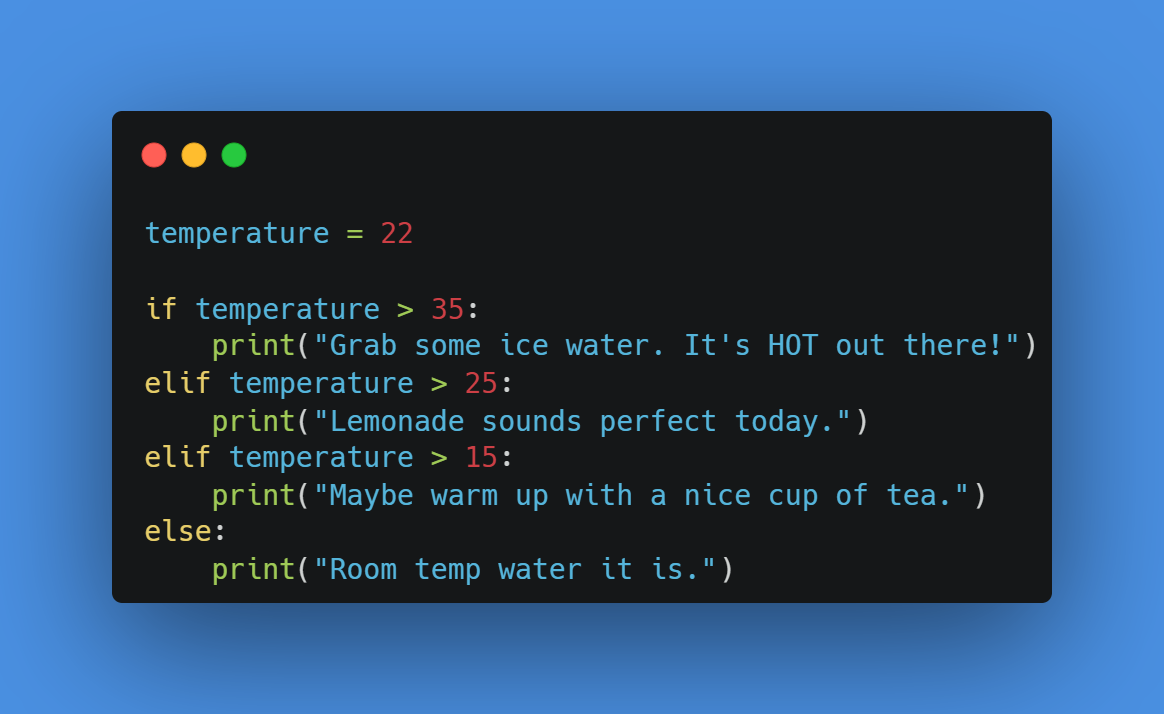
Often, you'll need to check more than two possibilities. You could use a series of if statements, but a more elegant solution is the elif statement, which is short for "else if".
An if-elif-else chain lets you check multiple conditions in order:
- Python starts with the
ifcondition. If it'sTrue, its block is executed, and the rest of the chain (elifandelse) is skipped. - If the
ifcondition isFalse, Python moves to the firstelifand checks its condition. If that'sTrue, its block runs, and the rest of the chain is skipped. - This continues for any subsequent
elifstatements. - If all
ifandelifconditions areFalse, the finalelseblock is executed (if one is present).
It's guaranteed that at most one block in an if-elif-else chain will execute.
The Importance of Order
The order of your elif conditions is critical. Since Python stops at the first True condition, a poorly ordered chain can lead to bugs. For example, if you check age > 18 before checking age > 65, the age > 65 block will never be reached for someone who is 70, because 70 > 18 is already true.
The "Bro Code" video has a great segment explaining this common pitfall.
If statements in Python are easy (if, elif, else) 🤔
This video clearly demonstrates how to use elif to check multiple conditions and highlights why the order of these checks is so important.
Watch the segment from this point. Pay close attention to the example where he reorders the age checks to fix a bug in the logic.
Nested if Statements
You can also place if statements inside other if statements. This is called nesting and allows for more complex, layered logic. For example, first you might check if a number is positive or negative, and then, inside that check, you can determine if it's even or odd.
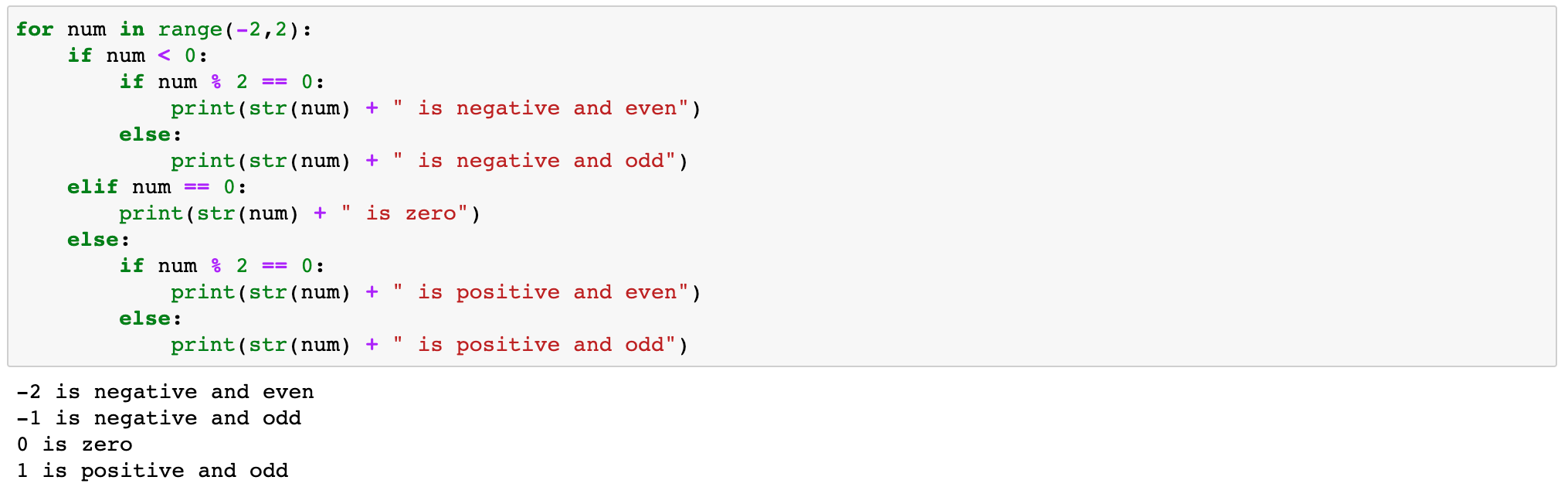
In the example above, the program first checks if num < 0. If that is true, it then enters a new, nested if-else block to decide if the number is even or odd. This pattern allows you to build very detailed decision trees.
Putting It All Together: A Practical Example
Let's review a complete program that uses these concepts to solve a practical problem. The "dishonest capacity calculator" from Automate the Boring Stuff is a great example that combines user input, type conversion, and an if-elif structure with a complex condition (unit == 'TB' or unit == 'tb').
This short program is an excellent case study of how the concepts from this and previous lessons come together to create a useful utility.
Please read the section titled Dishonest Capacity Calculator. Trace the logic of the program and make sure you understand how the if and elif statements control which calculation is performed based on user input.
Conclusion
In this lesson, you've gained the power to control the flow of your programs. You can now guide Python down different paths based on conditions you define. We covered:
- The basic
ifstatement for conditional execution. - The
if-elsestructure for handling two alternative paths. - The
if-elif-elsechain for managing multiple, mutually exclusive options. - The importance of indentation for defining code blocks and the colon (
:) for starting them. - The critical role of
eliforder in preventing logical bugs.
You now have the tools to make your programs respond intelligently to different inputs and states. In our next lesson, we'll introduce another crucial flow control tool: loops. While if statements allow your program to choose what to do, loops will allow it to perform an action repeatedly, a necessary step for processing collections of data like the words in a sentence or the items in a list.