Recommended resources
The freely available resources this lesson will direct you to.
Welcome to our third lesson! In our previous session, you learned how to make your programs interactive by using print() to display information and input() to receive it. You also mastered the crucial skill of converting user input into the correct data types for calculations.
Today, we'll build on that by learning how to make our programs "think." We'll explore how to ask questions about data and combine the answers to form complex logic. This lesson covers how to use comparison and logical operators to create conditions. These conditions are the fundamental building blocks for decision-making in any program, from the simple chatbot you're interested in building to complex AI systems.
Asking Questions with Comparison Operators
At its core, a program makes decisions by asking a series of yes-or-no questions about the data it's handling. Does the user's input match the correct password? Is the number of items in the shopping cart greater than zero? Is the user's name on the ban list?
In Python, we ask these questions using comparison operators. They compare two values and produce a Boolean result: either True or False.
The main comparison operators are:
==: Equal to!=: Not equal to>: Greater than<: Less than>=: Greater than or equal to<=: Less than or equal to
The Launch School guide provides a thorough explanation of how these operators work with different data types, including numbers and strings.
Comparisons & conditionals in Python - Launch School
This article offers a detailed look at how Python compares values, which is essential for building accurate conditions.
Please read the section titled Comparisons. Pay special attention to the examples involving string comparisons, as the logic might be different from what you expect. For example, understand why '42' < '402' evaluates to False.
As you read, it's critical to remember the difference between the assignment operator (=) and the equality comparison operator (==).
my_variable = 5assigns the value5tomy_variable. It's an action.my_variable == 5asks if the value ofmy_variableis5. It's a question that results inTrueorFalse.
Let's look at some examples in code:
# Comparing numbers
age = 25
print(age >= 18)  # Asks "is age greater than or equal to 18?" -> True
print(age == 30)  # Asks "is age equal to 30?" -> False


# Comparing strings
username = "admin"
print(username == "admin")  # Asks "is username equal to 'admin'?" -> True
print(username != "guest")  # Asks "is username not equal to 'guest'?" -> True


# Case-sensitivity matters
print("Python" == "python") # False, because 'P' is not the same as 'p'
Combining Questions with Logical Operators
Often, a single question isn't enough. For a chatbot to respond to a greeting, it might need to check if the user's message contains "hello" or "hi". To grant access to a secure area, a program might need to verify that the username is correct and the password is correct.
We can combine Boolean values (True/False) using logical operators: and, or, and not.
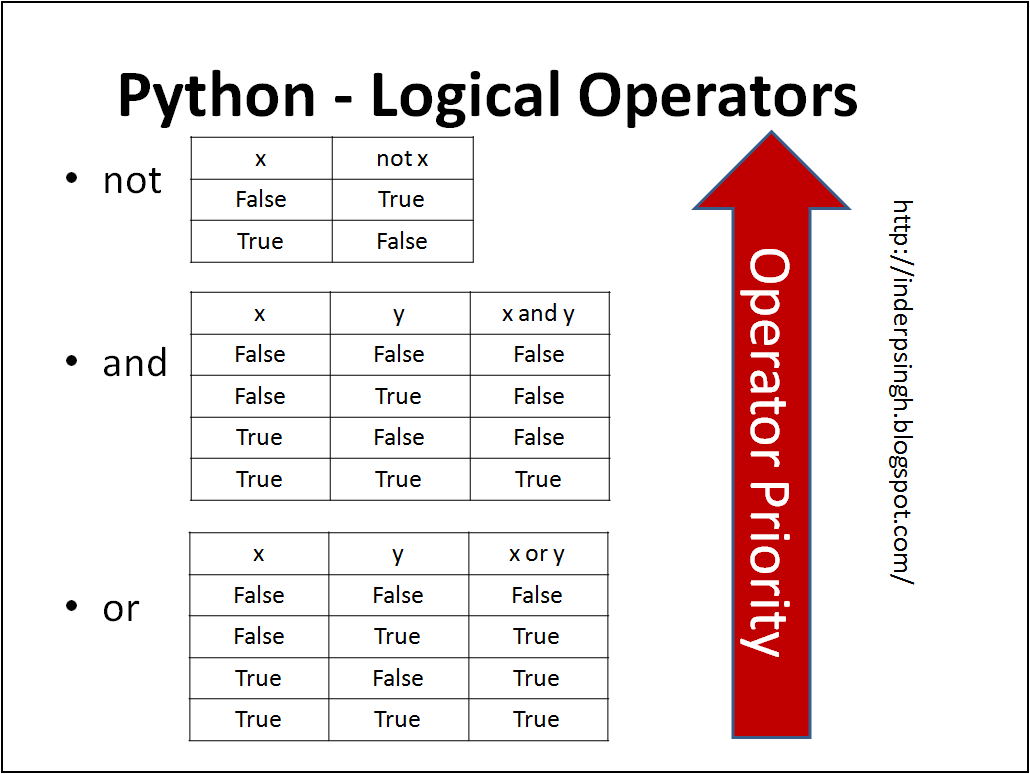
The "Data with Baraa" channel, which we used in our last lesson, offers a great visual walkthrough of these operators.
Python Logical Operators (Visually Explained) | and, or, not, Execution Order | #Python Course 13
This video explains the and, or, and not operators with clear diagrams and practical examples that will help you understand how to build complex logical expressions.
Please watch these segments: First, watch the explanation of the and operator from this section. It requires all conditions to be true. Next, see how the or operator works from this part. It requires at least one condition to be true. Then, watch the demonstration of these operators with code examples from this segment. The user login scenario is a perfect example of using and. Finally, understand the not operator, which simply flips a True to False and vice versa, by watching this explanation.
Here's a quick summary of the rules:
A and BisTrueonly if both A and B areTrue.A or BisTrueif either A or B (or both) areTrue.not AisTrueif A isFalse, andFalseif A isTrue.
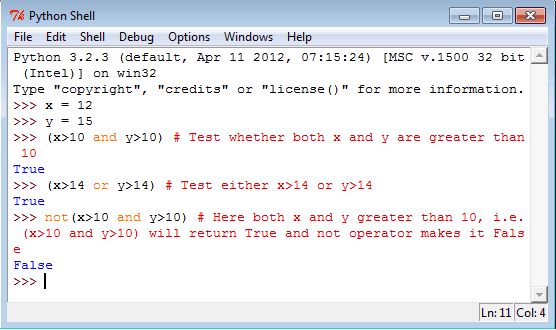
Let's see this in a Python shell, similar to the one in the image below.
Operator Precedence and Parentheses
What happens when you mix operators in one line, like is_admin or is_editor and is_active? Does Python evaluate or first, or and? The order matters and can completely change the result.
Python has a default order of precedence: it evaluates not first, then and, and finally or.
However, relying on this default order can make your code confusing and prone to bugs. The best practice is to use parentheses () to explicitly group your conditions and control the order of evaluation. Anything inside parentheses is evaluated first.
The "Data with Baraa" video has an excellent final segment explaining this with a practical scenario.
Python Logical Operators (Visually Explained) | and, or, not, Execution Order | #Python Course 13
This final segment is crucial. It demonstrates why controlling the order of operations with parentheses is essential for writing correct and readable code.
Please watch the section on mixing operators from this part. Pay close attention to the example about user access (is_logged_in or is_guest and not is_banned) and see how adding parentheses changes the outcome to produce the correct logic.
Let's break down the example from the video. Imagine we want to grant access if a user is either logged in or a guest, AND they are not banned.
is_logged_in = True
is_guest = False
is_banned = True


# Incorrect logic without parentheses
# Python evaluates `is_guest and not is_banned` first because `and` has higher precedence.
# (not is_banned) is `not True` -> `False`
# `is_guest and False` is `False and False` -> `False`
# `is_logged_in or False` is `True or False` -> `True`
# The banned user gets access! This is wrong.
access_granted_wrong = is_logged_in or is_guest and not is_banned
print(f"Access granted (wrong logic): {access_granted_wrong}") # Output: True


# Correct logic with parentheses
# The parentheses force Python to evaluate the `or` part first.
# `(is_logged_in or is_guest)` is `(True or False)` -> `True`
# `not is_banned` is `not True` -> `False`
# `True and False` -> `False`
# Access is correctly denied.
access_granted_correct = (is_logged_in or is_guest) and not is_banned
print(f"Access granted (correct logic): {access_granted_correct}") # Output: False
This example clearly shows that using parentheses is not just for style—it is fundamental for ensuring your program behaves as you intend.
Practice Time
Now, let's test your understanding. Try to predict the final value of each of the following expressions before you check the answers. This exercise will help you solidify your grasp of operator precedence and how Python evaluates different values in a Boolean context (a concept called "truthiness").
Comparisons & conditionals in Python - Launch School
This exercise tests your ability to evaluate complex conditional expressions.
Find Exercise 1 and try to determine the result of each expression. Write down your answers, then compare them with the provided solution. Don't worry if you get some wrong; the goal is to understand why.
Conclusion
In this lesson, you've learned how to construct the logical core of a program. You can now use comparison operators (==, !=, <, >) to ask questions about data and logical operators (and, or, not) to combine those questions into complex conditions. Most importantly, you know how to use parentheses to group expressions, ensuring your logic is clear and correct.
You now have all the tools needed to build a condition. In our next lesson, we will put them to use. You'll learn how to write if, elif, and else statements that use these True/False outcomes to direct the flow of your program, allowing it to perform different actions based on different conditions. This is the next major step toward building programs that can respond intelligently to input.