Recommended resources
The freely available resources this lesson will direct you to.
Welcome to our next lesson. In our previous session, we established how to control the flow of a program by making decisions with if, elif, and else statements. These tools allow your code to choose which path to take. Today, we'll explore another fundamental type of flow control: repetition.
Often in programming, especially in the data-centric fields of AI and NLP you're interested in, you need to perform the same action on many items—for example, cleaning every word in a sentence or processing every data point in a file. Instead of writing the same code over and over, we use loops. This lesson focuses on the for loop, Python's primary tool for iterating over a sequence of items. By the end of this lesson, you will be able to write for loops to process items in sequences and repeat actions a specific number of times using ranges.
The Power of Repetition: Introducing the for Loop
Imagine you have a list of prices and need to apply a discount to each one. You could write a line of code for each price, but what if you had a thousand prices? This is where loops become essential. A for loop automates this repetition, saving you time and making your code cleaner and more scalable.
The "Visually Explained" channel provides a fantastic introduction to why we need loops and how they work.
Python For Loops - Visually Explained
This video introduces the concept of a for loop by showing how it automates a repetitive task. It then breaks down the syntax and visually walks through the execution process, which is a great way to see how Python handles the iteration step-by-step.
Watch from the beginning to this point. Pay close attention to: The problem with manually repeating code (discounting prices). The breakdown of the for loop syntax, including the loop variable and the loop body (syntax explanation). The visualization of how Python executes the loop, assigning a new value to the loop variable in each iteration (execution walkthrough).
As the video showed, the basic structure of a for loop is intuitive. It follows a simple logic: "for each item in this collection, do this action."
Let's formalize the syntax, which you saw in the video.
# for `variable` in `sequence`:
#     # Indented code block (the "loop body")
#     # This code runs once for each item in the sequence.

fruits = ["apple", "banana", "cherry"]
for fruit in fruits:
    print(f"I have a {fruit}")

print("Loop finished!")
In this example, fruit is the loop variable. In the first pass, fruit is "apple". In the second, it's "banana", and in the third, it's "cherry". The indented print() statement is the loop body. The final, unindented print() statement runs only once, after the loop has processed every item in the list.
Iterating Over Common Sequences
The for loop is designed to work with any "sequence" or collection of items. Let's look at the two most common types you'll encounter at this stage: lists and strings.
The article "Python for Loop | Iterating Sequences" provides clear code examples for both.
Python for Loop - Iterating Over Sequences
This resource offers a concise, code-first look at how for loops handle lists and strings. These examples solidify the core concept of iteration.
Please read the sections on Iterating Over Lists and Iterating Over Strings. Notice how the loop syntax is identical in both cases; only the sequence itself changes.
As you can see, the for loop provides a consistent way to work through a collection, whether it's a list of numbers or a string of characters. This is a powerful idea. In NLP, you will use this exact technique to loop through sentences (lists of words) or words (lists of characters).
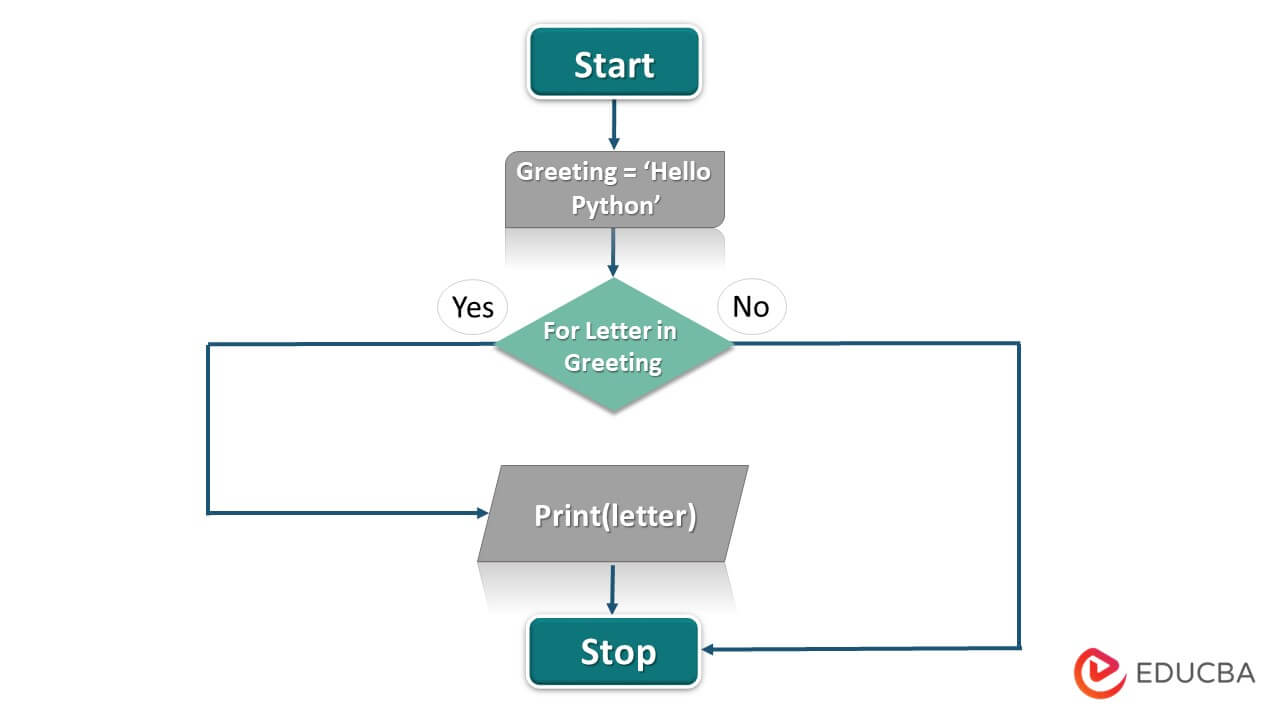
The flowchart below illustrates this process for a string. The loop checks if there are more items (letters) in the sequence. If yes, it processes the current item and repeats. If no, it exits.
Repeating Actions a Specific Number of Times with range()
Sometimes you don't have a pre-existing list to loop over. Instead, you just want to repeat an action a specific number of times. For this, Python gives us the built-in range() function.
The range() function generates a sequence of numbers that you can use with a for loop. This is perfect for tasks like "run this simulation 100 times" or "create 10 test users".
The Visually Explained video has another clear segment on this.
Python For Loops - Visually Explained
This part of the video explains why range() is useful and how to use it to generate a sequence of numbers on the fly.
Watch from this section on range(). The raffle ticket example clearly shows how range() simplifies creating numbered sequences.
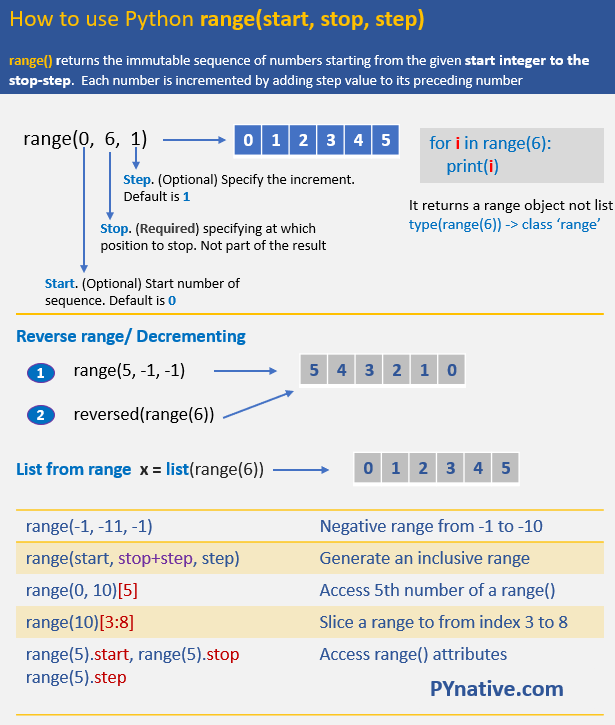
The range() function is very flexible. Let's look at its three main forms, which are essential to master.
range(stop): Generates numbers from0up to (but not including)stop.range(5)produces0, 1, 2, 3, 4.
range(start, stop): Generates numbers fromstartup to (but not including)stop.range(2, 6)produces2, 3, 4, 5.
range(start, stop, step): Generates numbers fromstartup to (but not including)stop, incrementing bystep.range(1, 10, 2)produces1, 3, 5, 7, 9.
This infographic is a great visual summary of how range() works.
For a more detailed textual reference on range(), the "Iterating Sequences" article is also an excellent resource.
Python for Loop - Iterating Over Sequences
This section provides code examples for all three variations of the range() function, reinforcing what you saw in the video.
Read the section titled Repeating Code with range(). Try running these examples yourself to see the output.
Practical Application: The Accumulator Pattern
One of the most common and powerful ways to use a for loop is to "accumulate" a result. You start with a variable initialized to a starting value (like 0 or an empty string), and then you use the loop to update that variable in each iteration.
A classic example is summing the numbers in a list.
Python for Loop - Iterating Over Sequences
This example demonstrates the "accumulator pattern" by calculating a running total. This is a fundamental pattern you will use frequently.
Read the section on Summing List Elements. Focus on how the total_score variable is initialized before the loop and then updated inside the loop.
Here is the logic step-by-step:
- Create an "accumulator" variable,
total_score, and set it to0. - The
forloop begins. In the first iteration,scoreis88. The linetotal_score = total_score + scorebecomestotal_score = 0 + 88, sototal_scoreis now88. - In the second iteration,
scoreis92. The line becomestotal_score = 88 + 92, sototal_scoreis now180. - This continues for all scores.
- After the loop finishes,
total_scoreholds the final sum.
Your Turn: Practice with Loops and Conditionals
Now it's time to combine what you've learned about for loops with the if statements from our last lesson. The following exercise asks you to loop through a list of numbers and print only the ones that meet certain criteria.
To solve this, you'll need two more keywords that give you finer control inside a loop:
break: Immediately exits the entire loop. No more iterations will run.continue: Immediately stops the current iteration and jumps to the beginning of the next one.
For example:
for i in range(10):
    if i == 5:
        break # Stops the loop when i is 5. Only 0, 1, 2, 3, 4 will be printed.
    print(i)

for i in range(10):
    if i % 2 != 0: # If i is odd...
        continue # ...skip the print statement and go to the next iteration.
    print(i) # This will only print even numbers: 0, 2, 4, 6, 8.
Now, try the exercise from learnpython.org.
Loops - Learn Python - Free Interactive Python Tutorial
This exercise challenges you to loop through a list, use conditional logic to filter numbers, and control the loop's execution.
Navigate to the Exercise section. Your goal is to: Loop through the numbers list. If a number is odd, skip it (continue). If the number 237 is encountered, stop the loop entirely (break). Otherwise, print the even number. Think about the order of your if statements inside the loop. The solution is provided on the page for you to check your work.
Conclusion
In this lesson, we moved from making decisions to performing repetitions. You've learned how to use for loops, one of the most essential tools in a programmer's toolkit.
Key takeaways include:
forloops are used to iterate over items in a sequence (like a list or a string).- The
for item in sequence:syntax is clean and readable. - The
range()function is your tool for repeating an action a fixed number of times by generating a sequence of numbers. - The accumulator pattern (initializing a variable before a loop and updating it inside) is a fundamental technique for tasks like summing numbers or building strings.
breakandcontinuegive you extra control over a loop's execution.
You now understand the two main pillars of flow control: conditional execution (if/else) and iteration (for loops). In the next lesson, we will explore Python's other type of loop, the while loop, which repeats an action as long as a condition is true, rather than for a fixed number of items.