Hello! Welcome back to our course on AI-assisted book publishing.
In our last lesson, we focused on the crucial step of infusing your manuscript with a unique authorial voice, transforming it from a generic AI-generated text into something that is authentically yours. Your manuscript now has structure, flow, and personality. We are now at the final stage of the editing process: the technical polish.
Today, we'll address the learning outcome: Use free tools like the Hemingway App or Grammarly's free version to check readability and grammar. Think of this as the final quality assurance check. Even the most compelling story or insightful advice can be undermined by distracting typos, grammatical errors, or clunky sentences. This lesson will equip you with the free tools to catch these issues and ensure your manuscript is professional and ready for formatting.
1. Two Tools for Two Different Jobs: Correctness vs. Clarity
It's a common misconception that editing tools are all the same. For our purposes, we'll focus on two of the most popular free tools, Grammarly and Hemingway Editor, which are excellent for different tasks.
- Grammarly (Free Version): Think of this as your meticulous proofreader. Its main job is to find objective errors—things that are definitively wrong. It's focused on correctness.
- Hemingway Editor (Free Version): This is your style and clarity coach. It flags passages that aren't necessarily "wrong" but could be written more effectively. It's focused on readability.
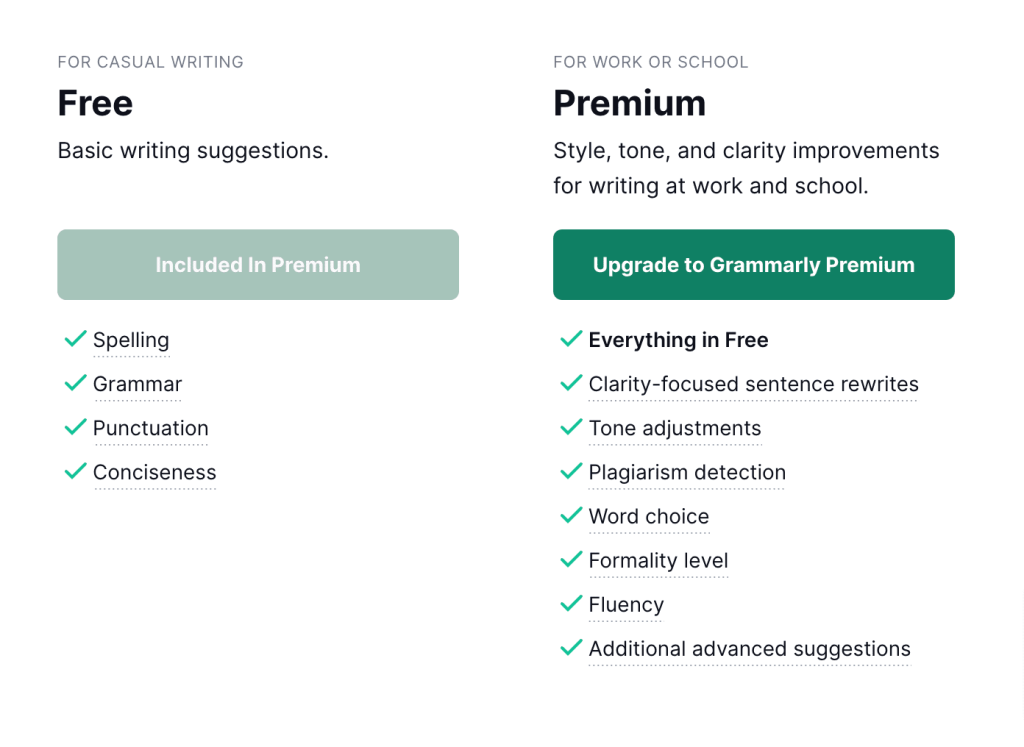
To get a better sense of their distinct roles, let's look at a direct comparison.
Hemingway Editor vs Grammarly: Which Tool Is Best?
The article 'Hemingway Editor vs Grammarly' from ProWritingAid provides a concise breakdown of what each tool excels at. Understanding this distinction is key to using them efficiently.
Please read the 'Overview' and the 'Side-by-Side Feature Comparison' sections. Pay special attention to the subsections on 'Grammar Checking' and 'Readability Checking' to see their core strengths.
As the article confirms, Grammarly's free version is the go-to for catching grammar and spelling mistakes, while Hemingway is designed specifically to improve clarity by flagging passive voice, complex sentences, and adverbs. Because they have different specialties, we'll use them in a specific, two-step workflow.
2. The Recommended Workflow: A Two-Step Polish
For maximum efficiency, we'll first clean up the objective errors and then refine the style.
Step 1: The Grammar Pass with Grammarly
Step 2: The Readability Pass with Hemingway Editor
This order prevents you from spending time rewording a sentence in Hemingway, only to find out later from Grammarly that it had a basic typo. Let's see how this works in practice. The following video provides a fantastic real-world demonstration of an author using both tools to edit a chapter.
How To Self Edit Your Book FOR FREE With Grammarly and Hemingway Editor | Free Book Editing Software
The video 'How To Self Edit Your Book FOR FREE With Grammarly and Hemingway Editor' by Iasmina Edina is a perfect walkthrough for this lesson. We'll watch it in two parts, mirroring our workflow.
For now, just watch the first part covering Grammarly (00:46 to 03:17). Observe how the author pastes her text, reviews the suggestions, and uses her judgment to accept or reject them. We will come back to the second part of the video later.
As you saw, Grammarly is great at spotting issues like misspellings, incorrect punctuation (especially commas), and basic grammatical mix-ups. However, notice that the author correctly ignored a suggestion because the tool misunderstood the context. This is a critical takeaway: always use your own judgment.
3. Deep Dive into Readability with Hemingway Editor
With the basic errors corrected, you can now copy your clean text from Grammarly and paste it into the Hemingway Editor. This is where you work on making your prose sharp and impactful.

To understand what each color signifies, this article provides a helpful guide.
How to Use Hemingway Editor Efficiently
The article 'How to Use Hemingway Editor Efficiently' from Proofed gives a clear explanation of Hemingway's color-coded feedback system.
Read the section titled 'What Hemingway Editor Does' to understand what each color highlight represents. Then, read the section 'Proofread Your Content,' which reinforces the idea that Hemingway is for editing, not proofreading, and that a separate grammar check is necessary.
In short, Hemingway helps you spot:
- Blue: Adverbs or weakening phrases. Consider using a stronger verb instead (e.g., instead of "walked quickly," try "dashed" or "sprinted").
- Green: Passive voice. Active voice is often more direct and engaging.
- Purple: Overly complex words. A simpler alternative might improve clarity.
- Yellow: Sentences that are hard to read. Try splitting them into shorter sentences.
- Red: Sentences that are very hard to read. These almost always need to be rewritten.
Now, let's return to our video demonstration and see this in action.
How To Self Edit Your Book FOR FREE With Grammarly and Hemingway Editor | Free Book Editing Software
Let's watch the second half of the video from earlier, where the author takes her chapter into the Hemingway Editor.
Please watch from 03:17 to 11:49. This is a masterclass in the editing mindset. Pay close attention to how she doesn't just blindly accept suggestions. She reads sentences aloud, considers the trade-offs, and sometimes decides her original phrasing is better for the character's voice or comedic effect.
This practical demonstration underscores the most important rule: you are the author. These tools provide suggestions, not commands. Your goal isn't to achieve a "perfect" score; it's to write a better book. If a long, complex sentence serves a specific purpose in your narrative, keep it. If the passive voice is stylistically appropriate for a certain passage, leave it.
4. A Power-User Tip: Unlocking ProWritingAid for Free
While Grammarly and Hemingway are an excellent free combination, there's another powerful tool worth knowing about. ProWritingAid offers more in-depth reports but limits its free web editor. However, with a simple workflow adjustment, you can leverage its advanced features without paying.
3 Best Self Editing Tools For Writers // Quickly Improve Your Writing With Book Editing Software
In another video, '3 Best Self Editing Tools For Writers,' the same author explains how to use ProWritingAid's powerful free version by working in small chunks.
Watch the section on ProWritingAid from 05:04 to 08:44. Focus on the 'hack' she describes: pasting your text in 500-word increments to access the full suite of reports for free. This is a perfect strategy that aligns with your preference for using free tools.
This technique allows you to get detailed feedback on things like repetitive words, sentence length variety, and sticky sentences—reports that go beyond what Grammarly or Hemingway's free versions offer. Consider it an optional "third step" for chapters that need an especially deep polish.
Test your understanding!
Read the following paragraph, which is AI-generated and has several issues.
"The project was completed successfully by the team. It is imperative that the final report is written very carefully, because the stakeholders will be scrutinizing it. The utilization of our new software solution has been determined to be a significant factor in the positive outcome, a reality which should be communicated effectively."
- What are two issues Hemingway would likely flag?
- What is one error Grammarly would likely flag as a "clarity" suggestion (even in the free version)?
- Rewrite the paragraph to address these issues, making it more direct and readable.
Show answer
-
Hemingway would likely flag:
- Passive voice: "The project was completed by the team," "report is written," "has been determined."
- Adverb: "very carefully."
- Complex words/phrases: "utilization," "imperative."
- Hard-to-read sentence: The entire last sentence is long and convoluted.
-
Grammarly would likely suggest simplifying "utilization of" to "using." Its free version is getting better at flagging wordiness.
-
Rewritten Paragraph:
"The team successfully completed the project. We must write the final report carefully, as stakeholders will scrutinize it. We should clearly communicate that using our new software was a key factor in our success."
This revised version is in active voice, more concise, and easier to understand.
Conclusion
You have now completed the final step of the editing and polishing phase. By systematically checking for correctness with Grammarly and for clarity with Hemingway, you can elevate your manuscript to a professional standard, ensuring that nothing distracts the reader from your story and your voice.
Key Takeaways:
- Use a two-step process for polishing your manuscript: Grammarly for correctness and Hemingway for clarity.
- Grammarly's free version excels at catching spelling, punctuation, and basic grammar errors.
- Hemingway's free version helps you write more direct and powerful prose by flagging long sentences, passive voice, adverbs, and complex words.
- For a deeper, free analysis, you can use ProWritingAid by editing your text in 500-word chunks.
- Ultimately, you are the final authority. Use these tools as advisors to make informed decisions, not as dictators to be blindly followed.
Preview of the Next Lesson:
Your manuscript is now written, edited, voiced, and polished. Congratulations! The creative heavy lifting is done. We now move into the production phase. In our next module, we'll start by tackling the technical task of turning your text document into a professional ebook. The next lesson will cover how to "Create a properly structured and navigable ebook in EPUB format using a free tool like Calibre or the Reedsy Book Editor."