Recommended resources
The freely available resources this lesson will direct you to.
Hello! In our last lesson, we mastered function prototypes, which give us the freedom to organize our code by declaring functions before defining them. This allows us to structure programs logically, for example, by placing the main function at the very top.
Now that we are comfortable creating separate, modular functions, a new question arises: how do these functions manage their data? If a variable is created inside one function, can another function see it? This lesson delves into the fundamental concept of variable scope, which governs the "lifetime" and "visibility" of variables in a C program. Understanding this is essential for writing correct, bug-free code as your programs grow in complexity.
1. What is Scope?
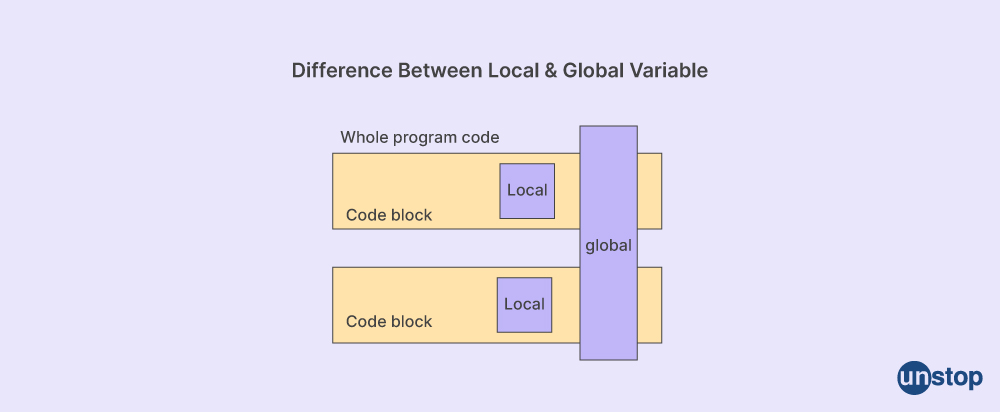
In programming, "scope" defines the region of your code where a declared variable is accessible and can be used. Think of it as a variable's home. Outside of its home, it's unknown.
There are two primary types of scope in C:
- Local Scope: The variable is confined to a specific function or block of code.
- Global Scope: The variable is accessible from anywhere in the program.
2. Local Variables: The Default in C
When you declare a variable inside a function (or any block of code enclosed in curly braces {}), you are creating a local variable. These variables are private and temporary.
- Visibility: They are only visible and accessible within the function or block where they are defined. No other function can see or modify them.
- Lifetime: They are created when the function is called (or the block is entered) and are destroyed automatically when the function returns (or the block is exited).
The following video provides a clear, practical demonstration of local variables and their properties.
Local vs. Global Variables | C Programming Tutorial
The video "Local vs. Global Variables" from Portfolio Courses clearly demonstrates the behavior of local variables.
Watch these two segments: Start with the explanation of a local variable. Notice how the local variable defined in function1 causes a "use of undeclared identifier" error when you try to access it from main. This is the core idea of local scope. Next, watch the segment on block scope. This shows that a variable can be local not just to a whole function, but to any pair of curly braces, like an if statement block.
As you saw, local variables provide a way to encapsulate data, preventing functions from accidentally interfering with each other. This is a cornerstone of writing modular and maintainable code.
3. Global Variables: Shared Program State
In contrast to local variables, global variables are declared outside of all functions, typically at the top of the file.
- Visibility: They are accessible to any function that comes after their declaration in the file.
- Lifetime: They are created when the program starts and exist until the program terminates.
Let's return to the same video to see how global variables work and how they differ from their local counterparts.
Local vs. Global Variables | C Programming Tutorial
This segment of the video introduces and demonstrates global variables.
Please watch from the introduction to global variables. Observe how the global variable is declared outside of any function and can then be successfully read and modified by both function1 and main.
While global variables seem convenient for sharing data, they should be used with caution. Since any function can change a global variable's value, it can become very difficult to track down bugs in larger programs. This is explained well in the video right after the section you just watched (
4. When Names Collide: Shadowing
What happens if a local variable has the same name as a global variable? In C, the local variable takes precedence. This is called shadowing. Inside the function where the local variable is declared, it "hides" the global variable of the same name.
Local vs. Global Variables | C Programming Tutorial
The same video provides an excellent example of shadowing.
Watch the segment from name conflicts. Notice that even though a global variable x exists, the printf call inside the function uses the local x because it is "closer" in scope.
5. Function Parameters are Local, Too
A quick but important point: the parameters you define in a function's signature also behave as local variables. Their scope is limited to that function.
Variable Scope in C – Local vs Global - DataFlair
This article from DataFlair has a concise section explaining this concept.
Please read the section titled "Formal Parameters as Local Variables". It clarifies that parameters like x and y in int sum(int x, int y) are created when the function is called and destroyed when it ends, just like any other local variable.
6. Summary and Best Practices
Let's consolidate the key differences in a table.
Variable Scope in C – Local vs Global - DataFlair
The DataFlair article provides a great summary table.
Review the "Comparison Chart: Global vs. Local Variables in C". This table is an excellent reference for comparing the features of local and global variables side-by-side.
Here is a summary of the table's key points:
| Feature | Global Variable | Local Variable |
|---|---|---|
| Declaration | Outside all functions | Inside a function or block {} |
| Scope | Accessible throughout the program (after declaration) | Accessible only within its function/block |
| Lifetime | Entire program execution | Only during function/block execution |
| Default Value | Initialized to 0 if not specified | Contains a garbage value if not specified |
| Memory | Stored in the data segment | Stored on the stack |
Best Practice: Prefer local variables. They make your functions self-contained and easier to understand and debug. Use global variables sparingly, only when you have data that truly needs to be accessible across many parts of your program.
7. Test Your Understanding
Let's see if you can predict the output of the following program. Read the code carefully and think about the scope of the count variable in each printf statement.
#include <stdio.h>

int count = 100; // Global variable

void func1() {
    int count = 10; // Local to func1, shadows the global
    printf("In func1, count is: %d\n", count);
}

void func2() {
    count++; // Modifies the global variable
    printf("In func2, count is: %d\n", count);
}

int main() {
    printf("In main (start), count is: %d\n", count);
    func1();
    printf("In main (after func1), count is: %d\n", count);
    func2();
    printf("In main (after func2), count is: %d\n", count);
    return 0;
}
What do you think will be printed?
Click to reveal the output and explanation
Predicted Output:
In main (start), count is: 100
In func1, count is: 10
In main (after func1), count is: 100
In func2, count is: 101
In main (after func2), count is: 101
Explanation:
In main (start): Prints the globalcount, which is100.func1()is called. It declares a new localcountand initializes it to10. It prints this local value,10. Whenfunc1finishes, its localcountis destroyed. The globalcountwas never touched.In main (after func1): Prints the globalcountagain. Sincefunc1didn't change it, it's still100.func2()is called. It does not have a localcount, so it accesses the global one. It increments it (100++becomes101) and prints the new value,101.In main (after func2): Prints the globalcountone last time. Sincefunc2modified it, the value is now101.
Conclusion
In this lesson, you've learned to distinguish between local and global variable scope, a crucial concept for managing data in C.
Key Takeaways:
- Scope determines where a variable can be accessed.
- Local variables are declared inside functions/blocks. They are private, temporary, and generally preferred for safe, modular code.
- Global variables are declared outside all functions. They are accessible everywhere and persist for the program's entire life, but can make code harder to debug.
- When a local and global variable share a name, the local variable shadows the global one within its scope.
- Function parameters behave as local variables.
Preview of the Next Lesson:
Now that you understand how to encapsulate data within functions using local scope, you're ready for a practical and powerful application. In the next lesson, we will learn how to refactor a monolithic program into smaller, single-purpose functions. You'll take a large block of code in main and break it down into clean, reusable functions, applying your knowledge of function definitions, prototypes, and variable scope.