Recommended resources
The freely available resources this lesson will direct you to.
Hello! Last time, you used const, let, and block scope to control where values can be read or changed. Now those values will drive decisions. A ticket-processing program, for example, might escalate a high-priority ticket only if it has waited long enough and has not been assigned.
In this lesson, you’ll build those decisions with comparisons, if/else if/else, logical operators, and the conditional (? :) operator. Allow about 40 minutes, including time to run the examples in Node.js.
Turn facts into branches
A comparison produces a Boolean value: true or false. You can use that result to decide which block runs.
const waitHours = 24;

if (waitHours >= 24) {
  console.log("Review for escalation");
} else {
  console.log("Keep in queue");
}
Here, >= means “greater than or equal to,” so a ticket at exactly 24 hours qualifies. The other ordering comparisons are >, <, and <=. For equality, prefer === (“strictly equal”) and !== (“not strictly equal”). A single = is assignment, not a test.
Watch the opening of Comparison Operators & If Else from freeCodeCamp.org. It demonstrates how a condition selects a block and, importantly, why the order of else if conditions matters. The video mentions ==; we’ll use === for equality in our code.
Comparison Operators & If Else - Beau teaches JavaScript
Watch the introduction to branching and comparison operators, then the example in which two age categories overlap.
Watch if and else for the two-branch structure, comparisons for boundary tests, and branch order to see why the first matching condition wins.
That “first matching condition” rule is useful for ticket priorities. Suppose a wait of at least 48 hours calls for urgent review, while at least 24 hours calls for ordinary review:
const waitHours = 50;
let reviewLevel;

if (waitHours >= 48) {
  reviewLevel = "urgent";
} else if (waitHours >= 24) {
  reviewLevel = "standard";
} else {
  reviewLevel = "not due";
}

console.log(reviewLevel); // "urgent"
Both comparisons would be true for 50, but only the first matching branch runs. If you put waitHours >= 24 first, the urgent branch would never be reached for any wait of 48 hours or more. The outer let reviewLevel also draws on the previous lesson: declaring it inside one branch would make it unavailable to the final console.log.
Strict equality matters when values come from different places. A value that looks like a number might still be a string:
const rawWaitHours = "24";

console.log(rawWaitHours === 24); // false
console.log(Number(rawWaitHours) === 24); // true
Read the “Strict equality” subsection of Comparisons in The Modern JavaScript Tutorial for why === avoids an implicit conversion that == would perform.
Comparisons - The Modern JavaScript Tutorial
Read the explanation of strict equality to connect last lesson’s type reasoning to the tests used in branches.
In “Strict equality,” start just after the 0 == false example, at the sentence “The same thing happens with an empty string:”. Read the explanation through the rule that different types do not compare equal with ===. Focus on the difference between converting an input deliberately and letting an equality operator convert it unexpectedly.
For numeric thresholds, convert an input to a number before comparing it. If both operands of < are strings, JavaScript compares them as strings: "10" < "2" is true, which is not the numeric comparison a wait-time rule needs.
Combine requirements without changing the rule
Suppose escalation requires all three facts: the ticket is open, its priority is high, and it has waited at least 24 hours. && means AND: every condition must pass. || means OR: at least one must pass. ! means NOT: it reverses a Boolean condition.
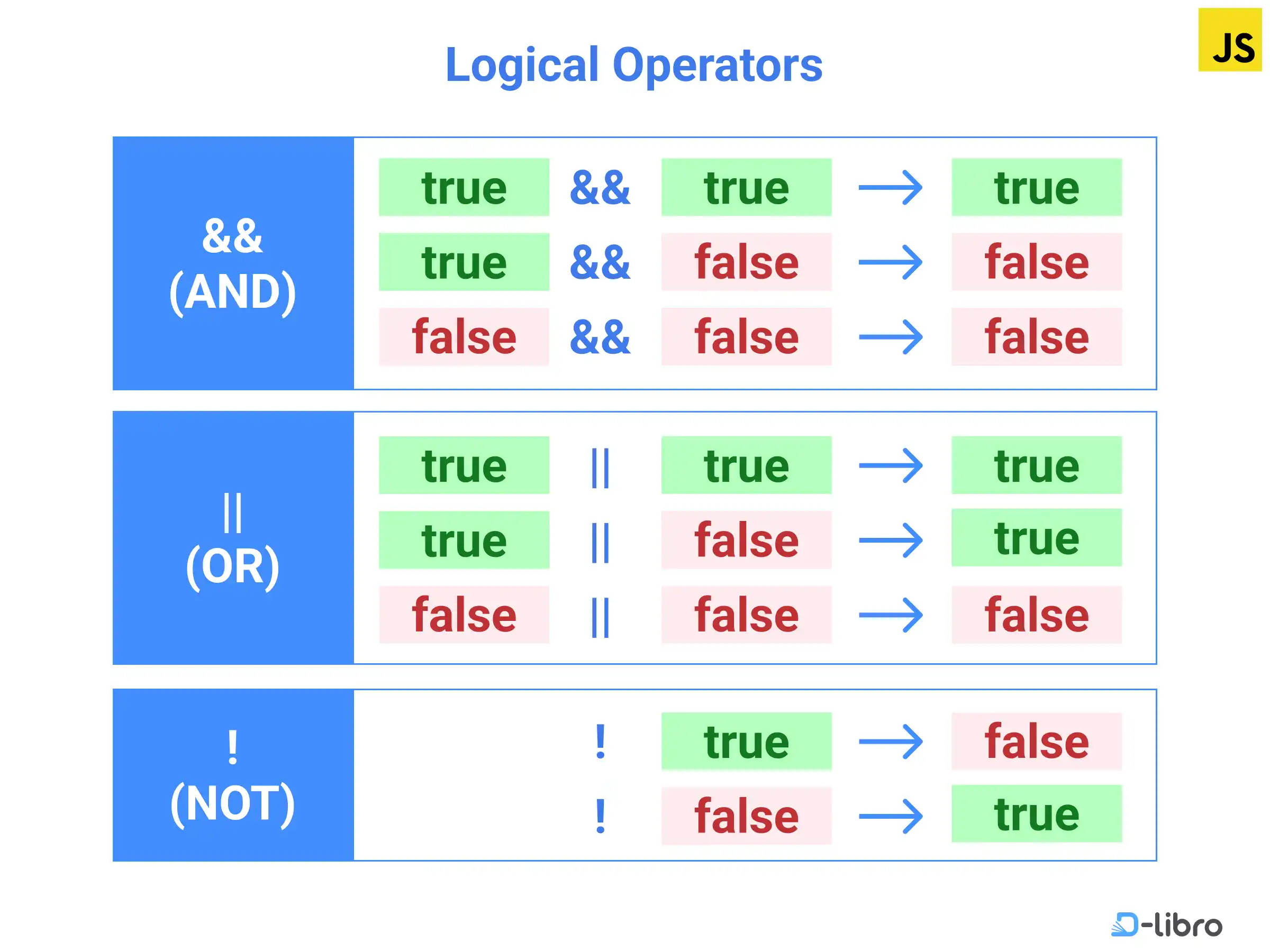
MDN’s Making decisions in your code — conditionals shows how to combine complete tests. Its OR example also catches a common mistake: each alternative needs its own comparison.
Making decisions in your code — conditionals - MDN Web Docs
Read MDN’s examples of AND, OR, and NOT, particularly the incorrect OR condition and its correction.
In “Logical operators: AND, OR and NOT,” begin with “If you want to test multiple conditions without writing nested” and read the logical-operator examples through the corrected explanation of OR. Stop before “switch statements.” The weather examples use browser code; concentrate on the conditions, which work the same way in Node.js.
Apply those operators to ticket facts:
const status = "open";
const priority = "high";
const waitHours = 30;
const isAssigned = false;

if (
  status === "open" &&
  priority === "high" &&
  waitHours >= 24 &&
  !isAssigned
) {
  console.log("Escalate");
}
!isAssigned is true here because isAssigned is false. Notice that each part expresses a complete requirement. For two acceptable priorities, write:
if (priority === "high" || priority === "critical") {
  console.log("Expedite review");
}
Writing priority === "high" || "critical" does not compare priority with "critical". The nonempty string "critical" is truthy, so that condition passes regardless of the priority.
There are two other details worth knowing when reading real JavaScript code:
- Short-circuiting:
&&skips its right side when the left side is falsy;||skips its right side when the left side is truthy. This lets JavaScript avoid evaluating a test that cannot affect the result. - Grouping:
&&is evaluated before||. Use parentheses when a business rule mixes them, so the intended grouping is visible.
For example, this rule requires an open ticket and either high priority or a wait of at least 48 hours:
if (status === "open" && (priority === "high" || waitHours >= 48)) {
  console.log("Review now");
}
Without those parentheses, a closed ticket that has waited 48 hours could pass the condition.
The image shows Boolean inputs, but JavaScript’s && and || do not always return Booleans: they can return one of their operands. For example, 0 || 10 evaluates to 10. That makes it important not to use if (waitHours) when zero is a valid wait time—0 is falsy. State the actual rule, such as waitHours >= 0.
Choose a value with the conditional operator
An if...else statement is useful when each branch performs work. When a condition simply selects one of two values, the conditional operator is often clearer:
const label = priority === "high" ? "expedited" : "standard";
It tests the condition before ?, evaluates the expression after ? if true, and otherwise evaluates the expression after :. The result is assigned to label.
Read MDN’s “Ternary operator” subsection for this two-value pattern.
Making decisions in your code — conditionals - MDN Web Docs
Read the short introduction and birthday-greeting example to see how a conditional expression produces a value.
In “Ternary operator,” start with “There is one final bit of syntax we want to introduce you to before we get you to play with some examples.” Read the two-value pattern through the explanation of the greeting. Stop before “Ternary operator example,” which switches to browser interactions.
Keep this form for a short, readable choice. An if...else if...else chain is easier to follow when there are several conditions or multiple statements in a branch. Both approaches are branching logic; the conditional operator is not a replacement for every if.
Put the decision together in Node.js
Save the following as decisions.js, then run node decisions.js from its directory:
const status = "open";
const priority = "high";
const waitHours = 30;
const isAssigned = false;

let action;

if (status !== "open") {
  action = "ignore";
} else if (
  priority === "high" &&
  waitHours >= 24 &&
  !isAssigned
) {
  action = "escalate";
} else {
  action = "keep in queue";
}

const auditLabel =
  action === "escalate" ? "urgent review" : "standard review";

console.log(action);     // "escalate"
console.log(auditLabel); // "urgent review"
Read the rule from top to bottom. A non-open ticket is ignored before its priority or age matters. An open ticket is escalated only when all escalation requirements hold. Every remaining case stays in the queue. Finally, the conditional operator selects a label from the chosen action.
Changing waitHours to 23 should produce "keep in queue" and "standard review"; changing status to "closed" should produce "ignore" and "standard review". Those small changes are a practical way to check that your code follows the rule at and around its boundaries.
Takeaways
Comparisons produce the tests that control branches; use === and !== for predictable equality and choose inclusive or exclusive boundaries deliberately. An else if chain runs only its first matching branch. Use &&, ||, !, and parentheses to express the whole decision clearly, and use ? : when you only need to select one of two values.
Next, you’ll use loops to repeat work a bounded number of times—so the same kind of ticket decision can be applied across more than one value.