Recommended resources
The freely available resources this lesson will direct you to.
Hello! In the previous lesson, you tracked the value and type of JavaScript expressions. Now we’ll look at where those values live. A correctly calculated ticket count can still cause trouble if unrelated code can overwrite it—or if a temporary value remains accessible long after it is needed.
This lesson focuses on choosing const or let, reading block scope, and avoiding accidental global state. Allow about 40 minutes, including time to run the short examples in Node.js.
Give each value the right kind of name
A declaration creates a name for a value. The choice between const and let is mainly a choice about reassignment: will that name need to refer to a different value later?
const ticketId = "T-42";
let processedCount = 0;

processedCount = processedCount + 1;

console.log(ticketId);       // "T-42"
console.log(processedCount); // 1
processedCount = ... is an assignment, not a new declaration. It is allowed because processedCount was declared with let. By contrast, ticketId = "T-43" would throw a TypeError: a const name cannot be reassigned. A const also needs a value when declared, so const ticketId; is a SyntaxError.
Watch these selected parts of Differences Between Var, Let, and Const from Web Dev Simplified. The scope demonstration will become more useful in the next section; for now, notice the distinction between assigning again and declaring again.
Differences Between Var, Let, and Const
Web Dev Simplified contrasts the three declaration keywords in running examples, then gives a practical rule for choosing between them.
Watch scope in blocks to see why a name declared inside an if block may not be available afterward. Continue with redeclaration: note why a second var declaration is accepted but a second let declaration in the same scope is not. Then watch const and objects and keyword choices. Focus on what const protects—the binding—not on memorizing every example.
The everyday rule is use const unless you intend to reassign the name; use let when you do. You will encounter var in existing code, but it is rarely the right choice for a new declaration. Unlike let and const, it permits redeclaration in the same scope:
var count = 3;
var count = 4; // Allowed, but an accidental second declaration is easy to miss

let total = 3;
// let total = 4; // SyntaxError: total has already been declared
total = 4;       // Allowed: this is reassignment
There is one important limit to const. It prevents assigning a new value to the name; it does not freeze an object’s contents. Read MDN’s “Constants” subsection for its object and array examples.
Grammar and types - JavaScript - MDN Web Docs - Mozilla
MDN distinguishes a constant binding from an unchangeable object. Read this before relying on const as protection against every kind of change.
In “Declarations,” find the “Constants” subsection. Begin where it introduces constant bindings. Stop just after the sentence introducing the array example. Pay particular attention to the object-property assignment between those points: it changes the object without reassigning its name.
For now, most of our examples use primitive values such as strings and numbers, where the distinction is straightforward. We’ll examine updating objects more closely in a later lesson.
A block sets a boundary for names
A block is code enclosed in curly braces, such as the body of an if statement. A name declared with let or const inside a block is available there, but not after the closing brace:
const rawCount = "3";

if (true) {
  const ticketId = "T-42";
  let count = Number(rawCount);
  count = count + 1;

  console.log(ticketId, count); // "T-42" 4
}

// console.log(ticketId); // ReferenceError: ticketId is not defined
// console.log(count);    // ReferenceError: count is not defined
console.log(rawCount);    // "3"
This carries forward the conversion rule from last lesson: Number(rawCount) ensures that adding one gives 4, not "31". Scope answers a different question: which parts of the program can use or change count? Here, the mutable count exists only where it is needed.
Read MDN’s “Variable scope” subsection for the underlying distinction between block scope and the broader scope of var.
Grammar and types - JavaScript - MDN Web Docs - Mozilla
MDN places block scope alongside function and module scope, which helps explain what “outside the block” actually means.
Under “Declarations,” open “Variable scope.” Start at the scope explanation and stop after the sentence saying that a var variable belongs to the containing function or global scope rather than its immediate block. Focus on the contrast with the preceding explanation of let and const; the following var example reinforces it.
Code inside a block can read a name from an enclosing scope. It can also reassign an enclosing let name, so braces alone do not make shared state safe:
let total = 0;

if (true) {
  total = total + 1; // Uses the outer total
}

console.log(total); // 1
A new declaration inside the block behaves differently. It creates a local name that shadows the outer one:
const status = "new";

if (true) {
  const status = "triaged";
  console.log(status); // "triaged"
}

console.log(status); // "new"
When reading a name, JavaScript looks in the current scope first, then in enclosing scopes. The inner status does not replace the outer status. This is useful occasionally, but using distinct names often makes code easier to follow.
var does not respect the same block boundary. In a Node.js file, this variable remains accessible after the if block:
if (true) {
  var temporaryLabel = "urgent";
}

console.log(temporaryLabel); // "urgent"
That wider visibility is a reason to prefer const and let: temporary names stay closer to the code that needs them.
Keep scope and global state distinct
The supplied comparison chart is a compact reference for the keywords. Its “creates global property” column needs context: it describes var at the top level of a classic browser script. A normal Node.js module file does not turn its top-level var, let, or const declarations into properties of globalThis.
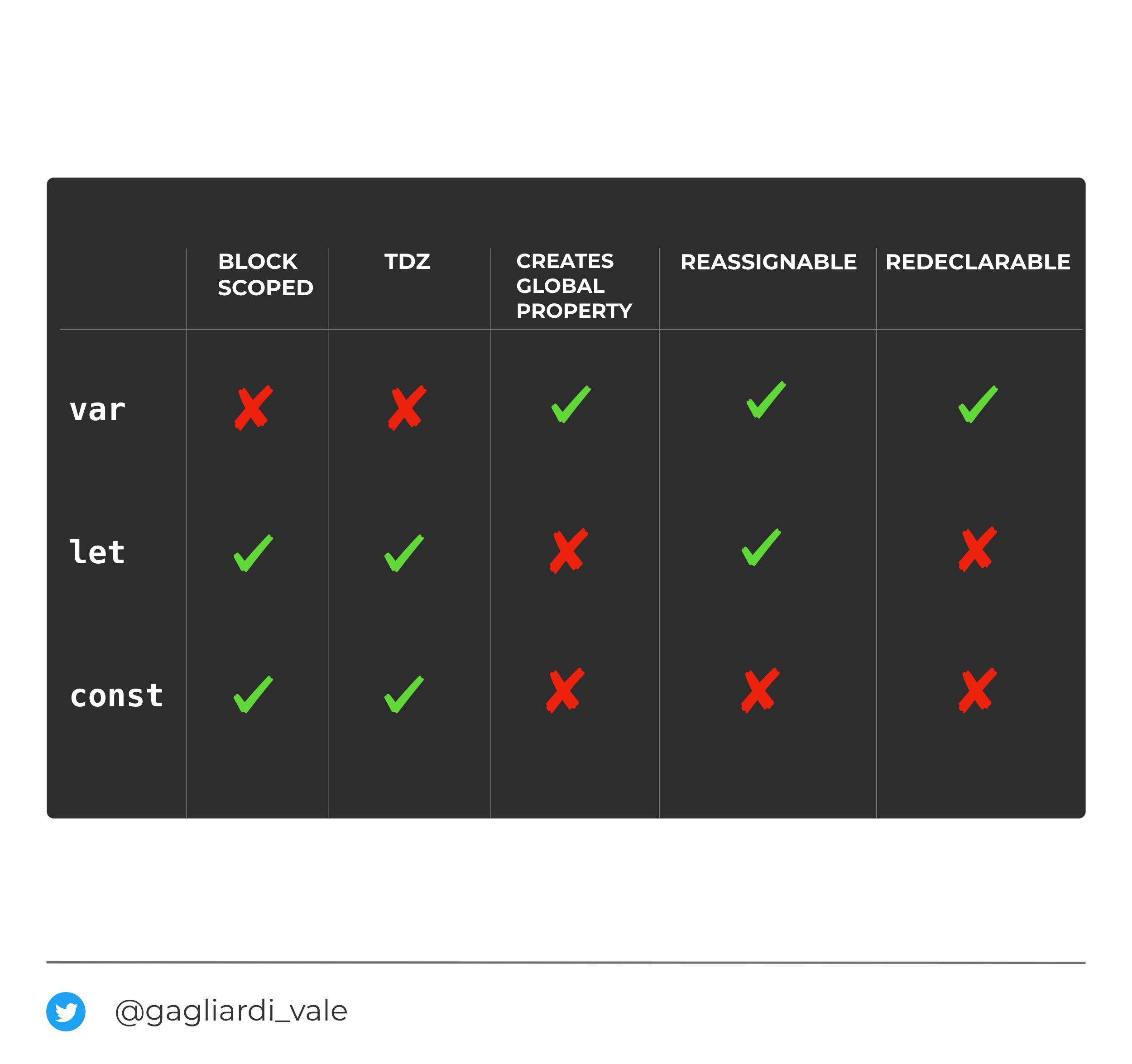
In Node.js, prefer an explicitly declared name in the smallest useful scope. Do not try to make a value accessible by assigning to a name that was never declared. In some non-strict JavaScript code, that mistake can create an unintended global property. Node.js ES modules are strict by default; for a CommonJS file, you can also make the mistake fail clearly with "use strict":
"use strict";

ticketCount = 4; // ReferenceError: ticketCount is not defined
Run that snippet separately if you want to inspect the error. The repair is to declare the name in the scope that needs it, not to add it to globalThis:
"use strict";

const ticketCount = 4;
console.log(ticketCount);
Finally, put a declaration before its first use. Accessing a let or const name earlier in its block produces a ReferenceError, even though the declaration appears later. That interval is called the temporal dead zone (TDZ).
{
  // console.log(priority); // ReferenceError if uncommented
  const priority = "high";
  console.log(priority);     // "high"
}
This differs from a let that has been declared without an initial value: after its declaration, that name exists and holds undefined. If you want the precise distinction, read the opening explanation in MDN’s “Temporal dead zone (TDZ)” subsection.
let - JavaScript - MDN Web Docs
MDN explains why “declared later” is not the same as “ready to use now.”
Under “Description,” find “Temporal dead zone (TDZ).” Start with the sentence defining the TDZ for let, const, and class; the linked TDZ explanation begins within that sentence. Continue through the paragraph contrasting access to var and let before their declarations, and stop after its example. Focus on when the ReferenceError occurs, rather than treating all undefined results as errors.
Takeaways
Use const for a name you will not reassign, and let for one you will. Both obey block boundaries; var does not, so it can leave a temporary name visible more widely than intended. A block can still read—and potentially change—an outer name, so keeping state local also depends on where you declare it. In Node.js, an undeclared assignment is not a substitute for a declaration, and strict mode makes that error explicit.
Next, you’ll use comparison, logical, and conditional operators to make decisions with these carefully scoped values.