Recommended resources
The freely available resources this lesson will direct you to.
Hello! Last lesson connected containerized workloads to Kubernetes’ desired-state model. Before we ask Kubernetes to run an application, we need to understand what it receives, where it finds it, and what actually starts the process on a node.
This lesson follows a container image from its layers, through a registry, to a container runtime. We’ll then see how the Open Container Initiative (OCI) defines common standards for those pieces. Allow about 35–40 minutes, including the video and readings. Your Linux experience will be useful when we reach the point where an image becomes an isolated process.
An image is a filesystem plus instructions for running it
A container image is not a running container. It is a packaged application: files such as executables and libraries, together with configuration such as the command to run. When a container starts, it uses those files and configuration to create a running process.
The package is assembled from filesystem layers. Picture an application whose base supplies Debian files, with Python and its dependencies added above that base. The resulting filesystem is what the application sees when it runs.

Layers matter for more than organization. If two images use the same unchanged base layer, that layer need not be stored or downloaded twice on a host that already has it. If you change only application source, unchanged underlying layers can often be reused. This is one reason image builds and pulls can be efficient.
Image layers are read-only. A running container gets a writable layer for changes it makes during execution; that does not edit the underlying image. Think of the image as a reproducible starting point, not as a continuously updated installation. The drawing is conceptual rather than a promise that every label represents exactly one layer—build tools can produce layers in different ways.
Watch the first part of Canonical Ubuntu’s What is the Open Container Initiative? for a closer look at the image’s contents. The speaker uses an archive analogy; focus on the layers, manifest, and configuration, rather than imagining that a registry must store every image as one large tar file.
What is the Open Container Initiative?
Canonical Ubuntu’s “What is the Open Container Initiative?” connects image structure to portability between tools.
Watch the OCI overview for the interoperability goal. Continue with image anatomy, focusing on how the manifest identifies an image’s components and how configuration records details such as its startup command.
The manifest identifies the image’s configuration and filesystem layers. The configuration includes information needed to launch it, such as its command and environment settings. Thus, an image is more specific than “a directory of files,” but it is still not a process: something must retrieve it and run it.
A registry makes images available to other hosts
Suppose you build an image on your PC, but a Kubernetes worker node needs to run it. The worker cannot use your PC’s local image store merely because you gave it an image name. Normally, the image is pushed to a registry, and the node pulls it from there. A registry is a service for storing and distributing images; it does not execute them. Docker Hub is one example, and organizations can also operate private registries.
The name you specify tells a tool where to look and which image to request. In registry.example.com/team/checkout:v1, registry.example.com identifies the registry, team/checkout identifies the image repository, and v1 is a tag. A tag is a convenient name, but it can be reassigned to different image content. A digest, written in a form such as checkout@sha256:..., identifies specific content instead.
Read the Kubernetes documentation’s treatment of image names, then its short passages on caching and digests. You do not need to learn every imagePullPolicy rule yet.
The Kubernetes documentation shows how image names are used in workloads and why a tag and a digest make different promises.
Under “Image names,” read names and identities, starting with the example names and stopping after the tag-versus-digest distinction. Under “Updating images” and its “Image pull policy” subsection, find the paragraph beginning “The caching semantics of the container runtime” and read layer caching. In that same subsection, read digest pinning; it ends just before the paragraph about admission controllers.
The distinction has an operational consequence. If checkout:v1 is moved to new content, two nodes that pulled it at different times could run different code under the same tag. Referring to a digest pins the requested image content. Layer caching remains useful in either case: a node can avoid downloading layers it already has, even when it checks a registry for an image.
A runtime turns the image into a running container
Here is where your Linux foundations become concrete. Files in an image cannot isolate or execute themselves. A container runtime prepares a container’s filesystem, applies its runtime configuration, and starts the application process. On Linux, isolation and resource controls ultimately rely on kernel mechanisms including namespaces and cgroups. As in our first lesson, the container shares the host kernel; it does not boot a guest kernel.
Docker helps illustrate the division of work, though “Docker” names a toolset rather than every component being one thing:
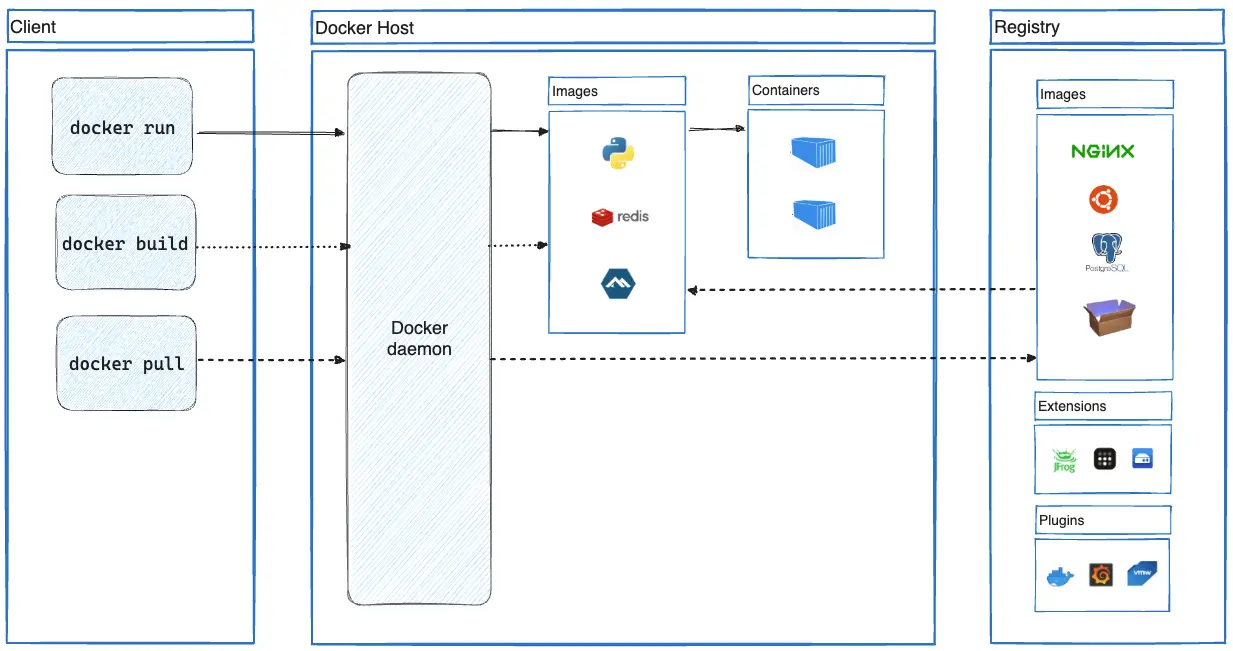
In the Docker architecture diagram, docker pull obtains an image for the host, whereas docker run requests a container from an image. The Docker client is not itself the running application, and the registry is not the runtime. Docker Engine coordinates several components behind those commands; you do not need to memorize that internal chain for this outcome.
Kubernetes has a similar division of responsibility on a worker node. The kubelet asks a node’s container runtime to ensure the required containers are running. Implementations such as containerd or CRI-O handle image retrieval and container management and can use a lower-level OCI runtime, such as runc, to start the container process. Kubernetes communicates with the node runtime through the Container Runtime Interface (CRI). CRI is a Kubernetes interface; it is not one of the OCI specifications. We’ll examine the kubelet and node components in detail later.
Notice the boundaries: a runtime starts and manages containers on a host, while Kubernetes decides what should run across its cluster and works to maintain that desired state. A runtime is essential to orchestration, but is not an orchestrator by itself.
OCI supplies the common contracts
We now have several parties that must agree: an image builder, a registry, and software that retrieves and runs images. The Open Container Initiative develops open specifications so these pieces need not belong to one vendor’s toolset.
Read the OCI’s own overview for the precise scope of its three specifications.
About the Open Container Initiative - Open Container Initiative
The Open Container Initiative’s overview names the three specifications and describes how image contents relate to a runnable filesystem bundle.
In the opening overview, read the three specifications. Continue into the paragraph beginning “To support this UX” and read image components. Finally, in the closing paragraph beginning “The distribution specification reached,” read distribution’s scope.
Each specification answers a different question:
| OCI specification | What it standardizes |
|---|---|
| Image | The image’s manifest, configuration, and filesystem layers |
| Distribution | An API for distributing content, notably uploading and downloading images through registries |
| Runtime | How to run an unpacked filesystem bundle as a container |
OCI specifies interoperability at these boundaries; it is not a container engine, a registry, or a Kubernetes replacement. Its value is that compatible tools can participate in the same workflow without requiring the same product at every stage. Compatibility does not mean every image runs on every machine: the image still needs to suit the target operating system and CPU architecture.
Put the roles together
Consider a checkout application being deployed to Kubernetes. Its image contains the application files in layers, plus metadata describing how it should start. A registry makes that image available beyond the machine where it was built. Kubernetes specifies which image the workload should use; on a selected node, the kubelet works with a container runtime to obtain the image and start a container. OCI standards help the image, distribution mechanism, and runtime work across compatible implementations.
For KCNA, keep four distinctions sharp: layers package reusable filesystem content; registries distribute images; runtimes start containers; OCI standardizes the relevant formats and interfaces. None of those alone decides how many checkout instances Kubernetes should maintain—that belongs to the orchestration and reconciliation model from the previous lesson.
Next, you’ll use your local Docker installation to run and inspect a container, making the distinction between an image and its running instance visible at the command line.