Recommended resources
The freely available resources this lesson will direct you to.

Hello! Last time, we distinguished a container from a VM: a container packages an application’s userspace and runs as isolated processes on a shared kernel, rather than booting a guest operating system. Today we’ll place that packaging choice in a larger system.
The KCNA question is not simply “Why use containers?” It is how microservices, containers, declarative APIs, and orchestration work together—and which problem each solves. Allow about 35–40 minutes for the lesson, including the videos and reading.
Start with the application: microservices
Imagine a ticketing application with a storefront, inventory checker, checkout function, and reporting function. One design is to build and release them as a single application—a monolith. Another is to make some of them separate services that communicate through network APIs. In a microservices architecture, services are organized around distinct capabilities and can generally be developed, deployed, and scaled independently.
If checkout traffic spikes while reporting remains quiet, separate checkout instances can be added without duplicating the reporting component. A team may also release a reporting change without releasing checkout at the same time. Those benefits depend on well-defined service interfaces and operational discipline; splitting code into many services does not create independence automatically.
Watch “What are Microservices?” from IBM Technology for its ticketing-application comparison between a monolith and separate services.
Start with the monolith, from the explanation of a single server-side application through shared dependencies. Then watch scaling checkout, which shows why duplicating an entire application may be inefficient when one capability needs capacity. Finish with separate services, focusing on independent releases and scaling. Treat the video’s claims about outages as potential benefits, not guarantees: one service can still depend critically on another.
There is a cost to that separation. A function call within one process becomes communication across a network, where requests can be slow, fail, or arrive while another service is unavailable. More independently deployed parts also mean more things to locate, configure, and monitor. Microservices are an architectural choice, not a requirement for being cloud-native. A monolith can run in a container and be managed by Kubernetes; microservices can exist without containers.
Give each workload a repeatable package
Containers address a different problem: how do we package and run each workload consistently? An inventory service might need a particular executable and set of libraries, while checkout needs another. Container images give each a versioned application package that can be run on suitable hosts without manually installing those application dependencies on every machine. The shared-kernel qualification from the previous lesson still applies.
This pairing is useful but should not be confused with an identity: a microservice is a way to divide an application; a container is a way to package and run software. A service might run as multiple container instances to handle demand or survive an instance failure. Conversely, a container might run a complete monolithic application.
Your Docker installation will let you run and inspect individual containers shortly. A single-host container tool, however, does not by itself answer where many instances should run across several machines, what should replace a failed instance, or how clients should find a replacement. Those are cluster-management problems.
Describe the outcome, not every action
Suppose checkout should have three running instances using a particular image version. An imperative approach might tell an operator exactly which machines to use and issue individual start commands. If an instance disappears, someone or something must notice and repeat the appropriate commands.
A declarative API lets us state the desired state: for example, “keep three checkout instances running with this image.” Kubernetes accepts such requests through its API. Control processes then repeatedly compare the desired state with what exists and act on differences. This ongoing process is called reconciliation.
If only two suitable instances exist, the system works to create another. If the desired count changes to four, it works toward four. If an instance fails later, the desired count has not changed, so reconciliation has a reason to replace it. This is not an instant promise: insufficient capacity, a missing image, or a broken application can prevent the desired state from becoming healthy.
Watch the desired-state portion of “Kubernetes Explained” from IBM Technology. It turns the abstract idea of reconciliation into an example with replicated application instances.
In desired replicas, follow the change from one instance to a request for three and the explanation of replacement after failure. Focus on the intended state versus the observed count, not the diagram’s suggested placement on particular nodes. The presenter notes that the YAML is illustrative rather than valid syntax; you will write actual manifests later.
Two meanings of “API” matter here. Application APIs let services such as checkout and inventory exchange requests. The Kubernetes API lets users and tools declare and inspect how workloads should run. The latter manages the application; it does not replace the application’s own interfaces.
If you have used systemd to keep a Linux service running, you have seen a narrower form of continual supervision. Kubernetes extends the idea across a cluster: it can work toward a requested number of workload instances even when an individual instance or host is lost. The exact controllers and node components behind that behavior come later in the course.
Orchestrate across machines
Container orchestration is the coordination needed when workloads run across a cluster rather than as a few manually managed containers on one host. Kubernetes can arrange for workloads to run on nodes with available resources, maintain requested instance counts, and provide ways for workloads to be reached despite individual instances coming and going. It also supports controlled application updates.
Read the Kubernetes overview for the capabilities that make this more than “start some containers.”
Read the official Kubernetes overview to connect declarative configuration with the practical jobs of a cluster orchestrator.
Begin at the page’s opening definition. In “Why you need Kubernetes and what it can do,” read from “Containers are a good way to bundle and run your applications” through the horizontal scaling bullet. Focus especially on service discovery, rollouts, scheduling (“bin packing”), and self-healing. Then, in “What Kubernetes is not,” find the final paragraph beginning “Additionally, Kubernetes is not a mere orchestration system.” Read that paragraph to see why Kubernetes favors continuous control processes over a fixed sequence of operational commands.
There is a terminology wrinkle worth noticing for KCNA. Kubernetes is commonly called a container orchestrator because it coordinates containerized workloads. The overview uses orchestration more narrowly to mean a predetermined workflow—“first do A, then B, then C”—and contrasts that with Kubernetes’ continuous reconciliation. Both descriptions can be understood together: Kubernetes coordinates workloads, but its central operating model is maintaining desired state, not merely executing a one-time script.
The following Azure Kubernetes Service (AKS) diagram shows one possible multi-node application arrangement:
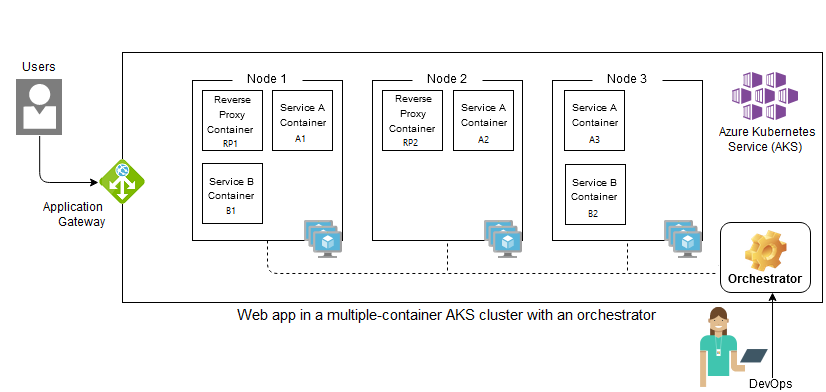
Read the diagram as a division of responsibilities, not as a universal Kubernetes blueprint. Service A and Service B represent application capabilities; their containers are running instances distributed across nodes. The orchestrator’s concern is keeping the requested workloads running and coordinating their placement and lifecycle. The gateway addresses incoming traffic. Adding more instances of Service A would not require creating a new kind of application—just more running copies of that workload.
Even with orchestration, the application remains responsible for its own correctness. Kubernetes can replace an instance that fails; it cannot make a faulty checkout transaction correct or eliminate the need to handle network failures between services.
Bringing the four ideas together
A useful KCNA mental model is to ask four different questions about the same system. Microservices answer how application capabilities are divided. Containers answer how workloads are packaged and run. A declarative API answers how operators state what should exist. Orchestration and reconciliation answer how the platform works to maintain that state across machines as conditions change.
These ideas reinforce one another without being interchangeable. Separate services create a need to deploy and scale distinct workloads; containers make those workloads repeatable; a declarative API expresses the intended deployment; and Kubernetes continually works to keep reality aligned with it. None of these mechanisms guarantees availability by itself, but together they provide a foundation for systems that can be changed and operated at scale.
Next, we’ll look inside the container package: image layers, registries, runtimes, and the standards that let those pieces work together.