Recommended resources
The freely available resources this lesson will direct you to.
Hello! We’ll begin your KCNA preparation with the boundary Kubernetes eventually relies on: a container is not a small virtual machine. This first module moves from containers and cloud-native concepts toward a local Kubernetes lab. Today, the goal is narrower: distinguish containers from VMs by what they isolate, what they package, and what resources they consume.
Your Linux administration experience gives us a useful starting point. Think of a container first as a Linux process with a deliberately restricted view of the system—not as a separate server. Allow about 30–40 minutes, including the short video and reading.
Where the operating system sits
A virtual machine is given virtual hardware by a hypervisor. It boots its own guest operating system, including its own kernel. Several VMs can therefore run on one physical machine while behaving like separate computers.
A container runs as one or more processes using an existing kernel. It can have its own filesystem view and application dependencies, but it does not boot a separate kernel. Multiple Linux containers on the same Linux host use that host’s kernel.
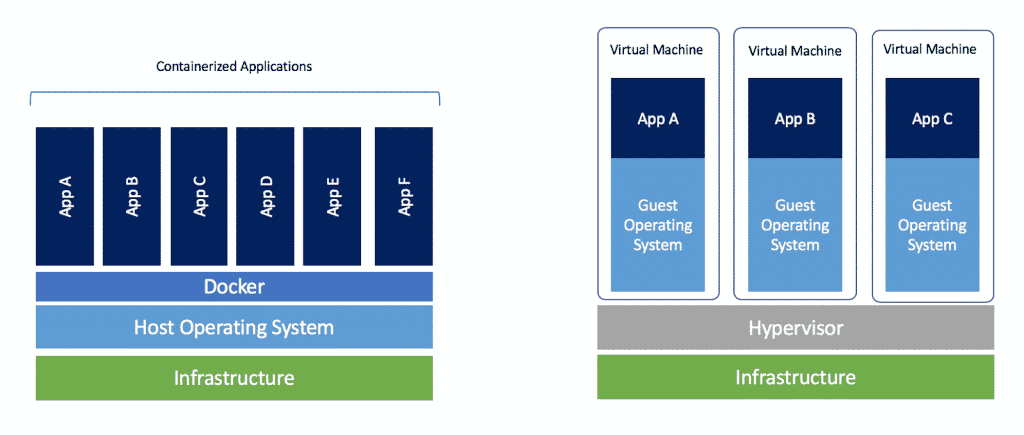
The diagram is intentionally simplified. “Docker” represents container-management software, not a replacement for the kernel. Likewise, a hypervisor may run directly on hardware or alongside a host operating system. Neither detail changes the central comparison: containers isolate processes within an operating system; VMs isolate entire guest operating systems using virtual hardware.
Containers vs VMs: What's the difference?
Watch “Containers vs VMs: What’s the difference?” from IBM Technology for a visual explanation of the two stacks and their isolation mechanisms.
Watch the two stacks to locate the hypervisor and the shared kernel. Continue with isolation types, focusing on machine-level versus process-level separation. Finish with kernel mechanisms for namespaces and cgroups.
Isolation: a separate machine or a restricted process?
Inside a VM, processes make system calls to the guest kernel. That kernel runs within a virtual machine whose hardware access is mediated by the hypervisor. The guest-kernel boundary is a substantial reason to choose VMs when workloads need separate operating systems or a stronger separation boundary.
A process inside a Linux container instead makes system calls to the host’s Linux kernel. Its isolation comes from kernel facilities you may recognize from Linux administration:
- Namespaces control what a process can see. For example, PID, mount, and network namespaces can give it a distinct process list, filesystem mount view, and network environment.
- Control groups (cgroups) account for and constrain resource use, such as CPU and memory. They answer “how much may this workload use?” rather than “which processes and resources can it see?”
Other controls, including capabilities and SELinux policies, can further restrict container processes. But a container is not an independent kernel. A flaw that crosses the container boundary can affect the shared host; VM isolation is stronger in many threat models, though neither approach is an absolute security guarantee. Also, cgroups do not make a container small: an application using substantial memory still uses substantial memory.
A useful distinction is that isolation and resource limits are different claims. A process can be isolated from another process’s PID namespace yet have no effective memory limit. Conversely, a process can have a memory limit without being placed in a container.
Packaging: what travels with the application?
The Docker documentation makes the packaging distinction concise. Read its explanation before considering what an application image does—and does not—contain.
Read Docker’s “What is a container?” for its description of an isolated application environment and its comparison with a VM.
Under “Enter containers!”, begin with the paragraph starting “What is a container? Simply put”. Read the explanation through the “Containers versus virtual machines (VMs)” subsection, ending at the shared-kernel sentence. Focus on what “self-contained” means despite that shared kernel. You can stop before the “Using VMs and containers together” box and skip “Try it out”; Docker commands come in a later lesson.
A VM image typically supplies a guest operating system—including its kernel—along with installed software and configuration. A container image supplies an application and the userspace files it needs, such as libraries and binaries. The image is the packaged artifact; a container is a running instance created from it. A Dockerfile, which you will use later, is a recipe for building an image, not the image itself.
“Self-contained” therefore needs a qualification: the application need not depend on arbitrary libraries preinstalled on the host, but it does depend on a compatible kernel and platform. For example, a container can contain Ubuntu userspace files while running on a RHEL Linux host. Reading its /etc/os-release may suggest Ubuntu, but uname -r reports the kernel it shares with the host. Packaging Ubuntu userspace has not given that container an Ubuntu kernel.
This also explains a common desktop setup. When Linux containers run through Docker Desktop on Windows or macOS, a Linux VM commonly supplies the Linux kernel they need. That is an example of containers and VMs working together, not evidence that each container has its own VM.
Resource use and the right comparison
Because a VM boots and maintains a guest OS, it generally has more memory and storage overhead than a container running the same application. Booting that OS also generally takes longer than starting a container process. Containers can therefore make it practical to run many independently packaged application instances on a host.
These are typical trade-offs, not fixed measurements. A large containerized application can consume more resources than a small VM, and VMs can use their physical CPUs efficiently. Container startup still depends on such factors as whether the image is already available. The sound exam answer is about where the additional overhead comes from, not a promise that every container starts in a particular number of seconds.
| Question | Container | Virtual machine |
|---|---|---|
| What is isolated? | Processes and their views of system resources | A guest machine and its operating system |
| What is packaged? | Application and needed userspace dependencies; no separate kernel | Guest OS, including kernel, plus software |
| What provides the kernel? | The host OS, or a VM hosting the containers | Each VM’s guest OS |
| Typical overhead | Lower, without a guest OS per instance | Higher, with a guest OS per instance |
Suppose you need many replicas of a web API that can run on the same Linux kernel. Containers offer a natural packaging unit without booting an OS for each replica. If instead you must run a different kernel or need a stronger boundary between workloads, VMs may be appropriate. A common deployment uses both: cloud VMs as hosts, with multiple containers running inside each VM.
Key takeaways
For KCNA, keep three contrasts together: VMs virtualize machines and boot guest kernels; containers isolate processes and share a kernel; container images package application userspace rather than an entire guest OS. Sharing the kernel usually reduces overhead, while the separate guest-kernel boundary often favors VMs where stronger isolation or different operating systems matter.
Next, we’ll connect containers to the broader cloud-native picture: microservices, declarative APIs, and orchestration.